Vagrant: Using Vagrant while a VPN is active
Expected behavior
That I be able to vagrant up or vagrant ssh while connected to a VPN.
Actual behavior
Either:
vagrant uphangs on ‘Waiting for machine to boot’,
```
vagrant up
Bringing machine 'vagrant-test-01' up with 'vmware_fusion' provider...
==> vagrant-test-01: Cloning VMware VM: 'coreos-alpha'. This can take some time...
==> vagrant-test-01: Checking if box 'coreos-alpha' is up to date...
==> vagrant-test-01: Verifying vmnet devices are healthy...
==> vagrant-test-01: Preparing network adapters...
==> vagrant-test-01: Starting the VMware VM...
==> vagrant-test-01: Waiting for machine to boot. This may take a few minutes...
vagrant-test-01: SSH address: 192.168.131.145:22
vagrant-test-01: SSH username: core
vagrant-test-01: SSH auth method: private key
```
- or
vagrant upthrows a NetworkingHostOnlyCollision error:
   The host only network with the IP '172.17.8.101' would collide with
   another device 'tun0'. This means that VMware cannot create
   a proper networking device to route to your VM. Please choose
   another IP or shut down the existing device.
Personally, this occurs with VyprVPN (they have a free tier of service, so it should be pretty easy to reproduce this on OS X.); but I'm not the first person to experience this. :P
Ideally, Vagrant should: 1. throw a more informative error, and hopefully 2. allow for the selection or configuration of an alternative device, if the VPN configuration is creating some sort of conflicting network setup that is insurmountable from Vagrant's end. (I'm no networking guru, as I suspect is true of many Vagrant users; and that error is completely inscrutable to me!)
Vagrant version: Vagrant 1.8.1
Host operating system: Mac OS X 10.11.3
Guest operating system: CoreOS 1032.1.0
 ELLIOTTCABLE
All 16 comments
(This is especially problematic, when combined with #7309: Between these two, as I can't work with my VPN enabled, and I can't work with my WiFi turned off … I can't work on Vagrant-using projects _at all_ on public WiFi, without serious compromising my security!)
ELLIOTTCABLE
on 12 May 2016
Hi @ELLIOTTCABLE
Thank you for opening an issue. Unfortunately the issue you are experiencing is a very common one, and there's no good solution. The problem is actually virtualbox or, more generally, virtualization among many networks. VyprVPN (along with Cloak, HYA, Viscosity, etc) all install their own bridged interface and basically "intercept" traffic. The problem is that your IP address space is conflicting with the IP address space assigned to you in your provider's data center.
You can choose an alternate device to bind to in the Vagrantfile:
config.vm.network "public_network", bridge: [
  "en1: Wi-Fi (AirPort)",
  "en6: Broadcom NetXtreme Gigabit Ethernet Controller",
]
You can also customize the IP address:
config.vm.network "public_network", ip: "192.168.0.17"
 sethvargo
on 27 May 2016
sethvargo
on 27 May 2016
Hm, @sethvargo; do you have more information on how to choose the entries in the list passed to config.vm.network? Do the names after the colons matter, i.e. must they match the name of the hardware; and if so, any idea how I might go about getting those names?
ELLIOTTCABLE
on 11 Jul 2016
Also, even given that info, I can't seem to circumvent this problem (and it's really, really a crucial one for me: I work very often on insecured networks!)
First off, I can't get private_network working, becase whatever IP I try (192.168.123.123, 123.123.123.123, 127.0.0.2, 10.0.1.2), I'm getting the same error:
The host only network with the IP '123.123.123.123' would collide with
another device 'en0'. This means that VMware cannot create
a proper networking device to route to your VM. Please choose
another IP or shut down the existing device.
It's always conflicting with en0:
en0: flags=8863<UP,BROADCAST,SMART,RUNNING,SIMPLEX,MULTICAST> mtu 1500
    ether b8:e8:56:46:07:9a
    inet 104.194.117.28 netmask 0xfffff000 broadcast 104.194.127.255
    media: autoselect
    status: active
Meanwhile, trying to use the public_network configuration you gave, with bridge, doesn't seem to change the original issue reported? I still get an indefinite hang at the end of vagrant up, whenever the VPN is running:
  config.vm.network "public_network", ip: "10.0.1.2", bridge: [
    "en0: Wi-Fi (AirPort)"
  ]
On a related note: as you mention that ‘the issue you're experiencing is a very common one’, I'm actually really surprised that Vagrant doesn't have any meaningful error output for these various situations above. Generally speaking, Vagrant has very useful human-friendly error reporting; and I feel this case could really benefit from detection and reporting to the user. )=
ELLIOTTCABLE
on 11 Jul 2016
Bump, on the off-chance I can get some help with this … it's still _really_ problematic, and I still run into it every single time I try to use Vagrant.
ELLIOTTCABLE
on 8 Aug 2016
Just hitting this now for the first time myself. Have you found any resolution @ELLIOTTCABLE ?
 tkellen
on 18 Nov 2016
tkellen
on 18 Nov 2016
Bump - this is a rather large issue for my team right now.
 igloude
on 20 Dec 2016
igloude
on 20 Dec 2016
Bump, same for me. Our corporate VPN takes over the whole routing table.
However, I have noticed that:
- with the virtualbox provider I actually can work in the VPN
- only with vmware provider I can't
The reason is that with the virtualbox provider vagrant always connects via the port-forwarded ssh port (127.0.0.1:2200 etc), whilst with the vmware provider it tries to connect via the VM's IP address.
I don't know why the behaviour is different in the two providers, but the approach taken in the virtualbox provider is much more resilient to such kind of issues.
@mitchellh @sethvargo do you see any chance that using the port-forwarded ssh port in the vmware provider too would solve this common problem?
 tknerr
on 16 Jul 2017
tknerr
on 16 Jul 2017
(Might want to add :+1: votes to my OP if this affects you too; that's becoming rather standard-practice on GitHub for “voting for” issues.)
ELLIOTTCABLE
on 17 Jul 2017
@tknerr FYI, the vmware_fusion provider behavior seems to have been fixed to use the 127.0.0.1:2222 port forwarded address, so things like vagrant ssh work while on VPN now.
See my comment in https://github.com/hashicorp/vagrant/issues/5740#issuecomment-343539795
 cdwilson
on 10 Nov 2017
cdwilson
on 10 Nov 2017
Awesome, thanks @cdwilson for the ping!
Referring to your other comment, does that mean that vagrant up does not work from within the VPN yet, but if you do vagrant up outside the VPN and then switch back to VPN at least vagrant ssh / provision will work?
Or does everything work as expected with vagrant-vmware-plugin 5.0.3, including vagrant up from within the VPN?
tknerr
on 14 Nov 2017
Can someone summarize steps for using a Vagrant VirtualBox when on a VPN? Thnx.
 sodacrackers
on 15 Mar 2018
sodacrackers
on 15 Mar 2018
I have the same problem with Virtualbox on windows 10.
 anrizal
on 6 Apr 2018
anrizal
on 6 Apr 2018
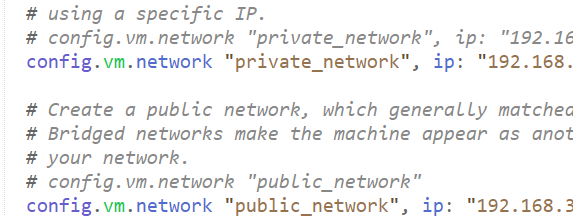
I had the same issue. I got two solution for it.
Uninstall check point endpoint security application OR
added below line in vagrantfile
config.vm.network "public_network", ip: "{ip}" along with config.vm.network "private_network", ip: "{ip}"
 Prem-Patel
on 29 Jun 2018
Prem-Patel
on 29 Jun 2018
@Prem-Patel why would you use an image? :D
it also did not work for me
 johnypony3
on 13 Feb 2019
johnypony3
on 13 Feb 2019
I'm going to lock this issue because it has been closed for _30 days_ ⏳. This helps our maintainers find and focus on the active issues.
If you have found a problem that seems similar to this, please open a new issue and complete the issue template so we can capture all the details necessary to investigate further.
![hashibot[bot] picture](https://avatars.githubusercontent.com/in/8332?v=4&s=40) hashibot[bot]
on 28 Mar 2020
hashibot[bot]
on 28 Mar 2020
Related issues
 gwagner
·
3Comments
gwagner
·
3Comments
 bbaassssiiee
·
3Comments
bbaassssiiee
·
3Comments
 DreadPirateShawn
·
3Comments
DreadPirateShawn
·
3Comments
 cbednarski
·
3Comments
cbednarski
·
3Comments
 OtezVikentiy
·
3Comments
OtezVikentiy
·
3Comments
Most helpful comment
Bump, on the off-chance I can get some help with this … it's still _really_ problematic, and I still run into it every single time I try to use Vagrant.