Vaadin-grid: Sometimes ellipsis shown in selection column
Description
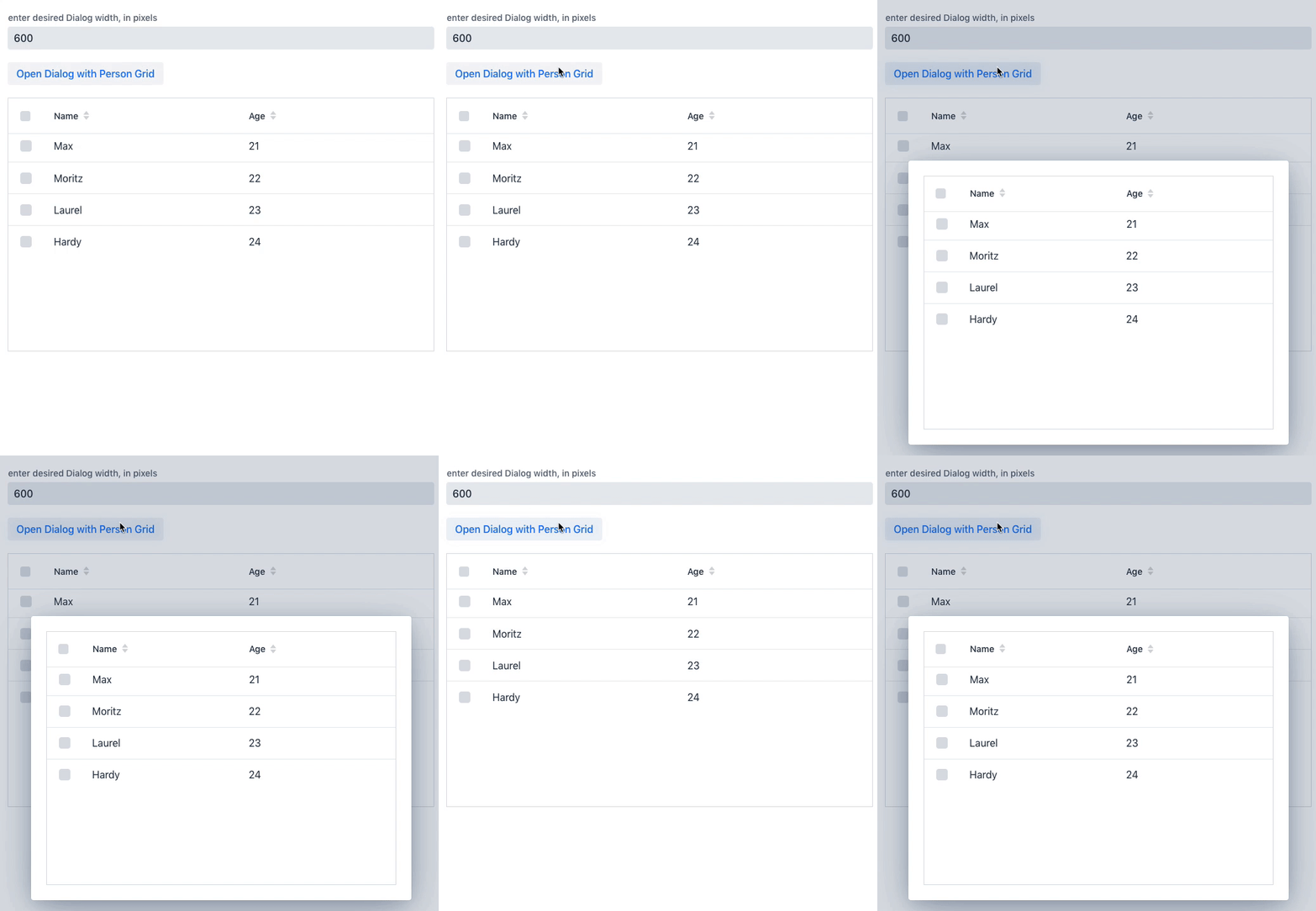
The selection column of multiselect Grids sometimes shows ellipsis. Usually happens when the grid is added within a Dialog. I see similarity with previous issue #1523, but it's different.
Vaadin version 14.1.26
Expected outcome
No ellipsis shown in Grids selection column next to checkbox
Actual outcome
When Grid is in a Dialog, the selection column shows an ellipsis
Code for reproduction
@Route(value = "Test")
public class TestView extends VerticalLayout{
    public TestView() {
        TextField dialogWidth = new TextField("enter desired Dialog width, in pixels");
        dialogWidth.setValue("600");
        dialogWidth.setWidthFull();
        add(dialogWidth);

        add(new Button("Open Dialog with Person Grid", click -> {
            Dialog dialog = new Dialog();
            dialog.add(createPersonGrid());
            dialog.setWidth(String.format("%spx", dialogWidth.getValue()));
            dialog.open();
        }));

        Grid<Person> personGrid = createPersonGrid();
        add(personGrid);
    }

    private Grid<Person> createPersonGrid() {
        Grid<Person> personGrid = new Grid<>(Person.class);
        personGrid.setColumns("name", "age");
        personGrid.setSelectionMode(Grid.SelectionMode.MULTI);
        personGrid.setItems(
                new Person("Max", 21),
                new Person("Moritz", 22),
                new Person("Laurel", 23),
                new Person("Hardy", 24)
        );
        return personGrid;
    }

    public class Person {
        private String name;
        private int age;
        public Person(){

        }
        public Person(String name, int age){
            this.name = name;
            this.age = age;
        }
        public String getName() {
            return name;
        }
        public void setName(String name) {
            this.name = name;
        }
        public int getAge() {
            return age;
        }
        public void setAge(int age) {
            this.age = age;
        }
    }
}
Steps to reproduce
- Add the above TestView to a starter project
- Open the page in a web browser.
- Check that the Grid directly added to the view has no Ellipsis in the selection column
- Click "Open Dialog with Person Grid"
- Check that the Grid inside the Dialog has Ellipsis in the selection column, close dialog by outsideclick.
- Repeat steps 4+5 several times, there seems to be no consistency.
Browsers Affected
- [x] Chrome
- [ ] Firefox
- [ ] Edge

 KasparScherrer
All 15 comments
I think it's about the selection column width being automatically calculated. The timing for auto-width doesn't probably take the dialog's opening animation into account so the selection column is assigned the effective width it has during the opening animation.
 tomivirkki
on 30 Apr 2020
tomivirkki
on 30 Apr 2020
Thanks for the quick response. Your theory sounds probable, especially with the fact that the dialogs width doesn't matter. One could set the width of the dialog to 1800px and still have this happen.
Do you know a workaround that I could use, until this issue is resolved and the fix released?
Can I also ask whether it makes sense to have auto-width on the selection column, seeing as this column always has the same content? Is the auto-width only there to account for custom stylings that would change the size of the selection combobox?
And lastly, could this be labelled as bug, so I can prioritize it? Thank you
KasparScherrer
on 30 Apr 2020
Is the auto-width only there to account for custom stylings
Yes, this is the reason. With the Material theme, the width of the selection column might be different than what it is with Lumo.
tomivirkki
on 30 Apr 2020
Do you know a workaround that I could use, until this issue is resolved and the fix released?
grid.getElement().executeJS('this.recalculateColumnWidths()');
...should work but the timing might be tricky. The dialog's opening animation is 0.25s so maybe 300ms timeout does the trick:
grid.getElement().executeJS('setTimeout(function(){ this.recalculateColumnWidths() }, 300)');
Uncaught TypeError: this.recalculateColumnWidths is not a function is shown when I tried this with a 300 ms timeout. I also tried a 600 ms timeout, same result.
Edit: I now have success with this way of doing it:
UI.getCurrent().getPage().executeJs("setTimeout(function(){ $0.recalculateColumnWidths() }, 600)", personGrid.getElement());
However reducing the timout to 300 will no longer work. and 600 is too much, I can see the ellipsis before they vanish. I will tweak a little and update here
--> 400 ms is the golden timeout for me, at least in this test scenario. 390 ms will catch it most of the times but not always.
KasparScherrer
on 30 Apr 2020
Which Vaadin version is this btw? I can't reproduce the issue on 14.2.0.beta1
tomivirkki
on 30 Apr 2020
I am using Vaadin 14.1.26 and Chrome 81 on a Windows machine.
Also, I only experience the issue with Chrome browser. I tried with Firefox and Edge too, it works there without needing to recalculate column widths.
KasparScherrer
on 30 Apr 2020
This is strange. I tried with the same exact Vaadin version, Chrome (81) browser both Windows and Mac OS, but can't reproduce the issue.
tomivirkki
on 30 Apr 2020
I have just now tried again with a completely new spring-boot starter from https://vaadin.com/start/v14 (14.1.28) added my Test View and ran the project with spring-boot:run -> The issue is still there. Using Chrome 81.0.4044.138 on a Windows 10 machine
KasparScherrer
on 14 May 2020
I've got the same issue (Grid inside a Dialog). Vaadin 14.1.27 on Chrome 81.0.4044.138 (Mac).
I applied this workaround:
grid.getElement().executeJs("setTimeout( () => $0.recalculateColumnWidths(), 300)");
or this:
grid.getElement().executeJs("setTimeout( function() { $0.recalculateColumnWidths();}.bind($0), 300)");
But if I open the inspector at the same time it's not working (I probably need to apply a timeout > 300).
 jcgueriaud1
on 14 May 2020
jcgueriaud1
on 14 May 2020
I applied a theme for this grid to remove the ... instead of calling the js function:
:host([theme~="my-workaround-theme"]) [part~="cell"] ::slotted(vaadin-grid-cell-content) {
    text-overflow: clip;
}
I can not use the theme workaround because I like (read: need) the ellipsis in all other columns than this one
@jcgueriaud1 try a timeout of 400ms, that's the timeout duration that works for me best.
My best guess of why this happens in the first place is that it apparently needs more than 300ms for its animation, or that the animation starts with a small delay, or similar. I think if it indeed only took 300ms then it would work great out of the box and we wouldn't be having this discussion.
This doesn't explain why Tomi can't reproduce though. Maybe faster hardware? (I doubt it)
PS: This issue happens for me both when running with liberty (WebSphere) or spring boot.
KasparScherrer
on 14 May 2020
I can not use the theme workaround because I like (read: need) the ellipsis in all other columns than this one
You could scope the selector to the first column only with:
:host([theme~="my-workaround-theme"]) [part~="cell"][first-column] ::slotted(vaadin-grid-cell-content) {
    text-overflow: clip;
}
If you want to be even more specific about the column, you could use a classNameGenerator
tomivirkki
on 15 May 2020
I'll update my workaround, thank you Tomi.
jcgueriaud1
on 15 May 2020
Thank you Tomi! This one I can use and it works perfectly as a workaround.
KasparScherrer
on 15 May 2020
Related issues
 brp-jimmy
·
6Comments
brp-jimmy
·
6Comments
 Mika83AC
·
6Comments
Mika83AC
·
6Comments
 finaris-cs
·
4Comments
finaris-cs
·
4Comments
 Springrbua
·
4Comments
Springrbua
·
4Comments
 limonte
·
5Comments
limonte
·
5Comments