Vaadin-grid: Make table copyable for Sheets/Excel

Created on 12 Apr 2017  路  13Comments  路  Source: vaadin/vaadin-grid

Right now, when I select rows and columns in vaadin-grid and paste them into Google Sheets, it just becomes a long column. If I was to use the

tag or use div tags with display: table-row and display: table-cell and "paste values only" it into Google Sheets, the column and row are pasted properly.

If I change the CSS .vaadin-grid-table-row to display: table-row and .vaadin-grid-table-cell to display: table-cell, the copy-paste functionality works, but it messes up the look of everything because vaadin-grid relies on flex. Is there a way to work around this?

P.S. This element is super awesome so thank you!

enhancement

All 13 comments

Which version and browser are you running, I'm able to copy-paste from https://cdn.vaadin.com/vaadin-grid/2.0.0/demo/ with Chrome to Google Sheets?

The latest from branch 2.1-polymer-2. I just tested, and it works with the link you gave me (version 2.0). But, it doesn't work on 2.1. :\

I just looked at it for a little bit. It looks like in 2.0 there is td is="vaadin-grid-table-cell" while 2.1 uses divs or vaadin-grid-table-cell. O_o I'm using shadow dom instead of shady dom. I don't know if that makes a difference.

This is not something that the <vaadin-grid> officially supports. Copy-pasting to sheets happens to work with Chrome due to the grid鈥檚 internal table structure, and as you discovered, in <vaadin-grid> 2.0 we used extended native elements (td is="vaadin-grid-table-cell") internally which made the DOM structure possible in the first place.

But since Polymer 2 no longer supports Type-extension elements, we need to drop the table structure in the hybrid version and revert to using normal custom elements internally.

The type-extension isn't currently supported, but it might be in the future. https://github.com/Polymer/polymer/issues/3925

It would be a nice feature to have in vaadin-grid 2.1+ if possible because it makes the element almost useless for me otherwise. I'm not familiar with this so bare with me. :)

Would doing this work?
class vaadin-grid-table-row extends HTMLTableRowElement

If not, I guess we can wait until there is a resolution on this issue. https://github.com/w3c/webcomponents/issues/509

Thank you!

It is possible to work around this limitation even when using non-table elements. We could listen copy events and populate the clipboard data manually. We quickly prototyped this with @saulis sole time ago.

@jouni Is the prototype in a local branch? If so, can you please push it upstream?

@atishpatel I remember us doing it adhoc in jsbin, not on top of vaadin-grid. We just prototyped the generic concept of intercepting copy events and how to populate the clipboard data, which could be used in vaadin-grid.

an aside: is it possible to paste from Excel/etc into vaadin-grid?

The latest 4.0.0 stable version has table structure re-implemented under the hood. I tried copying rows from the demo and it works with both Google Sheets and Excel (tested in MS Office 2007). Therefore I am closing this issue.

The latest 4.0.0 stable version has table structure re-implemented under the hood. I tried copying rows from the demo and it works with both Google Sheets and Excel (tested in MS Office 2007). Therefore I am closing this issue.

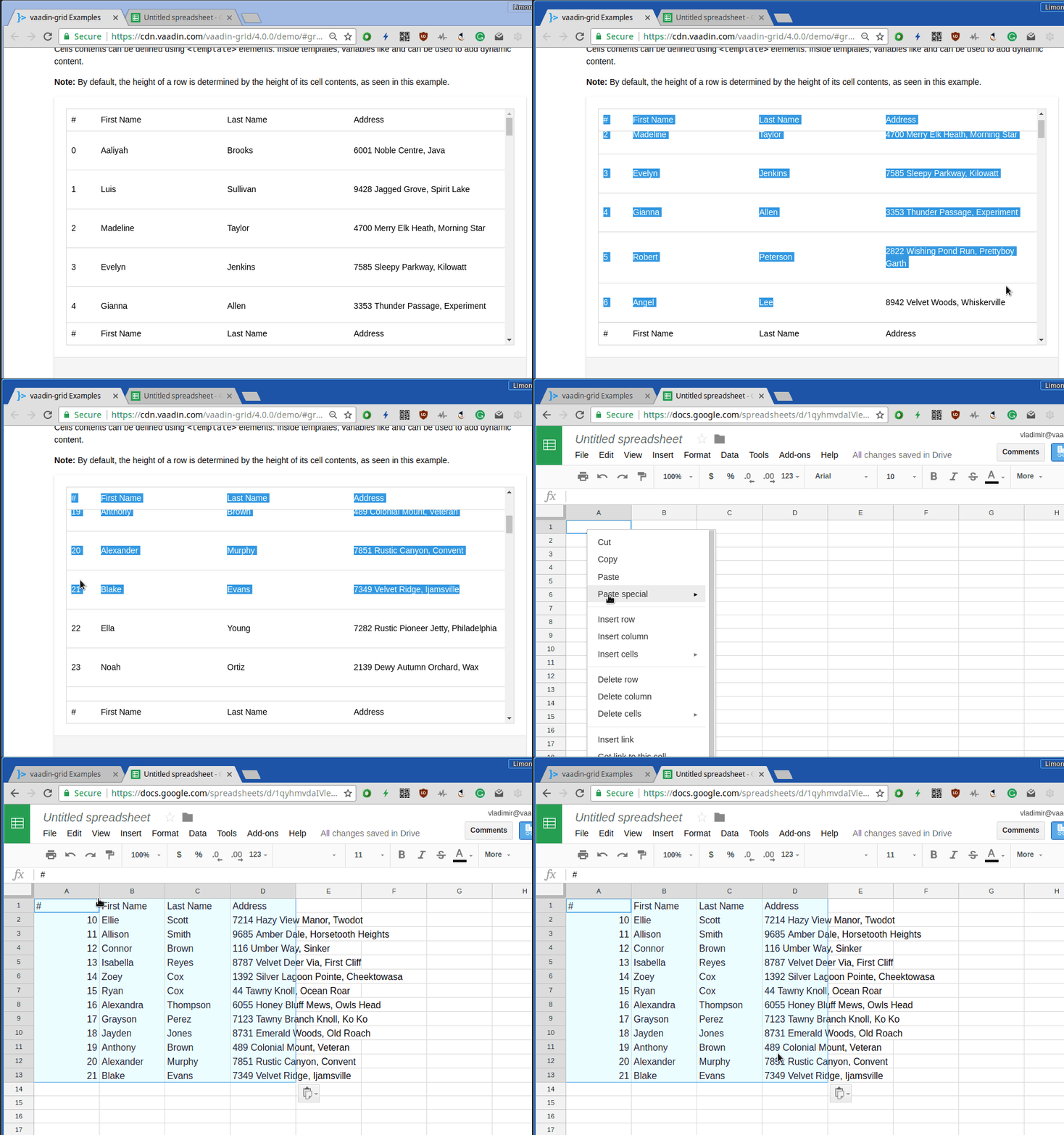
Still not quite right:

recorded

Expected would be: when pasting from the gif above, rows from 0 to 21 inclusively are pasted.

Yeah, you can only copy the rows/cells that are actually visible in the DOM.

This is not something that the officially supports

This might currently work (on Chrome) to some extent but all our official features should work in all supported browsers. I think the only way to make this work nicely across browsers is to implement virtual selection and populating the clipboard programmatically.

Was this page helpful?
0 / 5 - 0 ratings