V8-archive: Setting and getting translations
Hello,
My issue refers to two parts in the documentation:
1) https://docs.directus.io/app/admin/relationships.html#translations
and
2) https://docs.directus.io/api/reference.html#language
I've followed the documentation and while it does work, I am not 100% satisfied with how it looks.

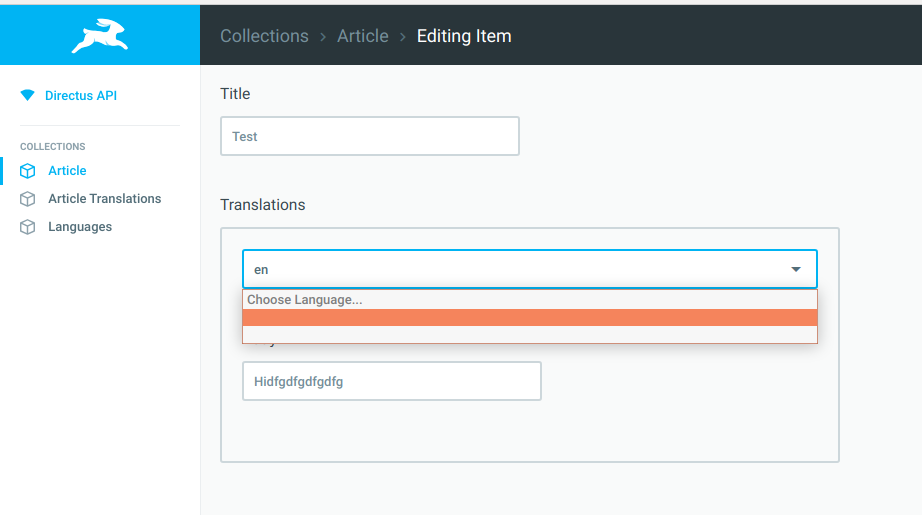
As you can see from the image, the dropdown is English/Spanish, but if either of those are selected the input box will have en/sp - I'd prefer if it showed the dropbox values. How can I make it do that? Only solution I can think of is having the "code" also contain "English" but that's just duplication of data. Let me know if you need any images of the other table structure.
The other issue is with the actual API call. For example I have this URL:
http://localhost/_/items/article
This returns
{
    "data": [
        {
            "id": 1,
            "title": "Test"
        }
    ]
}
As you can see it's not returning the translation item. The documentation in 2) suggests there's some kind of special relationship when the Translations interface is used, but I can't seem to make any use of it. I've tried to put ?lang=en at the end of the URL, but still just returns the JSON above.
Appreciate any help
 mortyac
All 7 comments
As you can see from the image, the dropdown is English/Spanish, but if either of those are selected the input box will have en/sp - I'd prefer if it showed the dropbox values. How can I make it do that?
This was a bug in the dropdown, and has been fixed in a subsequent release 😄
As you can see it's not returning the translation item.
By default, directus only returns items one "level" deep, meaning the actual columns with raw values of the item you're fetching. The translations are technically in another collection, meaning that we have to follow the relationship to get the data.
_We decided to make fetching relational items opt-in instead of opt-out, because we've learned that most users prefer fetching the least amount of data possible with adding in extra information._
You can choose what fields to select by using the fields parameter: fields=translations.title will fetch the translated titles of the items.
As you might guess, this will _only_ retrieve the translated titles, nothing else. The fields parameters supports CSV lists: fields=title,translations.title and/or the asterisk * character to fetch all fields on a certain level: fields=* will fetch everything on the root level, fields=*.* will fetch everything on the root level _and_ the first relation (eg all the translations).
I hope that answers your question 😄
 rijkvanzanten
on 17 Nov 2018
rijkvanzanten
on 17 Nov 2018
Hello and thanks for getting back to me.
As you can see from the image, the dropdown is English/Spanish, but if either of those are selected the input box will have en/sp - I'd prefer if it showed the dropbox values. How can I make it do that?
This was a bug in the dropdown, and has been fixed in a subsequent release
Okay, I did a git pull but now I am getting a similar, but slightly different issue. The human readable part is now just white text (and the selected language is still just the code)
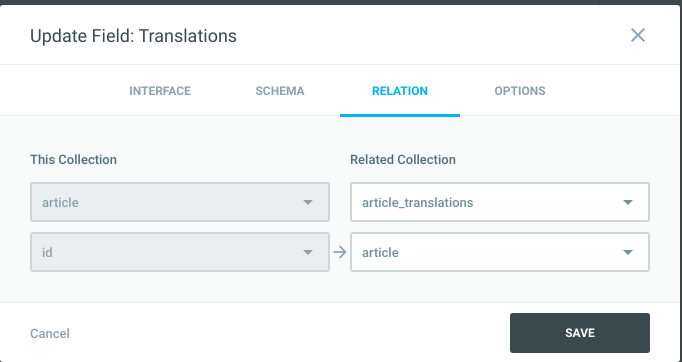
In case I've configured it incorrectly, I've attached two images that show how I've set up the Translation field in the article collection
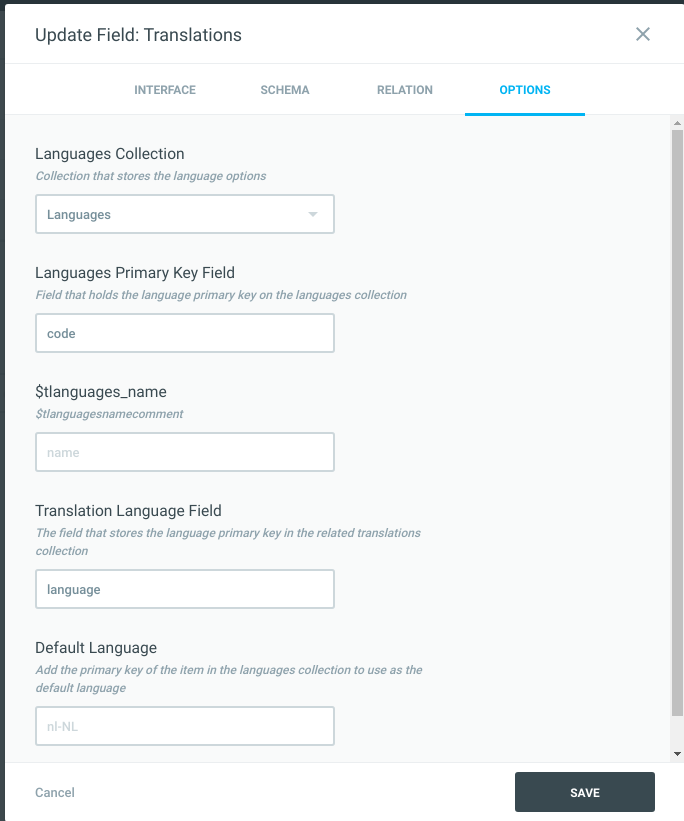
In the languages table itself I have 2 fields;
"Code" which has been set as a primary key field
"name" which is the readable format of the code.
Could you please let me know what I am doing wrong? Thanks
mortyac
on 19 Nov 2018
Hey @biofen — can you confirm which way you installed Directus? (Manual or combined build, fresh or upgrade).
Also, what steps have you gone through to update to the latest version? Did you run the update/migrations script or re-install composer/npm dependencies (if on the manual install)?
Thanks!
 benhaynes
on 19 Nov 2018
benhaynes
on 19 Nov 2018
Hi All
I'm working in a multi-lingual website so I'm using the translations module (which is fantastic !!).
In the web front end, I need to display a "languages" dropdown, with all the languages used for translations in the CMS.
As I can see, in earlier versions of Directus, a new custom table "languages" was defined to store the available languages (code & name) and then, connect the Translations module to it.
So BEFORE, I could use the API to retrieve the languages table contents, and create my dropdown in the front.
But in the current version, that "languages" table is not used nor defined anymore, as the CMS interface allows to define which languages are allowed (new languages key-value list) .
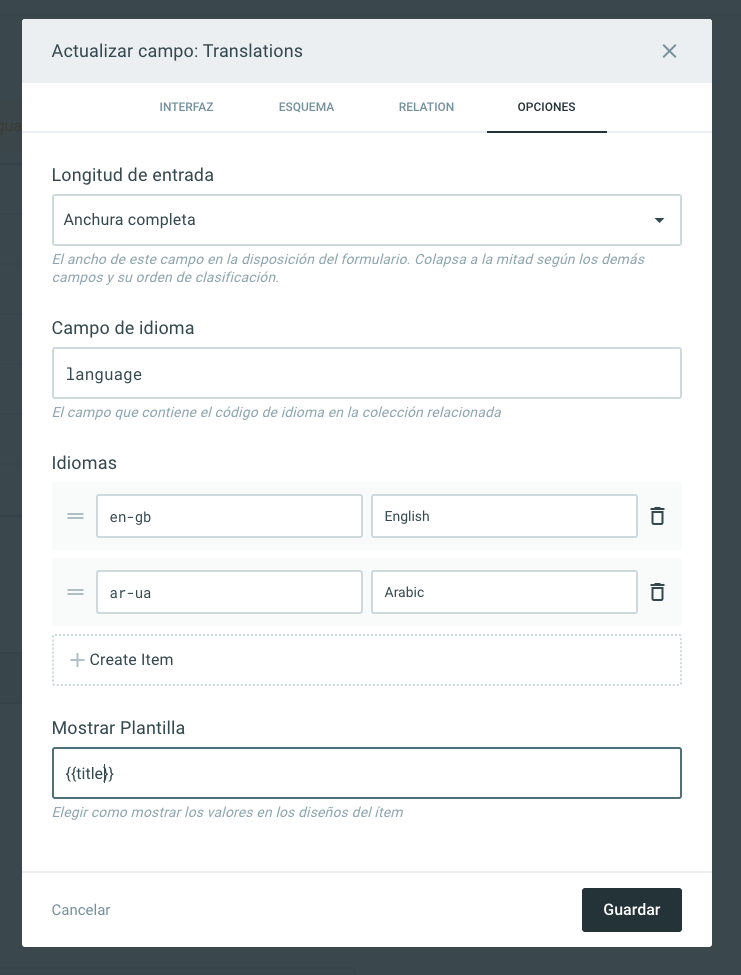
My problem is that I don´t know how to request for the languages used for translations.
How can I do it?
Another problem I'm facing is related with the "Arabic" translations, as Arabic is RTL, but the interface is LTR.
Is there any way for me (custom CSS or JS) to change textfield's direction once Arabic is selected?
Thanks in advanced
 colorao
on 25 Feb 2020
colorao
on 25 Feb 2020
My problem is that I don´t know how to request for the languages used for translations.
How can I do it?
This is stored on the interface level, so you should be able to retrieve that information through /:project/field/:collection/:field (https://docs.directus.io/api/fields.html#list-fields-in-collection)
Is there any way for me (custom CSS or JS) to change textfield's direction once Arabic is selected?
There's no way to do that as of right now
rijkvanzanten
on 25 Feb 2020
Hi Rijk
Thanks for your quick and valid response .
Yes, I could request every collection/field for the languages used on it's translations.
Then, I could set collections which translates to English and Arabic, but also some other collections which translates to English, Arabic and Spanish, so I know this is a quite flexible feature.
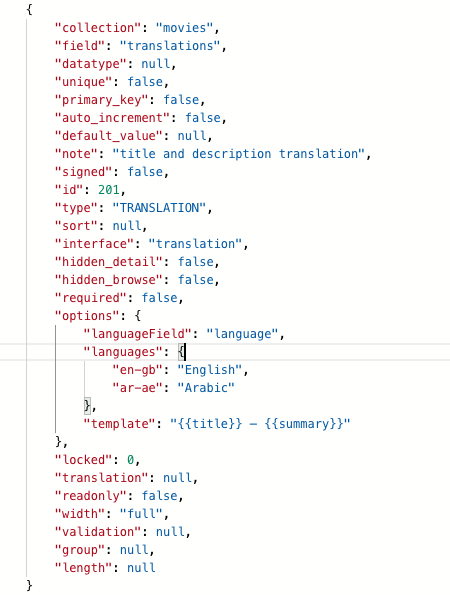
But ain't no way to have it centralized into one single "languages" collection, and set relations by myself, In the way it was implemented in earlier versions?
Regarding to textfields reading direction (RTL & LTR) , please, consider adding this functionality to future versions, as it is quite usual facing this "problem" and Arabic CMS editors will feel much more comfortable by editing translations in their native reading direction.
Thanks again
colorao
on 25 Feb 2020
But ain't no way to have it centralized into one single "languages" collection, and set relations by myself, In the way it was implemented in earlier versions?
This is not possible in v8, correct.
Regarding to textfields reading direction (RTL & LTR) , please, consider adding this functionality to future versions, as it is quite usual facing this "problem" and Arabic CMS editors will feel much more comfortable by editing translations in their native reading direction.
I absolutely agree!
rijkvanzanten
on 26 Feb 2020
Related issues
 Nitwel
·
3Comments
benhaynes
·
4Comments
Nitwel
·
3Comments
benhaynes
·
4Comments
 binary-koan
·
3Comments
binary-koan
·
3Comments
 HashemKhalifa
·
3Comments
HashemKhalifa
·
3Comments
 metalmarco
·
3Comments
metalmarco
·
3Comments