V8-archive: Unauthorized request in /src/helpers/app.php:286 after manual upgrade 7.0.20->8.3
Bug Report
I followed the steps from here https://docs.directus.io/guides/upgrading.html#manually-upgrading-ftp-installs and also from the release notes about migrating from 7->8. However, when I try to access the login page, I get "Request failed with status code 500" message. From logs, I see the following
[2019-12-30 16:56:37] api[paper-reviewer].ERROR: Directus\Exception\UnauthorizedException: Unauthorized request in ...../src/helpers/app.php:286
I first installed the Directus through softaculous, since I am on a shared host. I did the upgrade through FTP and I don't have access on ssh.
Steps to Reproduce
- Install 7.0.20
- Do a manual upgrade through FTP to 8.3
- Try to open the login page
Expected Behavior
Let me put my credentials. Show login form
Actual Behavior
Login form is not there and I have the above error message
 ventouris
All 13 comments
What's the path of the app / api?
 rijkvanzanten
on 2 Jan 2020
rijkvanzanten
on 2 Jan 2020
I only did the changes mentioned here:
1) https://docs.directus.io/guides/upgrading.html#manually-upgrading-ftp-installs
2) https://github.com/directus/directus/releases/tag/v8.0.0
I guess the path was the default by softaculous. Which is mydomai.com/public/admin and mydomain.com/public/_/
ventouris
on 2 Jan 2020
Did you rename your config file from api.php to _.php? See https://github.com/directus/directus/releases/tag/v8.0.0
rijkvanzanten
on 3 Jan 2020
I tried the same upgrade following the instructions mentioned by @ventouris and I get the following errors when trying to login:

Any idea what could the reason for this error?
 obruehl
on 12 Jan 2020
obruehl
on 12 Jan 2020
Hard to tell without more context @obruehl. Could you open a new issue detailing your exact setup and steps to reproduce?
rijkvanzanten
on 13 Jan 2020
Same here, i have upgrade from 7 to 8, after the upgrade i only renamed my config files and change them like in the migration guide was documented. I run,
bin/directus db:upgrade
but get this,
Config file for "" does not exist at: "/var/www/directus"
I have tried to login, but he only recognized the user, but shows me this,
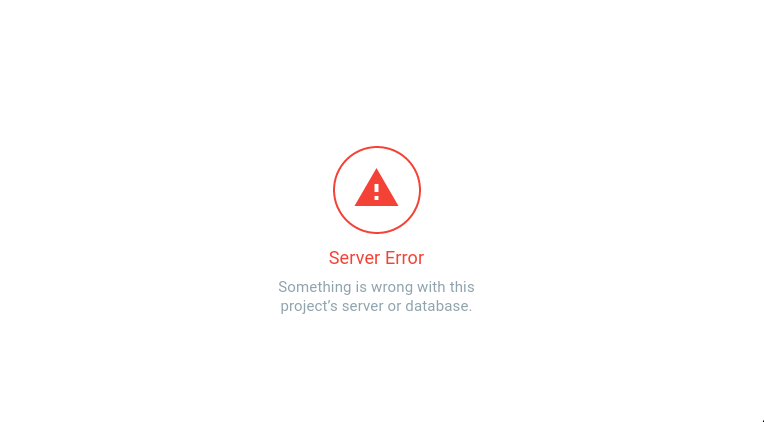

He also shows not longer the names of the project in the login,

"Forgot Password" send me a E-Mail, but the link only redirect to the login, nothing happens.
BUT, the Websites that uses Directus seems to run with no errors...
 HerrHase
on 4 Feb 2020
HerrHase
on 4 Feb 2020
I ran into the same problem, upgrading from V7 to V8 (8.4.0 in my case). I used git pull origin to update directus, and everything seemed to go as expected. Logging into the admin seemed to work OK until logging in, got the same messages User not authenticated/Unauthorized request. Did some research to find out what caused this.
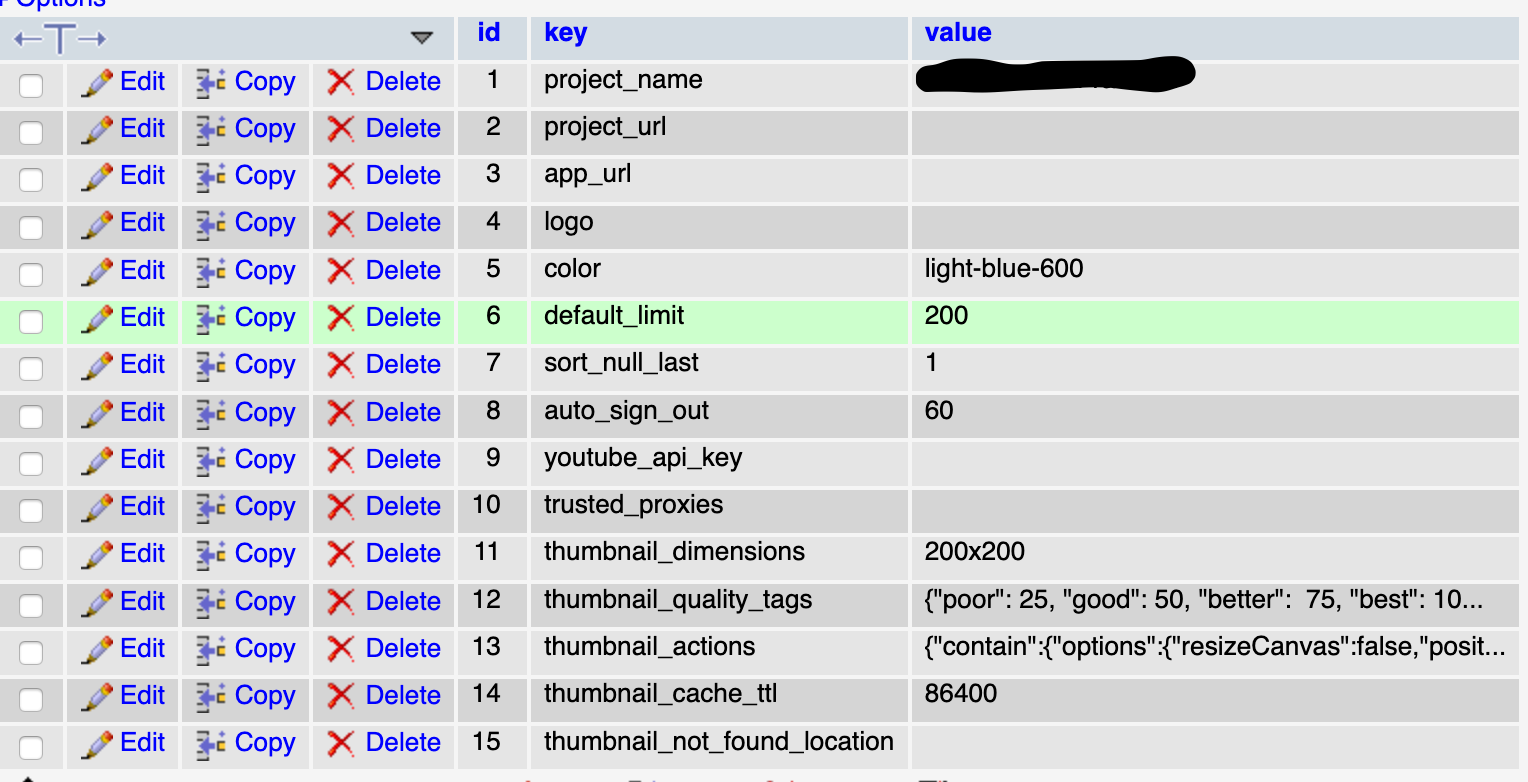
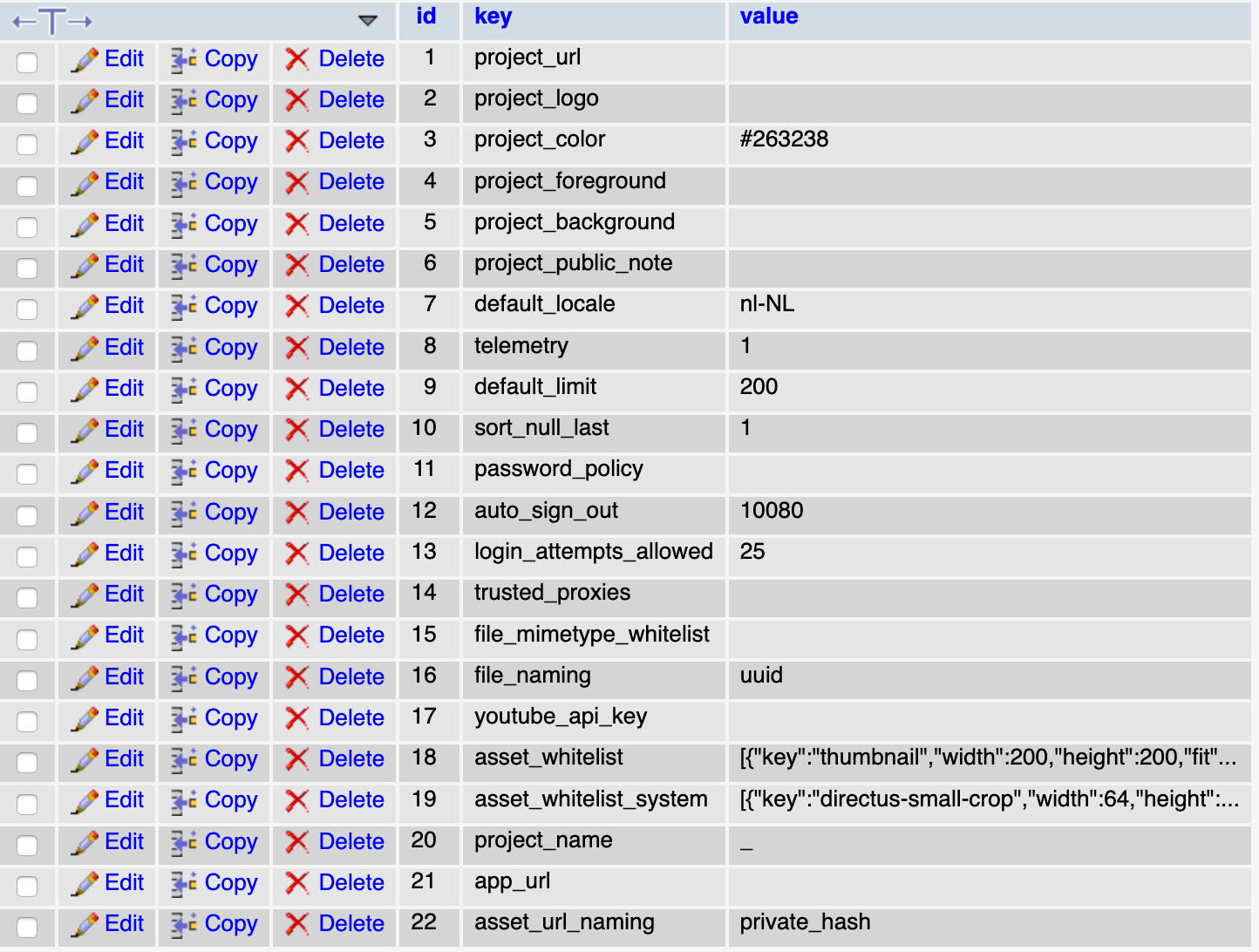
On updating the DB migration was also executed, but for some reason the directus_settings table wasn't updated. Copying this table from a fresh install fixed my problem. I was, with no problem, able to login and continue where I left of in V7.
Maybe you can check the directus_settings table. I added two screenshots so the differences between the old and new table are visible.
Directus_settings table as used to be in V7:
Directus_settings table in V8
Hope this helps solve your problem too.
 ErwinLiemburg
on 4 Feb 2020
ErwinLiemburg
on 4 Feb 2020
@bjgajjar
rijkvanzanten
on 4 Feb 2020
@ErwinLiemburg Thank you! That helped! The Table had the right structure, after testing keys that have different values, changing auto_sign_out to 10080 the login works.
HerrHase
on 4 Feb 2020
@HerrHase Can we close this issue?
 hemratna
on 21 Feb 2020
hemratna
on 21 Feb 2020
@hemratna for me is solved, but the initiator of this issue was @ventouris
HerrHase
on 22 Feb 2020
@ventouris Kindly follows the steps mentioned https://github.com/directus/api/issues/1726#issuecomment-582055168, https://github.com/directus/api/issues/1726#issuecomment-582103593
If this will fix the issue, Please close this issue.
hemratna
on 24 Feb 2020
Closing this issue due to inactivity. Feel free to reopen. 🙂
hemratna
on 28 Feb 2020
Related issues
 ondronix
·
3Comments
ondronix
·
3Comments
 24js
·
3Comments
24js
·
3Comments
 Varulv1997
·
3Comments
Varulv1997
·
3Comments
 gitlabisbetterthangithub
·
3Comments
gitlabisbetterthangithub
·
3Comments
 cdwmhcc
·
3Comments
cdwmhcc
·
3Comments
Most helpful comment
I ran into the same problem, upgrading from V7 to V8 (8.4.0 in my case). I used
git pull originto update directus, and everything seemed to go as expected. Logging into the admin seemed to work OK until logging in, got the same messagesUser not authenticated/Unauthorized request. Did some research to find out what caused this.On updating the DB migration was also executed, but for some reason the
directus_settingstable wasn't updated. Copying this table from a fresh install fixed my problem. I was, with no problem, able to login and continue where I left of in V7.Maybe you can check the directus_settings table. I added two screenshots so the differences between the old and new table are visible.
Directus_settings table as used to be in V7:

Directus_settings table in V8

Hope this helps solve your problem too.