V8-archive: Server Error when logging in after migration, /users/me not found
Bug Report
I migrated over from Directus 7 (following the steps from this migration guide). However, when logging in the app immediately leads to a server error screen.
Steps to Reproduce
- Previously existing Directus 7 distro, working
- truncate migrations table
- clone Directus 8 repo (originally hadn't cloned for Directus 7)
- copy & make required changes to config, copy over files, etc
- Attempt to login
Expected Behaviour
At this point, I should be able to log back into the system, with directus migrating the database for the new database structure required
Actual Behaviour
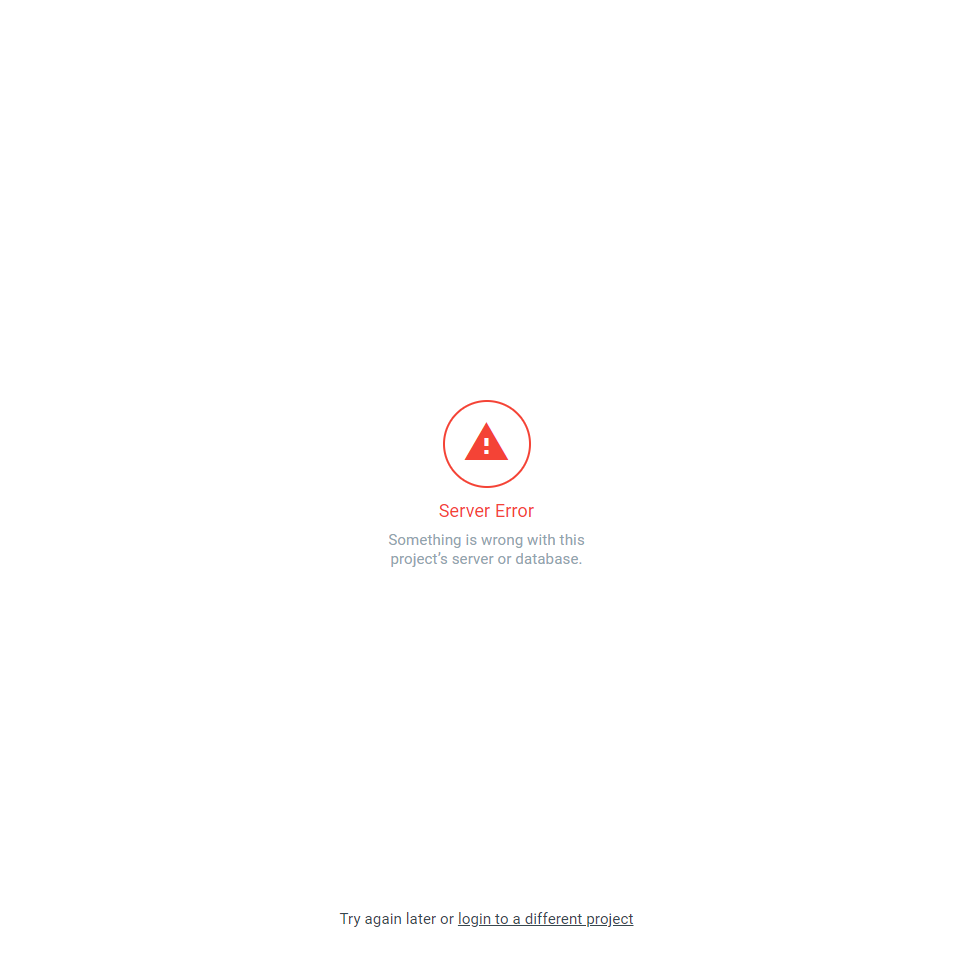
Server error screen, with error reported to console.
VM1197:1 GET http://localhost/directus_8/public/{{project}}/users/me?fields[0]=id&fields[1]=avatar.*&fields[2]=email&fields[3]=first_name&fields[4]=last_name&fields[5]=locale&fields[6]=role.*&fields[7]=last_page&fields[8]=theme 404 (Not Found)
I checked the logs and I'm given this error:
`[2019-12-19 14:55:16] api[cpl-group].ERROR: Directus\Database\Exception\ItemNotFoundException: Item not found in C:\xampp\htdocs\directus_8\src\core\Directus\Services\ItemsService.php:138
Stack trace:
0 C:\xampp\htdocs\directus_8\src\core\Directus\Services\UsersService.php(144): Directus\Services\ItemsService->findByIds
directus/directus#1 C:\xampp\htdocs\directus_8\src\endpoints\Users.php(92): Directus\Services\UsersService->findByIds
directus/directus#2 [internal function]: Directus\Api\Routes\Users->read
directus/directus#3 C:\xampp\htdocs\directus_8\vendor\slim\slim\Slim\Handlers\Strategies\RequestResponse.php(40): call_user_func
directus/directus#4 C:\xampp\htdocs\directus_8\vendor\slim\slim\Slim\Route.php(281): Slim\Handlers\Strategies\RequestResponse->__invoke
directus/directus#5 C:\xampp\htdocs\directus_8\src\core\Directus\Application\Http\Middleware\AbstractRateLimitMiddleware.php(34): Slim\Route->__invoke
directus/directus#6 [internal function]: Directus\Application\Http\Middleware\AbstractRateLimitMiddleware->__invoke
directus/directus#7 C:\xampp\htdocs\directus_8\vendor\slim\slim\Slim\DeferredCallable.php(57): call_user_func_array
directus/directus#8 [internal function]: Slim\DeferredCallable->__invoke
directus/directus#9 C:\xampp\htdocs\directus_8\vendor\slim\slim\Slim\MiddlewareAwareTrait.php(70): call_user_func
directus/directus#10 C:\xampp\htdocs\directus_8\src\core\Directus\Application\Http\Middleware\AuthenticationMiddleware.php(124): Slim\Route->Slim{closure}
directus/directus#11 [internal function]: Directus\Application\Http\Middleware\AuthenticationMiddleware->__invoke
directus/directus#12 C:\xampp\htdocs\directus_8\vendor\slim\slim\Slim\DeferredCallable.php(57): call_user_func_array
directus/directus#13 [internal function]: Slim\DeferredCallable->__invoke
directus/directus#14 C:\xampp\htdocs\directus_8\vendor\slim\slim\Slim\MiddlewareAwareTrait.php(70): call_user_func
directus/directus#15 C:\xampp\htdocs\directus_8\src\core\Directus\Application\Http\Middleware\TableGatewayMiddleware.php(25): Slim\Route->Slim{closure}
directus/directus#16 [internal function]: Directus\Application\Http\Middleware\TableGatewayMiddleware->__invoke
directus/directus#17 C:\xampp\htdocs\directus_8\vendor\slim\slim\Slim\DeferredCallable.php(57): call_user_func_array
directus/directus#18 [internal function]: Slim\DeferredCallable->__invoke
directus/directus#19 C:\xampp\htdocs\directus_8\vendor\slim\slim\Slim\MiddlewareAwareTrait.php(70): call_user_func
directus/directus#20 C:\xampp\htdocs\directus_8\src\core\Directus\Application\Http\Middleware\DatabaseMigrationMiddleware.php(15): Slim\Route->Slim{closure}
directus/directus#21 [internal function]: Directus\Application\Http\Middleware\DatabaseMigrationMiddleware->__invoke
directus/directus#22 C:\xampp\htdocs\directus_8\vendor\slim\slim\Slim\DeferredCallable.php(57): call_user_func_array
directus/directus#23 [internal function]: Slim\DeferredCallable->__invoke
directus/directus#24 C:\xampp\htdocs\directus_8\vendor\slim\slim\Slim\MiddlewareAwareTrait.php(70): call_user_func
directus/directus#25 C:\xampp\htdocs\directus_8\vendor\slim\slim\Slim\MiddlewareAwareTrait.php(117): Slim\Route->Slim{closure}
directus/directus#26 C:\xampp\htdocs\directus_8\vendor\slim\slim\Slim\Route.php(268): Slim\Route->callMiddlewareStack
directus/directus#27 C:\xampp\htdocs\directus_8\vendor\slim\slim\Slim\App.php(503): Slim\Route->run
directus/directus#28 C:\xampp\htdocs\directus_8\src\core\Directus\Application\Http\Middleware\AbstractRateLimitMiddleware.php(34): Slim\App->__invoke
directus/directus#29 [internal function]: Directus\Application\Http\Middleware\AbstractRateLimitMiddleware->__invoke
directus/directus#30 C:\xampp\htdocs\directus_8\vendor\slim\slim\Slim\DeferredCallable.php(57): call_user_func_array
directus/directus#31 [internal function]: Slim\DeferredCallable->__invoke
directus/directus#32 C:\xampp\htdocs\directus_8\vendor\slim\slim\Slim\MiddlewareAwareTrait.php(70): call_user_func
directus/directus#33 C:\xampp\htdocs\directus_8\vendor\directus\proxy-detection\src\ProxyDetectionMiddleware.php(30): Slim\App->Slim{closure}
directus/directus#34 C:\xampp\htdocs\directus_8\src\core\Directus\Application\Http\Middleware\ProxyMiddleware.php(18): RKA\Middleware\ProxyDetectionMiddleware->__invoke
directus/directus#35 [internal function]: Directus\Application\Http\Middleware\ProxyMiddleware->__invoke
directus/directus#36 C:\xampp\htdocs\directus_8\vendor\slim\slim\Slim\DeferredCallable.php(57): call_user_func_array
directus/directus#37 [internal function]: Slim\DeferredCallable->__invoke
directus/directus#38 C:\xampp\htdocs\directus_8\vendor\slim\slim\Slim\MiddlewareAwareTrait.php(70): call_user_func
directus/directus#39 C:\xampp\htdocs\directus_8\vendor\akrabat\ip-address-middleware\src\IpAddress.php(113): Slim\App->Slim{closure}
directus/directus#40 [internal function]: RKA\Middleware\IpAddress->__invoke
directus/directus#41 C:\xampp\htdocs\directus_8\vendor\slim\slim\Slim\DeferredCallable.php(57): call_user_func_array
directus/directus#42 [internal function]: Slim\DeferredCallable->__invoke
directus/directus#43 C:\xampp\htdocs\directus_8\vendor\slim\slim\Slim\MiddlewareAwareTrait.php(70): call_user_func
directus/directus#44 C:\xampp\htdocs\directus_8\src\core\Directus\Application\Http\Middleware\CorsMiddleware.php(71): Slim\App->Slim{closure}
directus/directus#45 [internal function]: Directus\Application\Http\Middleware\CorsMiddleware->__invoke
directus/directus#46 C:\xampp\htdocs\directus_8\vendor\slim\slim\Slim\DeferredCallable.php(57): call_user_func_array
directus/directus#47 [internal function]: Slim\DeferredCallable->__invoke
directus/directus#48 C:\xampp\htdocs\directus_8\vendor\slim\slim\Slim\MiddlewareAwareTrait.php(70): call_user_func
directus/directus#49 C:\xampp\htdocs\directus_8\src\core\Directus\Application\Http\Middleware\ResponseCacheMiddleware.php(62): Slim\App->Slim{closure}
directus/directus#50 [internal function]: Directus\Application\Http\Middleware\ResponseCacheMiddleware->__invoke
directus/directus#51 C:\xampp\htdocs\directus_8\vendor\slim\slim\Slim\DeferredCallable.php(57): call_user_func_array
directus/directus#52 [internal function]: Slim\DeferredCallable->__invoke
directus/directus#53 C:\xampp\htdocs\directus_8\vendor\slim\slim\Slim\MiddlewareAwareTrait.php(70): call_user_func
directus/directus#54 C:\xampp\htdocs\directus_8\vendor\slim\slim\Slim\MiddlewareAwareTrait.php(117): Slim\App->Slim{closure}
directus/directus#55 C:\xampp\htdocs\directus_8\vendor\slim\slim\Slim\App.php(392): Slim\App->callMiddlewareStack
directus/directus#56 C:\xampp\htdocs\directus_8\vendor\slim\slim\Slim\App.php(297): Slim\App->process
directus/directus#57 C:\xampp\htdocs\directus_8\src\core\Directus\Application\Application.php(161): Slim\App->run
directus/directus#58 C:\xampp\htdocs\directus_8\publicindex.php(5): Directus\Application\Application->run [] []`
From the looks of it, /users/me doesn't exist as a path, but Directus is trying to run this path.
My guess from the stack trace is users/me is being seen as a call for user with id "me" rather than a custom endpoint of the user info for the user currently logged in?
Other Context & Screenshots
This is the server error screen I receieve:
Technical Details
XAMPP Server:
PHP Version 7.3.6
Apache Version 2.4.39
Database: MySQL 10.3.16-MariaDB
Directus: Latest Version (cloned today)
 aSeriousDeveloper
All 15 comments
/me is being matched as ID in that endpoint, and this normally works. I have seen this behavior before where the session cookie doesn't make it to the /users/me endpoint, therefore the API is not able to extract who "me" is and fails.
 rijkvanzanten
on 19 Dec 2019
rijkvanzanten
on 19 Dec 2019
Is there anything in your environment (cdn in between for example) that might affect cookies from making it to the endpoint?
rijkvanzanten
on 19 Dec 2019
I'm running locally on a XAMPP server, so I don't believe I have any CDNs setup.
I've tried clearing my cookies for the page, which regenerates the PHPSESSION token as well as project token which seems to delete itself upon receiving the error.
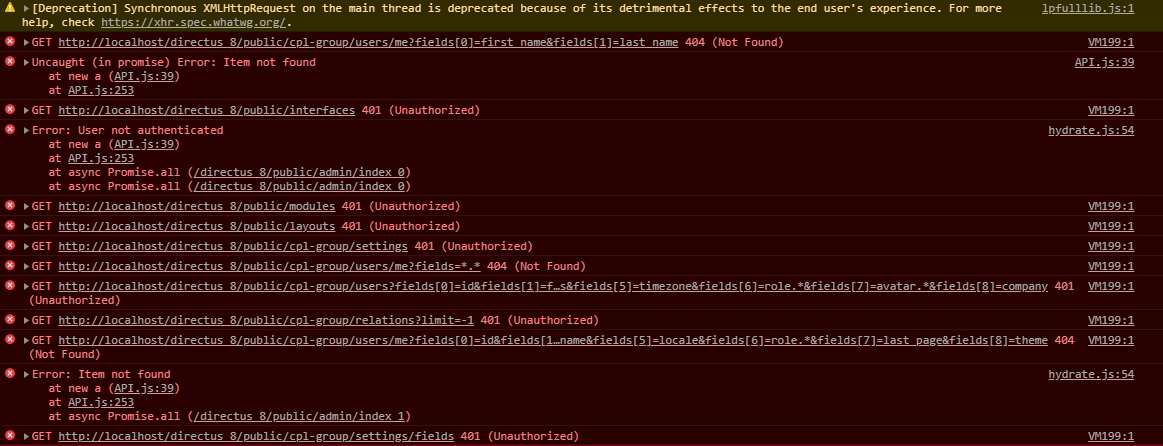
When doing this, I seem to get several more errors after the item not found error.
The first is:
[2019-12-19 17:31:24] api[cpl-group].ERROR: Directus\Authentication\Exception\UserNotAuthenticatedException: User not authenticated in C:\xampp\htdocs\{{project}}\src\core\Directus\Application\Http\Middleware\AuthenticatedMiddleware.php:21
There is also an Unauthorised Request Error. These 3 types of error show up multiple times in quick succession in the logs. This is what shows up in the console when doing this.
As far as anything else, there shouldn't be anything else affecting cookies getting to Directus.
EDIT: Here's a copy of the strack traces for the error shown. This is probably useful.
aSeriousDeveloper
on 19 Dec 2019
What's the value for auto-sign-out in directus_settings?
Maybe the cookie's expiration date is set to current date, meaning it invalidates right after that first "am i logged in check"
rijkvanzanten
on 20 Dec 2019
auto-sign-out was set to 60. I changed this to 60000 and I'm able to login fine now, so this seems to have been the issue. I believe that it may have been 60 for minutes from the old system, but this was changed to milliseconds and the database didn't reflect this?
However, I now have the issue of thumbnails not working correctly. I believe I mentioned this in another thread previously. I believe it was this one: Files are broken after v8 migration #1520
The directus app is resolving to localhost/{project}/assets/{image} and returning a 404.
However, querying the API returns localhost/directus_8/public/{project}/assets/{image} which returns the image correctly. I'm not sure why these two have a discrepancy and where I would be able to change the config for this.
Should I open a separate issue for this, or is there any existing one with a solution I overlooked?
aSeriousDeveloper
on 20 Dec 2019
auto-sign-out was set to 60. I changed this to 60000 and I'm able to login fine now, so this seems to have been the issue. I believe that it may have been 60 for minutes from the old system, but this was changed to milliseconds and the database didn't reflect this?
Very strange, that value is and was in minutes, so I'm kinda confused why that would fix it. Glad that it did though..
Should I open a separate issue for this, or is there any existing one with a solution I overlooked?
I believe that's controlled by the root and thumb_root setting in the config file.
rijkvanzanten
on 20 Dec 2019
The following are my values for the relevant storage config settings.
'root' => 'public/uploads/cpl-group/originals',          // Where files are stored on disk
'thumb_root' => 'public/uploads/cpl-group/thumbnails',    // Where thumbnails are stored on disk
'root_url' => '/uploads/cpl-group/originals',            // Where files are accessed over the web
Thumbnails and images are retrieved fine by calling the API directly and through the SDK via the given url. I can't seem to find a way to alter the url being used by the main Directus app.
aSeriousDeveloper
on 20 Dec 2019
Hmm, I thought this commit https://github.com/directus/api/commit/c76fbec43e0b8da61cddeb6a9e8c1f192db08985 took care of that.
I'm closing this issue as the original issue has seemingly be resolved. Feel free to open a new one for this mentioned thumbnail issue
rijkvanzanten
on 20 Dec 2019
Shouldn't the fix of changing the timestamp be on the list of breaking changes?
 lennerd
on 3 Jan 2020
lennerd
on 3 Jan 2020
@lennerd change of what timestamp where?
rijkvanzanten
on 3 Jan 2020
Having some settings for lifetime of a cookie inside directus_settings stored as minutes vs stored in seconds. Sounds like a breaking change, no?
lennerd
on 3 Jan 2020
That value was and still is in minutes.
rijkvanzanten
on 3 Jan 2020
You're right! At least the admin interface tells me its value is stored as minutes. So this is actually a bug, no? After upgrading and changing this value back to 60, I'm again not able to log in. I need to change the value back to 60000 to log in again. Something wrong in my setup?
lennerd
on 3 Jan 2020
Maybe your server / computer time is incorrect? If the server thinks its an hour in the future, it will set the cookie wrong too
rijkvanzanten
on 3 Jan 2020
Good idea, I will check that.
lennerd
on 6 Jan 2020
Related issues
 24js
·
3Comments
24js
·
3Comments
 cdwmhcc
·
3Comments
cdwmhcc
·
3Comments
 vuhrmeister
·
3Comments
vuhrmeister
·
3Comments
 ondronix
·
3Comments
ondronix
·
3Comments
 binary-koan
·
3Comments
binary-koan
·
3Comments
Most helpful comment
What's the value for auto-sign-out in directus_settings?
Maybe the cookie's expiration date is set to current date, meaning it invalidates right after that first "am i logged in check"