V8-archive: No password form on successful invitation landing page
Bug Report
As the documentation specifies, the invitation system supported by Directus sends an email:
It creates a user with an invited status, and then sends an email to the user with instructions on how to activate their account.
But then when we click on the link provided in the email, we only get to a raw JSON exposing the user properties.
Steps to Reproduce
Send an invitation to an email and click the provided link.
Expected Behavior
Is it intended to only land on this raw JSON?
I would have thought that once the token has been successfully recognised and the user is indeed invited, they could eventually define their password and then login. Exactly like the password reset process, but for a first initialisation.
Actual Behavior
When we click the link sent in the invitation, we get to a basic JSON page like this one:
{
  "data": {
    "id": 61,
    "status": "invited",
    "first_name": "John",
    "last_name": "Doe",
    "email": "[email protected]",
    "timezone": "Europe/Zurich",
    "locale": "fr-FR",
    "locale_options": null,
    "avatar": null,
    "external_id": "f7310b79-888c-4cfc-a0e3-9b42a08e14b6",
    "title": null,
    "company": null,
    "2fa_secret": null,
    "role": 5,
    "theme": null
  },
  "public": true
}
Technical Details
- Directus version 8.0.0
- Install Method: cloned
masterbranch
 LandazuriPaul
All 12 comments
@benhaynes @rijkvanzanten
Let's finalize the flow for this. Currently, the link of the email for the invitation will update the status from invited to active and return the user object.
 bjgajjar
on 9 Dec 2019
bjgajjar
on 9 Dec 2019
How about:
- User creates a new user with status invited
- The API sends an email to the user with a link to the app
/#/invitewith a query param for the email[email protected] - The app renders a password input with a welcome text
- App posts to an api endpoint to enable the user with the new password
For added security, we can generate a token on step 2 and have the app post that to the API as well.
_the above is a draft_
 rijkvanzanten
on 9 Dec 2019
rijkvanzanten
on 9 Dec 2019
That looks good to me! To be clear Step 3 would be a "public" page, and in no way give them access to the rest of the system (until they save proper creds). For the App UI, I imagine this as a modal (Tour can come later, obviously):
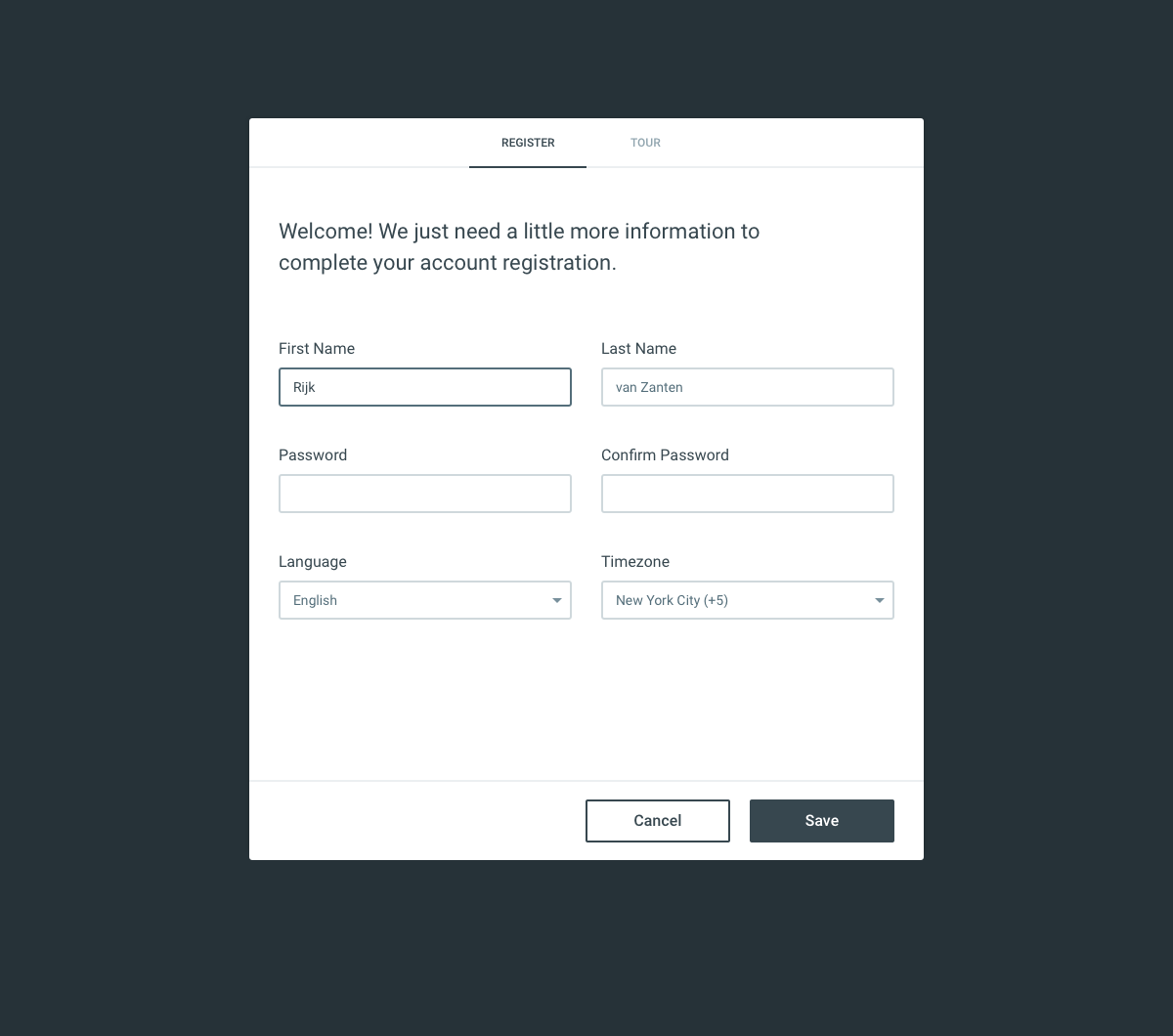
Also, this same UI would be used if/when we enable "Account Registration" from the public pages. Just something to keep in mind.
 benhaynes
on 9 Dec 2019
benhaynes
on 9 Dec 2019
Should it be in the same public page style as the other stuff? I was thinking it would be closer to the install style
rijkvanzanten
on 9 Dec 2019
Ahh, good point! Yes, let's just transpose this form into the Public page style. Also, Language and Timezone aren't required... so we can remove those if that's easier. Upon login, it'd be nice if we could send them to their Profile Detail page so that they can easily fill in the non-required fields (eg: avatar).
benhaynes
on 9 Dec 2019
User creates a new user with status invited
@rijkvanzanten - Can you please help me to clear my doubts here? Currently, the invitation can be sent from a separate API [/users/invite].
As per my knowledge, the email will not be sent on the Create User with status invited.
The API sends an email to the user with a link to the app /#/invite with a query param for the email ?[email protected]
This step will be performed at the APP side. API just needs to update the joining URL and I'll pass the token in that too.
So after updating the password; APP'll have a token to update the user detail.
Does that make sense?
bjgajjar
on 16 Dec 2019
@rijkvanzanten - Can you please provide the confirmation on this?
bjgajjar
on 19 Dec 2019
How about we go with something like:
- Click
+in the top right of the app - App asks to provide the new user's email in a modal (similar to creating a new collection)
- There's three buttons in this modal:
cancel,create manually, andinvite - Create manually will do what it does now (open edit form with all fields)
- Invite will use the
/users/inviteendpoint to invite the new user
Then in the invite email that the user gets, it should link to a /admin/#/accept-invite?token=abcdef page that lets the user set a name and password. The app will PATCH to /users/:id to set the records providing the token to "authenticate" the temporary user.
Sounds good @benhaynes @bjgajjar @WoLfulus ?
rijkvanzanten
on 19 Dec 2019
Yes. A few other notes:
- This modal (or at least the invite part) should also be available in Settings > Roles > Users
- The modal should have a textarea in it to accept a CSV of email addresses, with a primary button to "Invite", or another (secondary) button to "Create Manually"
- We should have validation for the invited emails
I like this though!
benhaynes
on 19 Dec 2019
@rijkvanzanten - LGTM. Should I wait for the confirmation of @WoLfulus to start the development?
bjgajjar
on 20 Dec 2019
LGTM!
Just make sure to invalidate the token after it's used (if it's a JWT, an expiration date should work just fine)
 WoLfulus
on 20 Dec 2019
WoLfulus
on 20 Dec 2019
@rijkvanzanten - https://github.com/directus/api/pull/1590 PR will update the link of email to accept the invitation.
bjgajjar
on 23 Dec 2019
Related issues
 cdwmhcc
·
3Comments
cdwmhcc
·
3Comments
 Varulv1997
·
3Comments
Varulv1997
·
3Comments
 ondronix
·
3Comments
ondronix
·
3Comments
 maettyhawk
·
3Comments
maettyhawk
·
3Comments
 metalmarco
·
3Comments
metalmarco
·
3Comments