V8-archive: MySQL Export/Import via phpMyAdmin fails - Specified key was too long
Bug Report
Steps to Reproduce
- Export Database as SQL file via phpmyadmin or some other tool like the CLI.
- Import the SQL file on a target host.
Expected Behavior
Normal import of SQL file
Actual Behavior
MySQL Error:
#1071 - Specified key was too long; max key length is 768 bytes
The Script will not execute correctly for some reason after this. Probably a Pyramid of breakdowns even tough just one error is popping up.
Other Context & Screenshots
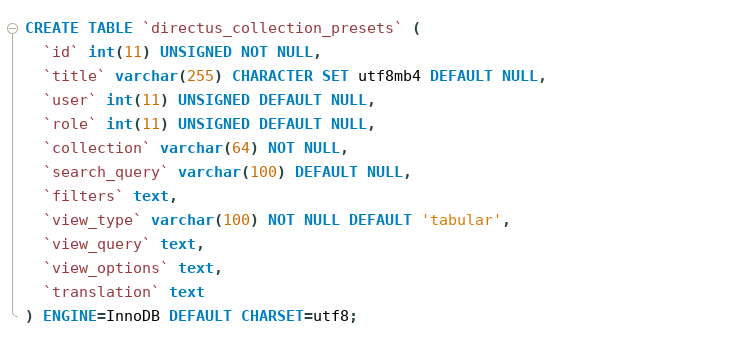
This error shows up at many places.
- A Slug with a size of 200+ fails to be imported as/when it is handled as a foreign key.
- Tables with multiple Keys where text is a key(VARCHAR), this will most probably be a error that pops up.
Example:

Quickfix 1:
This can be fixed/ignored if you OWN the MySQL Host like this:
- Open MySQL CLI
- Enter these commands:
set global innodb_large_prefix=ON;
Set global innodb_default_row_format=dynamic
Quickfix 2:
If you do not own the Host you can try to remove the collates from specific Queries; also DO NOT MIX COLLATES IN KEYS:
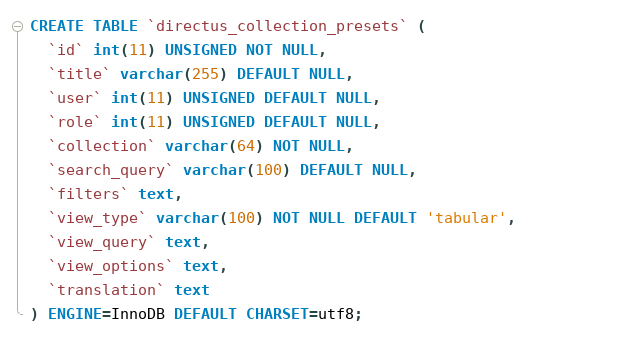
Important hints
- This is probably not exactly fixable by Directus; this is most probably a problem of the export schematic of phpMyAdmin/other CLI tools.
- This is probably solvable if a script would be added to export tables in Directus instead of phpMyAdmin. Which makes sure that the same collate is being used and slugs are not too long in bytesize. (Collate utf8 and utf4mb have different sizes as it seems and when crossed will make the key longer than it should be)
- If you make an export function maybe even use directus REST API calls for it? Maybe that idea is useful for setting up a lot of servers later on.
Technical Details
- Device: [eg: *]
- OS: [eg: *]
- Web Server: [eg: Apache 2.4.37]
- PHP Version: [eg: 7.3.0]
- Database: [eg: ~5.7] (not 8 as it seems to ignore this kind of error; source: Slack user)
- I am using a normal install of an MySQL Database
- Install Method: [eg: *]
 sayore
All 4 comments
Hey @edenprojectde, Thanks for taking the time to report this issue.
- This is probably not exactly fixable by Directus; this is most probably a problem of the export schematic of phpMyAdmin/other CLI tools.
But I agree with you here. It is not the issue of Directus. It's the issue of the tool.
- This is probably solvable if a script would be added to export tables in Directus instead of phpMyAdmin.
This is in our queue. We are planning to add the functionality of import/export DB.
 bjgajjar
on 4 Nov 2019
bjgajjar
on 4 Nov 2019
I made this script, it's currently really messy but it seems to give a reasonable output:
https://gist.github.com/edenprojectde/f752c29e514bca58ab432c227d973bc8
I will test this later when i got time. But this script generates an CREATE TABLE(with PK), and INSERT INTO with all the Data. Tough im unsure if MySQL needed Integer/Number Values to be parenthesesless. (dont have a sql server locally to test rn)
CREATE TABLE IF NOT EXISTS sprachen(
       id int(15) unsigned NOT NULL AUTO_INCREMENT,
       anzeigename varchar(200) NULL,
       icon int(10) unsigned NULL,
       PRIMARY KEY (id));
INSERT INTO sprachen (`id`, `anzeigename`, `icon`) VALUES (`1`, `Deutsch`, `5`);
INSERT INTO sprachen (`id`, `anzeigename`, `icon`) VALUES (`2`, `English`, `6`);
@edenprojectde - May I have an update on this?
It is not the issue of Directus. It's the issue of the tool.
IMO, we should close this.
bjgajjar
on 26 Dec 2019
As It is not the issue of Directus. It's the issue of the tool; I am closing this. Feel free to reopen it.
bjgajjar
on 7 Jan 2020
Related issues
 rijkvanzanten
·
3Comments
rijkvanzanten
·
3Comments
 metalmarco
·
3Comments
metalmarco
·
3Comments
 magikstm
·
3Comments
magikstm
·
3Comments
 maettyhawk
·
3Comments
maettyhawk
·
3Comments
 HashemKhalifa
·
3Comments
HashemKhalifa
·
3Comments