V8-archive: Max File Size incorrect on Nginx External API
I have the following Setup:
Nginx Server
with 2 nearly identical configs. Where both have a maximum upload body set.
(Nginx conf: https://pastebin.com/PpaDsrdR)
The Suite is directus.benjamin-krippner.de
The App is admin.benjamin-krippner.de
I installed the Suite and made a second instance of the App only in another folder. (To test for the "Server Problem" bug)
So far everything works, except for the File size in File dialogs. It stays at Max 0 B in the dialog and uploading a file seems to fail.
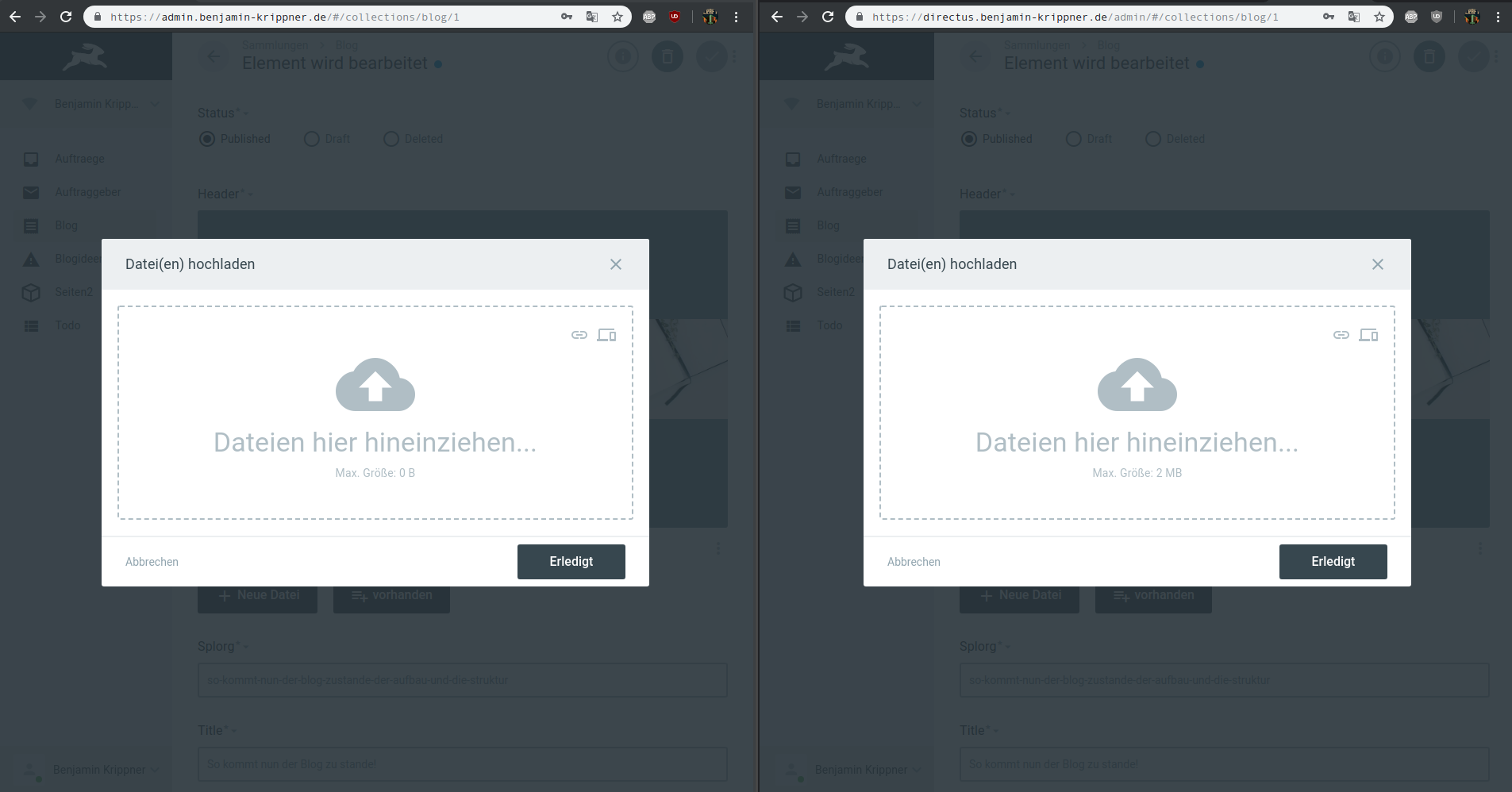
I tried fiddling around with CORS, but it doesn't seem like i can easily change this error, altrough i don't think this is the actual issue(This is the log on admin.benjamin-krippner.de where the max size is 0B):

Things i tried:
- Setting permissions a second time.
- Setting the Max File Size in the Admin Interface
- Tried to change relative to absolute URLs in the config file of the App
- Checking config files i could check
- Checking the docs for anything related to file size.
- Checking the issues (i found a docker related issue, which doesn't seem to fit into this issue)
Directus v7.8.0
PHP Zend Engine v3.3.7 with Zend OPcache v7.3.7-1+ubuntu18.04.1+deb.sury.org+1, Copyright (c)
Nginx Server
OS: Ubuntu
 sayore
All 39 comments
Please include your version of Directus, stack/server info, etc, so we can debug properly.
 benhaynes
on 29 Jul 2019
benhaynes
on 29 Jul 2019
Directus v7.8.0
Nginx Server
OS: Ubuntu
sayore
on 29 Jul 2019
same. concerned about it being "low priority" haha
 justrealmilk
on 17 Aug 2019
justrealmilk
on 17 Aug 2019
So I did some investigating and found that the app calls the API asking for some server info including the max upload size.
I'm not sure how or why it should be any different than when the app and API share the same server and same nginx config... Needless to say, requesting domain.api/_/?token=blah instead of just the root changes everything as it returns the server info as expected.
My patch in place of a real fix is hard coding the variables it's looking for: https://github.com/justrealmilk/upliftnaturereserve-app/blob/develop/src/store/modules/server-info/index.js#L4
justrealmilk
on 17 Aug 2019
i agree with the low priority thing, it completly disables the ability to upload files to a different server 😅
I will try this hotfix later too when I got time later today.
Sent with GitHawk
sayore
on 18 Aug 2019
Hey @justrealmilk and @edenprojectde — I believe the low priority is only because this is an alt-stack ticket (nginx). If the issue can be replicated on apache I'm sure we can bump this up to high
benhaynes
on 19 Aug 2019
I'd suggest handling the failure to fetch that server info differently: instead of preventing a user from even attempting to upload a file, change the max size watermark to 'unknown' and don't block the function. I understand the benefit of the block if it's true to the server limit - prevent the user from uploading half of a file and wasting that time - but this would be a good compromise.
justrealmilk
on 19 Aug 2019
That works for me! @directus/api-team can we make that happen?
benhaynes
on 19 Aug 2019
I was going to delete and post to the app repo referencing this issue but you're too fast.
justrealmilk
on 19 Aug 2019
@justrealmilk
The GET / endpoint with token return some basic server related info.
For example as below,
{
    "data": {
        "api": {
            "version": "2.1.0"
        },
        "server": {
            "max_upload_size": 524288000,
            "general": {
                "php_version": "7.3.6-1+ubuntu16.04.1+deb.sury.org+1",
                "php_api": "fpm-fcgi"
            }
        }
    }
}
Can you please verify, What you are getting in your case?
@edenprojectde
From your screenshot, I think you are getting CORS error.
Please compare your nginx.conf with https://github.com/directus/server-configs/blob/master/NGINX/README.md (Kindly try both the versions of nginx.conf.)
 hemratna
on 26 Aug 2019
hemratna
on 26 Aug 2019
@hemratna gave it a go as you said please but it made no change.
I get basic info if I specify a project i.e. /_/ or /myProject/. If I setup an authed request for them I get the server info as well, as you'd expect.
Am I right to assume that the root is suppose to do something magic when it's sent an auth token?
justrealmilk
on 26 Aug 2019
@justrealmilk When app pass valid token Get / will return the server info as mentation in the last comment.
BTW what the response of Get / in your case? Please make sure you pass the valid token.
hemratna
on 27 Aug 2019
@hemratna I set something up
[redacted auth details]
justrealmilk
on 27 Aug 2019
Thanks, @justrealmilk for providing access. (For sharing the private info you can find me @hem on directus.chat. 😀)
Some quick findings.
In the browser from Directus App
GET / is not being stalled
But in the Postman, the same request will complete
As you are on HTTP/1.1 protocol, It only supports up to 6 simultaneously requests
On my server, I am running on H2 protocol.
Can you update your server to support H2 protocol?
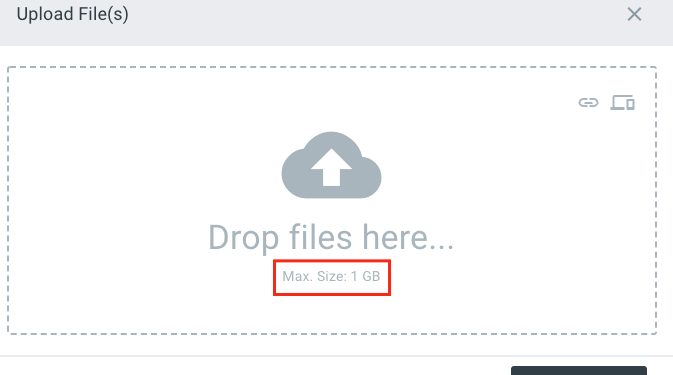
One more thing, I am able to see the maximum allows file size is 1 GB in your server and also able to upload the file.
hemratna
on 27 Aug 2019
GET /is not being stalled
Unsure what this means 😛
Max. size: 1 GB
I hard coded it so I could upload files - https://github.com/justrealmilk/upliftnaturereserve-app/blob/develop/src/store/modules/server-info/index.js
H2
What's a H2? Guess I have some googling to do... HTTP2. I attempted to configure it according to https://www.digitalocean.com/community/tutorials/how-to-set-up-nginx-with-http-2-support-on-ubuntu-18-04 and failed to enable HTTP2. That said, I'm fairly positive the number of connections my server does or doesn't allow has nothing to do with the server's response to this request.
I think it's most likely the server conf in terms of CORS and what index.php thinks it's doing.
justrealmilk
on 27 Aug 2019
stalled means request is not going from browser to server.


I am requesting, can you please try to do GET / from the postman and share the response?
hemratna
on 27 Aug 2019
@hemratna well that works
{
    "data": {
        "api": {
            "version": "2.4.0"
        },
        "server": {
            "max_upload_size": 1073741824,
            "general": {
                "php_version": "7.2.17-0ubuntu0.18.04.1",
                "php_api": "fpm-fcgi"
            }
        }
    }
}
Thanks, @justrealmilk for confirming,
When the browser made the same, It never reaches the server due to HTTP/1.1 protocol limitation. (Please check the screenshot I gave you in the last comment.)
Can you try on some other machine might be on your local computer?
hemratna
on 28 Aug 2019
As this is not a Directus related issue; I am closing this. Feel free to reopen it.
 bjgajjar
on 10 Sep 2019
bjgajjar
on 10 Sep 2019
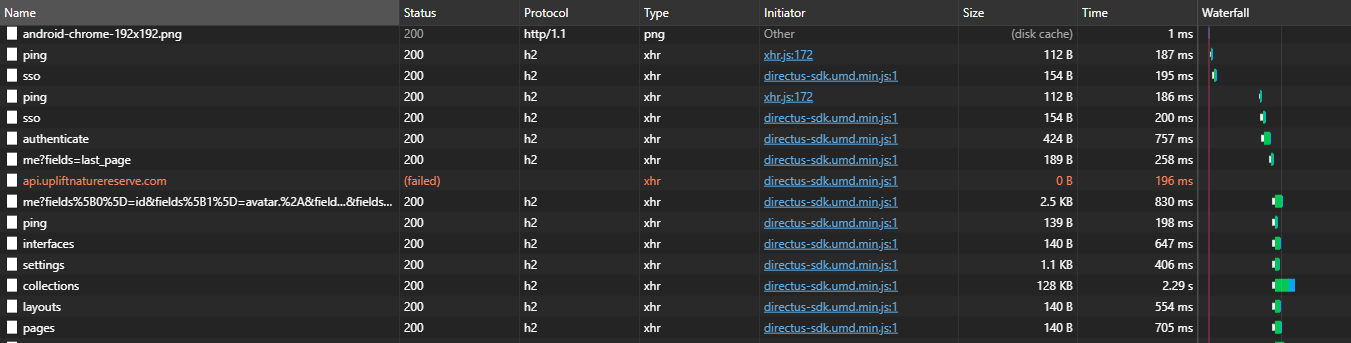
I've enabled h2.
justrealmilk
on 10 Sep 2019
This my server conf
server {
        root /var/domains/url/public;
        error_log off;
        access_log off;
        index index.php;
        server_name url;

        # disable_symlinks if_not_owner;

        location / {
            try_files $uri $uri/ /index.php?$args;
        }

        location /thumbnail {
            try_files $uri $uri/ /thumbnail/index.php?$args;
        }

        # Deny direct access to php files in extensions
        location /extensions/.+\.php$ {
            deny all;
        }

        # All uploads files (originals) cached for a year
        location ~* /uploads/([^/]+)/originals/(.*) {
            add_header Cache-Control "max-age=31536000";
        }

        # Serve php, html and cgi files as text file
        location ~* /uploads/.*\.(php|phps|php5|htm|shtml|xhtml|cgi.+)?$ {
            add_header Content-Type text/plain;
        }

        # Deny access to any file starting with .ht,
        # including .htaccess and .htpasswd
        location ~ /\.ht {
            deny all;
        }

        # pass PHP scripts to FastCGI server
        #
        location ~ \.php$ {
            try_files $uri =404;
            fastcgi_split_path_info ^(.+\.php)(/.+)$;
            fastcgi_pass unix:/var/run/php/php7.2-fpm.sock;
            fastcgi_index index.php;
            fastcgi_param SCRIPT_FILENAME $document_root$fastcgi_script_name;
            include fastcgi_params;
        }


    listen 443 ssl http2; # managed by Certbot
    ssl_certificate /etc/letsencrypt/live/vergil.upliftnaturereserve.com/fullchain.pem; # managed by Certbot
    ssl_certificate_key /etc/letsencrypt/live/vergil.upliftnaturereserve.com/privkey.pem; # managed by Certbot
    # include /etc/letsencrypt/options-ssl-nginx.conf; # managed by Certbot
    ssl_ciphers "EECDH+CHACHA20:EECDH+AES128:RSA+AES128:EECDH+AES256:RSA+AES256:EECDH+3DES:RSA+3DES:!MD5";
    ssl_dhparam /etc/letsencrypt/ssl-dhparams.pem; # managed by Certbot


}server {
    if ($host = url) {
        return 301 https://$host$request_uri;
    } # managed by Certbot


        server_name url;
    listen 80 http2;
    return 404; # managed by Certbot


}
This is not a Directus related issue? Did the HTTP2 solve the issue?@justrealmilk I only see that there is a hardcoded solution.
sayore
on 11 Sep 2019
H2 (is enabled) does not change anything.
It _is_ a Directus related issue as I've configured my server to match the recommended configuration and the API doesn't send the correct response nor one with CORS headers.
justrealmilk
on 11 Sep 2019
Hey all — can we replicate this issue on Apache?
nginx should work, but isn't officially supported because we have a small open-source team. We can help debug, but need to get our platform stable on the supported stack first. It sucks, I know... but until we have revenue coming in we have to triage appropriately.
benhaynes
on 11 Sep 2019
can we replicate this issue on Apache?
Hey @benhaynes - It's not replicated in the Apache server.
bjgajjar
on 15 Oct 2019
From my working with Directus the last few weeks:
App(dev) -> API(Apache2) => Max file size is working
App(Apache2) -> API(Apache2) => Max file size is working
App(Nginx) -> API(Apache2) => Max file size is working
App(dev) -> API(Nginx) => Max file size is not working
App(Apache2) -> API(Nginx) => Max file size is not working
App(Nginx) -> API(Nginx) => Max file size is not working
Which would be a hint at some path not being routed in Nginx using the current nginx config.
sayore
on 15 Oct 2019
I think I stumbled and fixed on my own installation this issue and the problem was that the / endpoint had no CORS setup and had to manualy setup CORS on nginx here are my comments regarding this issue https://github.com/directus/api/issues/797#issuecomment-511598298
 cesasol
on 16 Oct 2019
cesasol
on 16 Oct 2019
https://github.com/directus/api/issues/1159#issuecomment-542526411 / https://github.com/directus/api/issues/797#issuecomment-511598298 solves this problem. Adding this onto the top of my Nginx locations seem to make the ServerInfo work again.
So i assume where ever in the API the Headers are set is not covering all Paths for Server Info etc.
sayore
on 16 Oct 2019
@benhaynes - Should we close this?
bjgajjar
on 26 Dec 2019
It would be nice to fix this, but since NGINX isn't officially supported, this is not a priority. @rijkvanzanten @WoLfulus ... thoughts on these alt-stack tickets?
benhaynes
on 27 Dec 2019
@bjgajjar @benhaynes We can not have a convenient way to get the max file size config from Nginx, and we have a discussion before https://github.com/directus/api/issues/1555, maybe we should close this issues.
 everyx
on 27 Dec 2019
everyx
on 27 Dec 2019
Maybe NGINX, being as popular as it is, should be officially supported... at some point
justrealmilk
on 27 Dec 2019
That _would_ be nice — but being free and open-source software, we can't take on any additional project scope without financial backing. Perhaps when we have additional resources we can continue discussing this.
benhaynes
on 27 Dec 2019
the max file size is served with the server info(since v8 as far as i know?), why does it fallback to 2mb after being reverse proxied?
well i know its not your priority and stuff but it feels weird that it is still the case 🤔
maybe the number was indeed 2mb in the server info request tough
th backend has a field to set the max file size now maybe the read from db is missing from the endpoint?
sayore
on 27 Dec 2019
Hmm, not sure. @directus/api — thoughts?
benhaynes
on 30 Dec 2019
2mb is the php default max upload limit. Maybe nginx uses the wrong php ini config somehow? 🤔
 rijkvanzanten
on 2 Jan 2020
rijkvanzanten
on 2 Jan 2020
@edenprojectde As I can see, we don't have any field (or key in directus_settings) in DB to store max file size? We are reading from server config.
Kindly provide the DB field or key name. So I can verify.
hemratna
on 27 Feb 2020
It's not in directus_settings (anymore) @hemratna
rijkvanzanten
on 27 Feb 2020
@benhaynes I am not able to reproduce on Nginx. I suggest you close this issue.
hemratna
on 28 Feb 2020
Related issues
 magikstm
·
3Comments
benhaynes
·
4Comments
magikstm
·
3Comments
benhaynes
·
4Comments
 Nitwel
·
3Comments
rijkvanzanten
·
3Comments
Nitwel
·
3Comments
rijkvanzanten
·
3Comments
 jwkellyiii
·
3Comments
jwkellyiii
·
3Comments
Most helpful comment
I think I stumbled and fixed on my own installation this issue and the problem was that the / endpoint had no CORS setup and had to manualy setup CORS on nginx here are my comments regarding this issue https://github.com/directus/api/issues/797#issuecomment-511598298