V8-archive: File uploads over a certain size result in a 0 byte file.
Bug Report
Steps to Reproduce
- Go to 'File Library' in the Admin app at [yourAPI]/admin
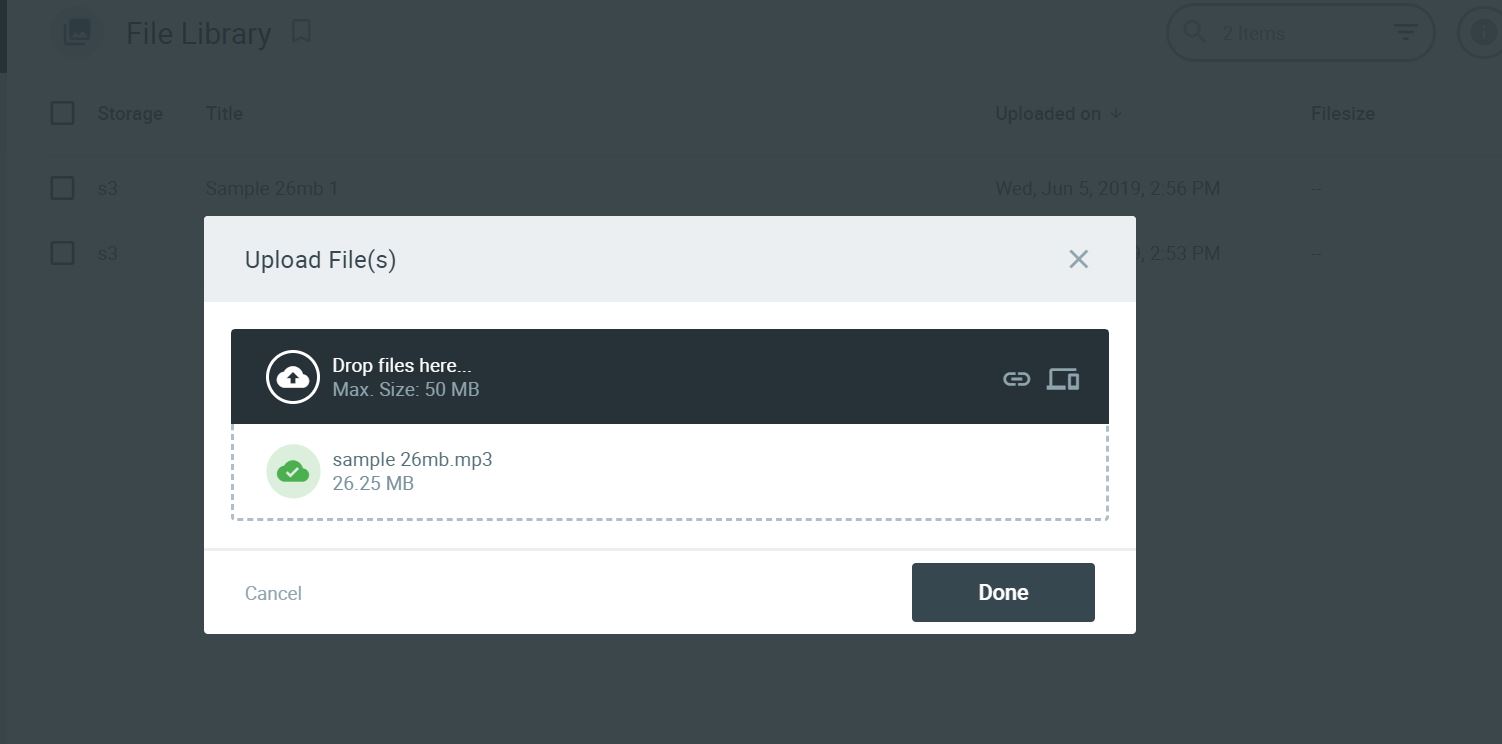
- Click on '+' to add a new file, and upload a file over 17MB.
- Admin app shows a green checkmark (successful upload)
- Go to your storage (s3 bucket or directus/public/uploads/{projectname}/originals) and examine the uploaded file.
Expected Behavior
Any file that you uploaded should have been uploaded successfully without any change, regardless of the file size.
Actual Behavior
If upload file was over 17MB, the destination file exists and is named properly. Size is 0 bytes. Smaller files work normally.
Other Context & Screenshots
In other installations of Directus, the cutoff file size was variously 25MB or 20MB. In this setup, the cutoff is 17MB.
Technical Details
- Device: Digital Ocean one-click LAMP server
- OS: Ubuntu 18.04
- Web Server: Apache 2.4.29
- PHP Version: 7.2.17
- Database: MySQL 5.7.26
- Install Method: cloned
masterbranch

 lazarporter
All 22 comments
Hey guys, I am also having this issue, any hope on the horizon for this one?
 nassan
on 19 Jun 2019
nassan
on 19 Jun 2019
Hey @nassan — this is more of an enhancement or low priority bug so it's not at the top of the list. As soon as the other (higher priority) bugs are resolved we'll look into this.
In the meantime, any more insight the community can provide would be very helpful!
 benhaynes
on 19 Jun 2019
benhaynes
on 19 Jun 2019
Hi @benhaynes
I dig deeper and found, currently, Directus uses base64_encode and base64_decode to upload the file.
base64_encode and base64_decode will create an issue for large files.
So instead to using it we have to use the move_uploaded_file and rewrite file upload mechanism.
 hemratna
on 19 Jun 2019
hemratna
on 19 Jun 2019
Great insight @hemratna!!
Any idea how long it would take to code this new direction and do some benchmarks/testing/comparisons?
benhaynes
on 19 Jun 2019
Any updates here, or is this on indefinite hold?
lazarporter
on 23 Jun 2019
We're focusing on all bugs right now (App and API) so it's not on hold... we just needed to resolve some bugs that were a higher priority. Hopefully we can get this resolved this week!
benhaynes
on 24 Jun 2019
yayyyyyyyyyy! Looking forward
nassan
on 26 Jun 2019
Tried the new version 2.2.1 with the fix #1051 and uploaded a big file but it is not working for me running it on nginx + digital ocean spaces adaptor (aws compatible). Getting new kind of errors and not sure what causes it.
Upload big file (30 mb)
API log:
[warn] 214#214: *1245 a client request body is buffered to a temporary file /var/tmp/nginx/client_body/0000000008
WARNING: [pool www] child 251 said into stderr: "[28-Jun-2019 15:00:44 UTC] PHP Warning:  strpos() expects parameter 1 to be string, object given in /var/www/html/src/core/Directus/Filesystem/Files.php on line 236"
WARNING: [pool www] child 251 said into stderr: "[28-Jun-2019 15:00:44 UTC] PHP Warning:  base64_decode() expects parameter 1 to be string, object given in /var/www/html/src/core/Directus/Filesystem/Files.php on line 241"
WARNING: [pool www] child 251 said into stderr: "[28-Jun-2019 15:00:44 UTC] PHP Warning:  strlen() expects parameter 1 to be string, object given in /var/www/html/src/core/Directus/Filesystem/Files.php on line 273"
Error in App:
localhost/_/files:1 POST http://clocalhost/_/files 500 (Internal Server Error)
upload.vue:229 Uncaught (in promise) TypeError: Cannot read property 'message' of undefined
    at upload.vue:229
(anonymous) @ upload.vue:229
Promise.catch (async)
save @ upload.vue:226
filesChange @ upload.vue:174
change @ upload.vue?d2f4:7
nt @ vue.runtime.esm.js:1854
n @ vue.runtime.esm.js:2179
Zo.i._wrapper @ vue.runtime.esm.js:6911
Now also small file upload failes (1.5 mb)
It now also breaks uploads of small file which worked before. With small files the upload seems to work somehow, the file lands in the digital ocean (aws compatible) spaces but the app spits an error and the file is not added. I can see it in the File Library but have to manually add it to the table item after a page refresh.
API log:
WARNING: [pool www] child 209 said into stderr: "[28-Jun-2019 15:20:53 UTC] PHP Notice: Undefined index: charset in /var/www/html/src/core/Directus/Filesystem/Files.php on line 294"
App:
vue.runtime.esm.js:1888 TypeError: Cannot read property 'id' of undefined
    at a.saveUpload (input.vue:196)
    at nt (vue.runtime.esm.js:1854)
    at a.n (vue.runtime.esm.js:2179)
    at nt (vue.runtime.esm.js:1854)
    at a.e.$emit (vue.runtime.esm.js:3882)
    at upload.vue:217
ot @ vue.runtime.esm.js:1888
rt @ vue.runtime.esm.js:1879
tt @ vue.runtime.esm.js:1839
nt @ vue.runtime.esm.js:1862
n @ vue.runtime.esm.js:2179
nt @ vue.runtime.esm.js:1854
e.$emit @ vue.runtime.esm.js:3882
(anonymous) @ upload.vue:217
Promise.then (async)
save @ upload.vue:216
filesChange @ upload.vue:174
change @ upload.vue?d2f4:7
nt @ vue.runtime.esm.js:1854
n @ vue.runtime.esm.js:2179
Zo.i._wrapper @ vue.runtime.esm.js:6911
 mimamuh
on 28 Jun 2019
mimamuh
on 28 Jun 2019
Technically we don't support nginx, so that might be the issue here... but I'll defer to @bjgajjar and @rijkvanzanten on if we need to re-open this.
benhaynes
on 28 Jun 2019
The errors provided look like php errors, I don't see anything Nginx specific just based on this, so let's reopen this
 rijkvanzanten
on 29 Jun 2019
rijkvanzanten
on 29 Jun 2019
Thx, in case you need it for reproduction: I can share a docker setup with you. Actually it is simply the one from your github repro modified so that I can upgrade directus via a ENV var and connect it to a aws compatible store.
mimamuh
on 29 Jun 2019
Hey @mimamuh
I can share a docker setup with you
I think you are getting this error in Docker. Actually, we are almost on the track of update the Docker. So once it's done you will not find this error. It is not the API related issue but the Docker one :)
 bjgajjar
on 29 Jun 2019
bjgajjar
on 29 Jun 2019
@bjgajjar Thx, looking forward to that. :)
I tried it with a different docker image using apache php:7.3.6-apache-stretch and same error. I'm not sure if it is docker related but the file upload worked before v2.2.1 at least for small files and now it is broken totally. So it is not that I can't upload big files only, I can't upload any file anymore. No change when using apache for it.
PHP Warning:  strpos() expects parameter 1 to be string, object given in /var/www/html/src/core/Directus/Filesystem/Files.php on line 236, referer: http://app.localhost/admin
PHP Warning:  base64_decode() expects parameter 1 to be string, object given in /var/www/html/src/core/Directus/Filesystem/Files.php on line 241, referer: http://app.localhost/admin
@mimamuh
For the small files (1.5 mb)
API log showing the warning, not an error. I fix the warning for the charset. #1070
For the big file (30 mb)
I test on my DO spaces (with API repo) and code is working fine. In this case, it's also showing the warning, I will test the file upload on your PHP version php 7.3 and update here.
hemratna
on 1 Jul 2019
@hemratna Thx. I digged deeper and checked it again, I found a typo of mine. Good news is at least the api side works on apache with php 7.1.30 and also on php 7.3.6. Sorry for keeping you busy guys.
On nginx
It still fails on the nginx setup, but I realized the directus logs aren't pushed to stdout and therefore I had to look in the logs folder and found 'XMLWriter' not found in /var/www/html/vendor/aws/aws-sdk-php/src/Api/Serializer/XmlBody.php:38. This seems to be a docker issue to me with the php-core dependency, so I probably have to check the docker setup again or just use the apache thing;
One issue remains when uploading files:
When I upload a file using aws the app shows its green progress circle/bar only for the time the file uploads from the client to the api-server which leads to errors, see video.
The part from the api-server to the aws droplet isn't accounted as part of the upload. To the user it seems everything is fine but he still can't save the row the the file-field is required or: when it is not required the user thinks everything is fine and it saves but it may not have saved his file included. That is troublesome for big files. So I don't know if it is a api or app related issue or both?
mimamuh
on 1 Jul 2019
@mimamuh I am glad that this worked for you.
@rijkvanzanten Is this something we can handle on app side?
hemratna
on 1 Jul 2019
We might. The application now relies on the progress returned by the server in the file upload progression. Maybe I can let is "stick" on 99% until the API returns the actual response which fixes that.
However, based on the video @mimamuh send, it looks like something else is going on. It looks like it's not even uploading the file in the first place.
rijkvanzanten
on 1 Jul 2019
@rijkvanzanten It is uploading the file fine. But as I run it locally on docker it goes quite fast first and only the upload to the digitalocean droplet takes longer. But when I test it with a bigger file the first upload to the api-server takes some more time too and you see the progress-bar working fine, but only for the upload to the api-server.
mimamuh
on 1 Jul 2019
Ohh gotcha 👍 In that I think my idea above should fix that.
rijkvanzanten
on 1 Jul 2019
rijkvanzanten
on 1 Jul 2019
@mimamuh If the file upload works for you, can we close the issue?
hemratna
on 1 Jul 2019
@hemratna: Yes!
mimamuh
on 1 Jul 2019
Related issues
 cdwmhcc
·
3Comments
cdwmhcc
·
3Comments
 metalmarco
·
3Comments
metalmarco
·
3Comments
 magikstm
·
3Comments
magikstm
·
3Comments
 andgar2010
·
3Comments
cdwmhcc
·
3Comments
andgar2010
·
3Comments
cdwmhcc
·
3Comments
Most helpful comment
We're focusing on all bugs right now (App and API) so it's not on hold... we just needed to resolve some bugs that were a higher priority. Hopefully we can get this resolved this week!