V8-archive: [SECURITY] Directory Listing
Feature Request
About audited Directus version.
It has been cloned from suite repo.
Latest commit https://github.com/directus/directus/commit/1d151a9034514e3f2ec1c80001e7c5fffdef2d4e
Description:
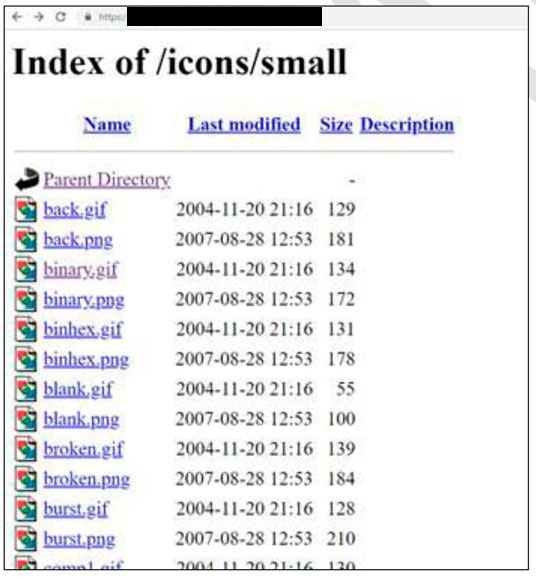
Directory listing provides an attacker with the complete index of all the resources located inside the directory. Some of these files could contain sensitive information or various possible attack vectors.
Business risk:
Discovering an informative about the internal technologies, components and their versions may help an attacker to perform a successful attack, since they can search and exploit known server vulnerabilities for that specific server type and version.
Technical details:
The following screenshots represent directory listing on two specific URLs:
https://xxxxxx/icons/
https://xxxxxx/icons/small/
What problem does this feature solve?
Fixes security hole.
How do you think this should be implemented?
- Restrict access to a fixed location where only the client's files are stored.
- Disable directory listing for all pages.
Would you be willing to work on this?
Maybe, with help/guidance from Directus team.
 ybelenko
All 12 comments
As far as I know this is a config of the serverside so not directly connected to directus.
But it would be possible to restict access using a .htaccess file for the uploads folder.
And I'm not an expert on this topic so I could be wrong.
 Nitwel
on 29 May 2019
Nitwel
on 29 May 2019
@Nitwel or simply put an index.html file in public folders, for example, WordPress puts a .php file in publicly accessible folders
https://github.com/WordPress/WordPress/blob/master/wp-content/plugins/index.php
Edit: nvm this needs a better solution for API side since thumbnail folders are custom and get generated
 24js
on 2 Jun 2019
24js
on 2 Jun 2019
@benhaynes
As mentioned by @ybelenko, directories can be accessed directly from app side(http://example.com/img/icons), to resolve this issue .htaccess file should be placed in root folder of app with this line Options -Indexes in it.
@ybelenko Question :
Except uploaded file URL(uploaded file is accessible with URL directly without login as mentioned in #987), does any directory accessible directly from API side same as APP?
 itsmerhp
on 3 Jun 2019
itsmerhp
on 3 Jun 2019
Hey @itsmerhp — that seems like the ideal solution to hide the public listings, yes.
Would you mind opening a PR for that?
 benhaynes
on 3 Jun 2019
benhaynes
on 3 Jun 2019
@itsmerhp, security department response:
The directory listing available only on the following paths:
https://xxxxxx/icons/
https://xxxxxx/icons/small/
we perform the test only on Directus application and not on the APIs.
ybelenko
on 4 Jun 2019
@benhaynes
This change is from app side, so it is better to move it in app bug traige as such app developer can check any other change needed along with it.
itsmerhp
on 5 Jun 2019
Aren't these directories all in the API repo? The app doesn't manage any folders for uploads...
Right @rijkvanzanten ?
benhaynes
on 5 Jun 2019
That's correct, this should be added in the htaccess of the API
 rijkvanzanten
on 5 Jun 2019
rijkvanzanten
on 5 Jun 2019
@benhaynes and @rijkvanzanten
I think in this task, security department is talking about directories of APP (https://github.com/directus/app/tree/master/public/img/icons), not uploads directory of API.
When we hit URL http://example.com/img/icons, icons from APP is directly accessible which can be restricted by placing .htaccess in APP root folder.
Regarding API uploads directory, separate issue #987 has been logged.
itsmerhp
on 5 Jun 2019
I'm not sure about that. The htaccess is setup to redirect everything to index.html that isn't an existing file, and the files in the screenshot aren't files that are included in the app to begin with 🤔
rijkvanzanten
on 5 Jun 2019
I'm not sure about that. The htaccess is setup to redirect everything to index.html that isn't an existing file, and the files in the screenshot aren't files that are included in the app to begin with
Nice catch! I need to ask server admin, looks like default Apache folder or something from hosting provider... In total it's not related to Directus at all. I think that I'll close this issue soon.
ybelenko
on 5 Jun 2019
Closed as not related to Directus, sorry.
ybelenko
on 6 Jun 2019
Related issues
 binary-koan
·
3Comments
binary-koan
·
3Comments
 vuhrmeister
·
3Comments
24js
·
3Comments
vuhrmeister
·
3Comments
24js
·
3Comments
 metalmarco
·
3Comments
metalmarco
·
3Comments
 cdwmhcc
·
3Comments
cdwmhcc
·
3Comments
Most helpful comment
@itsmerhp, security department response: