V8-archive: [SECURITY] Multiple Login for Each User
Feature Request
About audited Directus version.
It has been cloned from suite repo.
Latest commit https://github.com/directus/directus/commit/1d151a9034514e3f2ec1c80001e7c5fffdef2d4e
Description:
The application permits multiple logins for the same user account, resulting in several security risks:
- Multiple users can share a single user account in the application. In a case of a security violation, it is harder to determine the responsible entity.
- If an attacker attempts to login with stolen credentials, the legitimate users may not be able to detect it.
- Unexpected behavior can be caused while working from different logins on the same account.
Business risk:
Malicious users might use this flaw to login from several computers, consecutively perform operations, and as a result, bypass business logic restrictions.
Technical details:
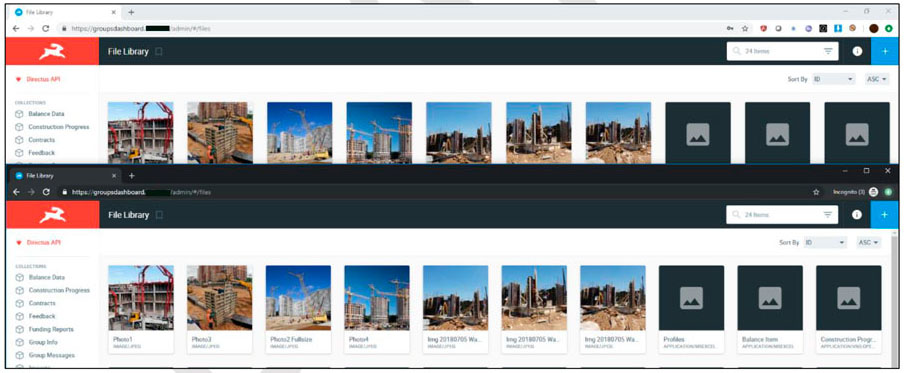
The system allows multiple simultaneous logons from the same user are allowed from the same client.
The following picture represents the same user has an active session in two different browsers:
What problem does this feature solve?
Fixes security hole.
How do you think this should be implemented?
Allow only one connection at a single point in time for each account in the application. One of the following approaches may be taken if a second login is attempted while another session is active for the account:
- Reject the second successful login, explaining that a session with the requesting user is already active. Ask the user to wait for session invalidation or notify an administrator in case he did not connect to the application in the near past.
- Accept the second login and disconnect all previous sessions opened for the same account.
- Display clear instructions in the application on the methods of reporting to the application managers if the user suspects that his credentials are used by an attacker.
Would you be willing to work on this?
Maybe, with help/guidance from Directus team.
 ybelenko
All 19 comments
Nice solutions you got there. 👍
The fist solution would take more time to code because then we would need a logout activity/event to know if an User is still online or already offline. This could also cause problems when you dont properly logout and want to relogin again.
The second solution would be easy to code because we would just need to generate the token for each login. (Which makes me wonder that this isn't the case at the moment)
The 3rd option has the same benefits/disadvantages as the first one.
 Nitwel
on 29 May 2019
Nitwel
on 29 May 2019
@Nitwel Is this even possible with JWT? As far as I noticed current JWT implementation is stateless and you don't save tokens to database, right?
ybelenko
on 29 May 2019
https://docs.directus.io/api/reference.html#tokens
Ah, yes, my misconception. This makes things even harder I guess.
Nitwel
on 29 May 2019
@Nitwel Yeap, no session at all in Directus ) The moment token issued nobody can kill it until it expires.
ybelenko
on 29 May 2019
Then we definetly need a logout event to differenciate if a user is still logged in or already logged out.
Nitwel
on 29 May 2019
@Nitwel What if user wants two authorized devices? Let's say there is a mobile app and website both uses the same public api. In this case mobile app exits every time user logins through website... sounds weird, never seen that kind of behaviour before.
ybelenko
on 29 May 2019
Thats true too. A thing that google does for example is to ckeck where these requests have come from (geologically) and when a user has logged in at a new location, an E-Mail gets send to the admin or the user to ask if they have logged in at the new location. If this is not the case there should be a link to disable the account directly or to send an email to an admin.
Nitwel
on 29 May 2019
As per my understanding, JWT doesn't support such a mechanism.
We need to implement the OAuth to achieve this.
 hemratna
on 25 Jun 2019
hemratna
on 25 Jun 2019
Any thoughts on this @rijkvanzanten?
I don't think we want to move away from JWT, and I personally don't see an issue with users being able to login multiple times on different devices. I think we could offer some insight into those logins, such as: Your account has recently logged in from: New York (123.123.123.123), etc.
I understand that this might not give us the ability to instantly log someone out of the system — but if there is malicious activity you could change directus_user.token and the password, or disable the user's account completely. Rijk, can the malicious user still refresh their token ad infinitum?
Also, Directus has an IP Whitelist feature that could be used in the first place to avoid users logging in from places they shouldn't.
 benhaynes
on 25 Jun 2019
benhaynes
on 25 Jun 2019
I don't see the problem with this either.. Every refresh the user record is checked in the DB. If you disable the user there the token can't be refreshed.
 rijkvanzanten
on 25 Jun 2019
rijkvanzanten
on 25 Jun 2019
JWT can be stored in database, it's even includes reserved jti prop to specify JWT id. Ref to doc RFC 7519 - JSON Web Token - 4.1.7. jti.
In my opinion JWT is the same as OAauth when you store it in database. The only difference is issuing process. You can save that JWT id to database and map all usage data(request locations, IPs, UserAgents) to that record, but it kills the whole beauty of JWT which is stateless/database free usage.
ybelenko
on 2 Jul 2019
In my opinion JWT is the same as OAauth when you store it in database. The only difference is issuing process. You can save that JWT id to database and map all usage data(request locations, IPs, UserAgents) to that record,
Storing the JWT token in DB is like storing plain text password in DB.
The difference between JWT and OAuth is, OAuth stores the refresh token in DB, not the user token.
but it kills the whole beauty of JWT which is stateless/database free usage.
Yes, Agreed and losing the statelessness is not a good idea.
hemratna
on 3 Jul 2019
Storing the JWT token in DB is like storing plain text password in DB.
I meant to store JWT id in database, not JWT itself.
The difference between JWT and OAuth is, OAuth stores the refresh token in DB, not the user token.
How issuer/server validates access token(user token) then?
ybelenko
on 3 Jul 2019
How issuer/server validates access token(
user token) then?
user token behaves the same way as the JWT token does. In fact, we can use the JWT token as user token.
refresh token is used to create a new token or refresh the existing expire token.
hemratna
on 3 Jul 2019
@hemratna Hmm, you mean that user token in OAuth2 can be decrypted and contains payload? I thought it's pure random bytes string.
ybelenko
on 3 Jul 2019
I agree with @benhaynes and a couple of other comments made here. Being able to login to the same platform / app on multiple devices is perfectly normal and not something we'd disable. I also agree with the fact that the IP whitelist should offer enough protection to make sure your account doesn't get used unauthorized.
rijkvanzanten
on 9 Jul 2019
I've created this Feature Request to help provide more insight for the user.
benhaynes
on 9 Jul 2019
@hemratna Just to prove my point about tokens. I've finally figured out how OAuth2 works. And it doesn't contain any data in token itself. It's pure random string. Ref to recommended OAuth2 PHP Server implementation:
https://github.com/bshaffer/oauth2-server-php/blob/5a0c8000d4763b276919e2106f54eddda6bc50fa/src/OAuth2/ResponseType/AccessToken.php#L133-L163
ybelenko
on 1 Aug 2019
@ybelenko I definitely agreed with you on How the token is generated in oAuth, But in oAuth implementation, the server has stored the each generated access token in encrypted formate. So on later stage server can verify the user or even revoke the token if needed. But in the case of JWT, the server doesn't store any token.
hemratna
on 1 Aug 2019
Related issues
 metalmarco
·
3Comments
Nitwel
·
3Comments
metalmarco
·
3Comments
Nitwel
·
3Comments
 chintohere
·
3Comments
chintohere
·
3Comments
 jwkellyiii
·
3Comments
jwkellyiii
·
3Comments
 cdwmhcc
·
3Comments
cdwmhcc
·
3Comments
Most helpful comment
I agree with @benhaynes and a couple of other comments made here. Being able to login to the same platform / app on multiple devices is perfectly normal and not something we'd disable. I also agree with the fact that the IP whitelist should offer enough protection to make sure your account doesn't get used unauthorized.