V8-archive: Dynamic default action and quality for thumbnail information
Feature Request
Make action and quality used in generating thumbnail information in file helper configurable or dynamic in some way.
What problem does this feature solve?
Currently the thumbnail information added to the image data is by default "crop" with quality "good".
See:
https://github.com/directus/api/blob/master/src/helpers/file.php#L210
How do you think this should be implemented?
A simple approach would be to add setting options "Default thumbnail action" same for quality. That could be used as a 4th/5th parameter in the file helper.
A more sophisticated solution would be to read thumbnail settings and create thumbnails for all configured thumbnail actions and qualities. But maybe the current default would result in too many entries ( 2 actions * 4 qualities per size ).
Would you be willing to work on this?
Don't know if this would be a good place for a first contribution but I would be willing to give it a shot.
 futjikato
All 58 comments
Isn't this covered by the Thumbnailer configuration? I agree that we need a better way to enter these configurations.
https://docs.directus.io/guides/thumbnailer.html#thumbnail-actions
 benhaynes
on 9 Mar 2019
benhaynes
on 9 Mar 2019
I'm not really following regarding the "Default thumbnail action". Doesn't it allow you to get any source based on the URL structure of the file (where the thumbnail settings act as a whitelist/blacklist)?
 rijkvanzanten
on 9 Mar 2019
rijkvanzanten
on 9 Mar 2019
I am talking about the thumbnails array that is provided in an image.data.thumbnails. That array is generated by the "get_thumbnails" function ( https://github.com/directus/api/blob/master/src/helpers/file.php#L181 ) and only fetches the thumbnail dimensions from settings and generate a thumbnail URL with action crop and quality better. Doesnt matter what you configure.
futjikato
on 9 Mar 2019
Ahhh gotcha
rijkvanzanten
on 9 Mar 2019
As I am fairly new to directus I would be interested to know if this array is considered to be a good place to start in regards to generating thumbnail URLs. Sure, I could get the filename and build the thumbnail URL by myself but it feels more error resistant and maintainable to use that thumbnail array.
Currently I just eplace the string "/good/" with "/better/" and "/crop/" with "/contains/" where needed but maybe I am missing the easy solution ;)
futjikato
on 9 Mar 2019
I'm not entirely sure what a good solution would be here. If that array would return all the possible options, we'd end up with tens or even hundreds of links 🤔
The path structure of the thumbnail stays the same, so maybe we can return something like
{
  "sizes": ["200x200", "250x300"],
  "qualities": ["good", "poor"],
  "fit": ["contain"]
}
and you could use that information to dynamically generate the URL?
rijkvanzanten
on 11 Mar 2019
It seems the the ideal solution is to create a custom interface for managing this array. Then we can have a proper GUI for editing the config and still save things in the current format.
benhaynes
on 12 Mar 2019
I think you're confused @benhaynes. We're discussing the output of the API. Right now, the API returns an array of URLs to the various thumbnails, however its incomplete: It will return urls for the different sizes, but not the different qualities.
rijkvanzanten
on 12 Mar 2019
Yup! Haha... didn't pay attention to the repo.
The thumbnail whitelist should set each set of params, which it might not be doing now. That would give explicit control over what's allowed and avoid the issue of too many combinations being returned.
We use a named quality tag, but could switch to a percentage based one to keep things easier. So a whitelisted thumb value would look like:
200x200,80,contain
250x300,100,crop
Then it would be super easy to return all possible thumbs since each is whitelisted.
Am I on the right track now?
benhaynes
on 12 Mar 2019
That sounds like a proper solution to me :+1:
futjikato
on 13 Mar 2019
To keep this a CSV and since this is already for URLs, this seems cleaner:
200/200/80/contain,250/300/100/crop
We could also have quality last so it's separate from the dimensions and maybe even optional (need to have a single default, like 100).
200/200/contain/80,250/300/crop/90
To achieve better clarity/visibility, we are now tracking feature requests within the Feature Request project board.
This issue being closed does not mean it's not being considered.
benhaynes
on 20 May 2019
Just for the suggestion.
Can we use the crop syntax something like below?
w_300,h_200,c_crop
This gives more flexibility for adding additional parameters without making any major change.
The above syntax is used by many image delivery services like Cloudinary, ImageKit
For more info
https://cloudinary.com/documentation/image_transformations
https://imagekit.io/features/image-resize-smart-crop-responsive-dpr-client-hints
 hemratna
on 22 Jul 2019
hemratna
on 22 Jul 2019
Random thought of the day: should we use a POST request instead and rely on JSON for all the options?
rijkvanzanten
on 22 Jul 2019
There are two things to consider here, how we save the settings for this and how we access thumbnails in the URL. Ideally both are the same.
I like the idea of your syntax recommendation @hemratna — but I also don't want to make things overly complex if we can avoid it. Things like zoom, x, y, format, etc are all good options, but would we completely change the way we store thumbnail files? Right now we have a set directory architecture based on the width, height, action, and quality.
With the way I recommended we can have a CSV or whitelisted configurations...
200/200/contain/80,250/300/crop/90
How would we store multiple whitelisted thumbnail configs with this? Use a different character?
w_300,h_200,c_crop
Here is another way of doing it:
https://docs.cloudimage.io/go/cloudimage-documentation/en/operations
And another with query strings:
https://docs.imgix.com/apis/url/size/w
benhaynes
on 22 Jul 2019
Random thought of the day: should we use a POST request instead and rely on JSON for all the options?
If you are suggesting let's create a POST endpoint with /thumbnail with all the operation information in JSON then
I think <img src=""> will not do a POST request.
hemratna
on 23 Jul 2019
Store thumbnail
Store all the thumbnail under one directory thumbnails.
All the operational info will be appended in the name as below.
image-{width}x{height}-{operation}-{quality}.jpg
In this approch, we can handle the optional parameter also.image-w_300,h_200,c_crop.jpg
Store configuration
Store multiple whiltelisted thumbnail configs as below.
w_300,h_200,c_contain|w_250,h_300,c_crop,q_goodw-300_h-200_c-contain,w-250_h-300_c-crop_q-good
Simply we are looking for 2 different delimiters here.
Pros of this approach is
Every operation is not compulsory. For example, a user can whitelist config like below
w_300|h_300,q_good|h_200
hemratna
on 23 Jul 2019
Thumbnail Storage
Storing all thumbnails in one directory might have issues when we support folders in the future. When we support folders, you could potentially have files with the same name in different folders:
/directory-a/file-1.jpg
/directory-b/file-1.jpg
_Note: Our current solution doesn't work for this either._
This also changes the original file name, which might not be a _huge_ deal, but it's nice that as of now we serve thumbnails with the same name as the original.
It also makes it more difficult to "clear" or remove all of a specific thumbnail type (you'd really need a script to do this). Whereas now you can delete a sub-directory to remove a specific thumbnail group. Not a big deal, but worth noting.
Just wondering, couldn't we make directories with the whitelisted params and then keep the original filename within it? For example: /w_300,h_200,c_crop,q_80/original-filename.jpg
Thumbnail Config
The main reason for the whitelisting is to avoid potential file upload vulnerabilities where malicious users can generate _many_ different thumbnails on the server simply by requesting different permutations. So we'd need to really understand how the Thumbnailer works if fewer config params are set.
For example, if we whitelist w_300 — can the user choose any action, quality, etc? Or are those locked down somehow?
I think one of these below might work (@rijkvanzanten ?), but depending on which we choose we might need to update the tags interface (the one that will manage this Setting) to allow for custom delimiters (a bar in this case).
w_300,h_200,q_80|w_300,h_200,q_80
w_300+h_200+q_80,w_300+h_200+q_80
Lastly, I'm not sure about the "named" quality params — since those would need to be defined/set somewhere. I think a 1-100 quality is more foolproof, and we could make this optional with a single global quality default (eg: 75).
benhaynes
on 23 Jul 2019
Full disclosure: haven't read everything thoroughly / studied it yet
I like the flexibility, but
w_300,h_200,q_80|w_300,h_200,q_80
w_300+h_200+q_80,w_300+h_200+q_80
reads like an alien language. Docs are going to be absolutely crucial
rijkvanzanten
on 23 Jul 2019
I agree. That's why it took me hours to write this... I'm just not happy with how this looks raw. We'll be using the tags interface to manage this, so it will _look_ more like:
w_300,h_200,q_80 w_300,h_200,q_80
But still, I agree that this will need very clear docs.
benhaynes
on 23 Jul 2019
I've only skimmed this thread, there's a lot of discussion haha.
How about considering them like CSS properties? So it "sort of" follows a standard, with the added bonus, that imo, the following feels less "alien" w:300,h:200,q:80 then you have property:value
 shealavington
on 24 Jul 2019
shealavington
on 24 Jul 2019
It does "break" with 'normal' URL key-value pairs though eg w=300
That could also be an option though, query parameters:
/thumbnail/my-image.png?width=300&height=500&quality=100&fit=contain
rijkvanzanten
on 24 Jul 2019
Any downside to using query strings? Are they accepted everywhere? Cacheable? CDN? etc...
benhaynes
on 24 Jul 2019
I think most of the CDN support the query string. https://stackoverflow.com/q/1330011/1972413
All modern browsers support too.
hemratna
on 25 Jul 2019
If there is no detriment to using query strings for the thumbnail URLs then I'm fine with that, but we still need to agree on an ideal format for saving these KVPs as a CSV. Here's one more option that might work well with the query string approach:
w=300&h=200&q=80,w=200&h=200&c=crop&q=80
In the Settings interface this would look like (if we use the normal tags interface:
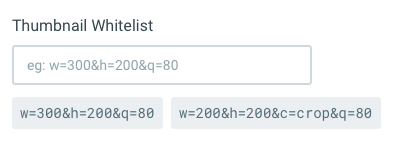
Or we could create a custom interface to manage this so it's even more intuitive.
So far, I'm liking this one the most since the DB whitelist and request format are the same, and relatively readable. Thoughts?
benhaynes
on 25 Jul 2019
@benhaynes we can store the settings for this in JSON too, doesn't have to be the exact URL format:
[
  {
    width: 300,
    height: 200,
    quality: 80
  },
  {
    width: 200,
    height: 200,
    fit: crop,
    quality: 80
  }
]
Which we can then render in settings with the repeater
rijkvanzanten
on 26 Jul 2019
True, JSON is a very clean and clear way to store this data. @hemratna , is it just as easy to parse JSON as exploding the string? Thoughts?
benhaynes
on 27 Jul 2019
Yes, API will parse the JSON format easily.
hemratna
on 29 Jul 2019
OK, the JSON seems to be the clearest way to store this information. Let's plan to move forward with that!
As for the URLs, I am fine with "clean" URLs or the query string — like the ?w=300&h=200&q=80. Let's make sure that the JSON keys and URL keys (letters) match. I can create a list... or we can follow the spec of one of those leading thumbnail platforms.
benhaynes
on 29 Jul 2019
I think the two options we have is shorthands: ?w=150&h=300&q=100 or "full" ?width=150&height=300&quality=100.
I think I personally prefer the shorthands in the URL, but that's just a matter of opinion
rijkvanzanten
on 29 Jul 2019
Yeah, I think these params are common enough where one letter will suffice. We could have full-length aliases, but not sure if that's worth supporting.
benhaynes
on 29 Jul 2019
I personally prefer the shorthands in the URL too.
I will document all the possible shorthands while development, then adds into docs.
@benhaynes Any comments on directory structure to store thumbnails?
hemratna
on 29 Jul 2019
What different flags do we have @hemratna?
Maybe /width/height/quality/<file>?
/300/150/60/my-image.webp?
rijkvanzanten
on 29 Jul 2019
First we should decide if we want "wildcards" with true or *. For example:
[
  {
    width: true,
    height: 200,
    quality: 80
  }
]
I personally think this leaves us open to the same issues where malicious users can flood the system with unwanted files... but I wanted to discuss before totally dismissing it.
If we're planning on allowing wildcards then we should have nested directories (similar to what we have now):
/w_200/h_300/q_80/original-file-name.ext
/w-200/h-300/q-80/original-file-name.ext
/w=200/h=300/q=80/original-file-name.ext
Or, if we will NOT allow wildcards, we can group them into single folders:
/w_200,h_300,q_80/original-file-name.ext
/w_200+h_300+q_80/original-file-name.ext
benhaynes
on 29 Jul 2019
@rijkvanzanten — one thing we're considering here is that there may be other operations/filters added in the future (thus moving to JSON). So we should make sure the folder structure allows for that too.
https://docs.cloudimage.io/go/cloudimage-documentation/en/operations
https://docs.imgix.com/apis/url/size/w
benhaynes
on 29 Jul 2019
@rijkvanzanten — one thing we're considering here is that there may be other operations/filters added in the future (thus moving to JSON). So we should make sure the folder structure allows for that too.
Additionally, I am also thinking like all fields are not required or each field is individually supported too.
There are some possibilities like below.
[
  {
    width: 300,
    height: 200,
    quality: 80
  },
  {
    height: 200,
    fit: crop,
    quality: 80
  },
  {
    width: 300
  }
]
P.S. Optional fields may be part of future enhancement. But I want to make sure we don't have to make major changes in the future.
hemratna
on 29 Jul 2019
Wildcards are very dangerous yet very useful. I suppose once we have authentication for thumbnails/files it's less of a problem though
rijkvanzanten
on 29 Jul 2019
Agree. I guess as long as our defaults don't include wildcards, and there's a way to
I think our only default will be the main one used in File Library:
[
  {
    width: 200,
    height: 200,
    fit: crop,
    quality: 80
  }
]
So we need to make sure that this only allows for ONE thumbnail, and not hundreds by exploiting the undefined parameters (now or in the future). For example: the crop positioning, filters, etc. Maybe we can add a filter: false or crop_px: false to ensure those can't be used?
benhaynes
on 29 Jul 2019
We make all the four arguments width, height, fit, duality required.
By enforcing this we can use the current directory structure of thumbnails too.
In the future, we may support optional arguments like filter, but it does not have any effect on directory structure.
hemratna
on 1 Aug 2019
Perfect. I guess we can figure out how to handle filter in the future... either subfolders (to preserve original file name) or we append/adapt the file name.
Anything else we need to figure out for this one?
benhaynes
on 1 Aug 2019
All set for now. 💪
Let's start working on this issue.
hemratna
on 2 Aug 2019
1 final thing to consider: is this a breaking change?
rijkvanzanten
on 2 Aug 2019
If the directory structure is the same, and potentially the URL structure is the same (depends if we want to add the key names), all were changing is how we store the settings... which we should be able to write migration scripts for.
benhaynes
on 2 Aug 2019
@benhaynes @rijkvanzanten
If the directory structure is the same, and potentially the URL structure is the same
Okay so let me conclude this conversation here. we will use the old URL only, and will not pass any query string or will not update the directory name. Am I right?
If we are going with this flow then below are some points which we should think once before this change.
URL will be changed as we are removing the quality tag with digits. It will be
200/200/contain/80instead of200/200/contain/goodWe should think for those users who already using this system.
which we should be able to write migration scripts for.
Yes, we can use migrations but below are some other cases which we should bear in mind.
We will have an
n*n*ncombination of thumbnails if we are going to migrate their DB.
Let me explain this with an example. Let's assume below is the data of the user's current DB.```
thumbnail_actions : {
contain: {
options: {
resizeCanvas: false,
position: center,
resizeRelative: false,
canvasBackground: ccc
}
},
crop: {
options: {
position: center
}
}
}
thumbnail_quality_tags : {
poor: 25,
good: 50,
better: 75,
best: 100
}thumbnail_dimensions = 50x100,50x50
```So here we will have a combination of
number_of_thumbnail_actions * number_of_thumbnail_quality_tags * number_of_thumbnail_dimensionsas athumbnail_whitelistWe make all the four arguments
width,height,fit,dualityrequired.If we make all these fields required then what if the user not set their value earlier? I meant what if from
number_of_thumbnail_actions * number_of_thumbnail_quality_tags * number_of_thumbnail_dimensionsone of this value is null?At that time are we supposed to set null as a
thumbnail_whitelistas the one combination is not there or any other logic we should implement?The required validation will be implemented in the global setting too. But for that, we can throw an error of "Insufficient data". So I think we should think about the old DB.
fitwill also contain a JSON object.[
{
width: 200,
height: 200,
fit: crop,
quality: 80
}
]This would be,
{
  width: 200,
  height: 200,
  fit: {
    crop: {
      options: {
        position: center
      }
    }
  },
  quality: 80
}
So let's move to the summing-up;
JSON value of
thumbnail_whitelistwill be{ width: 200, height: 200, fit: { crop: { options: { position: center } } }, quality: 80 }URL will be
200/200/contain/80
Thus for the development of this functionality, we should think about the logic of migration.
 bjgajjar
on 5 Aug 2019
bjgajjar
on 5 Aug 2019
Thank you Binal. A few questions:
Creating perfect migrations for this seems impossible, since we're trying to combine different values into one combined value (too many permutations).
If you had the following settings:
{
  width: 200,
  height: 200,
  fit: {
    crop: {
      options: {
        position: center
      }
    }
  },
  quality: 80
}
What if you also wanted a thumbnail with a different position? The URL would be the same, so I don't know how it would be referenced. I think we would either need to have the position be a URL parameter, or not support it.
Problem & Requirements
Taking a step back, I wonder if we should keep the whitelist configuration more simple... and allow for it to also be more permissive/flexible (if desired). Here is what we want/need:
- A default thumbnail for Directus Internal use
- A way to limit/block which thumbnails can be created
- A way to support complex options for thumbnails
- Simple and intuitive Admin Settings for configuration
Possible Solution
Four thumbnail settings. And for those legacy users migrating, we can just turn on "allow all thumbnails" so nothing breaks in their system (no migrations needed).
system_thumbnails
String that defines the internal Directus Thumbnails, eg: 200/200/crop/80. This could be used if you want to change the details (eg: size, quality, or fit) of the Directus system thumbs.
thumbnail_whitelist
This would be a simple CSV of supported thumbnail sizes, like 50/50/crop/60,400/400/contain/100,100/100/crop/*. These allow you to easily limit the generation to certain thumbnails based on width, height, fit, and quality, but don't support the advanced parameters. All four params are required in the configuration, but ideally we can support * wildcards for any of the params.
allow_all_thumbnails or allow_thumbnail_parameters (boolean)
When enabled, the whitelist is ignored and any thumbnail parameter can be requested/generated using the more advanced syntax discussed above (filters, etc?max_width=400&blur=5. These thumbnails would probably need to be stored using a different folder/naming structure.
thumbnail_defaults
JSON that describes all the default values for thumbnail generation. We don't need this one, but it might be nice if we wanted to make certain params optional.
benhaynes
on 6 Aug 2019
Hey @benhaynes ,
After checking your suggestion it seems like we are removing 3 variable from settings and adding new 4.
So dont you think so we are doing something more difficult?
bjgajjar
on 8 Aug 2019
The system_thumbnails and thumbnail_defaults are optional, we don't need them I just thought they would give more control to the admin. We can hardcode the system size and also use that for any defaults.
The main reason for this switch is to allow proper limiting of thumbnails, or generation of any (if needed). These new settings do that but the old ones don't.
Thoughts?
benhaynes
on 8 Aug 2019
Yeah, agree.
So can I start the development? As all the doubts are clear now.
bjgajjar
on 8 Aug 2019
Great! Let's get the App a bit more stable first (since this is a new feature). Hopefully we can come back to this soon and get it implemented.
benhaynes
on 8 Aug 2019
Hi, any updates on this? I ask because I'm in an urgent need of a solution to #1080 which appears to be dependent on this (I'm surprised other users aren't complaining about #1080 since for me it seems a rather serious impairment to the overall utility of file manager)
Is there anything I or others can do to work around this, or help bring about a solution?
 avonian
on 16 Sep 2019
avonian
on 16 Sep 2019
No updates, but anyone can either submit a PR or sponsor the work to speed up the development. Our team has been super busy with client projects, but hopefully we'll get to this in the next month or so.
benhaynes
on 16 Sep 2019
@avonian in the meantime, you could try creating a Hook that deletes the thumbnails on the item.update.directus_files action
rijkvanzanten
on 16 Sep 2019
Example Asset Data
directus_files.id = h2lh3nv092gj
directus_files.asset_hash = 0kvflkjc01vyl10
directus_files.filename = original-filename.jpg
Original Absolute Path
example.com/<project>/<directus_files.id>
https://directus.media/dcblkqcp/h2lh3nv092gj
                                ^^^ directus_files.id
Generated Asset Path
example.com/<project>/generated/<query>/<directus_files.id>

https://directus.media/dcblkqcp/generated/h300,w500,fcrop,q80/h2lh3nv092gj
                                          ^^^ query          ^^^ directus_files.id
Original/Generated Asset Middleware
example.com/<project>/assets/<directus_files.asset_hash>?<query>

https://directus.cloud/dcblkqcp/assets/0kvflkjc01vyl10?w=500&h=300&f=crop&q=80
                                       ^^^ directus_files.asset_hash
Middleware would return with original directus_files.filename so downloaded files are named correctly.
Content-Disposition: attachment; filename="original-filename.jpg"
benhaynes
on 9 Oct 2019
We can also add a name per whitelist name:
before:
https://directus.cloud/dcblkqcp/assets/0kvflkjc01vyl10?w=500&h=300&f=crop&q=80

[
  {
    width: 200,
    height: 200,
    fit: crop,
    quality: 80
  }
]
after:
https://directus.cloud/dcblkqcp/assets/0kvflkjc01vyl10?key=small

[
  {
    key: 'small',
    width: 200,
    height: 200,
    fit: crop,
    quality: 80
  }
]
This would also give us a solution for the folder of the Generated Asset Path:
before:
https://directus.media/dcblkqcp/generated/h300,w500,fcrop,q80/h2lh3nv092gj
after:
https://directus.media/dcblkqcp/generated/small/h2lh3nv092gj
Just adding that only width, height, fit, and quality would be required (we could discuss defaults for fit/quality if we don't want them to be required)... though there would be other optional parameters that could be added. The first object within the whitelist would be the system thumbnail (so you have the ability to change the system thumb options in the same Setting), and therefore this would be the _default_ value.
[
  {
    width: 200,
    height: 200,
    fit: crop,
    quality: 80
  }
]
And below is an example of a more complex thumbnail whitelist:
[
  {
    key: 'small',
    width: 200,
    height: 200,
    fit: crop,
    quality: 80,
    gravity: top,
    zoom: 1.2,
    radius: 4,
    angle: 90,
    effect: {
        grayscale: true,
        brightness: 60
    }
  },
  {
    key: 'large',
    width: 800,
    height: 600,
    fit: contain,
    quality: 90
  }
]
Files can be 2 types.
- Public (The flow which was defined in the above comments)
- Private
For the private files; one secret will be passed as a query string. The secret string will contain the expiry time, the user token (For whom this file will belong).
The backend will decrypt it and verified the access.
Though we can consider it as a feature enhancement.
bjgajjar
on 11 Oct 2019
@benhaynes @rijkvanzanten
Let me brief this whole flow again. Please review it and let me know if anything is missing.
JSON Format
[
  {
    key: 'small',
    width: 200,
    height: 200,
    fit: crop,
    quality: 80,
    gravity: top,
    zoom: 1.2,
    radius: 4,
    angle: 90,
    effect: {
        grayscale: true,
        brightness: 60
    }
  },
  {
    key: 'large',
    width: 800,
    height: 600,
    fit: contain,
    quality: 90
  }
]
Here, key, width, height, fit and quality are required parameter.
URL structure
The directus_fiels.id will be hashed id of the directus_files table. We can use this library to hash the ID.
1. Original Image
example.com/<project>/assets/<directus_files.id>
https://directus.media/dcblkqcp/assets/h2lh3nv092gj
2. Thumbnail
example.com/<project>/generated/<directus_files.id>?key=
https://directus.media/dcblkqcp/generated/h2lh3nv092gj?key=small
- Here,
keyis required as a query parameter. - If
keyis not specified thenwidthandheightare required (we can consider default value forfitandqualitysame as the current flow).
Though, the storage will S3 adapter - the URL will be of the server only. The image will serve from the S3 bucket but the URL will be the user's server.
DB Variables
1. thumbnail_whitelist
All the supported thumbnails will be here in a JSON format.
2. allow_all_thumbnails or allow_thumbnail_parameters (boolean)
When enabled, the whitelist is ignored and any thumbnail parameter can be requested/generated. And wildcard[*] support is there if the allow_all_thumbnails is enabled.
3. thumbnail_defaults
JSON that describes all the default values for thumbnail generation.
I didn't add system_thumbnails as system_thumbnails and thumbnail_defaults are almost same. Here is the description of these variables.
Folder Structure
1.Original Image
Original Image will be stored in uploads/originals path
2.Thumbnails
- Thumbnails will be at
uploads/thumbnails/<key> - If the
allow_all_thumbnailsis enabled then those thumbnails will be stored in theothersfolder.
Thus, the thumbnails folder will contain the <key> folder as well as others folder to store all other thumbs.
Question🤔
Will the other [allow_all_thumbnails] images will be stored directly in the others folder
or we should add a folder insider others with naming convention of the query param like - w_200,h_200,f_crop,q_80?
bjgajjar
on 20 Nov 2019
Some updates after discussing internally:
- We will not allow wildcards, only whitelist objects or ALL (whitelist off)
- We will only save generated assets in directories named from concatenated parameters (not the keys). This allows users to turn off the whitelist in the future without breaking things, or change the whitelist properties.
- Thumbnail directories will always be created based on a concat of props, required first, then additional props alphabetically:
w200,h200,fcrop,q80,a123,b123,c123 - We will not have
thumbnail_defaults - We will add a
thumbnail_whitelist_systemfor cards and avatars - We will add
thumbnail_whitelist_enabledfor toggling on/off the external whitelist (when off, all thumbs are allowed) - External generated, and system generated thumbnails will all be in the same concat pram directories... no
otherdirectory
benhaynes
on 20 Nov 2019
Related issues
 andgar2010
·
3Comments
andgar2010
·
3Comments
 cdwmhcc
·
3Comments
cdwmhcc
·
3Comments
 Varulv1997
·
3Comments
Varulv1997
·
3Comments
 magikstm
·
3Comments
magikstm
·
3Comments
 vuhrmeister
·
3Comments
vuhrmeister
·
3Comments
Most helpful comment
Great! Let's get the App a bit more stable first (since this is a new feature). Hopefully we can come back to this soon and get it implemented.