V8-archive: Uploading a file inline causes the file to be deleted using id file naming
Bug Report
Steps to Reproduce
- Set up S3 Flysystem adapter.
- Go to "My Profile" and try to upload an avatar.
- Click "Save".
Expected Behavior
The file should be uploaded when dragged into the "Drop file here" area, and then saved within the profile's M2M "Files" relationship.
Actual Behavior
The file is uploaded initially when dragged into the "Drop file here" area, but after clicking "Save", it deletes the file from S3, and returns the following JSON when calling PATCH /users/[userid]:
{"error":{"code":null,"message":"File not found at path: 00000000812.jpg"}}
Note that the "file" is leftover still in the File Library, but the file no longer exists in the S3 bucket.
The same issue occurs when inserting an existing file from the file library into an item- I can select the file, but then it deletes the file on save of the item.
Other Context & Screenshots
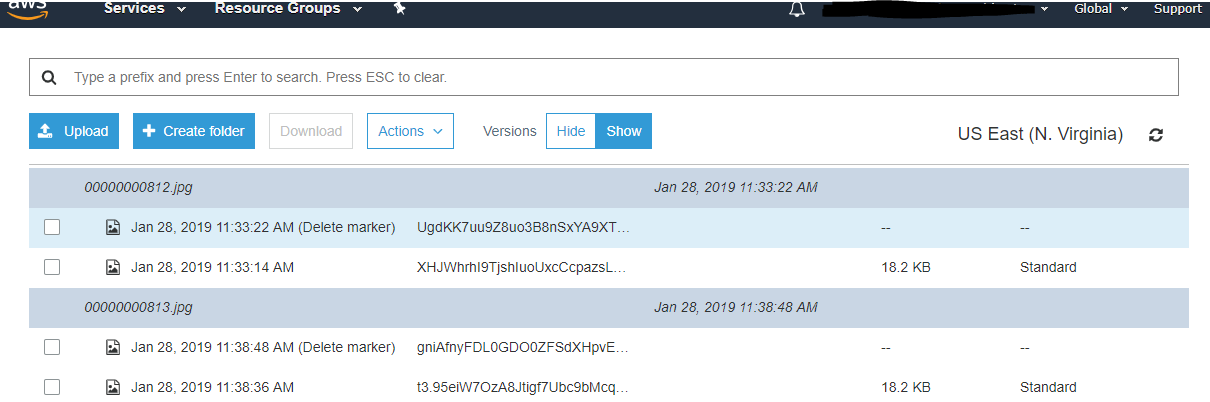
I have S3 versioning turned on in the bucket, and can see the file gets uploaded successfully, but then is deleted when the item is saved:
Technical Details
Chrome 71 on Windows
API 7.0.15 on directus/docker with Aurora MySQL DB, S3 bucket
 computerwizjared
All 12 comments
Thanks for reporting this @computerwizjared, I will try to get my hands on a S3 bucket to try to replicate this issue.
 wellingguzman
on 28 Jan 2019
wellingguzman
on 28 Jan 2019
Thanks @WellingGuzman, if you need me to provide any help let me know!
computerwizjared
on 28 Jan 2019
Hey @computerwizjared, I have been trying to reproduce this issue, without no luck.
I did your steps:
- I go to
/users/[id] - I drag and drop an image to avatar. File gets uploaded to S3.
- Click save, user data gets saved. File still on S3.
wellingguzman
on 28 Jan 2019
Hey @WellingGuzman, thanks for taking a look.
I did a lot more digging and couldn't narrow it down very far. I did, however, find the details of the API call that happens when I click "save" on the item (displayed below). The same problem also occurs when editing the description or other fields of the file itself in the directus_files table. Could this be related to directus/app#1284? Doubtful but thought maybe.
{
  "version":"0",
  "id":"32d149b2-db25-1c81-6636-99b353b8cb7b",
  "detail-type":"AWS API Call via CloudTrail",
  "source":"aws.s3",
  "account":"REDACTED",
  "time":"2019-01-28T20:52:03Z",
  "region":"us-east-1",
  "resources":[

  ],
  "detail":{
    "eventVersion":"1.05",
    "userIdentity":{
      "type":"AssumedRole",
      "principalId":"REDACTED",
      "arn":"arn:aws:sts::REDACTED",
      "accountId":"REDACTED",
      "accessKeyId":"REDACTED",
      "sessionContext":{
        "sessionIssuer":{
          "type":"Role",
          "principalId":"REDACTED",
          "arn":"arn:aws:iam::REDACTED",
          "accountId":"REDACTED",
          "userName":"REDACTED"
        },
        "attributes":{
          "creationDate":"2019-01-28T19:50:53Z",
          "mfaAuthenticated":"false"
        }
      }
    },
    "eventTime":"2019-01-28T20:52:03Z",
    "eventSource":"s3.amazonaws.com",
    "eventName":"DeleteObject",
    "awsRegion":"us-east-1",
    "sourceIPAddress":"REDACTED",
    "userAgent":"[aws-sdk-php/3.86.3 GuzzleHttp/6.3.3 curl/7.61.1 PHP/7.2.13]",
    "requestParameters":{
      "bucketName":"REDACTED",
      "Host":"s3.amazonaws.com",
      "key":"uploads/00000000819.jpg"
    },
    "responseElements":{
      "x-amz-delete-marker":"true",
      "x-amz-version-id":"xgaW2jM3rZiBGaAOqZCg0zaZa_Gk3Y.."
    },
    "additionalEventData":{
      "SignatureVersion":"SigV4",
      "CipherSuite":"ECDHE-RSA-AES128-GCM-SHA256",
      "AuthenticationMethod":"AuthHeader",
      "x-amz-id-2":"REDACTED"
    },
    "requestID":"7885E8278CE01AE6",
    "eventID":"5655abcf-52eb-4f9a-8028-92411992bc0a",
    "readOnly":false,
    "resources":[
      {
        "type":"AWS::S3::Object",
        "ARN":"arn:aws:s3:::REDACTED/uploads/00000000819.jpg"
      },
      {
        "accountId":"REDACTED",
        "type":"AWS::S3::Bucket",
        "ARN":"arn:aws:s3:::REDACTED"
      }
    ],
    "eventType":"AwsApiCall",
    "recipientAccountId":"REDACTED"
  }
}
@computerwizjared can you check the update request payload in your devtools network tab?
I would like to see what the app sends to the server that the API removes the file.
wellingguzman
on 28 Jan 2019
Could this be related to directus/app#1284? Doubtful but thought maybe.
I don't think it's related to this one.
wellingguzman
on 28 Jan 2019
@WellingGuzman I think I found the bug - check out https://github.com/directus/api/blob/master/src/core/Directus/Database/TableGateway/BaseTableGateway.php#L1771 and https://github.com/directus/api/blob/master/src/core/Directus/Filesystem/Files.php#L62
It seems that the rename($path, $newPath, $replace) method is causing the file to be deleted before being "renamed"... I'm not even really sure what this functionality is even used for.
As for the payload:

computerwizjared
on 28 Jan 2019
Thanks @computerwizjared! The issue here is when the file_naming is set to id.
I managed to reproduce this issue.
I'm not even really sure what this functionality is even used for.
the renaming part is because it needs to rename the filename to a numeric filename after it's uploaded.
wellingguzman
on 28 Jan 2019
@computerwizjared It's a API bug, but it was indeed kind of related to https://github.com/directus/app/issues/1284 (or at least it helped expose it).
wellingguzman
on 28 Jan 2019
I still have not a fix for this. I want to explain what it was pointed out above.
The issue exists because the API tries to rename a file to the same filename, but before that it deletes the new path, so it can rename the old to the new path (avoid "file exists error").
I am trying to figure it out where to fix it, filesystem or tablegateway class, or somewhere else. Nothing had quite worked out.
I will add an update as soon as I have one.
wellingguzman
on 6 Feb 2019
This is happening on both s3 and local storage.
wellingguzman
on 6 Feb 2019
This issue has been fixed by https://github.com/directus/api/commit/e721256d77ac5fe06ce825ff6c7536769780ebd4
wellingguzman
on 8 Feb 2019
Related issues
 Varulv1997
·
3Comments
Varulv1997
·
3Comments
 magikstm
·
3Comments
magikstm
·
3Comments
 Nitwel
·
3Comments
Nitwel
·
3Comments
 andgar2010
·
3Comments
andgar2010
·
3Comments
 metalmarco
·
3Comments
metalmarco
·
3Comments