V8-archive: Multiple API Projects — Only the default works
Bug Report
Steps to Reproduce
- Go to 'http://localhost:8081/login' and choose sign in into
secondAPI Endpoint - Click on login
- See error "Server Error Something is wrong with this instance’s server or database."
Expected Behavior
No error
Actual Behavior
The app doesn't work with other endpoint/project then _ default
Other Context & Screenshots
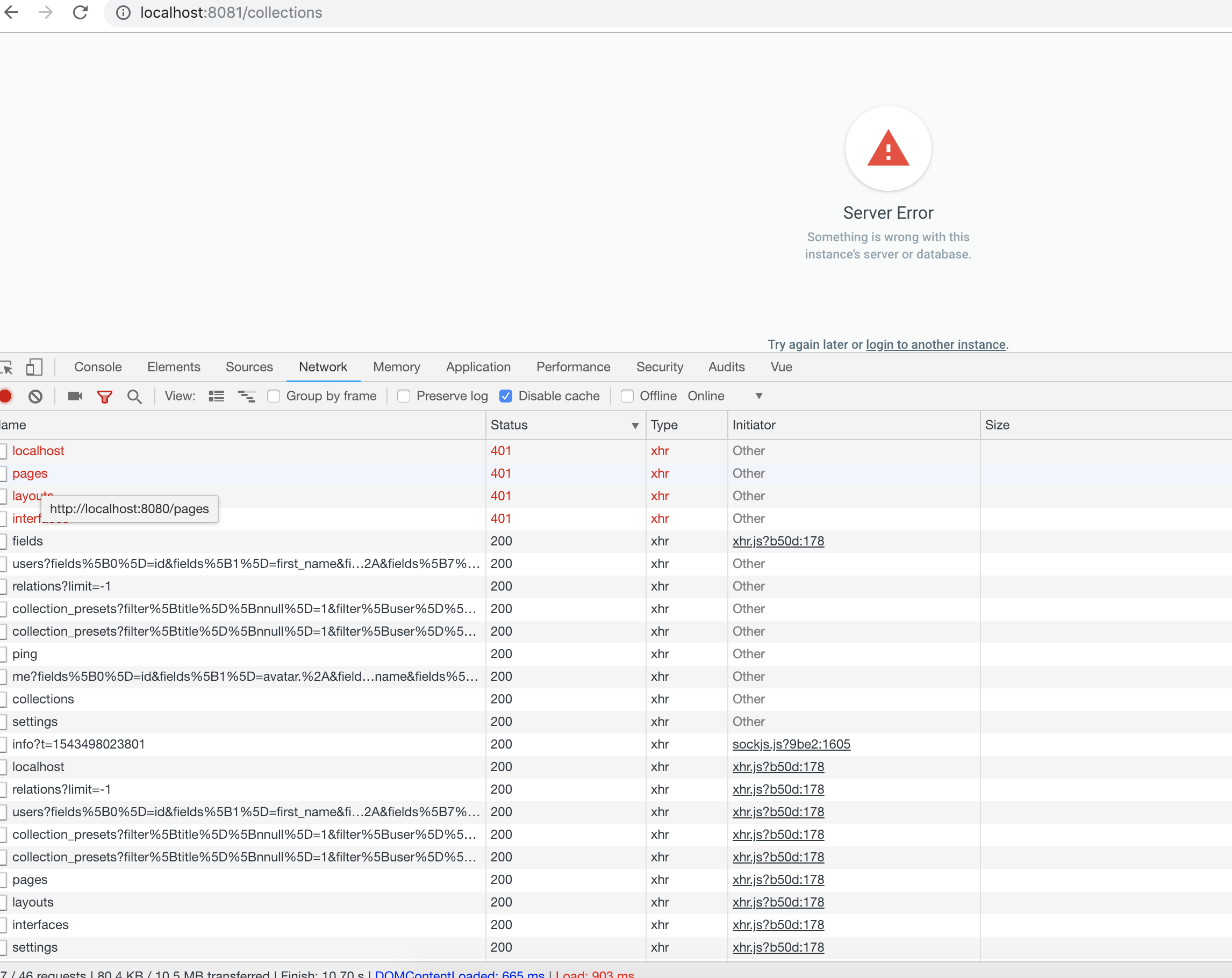
It looks like for some api routes the app uses the default project slug _
Please see screnshot which shows network connections and routes which are trying to connect to the default api endpoint without project name.
http://localhost:8080
http//localhost:8080/pages
http//localhost:8080/layouts
http//localhost:8080/interfaces
On the other hand here are some routes which include project name correcty:
http://localhost:8080/second/settings/fields
Technical Details
- Device: Desktop
- OS: MacOS 10.14.1
- Browser: Chrome Version 71.0.3578.75 (Official Build) beta (64-bit)
- Directus App: master
- Directus API: master
- Install Method: cloned master
 konradwww
All 43 comments
Hey @konradwww,
I cannot reproduce this issue. Are you on the latest master commit?
Also, have you tried to login in anonymous window?
 honzabilek4
on 30 Nov 2018
honzabilek4
on 30 Nov 2018
Hi @honzabilek4,
it was the latest master branch pointed to:
https://github.com/directus/app/tree/4b774d522ca5572fc24dd8db27ea034210152b5e
Yes, I also tried it in anonymous window.
konradwww
on 4 Dec 2018
I'm sorry but I cannot reproduce it.
Could you do a clean install and check if it works for you?
honzabilek4
on 4 Dec 2018
Same issue here!
API 7.0.11
APP 7.0.11
Debian 9
Apache 2.4.x
php-fpm
clean install using directus script
bin/directus install:config -n catalog -u ... -p ... -N catalog
bin/directus install:databse -N catalog
bin/directus install:install -N catalog -e ... -p ... -t ...
 lingej
on 6 Dec 2018
lingej
on 6 Dec 2018
I think that right now, the API needs the default endpoint to be present in the config folder. i.e. the api.php configuration file has to be there. Then you should be able to add other projects. (for example api.catalog.php). Is this your case?
honzabilek4
on 6 Dec 2018
No, the default endpoint is present and working.
After login to the default Endpoint access to /layout /pages and /interfaces returns 200
But login to the "catalog" instance for example returns 401 on /layouts /pages and /interfaces
lingej
on 6 Dec 2018
the app works if both Enpoints use the same secret_key and private_key!
lingej
on 6 Dec 2018
Thanks @lingej, I can confirm the issue. Let me have a look, whether I'm able to fix it quickly.
honzabilek4
on 6 Dec 2018
I think we should move this to the api repository, since this is clearly not a problem with the app.
(User is logged in to the correct environment and the api is sending right token in the header.)
The entire api instance is sharing app extensions between the environments. These extensions can be retrieved from /interfaces, /pages and /layouts endpoints. (Note that there's no environment name in the url)
Problem here is that these endpoints are secured using configuration from the default configuration file. When the secret_key variables are same for both environments, it works because you can still verify the JWT token integrity.
However, when you set them up differently, the app is authenticating with a token for the current environment, but the api is expecting JWT signed with the default secret_key.
(That's why we see the 401 http responses).
Solution here might be to allow for authenticating with JWT signed by any of these secret keys or move these endpoints under the project name url prefix as well.
@WellingGuzman, @rijkvanzanten
Thoughts?
honzabilek4
on 7 Dec 2018
Thanks @honzabilek4 !
Access to /interfaces, /pages and /layouts ist possible without authorization!
But if Request Header contains "Authorization: Bearer sometoken" the (invalid ) token is checked against the default config. Result is 404 "User not found"
Joerg
lingej
on 7 Dec 2018
@lingej ah yeah, thanks for clarification. Of course these are public.
honzabilek4
on 7 Dec 2018
@benhaynes, @WellingGuzman
Can we push this up? It looks like a pretty severe bug to me.
honzabilek4
on 10 Dec 2018
Absolutely, thanks for the reminder @honzabilek4 . I'll have Welling check this out now.
 benhaynes
on 10 Dec 2018
benhaynes
on 10 Dec 2018
I have been trying to replicate this issue without luck.
I have tried with:
- instances with the same email/password combination
- instances with the different email/password combination
Worked as expected. Can you all try removing/clearing the app site data (local storage and session storage)? I had a issue before with multiple instances where they were old data and cleaning that up fixes it.
 wellingguzman
on 10 Dec 2018
wellingguzman
on 10 Dec 2018
@WellingGuzman,
This is not about email/password combination. The problem is in the JWT secret_key stored in api configuration files. The API environment works only if the secret_key is exactly the same as the default one in api.php. (Check out my slightly longer comment above.)
honzabilek4
on 10 Dec 2018
@honzabilek4 I read your comment above, what I am believing is that the app is not sending the old token from the default instance, and that's why you are getting unauthorized errors.
I recommended clearing because it might have those token lying around in cache.
If you go and authenticate using credentials to a non-default instance and try to use those endpoints directly and see if it fails.
The three instances I used to test this issue locally didn't have the same secret_key and the app worked as expected.
wellingguzman
on 10 Dec 2018
Okay,
so I've pulled the latest versions again and everything works with the exactly same setup.
I think we might close it right now.
Thanks @WellingGuzman!
honzabilek4
on 10 Dec 2018
Awesome! Thanks for checking this out @honzabilek4 😄
benhaynes
on 10 Dec 2018
Hi,
I'm sorry but I have to reopen this issue, since the problem still occurs.
This time, I'm testing only the API using Postman. [v2.0.13]
- I've created new api config with random
secret_keydifferent form the default one inapi.php. Querying the
/interfacesendpoint withoutBearertoken in header works perfectly.
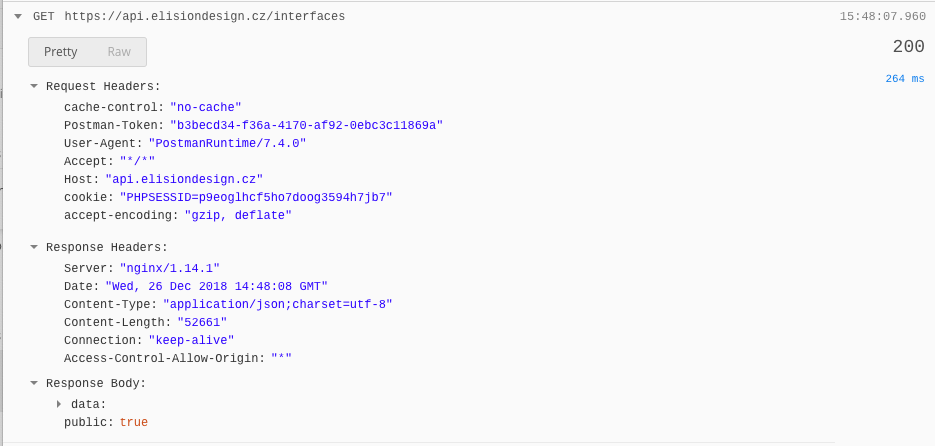
However, when querying the api with
Bearerit doesn't behave as a public endpoint. I'm trying to mimic the app behaviour here, so I'm logging in and using the returned JWT token with the request.
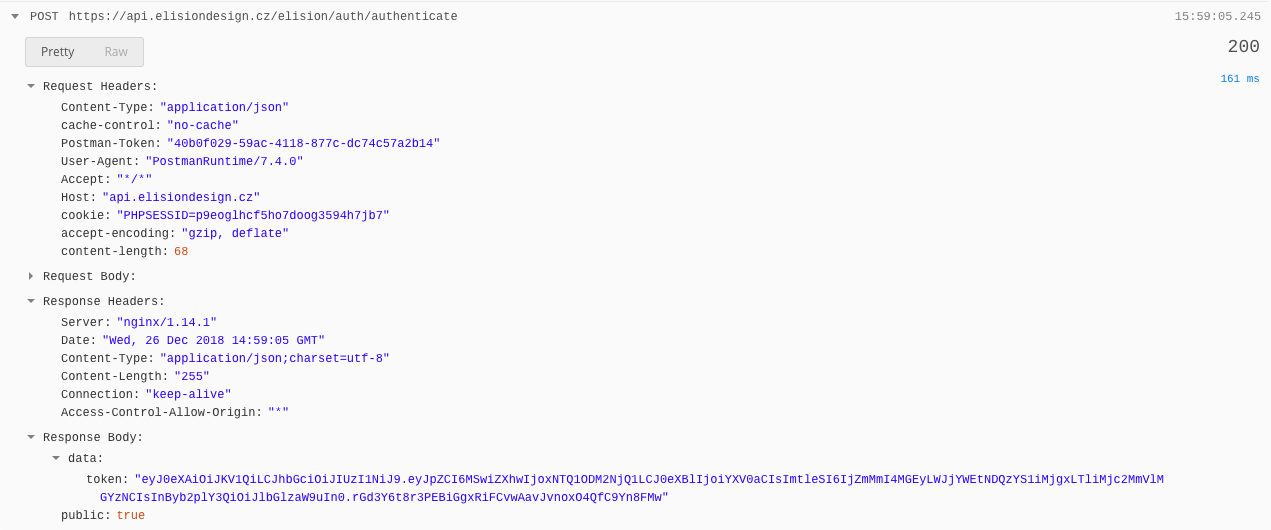
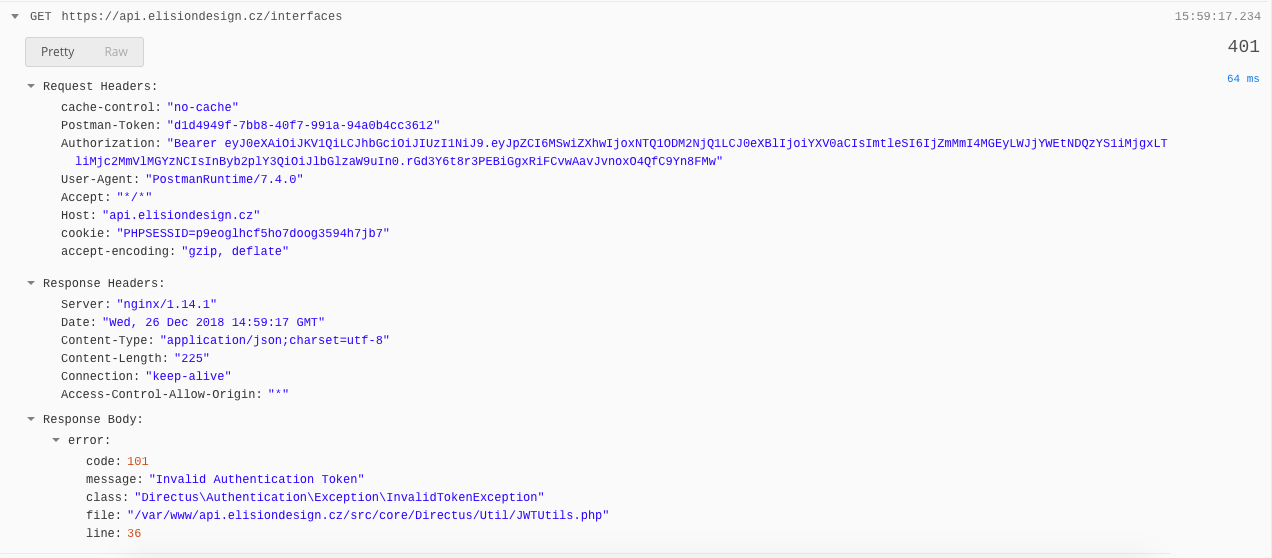
When changing the
secret_keyto same as inapi.phpand re-logging again (to get a new JWT signed with the changed key) it works, even when theBearertoken is present.
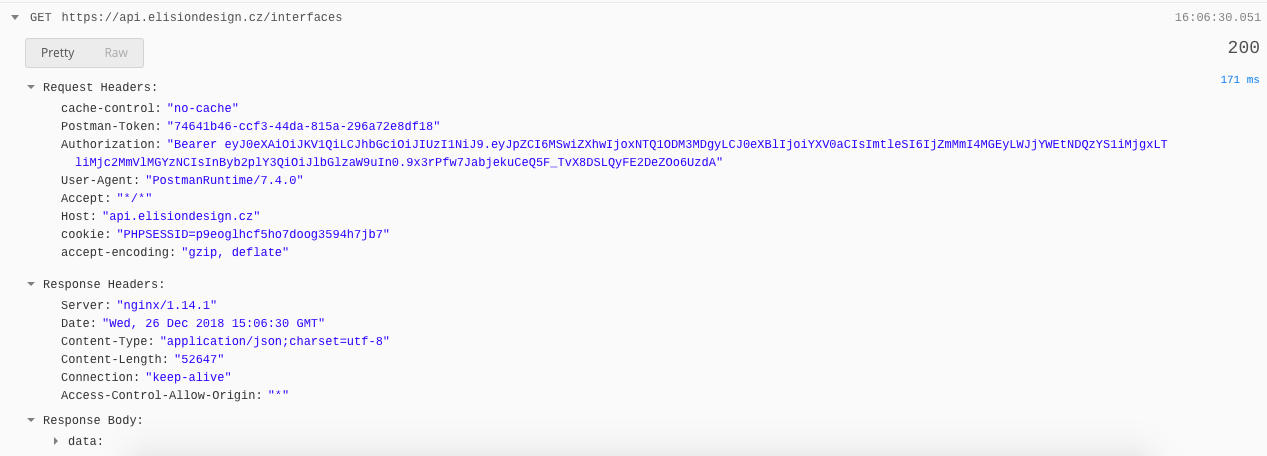
It's the same problem as described above, but here it's not dependent on the APP. There are more solutions to this, but I think that public endpoints shouldn't care about Bearer token at all, rather than disallowing it.
Another fix would be changing the javascript SDK to exclude the header for these endpoints, but this seems less ideal.
Opinions @WellingGuzman, @rijkvanzanten ??
honzabilek4
on 26 Dec 2018
Thanks @honzabilek4 for the steps to reproduce it, I will be taking a look at this in a moment.
wellingguzman
on 26 Dec 2018
I agree @honzabilek4. The API should ignore the auth headers on public endpoints. The SDK is more of a fix than a solution.
 rijkvanzanten
on 4 Jan 2019
rijkvanzanten
on 4 Jan 2019
These aren't actually public endpoints, but rather, shared endpoints for all projects. Are we saying these endpoints should be public?
What I found about moving from being public to authentication is this: https://github.com/directus/api/issues/166, and It didn't make sense to me why that exists in relation with the interfaces.
What I recall is we discussed these extensions should only be accessible to users.
wellingguzman
on 4 Jan 2019
same problem here, user cannot login on other projects than the default one...
if no bearer token is send the shared enpoints are working
 zyclonite
on 7 Jan 2019
zyclonite
on 7 Jan 2019
We just discussed this internally. We for privacy reasons we can't make those root extension endpoints public, but @WellingGuzman has an idea of how to fix this while keeping those private. I've escalated this to critical and it's next on our docket.
benhaynes
on 7 Jan 2019
This issue has been fixed by https://github.com/directus/api/commit/722e3c18bb6c39abfecf1c634ae793a06394eeec.
All global endpoints are protected and only authenticated users have permission to them.
These endpoints are:
/
/projects
/interfaces
/layouts
/pages
/types
Hopefully this should fix any issue related to authentication on global/shared endpoints.
wellingguzman
on 7 Jan 2019
Thanks @WellingGuzman!!! 💪
Can anyone who had reproduced this confirm that this commit resolves the issue? Once confirmed we can release the next version.
🔔 @zyclonite @konradwww @honzabilek4 @lingej
benhaynes
on 7 Jan 2019
the fix is working, thank you
zyclonite
on 8 Jan 2019
Hi,
I did some manual testing on this.
- Shared endpoints now aren't public, but require authentication to any project. ✅
- Tried to do multiple requests to these endpoints through Postman, belonging to one instance but different projects with different
secret_key. ✅ - Tried to log in to the same projects through the app with uncleared/cleared cache each time. ✅
Everything appears to be working. 🎉
honzabilek4
on 8 Jan 2019
Thanks for confirming this @zyclonite and @honzabilek4!
wellingguzman
on 9 Jan 2019
@WellingGuzman sorry, but i found a problem now...
looks like the "public" pages verify the user is from the session (token) but if the user only exists in the particular project and not in the default (_) project, it returns a 404 user not found
either it should check against the correct database for the project or ignore the auth token at all i guess
zyclonite
on 9 Jan 2019
@zyclonite let me give this a shot.
wellingguzman
on 9 Jan 2019
I am being playing around with this "global/shared" endpoints, and also aside from the issue loading the default db configuration instead of the token origin project, this means that using a static token, will always fails or resulting in an unexpected behavior because there's no way to tell where that token belongs without explicitly tells the API which one is it.
One way I am thinking to solve this, is implementing a "configuration" switcher, that depends on the auth token origin project. This is a bit complex solution, and It will only works with JWT token.
A quicker way will be implement this as a hotfix middleware that will only work for "shared" endpoints, but only on JWT token.
Unless we want to update the endpoints to add a way to specify the origin directly, to either use static token, load first the configuration based on this, or both.
I need to think more about this, as I will prefer to implement a proper "configuration" switcher, but a hotfix for the moment will do it.
wellingguzman
on 9 Jan 2019
One way I am thinking to solve this, is implementing a "configuration" switcher, that depends on the auth token origin project. This is a bit complex solution, and It will only works with JWT token.
This wouldn't really be a problem for interfaces, layouts, and pages, as those are very app-specific
rijkvanzanten
on 9 Jan 2019
@WellingGuzman Maybe we can make a rule that you always have to prepend your static token with the project name? Something like
<project>-<static-token>
That way we can make this work all around..
Thoughts?
rijkvanzanten
on 9 Jan 2019
That only would solve the issue with static token not being able to tell which project it belongs to.
The main issue here is that the api should "switch" its configuration and objects to an specific project. For example, there's only one database connection object, and it's attached to the default project. Here is the part that needs to be solve, using the other endpoints you know which is the project beforehand and pick the right connection because the project name is in the url.
There should be a refactor where the connection shouldn't be loaded until the app knows which project is pointing to.
wellingguzman
on 11 Jan 2019
Hey everyone,
We've been discussing this bug for a while and we came up with a solution by getting the project name from the JWT token on all the shared/global endpoints such as /interfaces.
If everyone could try this fix (currently on master branch) and confirm is working that would be great.
I've been testing for a while and I haven't found any issue, but we all know as soon as someone else test it, they could find a bug, if there's any.
Ref: https://github.com/directus/api/commit/0e5a715c210b8f45f6a3971685d4b0438b1693eb
wellingguzman
on 4 Feb 2019
Thanks @WellingGuzman !
I’ll be able to give it a shot on Thursday at earliest.
honzabilek4
on 4 Feb 2019
i tried 2.0.17 as well as the two commits after... but i cannot even login because the /server/ping resource gets me already a 401 "Unauthorized request"
zyclonite
on 4 Feb 2019
Hey @zyclonite — thanks for the heads up! We've rolled back the latest release until we have time to properly look into this issue.
benhaynes
on 5 Feb 2019
@zyclonite the master branch should be working now. we will appreciate it any one could test the master branch before next release.
I fixed the /server/ping issue here: https://github.com/directus/api/commit/dbb48782f221a14ece2b1ff34592b9321d08a1b5
wellingguzman
on 6 Feb 2019
@WellingGuzman tested the master at this id https://github.com/directus/api/tree/58304733dd3007d952fd589577dce868740f4fcd now and it worked.
zyclonite
on 6 Feb 2019
We'd love to hear from a few more folks to ensure this is working — but since this patch has been released we'll close the ticket so things don't get confusing.
If anyone has any issues with using multiple projects just let us know!
benhaynes
on 8 Feb 2019
I'm a bit late but I can confirm the problem is solved with the latest update !
 alrick
on 22 Feb 2019
alrick
on 22 Feb 2019
Related issues
 Nitwel
·
3Comments
Nitwel
·
3Comments
 vuhrmeister
·
3Comments
vuhrmeister
·
3Comments
 24js
·
3Comments
24js
·
3Comments
 jwkellyiii
·
3Comments
jwkellyiii
·
3Comments
 magikstm
·
3Comments
magikstm
·
3Comments
Most helpful comment
@WellingGuzman Maybe we can make a rule that you always have to prepend your static token with the project name? Something like
<project>-<static-token>That way we can make this work all around..
Thoughts?