部署环境: 群晖DS218+,INTEL Celeron J3355,虚拟机分配 2 CPU, 1G RAM 跑Centos7,分配本地LAN网络,一台笔记本和手机修改网关和DNS均指向这台Centos7进行转发。
问题:斗胆用perf分析了一下,不知道问题跟udp4_lib_lookup2()函数是不是有关系,还是本身群晖CPU就是渣,开机就能占用大量CPU,内存反而不超过250MB。
[root@tproxy-us1 ~]# uptime
 16:16:31 up 38 min,  1 user,  load average: 2.83, 2.90, 2.31
操作系统版本
[root@tproxy-us1 ~]# uname -r
5.6.14-1.el7.elrepo.x86_64
[root@tproxy-us1 ~]# cat /etc/redhat-release
CentOS Linux release 7.8.2003 (Core)
v2ray客户端版本
[root@tproxy-us1 v2ray]# ./v2ray --version
V2Ray 4.25.1 (V2Fly, a community-driven edition of V2Ray.) Custom (go1.14.4 linux/amd64)
A unified platform for anti-censorship.
客户端配置
[root@tproxy-us1 ~]# cat /etc/v2ray/config.json
{
#  "log": {
#    "access": "/var/log/v2ray/access.out",
#    "error": "/var/log/v2ray/error.out",
#    "loglevel": "info"
#  },
  "inbounds": [
    {
      "tag":"transparent",
      "port": 12345,
      "protocol": "dokodemo-door",
      "settings": {
        "network": "tcp,udp",
        "followRedirect": true
      },
      "sniffing": {
        "enabled": true,
        "destOverride": [
          "http",
          "tls"
        ]
      },
      "streamSettings": {
        "sockopt": {
          "tproxy": "tproxy"
        }
      }
    },
    {
      "port": 1080,
      "protocol": "socks",
      "sniffing": {
        "enabled": true,
        "destOverride": ["http", "tls"]
      },
      "settings": {
        "auth": "noauth"
      }
    }
  ],
  "outbounds": [
    {
      "tag": "proxy",
      "protocol": "vmess",
      "settings": {
        "vnext": [
          {
            "users": [
              {
                "id": "hidden",
                "alterId": 32,
                "security": "auto"
              }
            ],
            "address": "www.example.com",
            "port": 443
          }
        ]
      },
      "streamSettings": {
        "network": "ws",
        "security": "tls",
        "tlsSettings": {
          "allowInsecure": false
        },
        "wsSettings": {
          "path": "/path"
        }
      },
      "mux": {
        "enabled": true,
        "concurrency": 8
      }
    },
    {
      "tag": "direct",
      "protocol": "freedom",
      "settings": {
        "domainStrategy": "UseIPv4"
      },
      "streamSettings": {
        "sockopt": {
          "mark": 255
        }
      }
    },
    {
      "tag": "block",
      "protocol": "blackhole",
      "settings": {
        "response": {
          "type": "http"
        }
      }
    },
    {
      "tag": "dns-out",
      "protocol": "dns",
      "streamSettings": {
        "sockopt": {
          "mark": 255
        }
      }
    }
  ],
  "dns": {
  "hosts": {
    "orbilogin.com": "192.168.1.1",
    "orbilogin.net": "192.168.1.1",
    "drive.example.com": "192.168.1.251",
    "tproxy.example.com": "192.168.1.253",
    "docker.example.com": "192.168.1.254",
    "www.example.com": "1.2.3.4",
    "www.example.tk": "4.3.2.1"
  },
    "servers": [
      {
        "address": "223.5.5.5",
        "port": 53,
        "domains": [
          "geosite:cn",
          "example.com",
          "ntp.org"
        ],
        "expectIPs": [
          "geoip:cn"
        ]
      },
      {
        "address": "https://1.1.1.1/dns-query",
        "port": 53,
        "domains": [
          "geosite:geolocation-!cn",
          "geosite:speedtest"
        ]
      },
      "1.1.1.1",
      "localhost"
    ]
  },
  "routing": {
    "domainStrategy": "IPOnDemand",
    "rules": [
      {
        "type": "field",
        "inboundTag": [
          "transparent"
        ],
        "port": 53,
        "network": "udp",
        "outboundTag": "dns-out"
      },
      {
        "type": "field",
        "inboundTag": [
          "transparent"
        ],
        "port": 123,
        "network": "udp",
        "outboundTag": "direct"
      },
      {
        "type": "field",
        "ip": [
          "223.5.5.5",
          "1.2.3.4",
      "4.5.6.7",
      "8.9.1.2",
      "3.4.5.6"
        ],
        "outboundTag": "direct"
      },
      {
        "type": "field",
        "ip": [
          "8.8.8.8",
          "1.1.1.1"
        ],
        "outboundTag": "proxy"
      },
      {
        "type": "field",
        "domain": [
          "geosite:google",
          "domain:cip.cc"
        ],
        "outboundTag": "proxy"
      },
      {
        "type": "field",
        "domain": [
          "geosite:category-ads-all",
          "domain:baidu.com"
        ],
        "outboundTag": "block"
      },
      {
        "type": "field",
        "protocol":["bittorrent"],
        "outboundTag": "direct"
      },
      {
        "type": "field",
        "ip": [
          "geoip:private",
          "geoip:cn"
        ],
        "outboundTag": "direct"
      },
      {
        "type": "field",
        "domain": [
          "geosite:cn",
          "domain:example.local",
          "domain:example.com",
          "domain:example.tk"
        ],
        "outboundTag": "direct"
      }
    ]
  }
}
开启iptables情况
[root@tproxy-us1 ~]# iptables --version
iptables v1.4.21

:V2RAY - [0:0]
-A PREROUTING -j V2RAY
-A V2RAY -d 10.0.0.0/8 -j RETURN
-A V2RAY -d 127.0.0.1/32 -j RETURN
-A V2RAY -d 169.254.0.0/16 -j RETURN
-A V2RAY -d 172.16.0.0/12 -j RETURN
-A V2RAY -d 224.0.0.0/4 -j RETURN
-A V2RAY -d 255.255.255.255/32 -j RETURN
-A V2RAY -d 192.168.0.0/16 -p tcp -j RETURN
-A V2RAY -d 192.168.0.0/16 -p udp -m udp ! --dport 53 -j RETURN
-A V2RAY -p udp -j TPROXY --on-port 12345 --on-ip 0.0.0.0 --tproxy-mark 0x1/0xffffffff
-A V2RAY -p tcp -j TPROXY --on-port 12345 --on-ip 0.0.0.0 --tproxy-mark 0x1/0xffffffff
v2ray服务
[root@tproxy-us1 ~]# cat /etc/systemd/system/v2ray.service
[Unit]
Description=V2Ray - A unified platform for anti-censorship
Documentation=https://v2ray.com https://guide.v2fly.org
After=network.target nss-lookup.target
Wants=network-online.target

[Service]
# If the version of systemd is 240 or above, then uncommenting Type=exec and commenting out Type=simple
#Type=exec
Type=simple
# Runs as root or add CAP_NET_BIND_SERVICE ability can bind 1 to 1024 port.
# This service runs as root. You may consider to run it as another user for security concerns.
# By uncommenting User=v2ray and commenting out User=root, the service will run as user v2ray.
# More discussion at https://github.com/v2ray/v2ray-core/issues/1011
User=root
#User=v2ray
#CapabilityBoundingSet=CAP_NET_BIND_SERVICE CAP_NET_RAW
CapabilityBoundingSet=CAP_NET_ADMIN CAP_NET_BIND_SERVICE CAP_NET_RAW
NoNewPrivileges=yes
ExecStart=/usr/bin/v2ray/v2ray -config /etc/v2ray/config.json
Restart=on-failure
# Don't restart in the case of configuration error
RestartPreventExitStatus=23
LimitNPROC=500
LimitNOFILE=1000000

[Install]
WantedBy=multi-user.target
截图是重启之前保存


 H0u5er
All 27 comments
我也有用过 intel N3050 须然比不上J3355 但也可分享一些心得
我是 windows2019 hyper-v guest ubuntu 18.04, v2 tcp最尽只到12mbit/s, udp 就更少(实数已不记得,大约2-4mbit/s 而且非常消耗CPU)
UDP本身就非常消耗cpu, v2在4.25之後udp转换率已非常高 但消耗CPU还是依然 所以你的问题应不在tproxy或透明代理。
 kingwilliam
on 6 Jul 2020
kingwilliam
on 6 Jul 2020
Linux raspberrypi 4.19.118-v7l+ #1311 SMP Mon Apr 27 14:26:42 BST 2020 armv7l GNU/Linux
我也遇到类似问题了,树莓派4B (4G版本)按官网教程tproxy透明代理后(透明代理tcp+udp),CPU一段时间后接近100%。
网卡会出现丢包
warning:inbound packets dropped ratio 1.24% (10 mins)
warning:inbound packets dropped 300 packets (10 mins)
有没有可能有些进程没释放?因为每次开机或者service v2ray restart后,cpu占用并不多(5%)左右,设备上网都运转。
刚增加了测试,在单位ssh重启了v2ray,20:55重启的,已经半个小时之内,CPU还在10%以下。
家里智能设备都还连着,树莓派上还挂着qbittorrent,唯一区别应该就是主要上网的台式机没开。

但半小时后突然就上升了,不知道为什么,是不是下载bt的原因,配置文件里bittorrent设置为direct。#2615
台式机一直是关着的,重启v2ray之前,台式机已经关机了七八个小时了,CPU依然是100%,不会降下去。
 rhhu
on 6 Jul 2020
rhhu
on 6 Jul 2020
Linux raspberrypi 4.19.118-v7l+ #1311 SMP Mon Apr 27 14:26:42 BST 2020 armv7l GNU/Linux
我也遇到类似问题了,树莓派4B (4G版本)按官网教程tproxy透明代理后(透明代理tcp+udp),CPU一段时间后接近100%。网卡会出现丢包
warning:inbound packets dropped ratio 1.24% (10 mins)
warning:inbound packets dropped 300 packets (10 mins)有没有可能有些进程没释放?因为每次开机或者service v2ray restart后,cpu占用并不多(5%)左右,设备上网都运转。
刚增加了测试,在单位ssh重启了v2ray,20:55重启的,已经半个小时之内,CPU还在10%以下。
家里智能设备都还连着,树莓派上还挂着qbittorrent,唯一区别应该就是主要上网的台式机没开。
但半小时后突然就上升了,不知道为什么,是不是下载bt的原因,配置文件里bittorrent设置为direct。#2615
台式机一直是关着的,重启v2ray之前,台式机已经关机了七八个小时了,CPU依然是100%,不会降下去。
我也用的树莓派4上的透明代理. v2ray 4.25的CPU占用率是300%多。。。五六分钟就会出现。
 once2020
on 6 Jul 2020
once2020
on 6 Jul 2020
我也有用过 intel N3050 须然比不上J3355 但也可分享一些心得
我是 windows2019 hyper-v guest ubuntu 18.04, v2 tcp最尽只到12mbit/s, udp 就更少(实数已不记得,大约2-4mbit/s 而且非常消耗CPU)
UDP本身就非常消耗cpu, v2在4.25之後udp转换率已非常高 但消耗CPU还是依然 所以你的问题应不在tproxy或透明代理。
我不同意你的观点:
- 没测转发速度,但是无论是23.1还是现在25.1的版本下,fast.com和speedtest测速都能接近跑满家里带宽,而且23.1版本的时候没发现这个负载问题。我习惯服务器和tproxy端都是同时升级,同时使用相同版本。
2.重启tproxy服务器,负载就去到100%
Every 2.0s: uptime 5                                                                                                            Mon Jul  6 23:02:52 2020

 23:02:52 up 1 min,  1 user,  load average: 3.49, 1.56, 0.59
@H0u5er 能否用pprof分析下,更直观一些。
 ghost
on 7 Jul 2020
ghost
on 7 Jul 2020
@H0u5er 能否用
pprof分析下,更直观一些。
非常抱歉,我对开发方面不是很懂,请问可以指点大概步骤吗?
[root@tproxy-us1 debug]# go install $GOPATH/debug
go: github.com/dgryski/[email protected]: Get "https://proxy.golang.org/github.com/dgryski/go-metro/@v/v0.0.0-20180109044635-280f6062b5bc.mod": dial tcp 216.58.200.241:443: i/o timeout

[root@tproxy-us1 debug]# cat debug.go
package debug

import _ "net/http/pprof"
import "net/http"

func init() {
    go func() {
        http.ListenAndServe(":6060", nil)
    }()
}
修改 /etc/systemd/system/v2ray.service 文件,在 [Service] 下加入 LimitNPROC=500 和 LimitNOFILE=1000000
如果你按照白话文教程加入了LimitNPROC和LimitNOFILE,请把这两行删了,否则v2ray会打满CPU,我在9700k上的debian10虚拟机测试下来这个是影响CPU占用的唯一原因。或者把mangle规则给删除,CPU占用率也会下降至正常水平。
 matolv
on 7 Jul 2020
matolv
on 7 Jul 2020
修改 /etc/systemd/system/v2ray.service 文件,在 [Service] 下加入 LimitNPROC=500 和 LimitNOFILE=1000000如果你按照白话文教程加入了
LimitNPROC和LimitNOFILE,请把这两行删了,否则v2ray会打满CPU,我在9700k上的debian10虚拟机测试下来这个是影响CPU占用的唯一原因。或者把mangle规则给删除,CPU占用率也会下降至正常水平。
注释这两行代码之后,重启v2ray服务,CPU负载正常,约1%;
接着重启Centos7,全部服务包括iptbales都是自启动,负载又变成100%;
手动重启v2ray服务,CPU负载正常,约1%。 大约15分钟之后,CPU又变成满负载~~~
当然,从提交问题到现在,tproxy全程正常处理DNS和转发流量,没有变慢。
H0u5er
on 7 Jul 2020
@H0u5er
在 main/main.go 中添加一个import "v2ray.com/core/main/distro/debug":
import (
       ... ...
    _ "v2ray.com/core/main/distro/all"
    _ "v2ray.com/core/main/distro/debug" // 这行
)
编译core并运行,然后在终端中运行:
go tool pprof <path/to/core> http://127.0.0.1:6060/debug/pprof/profile
等待30s数据收集完毕后用top查看最耗时的地方。
我就是随便说说哈,具体的可以看这个。😃😃
ghost
on 7 Jul 2020
@rhhu @once2020 用树莓派做透明网关所有流量都会经过,可以试试我的这种方案,用到现在很稳定 https://github.com/felix-fly/openwrt-raspberry/blob/master/guide.md
 felix-fly
on 7 Jul 2020
felix-fly
on 7 Jul 2020
@H0u5er
在main/main.go中添加一个import"v2ray.com/core/main/distro/debug":import ( ... ... _ "v2ray.com/core/main/distro/all" _ "v2ray.com/core/main/distro/debug" // 这行 )编译core并运行,然后在终端中运行:
go tool pprof <path/to/core> http://127.0.0.1:6060/debug/pprof/profile等待30s数据收集完毕后用
top查看最耗时的地方。我就是随便说说哈,具体的可以看这个。😃😃
参考官方编译教程,手动编译出来了可执行的v2ray和v2tcl程序,请问下一步要怎么调试?另外我也发邮件给你了,可以从邮件里面回复。
感谢🙏
H0u5er
on 7 Jul 2020
编译好了,替换v2ray和v2ctl之后,调试截图如下:
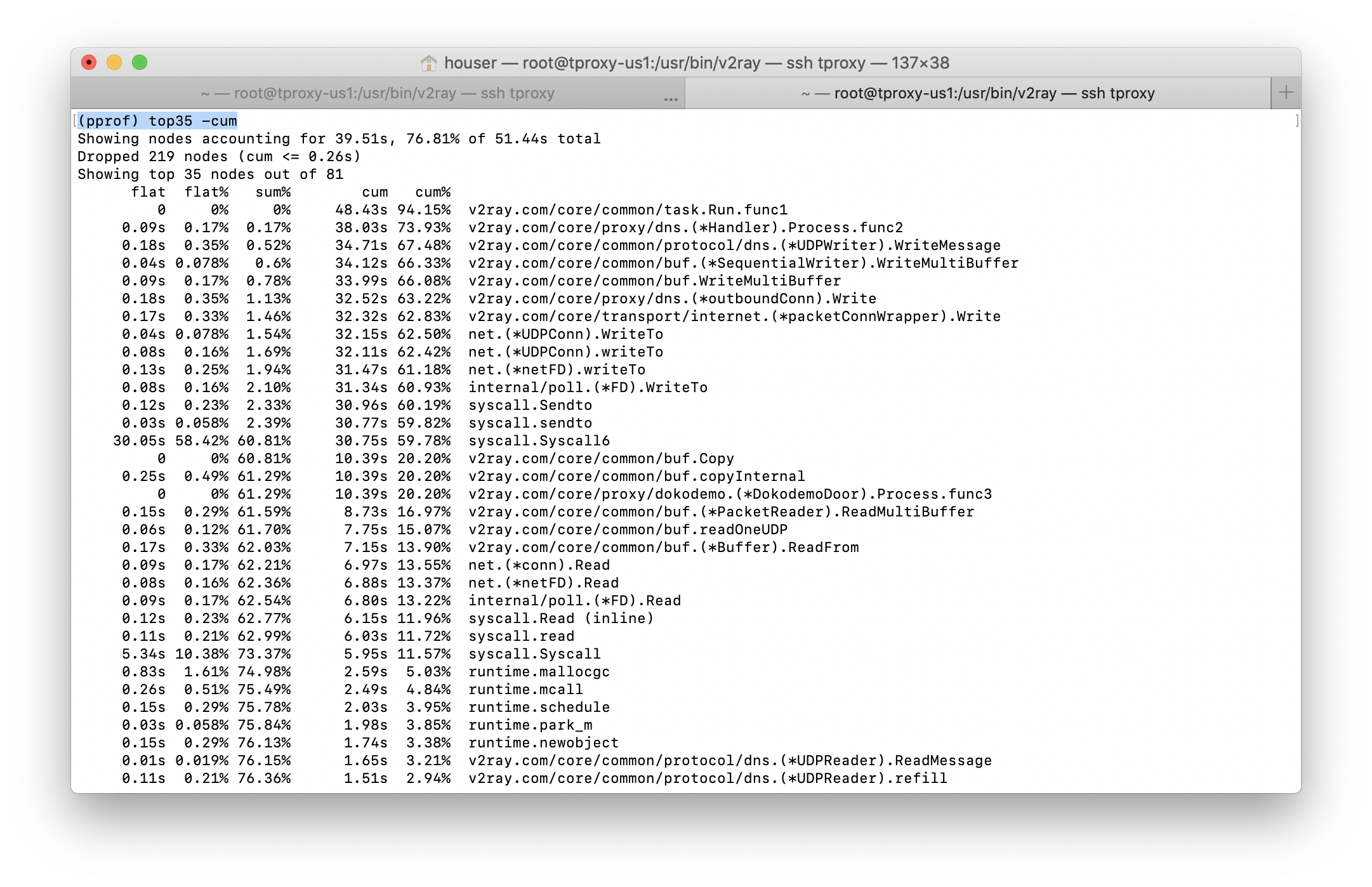
开机十分钟就满载了,重启v2ray服务会释放CPU,但是十分钟左右又会满载。如果局域网设备不连接过去到话,就不会有CPU负载问题。请帮忙看看是什么原因导致CPU满载, 🙏🙏🙏
其他截图和pd下载,传送门
H0u5er
on 7 Jul 2020
@H0u5er 你现在让v2ray做路由分流,所有的事情都是v2ray做,你可以尝试把分流的事情交给dnsmasq和ipset去做,进入v的流量就走proxy出去,不做路由
felix-fly
on 8 Jul 2020
@H0u5er
多个网卡的话 需要加上-i <网卡设备名>指定从某个网卡进入的情况才使用tproxy,可以避免死循环cpu过高。
-A V2RAY -i br-lan -p udp -j TPROXY --on-port 12345 --on-ip 0.0.0.0 --tproxy-mark 0x1/0xffffffff
-A V2RAY -i br-lan -p tcp -j TPROXY --on-port 12345 --on-ip 0.0.0.0 --tproxy-mark 0x1/0xffffffff
 asasuou
on 8 Jul 2020
asasuou
on 8 Jul 2020
@H0u5er 你现在让v2ray做路由分流,所有的事情都是v2ray做,你可以尝试把分流的事情交给dnsmasq和ipset去做,进入v的流量就走proxy出去,不做路由
前阵子研究了OpenWRT的时候,参考过你的post,也实际用过一段时间。虽然“专项专用”的思路很棒,但是我还是喜欢v2ray的一站式解决问题,而且在早起版本使用并没有发现负载问题。
H0u5er
on 8 Jul 2020
@H0u5er
多个网卡的话 需要加上-i <网卡设备名>指定从某个网卡进入的情况才使用tproxy,可以避免死循环cpu过高。
-A V2RAY -i br-lan -p udp -j TPROXY --on-port 12345 --on-ip 0.0.0.0 --tproxy-mark 0x1/0xffffffff
-A V2RAY -i br-lan -p tcp -j TPROXY --on-port 12345 --on-ip 0.0.0.0 --tproxy-mark 0x1/0xffffffff
感谢提醒,我的群晖DS218+只有一个网卡,不过未来有双网卡硬件的话,我也会参考这个做法。
H0u5er
on 8 Jul 2020
是不是v2的出口流量再次经过tproxy造成死循环?
将v2的出口流量全部打上mark,好像有个sockopt选项可以设置,
"streamSettings": {
"sockopt": {
"mark": 255
}
}
然后iptables将此mark 255流量跳过呢?
 wangmice
on 8 Jul 2020
wangmice
on 8 Jul 2020
以上办法全试过,4.26 4.25 都非常容易出现卡死CPU的情况,退回到4.24.2就不太容易出现。
 bzgszlk
on 9 Jul 2020
bzgszlk
on 9 Jul 2020
是不是v2的出口流量再次经过tproxy造成死循环?
将v2的出口流量全部打上mark,好像有个sockopt选项可以设置,
"streamSettings": {
"sockopt": {
"mark": 255
}
}
然后iptables将此mark 255流量跳过呢?
不是这个问题
bzgszlk
on 9 Jul 2020
以上办法全试过,4.26 4.25 都非常容易出现卡死CPU的情况,退回到4.24.2就不太容易出现。
树莓派透明代理,同样4.24.2没问题,4.25+出现这个问题。
 realEthanZou
on 9 Jul 2020
realEthanZou
on 9 Jul 2020
以上办法全试过,4.26 4.25 都非常容易出现卡死CPU的情况,退回到4.24.2就不太容易出现。
测试1,下载4.24.2二进制包,替换v2ray和v2tcl之后,运行30分钟,三台设备实现透明代理,CPU负载正常。
测试2,利用群晖虚拟机的快照回滚至于4.24.2版本,运行30分钟,三台设备实现透明代理,CPU负载正常。
对比4.24.2和4.25.1,top命令发现前者的v2ray -config /etc/v2ray/config.json 会进入sleep状态,后者则长时间处于Running并且超负载占用CPU。
H0u5er
on 9 Jul 2020
树莓派raspberry os 64bit ,v4.25.1,cpu占用高,不过我的间隔时间长一些,不定时的,有时候一天出现一次。
可以通过监控cpu使用率,重启v2ray解决。
!/bin/bash
state=0
while true
do
useCPU=$(top -bn1 | grep "Cpu(s)" | \
sed "s/., *([0-9.])%* id.*/\1/" | \
awk '{print 100 - $1}')
(( $(echo $useCPU">50.0" |bc -l) )) && { \
state=$((state+1));
} \
|| { }
sleep 2
[ $state = 5 ] && { \
service v2ray restart;
state=0;
}
done
cpu使用率超过50%,10秒钟后重启服务
 defead
on 11 Jul 2020
defead
on 11 Jul 2020
观察到dns ptr查询 源ip和目的ip一致,可能是这个导致回环
在PREROUTING链上再过滤一次就可以了
iptables -t mangle -I V2RAY -m mark --mark 0xff -j RETURN
 a1991937511
on 19 Jul 2020
a1991937511
on 19 Jul 2020
观察到dns ptr查询 源ip和目的ip一致,可能是这个导致回环
在PREROUTING链上再过滤一次就可以了
iptables -t mangle -I V2RAY -m mark --mark 0xff -j RETURN
试验了一天,没有再出现问题,十分感谢。
bzgszlk
on 21 Jul 2020
观察到dns ptr查询 源ip和目的ip一致,可能是这个导致回环
在PREROUTING链上再过滤一次就可以了
iptables -t mangle -I V2RAY -m mark --mark 0xff -j RETURN
在4.24.2,4.25.1和4.26.0版本上都虚拟机中都测试过了,CPU负载问题已经解决,感谢🙏
H0u5er
on 21 Jul 2020
观察到dns ptr查询源ip和目的ip一致,可能是这个导致回环
在PREROUTING链上再过滤一次就可以了
iptables -t mangle -I V2RAY -m mark --mark 0xff -j RETURN在4.24.2,4.25.1和4.26.0版本上都虚拟机中都测试过了,CPU负载问题已经解决,感谢🙏
我的也是群晖218+
执行 iptables -t mangle -A V2RAY -j RETURN -m mark --mark 0xff
系统提示:
iptables v1.6.0: Couldn't load match mark':No such file or directory
Tryiptables -h' or 'iptables --help' for more information.
请问你有遇到过么
 Bearljj
on 20 Feb 2021
Bearljj
on 20 Feb 2021
观察到dns ptr查询源ip和目的ip一致,可能是这个导致回环
在PREROUTING链上再过滤一次就可以了
iptables -t mangle -I V2RAY -m mark --mark 0xff -j RETURN在4.24.2,4.25.1和4.26.0版本上都虚拟机中都测试过了,CPU负载问题已经解决,感谢🙏
我的也是群晖218+
执行 iptables -t mangle -A V2RAY -j RETURN -m mark --mark 0xff
系统提示:
iptables v1.6.0: Couldn't load matchmark':No such file or directory Tryiptables -h' or 'iptables --help' for more information.
请问你有遇到过么
没有遇到,建议检查Mark的数值和iptables版本,需要支持tproxy
H0u5er
on 22 Feb 2021
Related issues
 IceCodeNew
·
32Comments
IceCodeNew
·
32Comments
 p4gefau1t
·
144Comments
p4gefau1t
·
144Comments
 rendaa
·
53Comments
rendaa
·
53Comments
 Leeray-Lau
·
45Comments
Leeray-Lau
·
45Comments
 nobk
·
81Comments
nobk
·
81Comments
Most helpful comment
观察到dns ptr查询 源ip和目的ip一致,可能是这个导致回环
在PREROUTING链上再过滤一次就可以了
iptables -t mangle -I V2RAY -m mark --mark 0xff -j RETURN