V2ray-core: Cloudflare Worker 中转websocket 出错
v2ray streamSettings使用websockt,使用客户端直连,可以正常连通,但是通过Cloudflare Worker中转却不行
1) 你正在使用哪个版本的 V2Ray?(如果服务器和客户端使用了不同版本,请注明)
4.22.1
2) 你的使用场景是什么?比如使用 Chrome 通过 Socks/VMess 代理观看 YouTube 视频。
通过Cloudflare Worker转发websocket
3) 你看到的不正常的现象是什么?(请描述具体现象,比如访问超时,TLS 证书错误等)
302 Found > websocket: bad handshake] > v2ray.com/core/common/retry: all retry attempts failed
而且在Chrome Console 里使用 var ws = new WebSocket('ws://我的vps地址'),报错
WebSocket connection to 'ws://xx.xx.x.xx/' failed: Error during WebSocket handshake: Unexpected response code: 403
这是正常的吗?
4) 你期待看到的正确表现是怎样的?
能正确连通
5) 请附上你的配置(提交 Issue 前请隐藏服务器端IP地址)。
服务器端配置:
   {
  "inbounds": [{
      "port": 80,
      "protocol": "vmess",
      "settings": {
        "clients": [{
          "id": "xxx",
          "alterId": 64
        }]
      },
      "streamSettings":{
          "wsSettings":{
              "path":"",
              "headers":{}
          },
          "network":"ws",
          "security": "none"
      }
    }
  ],
  "outbounds": [{
    "protocol": "freedom",
    "settings": {}
  }]
}
客户端配置:
    {
  "inbounds": [
    {
      "port": 1080,
      "protocol": "socks",
      "sniffing": {
        "enabled": true,
        "destOverride": ["http", "tls"]
      },
      "settings": {
        "auth": "noauth"
      }
    }
  ],
  "outbounds": [
    {
      "protocol": "vmess",
      "settings": {
        "vnext": [
          {
            "address": "xxx.xxx.workers.dev",
            "port": 80,
            "users": [
              {
                "id": "xxxx",
                "alterId": 64
              }
            ]
          }
        ]
      },
      "streamSettings":{
          "wsSettings":{
              "path":"",
              "headers":{}
          },
          "network":"ws",
          "security": "none"
      }
    }
  ]
}
6) 请附上出错时软件输出的错误日志。在 Linux 中,日志通常在 /var/log/v2ray/error.log 文件中。
服务器端错误日志:
无
客户端错误日志:
    2020/03/15 19:13:49 [Warning] v2ray.com/core: V2Ray 4.22.1 started
2020/03/15 19:14:01 [Warning] [1672131235] v2ray.com/core/app/proxyman/outbound: failed to process outbound traffic > v2ray.com/core/proxy/vmess/outbound: failed to find an available destination > v2ray.com/core/common/retry: [v2ray.com/core/transport/internet/websocket: failed to dial WebSocket > v2ray.com/core/transport/internet/websocket: failed to dial to (ws://floral-snow-d9bb.zhangqiang.workers.dev/): 302 Found > websocket: bad handshake] > v2ray.com/core/common/retry: all retry attempts failed
2020/03/15 19:14:02 [Warning] [1014633959] v2ray.com/core/app/proxyman/outbound: failed to process outbound traffic > v2ray.com/core/proxy/vmess/outbound: failed to find an available destination > v2ray.com/core/common/retry: [v2ray.com/core/transport/internet/websocket: failed to dial WebSocket > v2ray.com/core/transport/internet/websocket: failed to dial to (ws://floral-snow-d9bb.zhangqiang.workers.dev/): 302 Found > websocket: bad handshake] > v2ray.com/core/common/retry: all retry attempts failed
2020/03/15 19:14:02 [Warning] [423976419] v2ray.com/core/app/proxyman/outbound: failed to process outbound traffic > v2ray.com/core/proxy/vmess/outbound: failed to find an available destination > v2ray.com/core/common/retry: [v2ray.com/core/transport/internet/websocket: failed to dial WebSocket > v2ray.com/core/transport/internet/websocket: failed to dial to (ws://floral-snow-d9bb.zhangqiang.workers.dev/): 302 Found > websocket: bad handshake] > v2ray.com/core/common/retry: all retry attempts failed
2020/03/15 19:14:03 [Warning] [2455142268] v2ray.com/core/app/proxyman/outbound: failed to process outbound traffic > v2ray.com/core/proxy/vmess/outbound: failed to find an available destination > v2ray.com/core/common/retry: [v2ray.com/core/transport/internet/websocket: failed to dial WebSocket > v2ray.com/core/transport/internet/websocket: failed to dial to (ws://floral-snow-d9bb.zhangqiang.workers.dev/): 302 Found > websocket: bad handshake] > v2ray.com/core/common/retry: all retry attempts failed
7) 请附上访问日志。在 Linux 中,日志通常在 /var/log/v2ray/access.log 文件中。
2020/03/15 11:12:07 183.192.20.245:23704 rejected v2ray.com/core/proxy/vmess/encoding: failed to read request header > websocket: close 1006 (abnormal closure): unexpected EOF
8) 其它相关的配置文件(如 Nginx)和相关日志。
Cloudflare Worker 代码:
addEventListener(
  'fetch',event => {
     let url=new URL(event.request.url);
     url.hostname='xxx.com';
     if(url.protocol == 'https:') {
        url.protocol='http:'
     }
     let request=new Request(url,event.request);
     event.respondWith(
          fetch(request)
    )
  }
)
 mapic91
All 29 comments
应该是你worker没写好 ws要传递头部才行. (upgrade头)
怎么写我也不知道 不过你这个代码要是改好了之后能分享下么 :D
 k79e
on 15 Mar 2020
k79e
on 15 Mar 2020
应该是你worker没写好 ws要传递头部才行. (upgrade头)
我直接连接vps的ip地址也是出错:
Chrome Console 里使用:
var ws = new WebSocket('ws://我的vps地址')
报错:WebSocket connection to 'ws://xx.xx.x.xx/' failed: Error during WebSocket handshake: Unexpected response code: 403
是不是v2ray的websocket要配置哪里?
mapic91
on 15 Mar 2020
没那回事 chrome就是那样的 我用他连个正常的ws也是403
k79e
on 15 Mar 2020
你把所有http头部都转发就行了.
k79e
on 15 Mar 2020
你把所有http头部都转发就行了.
let request=new Request(url,event.request);
这一行应该是转发了http头
mapic91
on 15 Mar 2020
要转发
connection
upgrade
Sec-WebSocket-Key
Sec-WebSocket-Version
这4个才行
否则就全转发
可以参考gotox代码 他们好像弄好了ws通过.
k79e
on 15 Mar 2020
有的,我在vps上用nc看
直连vps的头:
Listening on [0.0.0.0] (family 0, port 80)
Connection from . 8185 received!
GET / HTTP/1.1
Host: 我的vps ip
User-Agent: Go-http-client/1.1
Connection: Upgrade
Sec-WebSocket-Key: ps5mV+krT++AjUN59li6Gw==
Sec-WebSocket-Version: 13
Upgrade: websocket
通过worker转发的头:
root@vultr:~# nc -lv 80
Listening on [0.0.0.0] (family 0, port 80)
Connection from 172.69.135.224 51514 received!
GET / HTTP/1.1
Host: 我的域名
Connection: Upgrade
Upgrade: websocket
Accept-Encoding: gzip
X-Forwarded-For: client的ip
CF-RAY: 5746bac961c2c36d-SIN
X-Forwarded-Proto: http
CF-Visitor: {"scheme":"http"}
Sec-WebSocket-Key: U06HLS8M0wzZkBWmzUP6Hg==
Sec-WebSocket-Version: 13
CF-EW-Via: 15
CDN-Loop: cloudflare; subreqs=1
User-Agent: Go-http-client/1.1
CF-Connecting-IP: client的ip
cf-worker: xxx.workers.dev
mapic91
on 15 Mar 2020
客户的302错误是这个:
HTTP/1.1 302 Found
Connection: close
Cache-Control: no-cache
Content-length: 0
Location: http://localhost
Refresh: 1
mapic91
on 15 Mar 2020
看来是被Cloudflare Worker屏蔽了,我用tcpdump,看到v2ray确实正确返回了的
3:28:42.477135 IP xxx.xx.xxx.xxx.52670 > xx.xx.x.xx.80: Flags [P.], seq 1:449, ack 1, win 64, length 448: HTTP: GET / HTTP/1.1
E...[email protected][email protected] / HTTP/1.1
Host: xxxxxx.xxxx
Connection: Upgrade
Upgrade: websocket
Accept-Encoding: gzip
X-Forwarded-For: xxx.xxx.xx.xxx
CF-RAY: 574ed19f554fd9f0-SIN
X-Forwarded-Proto: http
CF-Visitor: {"scheme":"http"}
Sec-WebSocket-Key: Fh0qCHua7L5mp5RhKcssKg==
Sec-WebSocket-Version: 13
CF-EW-Via: 15
CDN-Loop: cloudflare; subreqs=1
User-Agent: Go-http-client/1.1
CF-Connecting-IP: xxx.xxx.xx.xxx
cf-worker: xxxxx.workers.dev
13:28:42.477151 IP xx.xx.x.xx.80 > xxx.xx.xxx.xxx.52670: Flags [.], ack 449, win 1002, length 0
E..(yl@.@.^.-?.Q.E...P..........P...b...
13:28:42.477539 IP xx.xx.x.xx.80 > xxx.xx.xxx.xxx.52670: Flags [P.], seq 1:130, ack 449, win 1002, length 129: HTTP: HTTP/1.1 101 Switching Protocols
E...ym@.@.^,-?.Q.E...P..........P...cQ..HTTP/1.1 101 Switching Protocols
Upgrade: websocket
Connection: Upgrade
Sec-WebSocket-Accept: YqohUYuC7SPsRlRDXAIgs4L1MWA=
mapic91
on 16 Mar 2020
你自己代码有问题. 都屏蔽了你怎么可能收到请求头.
k79e
on 16 Mar 2020
代码没问题的,我用nodejs写了个简单的echo websocket server,然后通过cloud flare worker中转,在Chrome使用 var ws = new WebSocket('ws://我的worker中转地址'),可以正常连通,也可以发消息,消息也有返回。
mapic91
on 16 Mar 2020
const WebSocket = require('ws');
const wss = new WebSocket.Server({ port: 80 });
wss.on('connection', function connection(ws) {
ws.on('message', function incoming(message) {
console.log('received: %s', message);
ws.send("rec:" + message);
});
ws.send('something');
});
https://www.529i.com/archives/772.html
这个帖子也是这样的代码
mapic91
on 16 Mar 2020
这个报错是时间不正确,请检查下误差不要超过90s
 1265578519
on 17 Mar 2020
1265578519
on 17 Mar 2020
这个报错是时间不正确,请检查下误差不要超过90s
应该不是时间问题,直连vps,没问题,通过cloudflare worker中转就报302错误;
如果是时间问题,直连vps应该也不行。
mapic91
on 17 Mar 2020
知道原因了,我在另外一个海外vps开启v2ray客户端,服务端地址配的是cloudflare worker的地址,开启socket5代理端口,然后我电脑连接该vps的socket5代理,可以正常上网。说明是通过cloudflare worker中转,是被gfw干扰了。
mapic91
on 17 Mar 2020
可以中转了,客户端配置 "security": "tls","port": 443,就可以成功中转,不会被gfw干扰。
@k79e
下面是客户端配置示例:
{
  "inbounds": [
    {
      "port": 1080,
      "protocol": "socks",
      "sniffing": {
        "enabled": true,
        "destOverride": ["http", "tls"]
      },
      "settings": {
        "auth": "noauth"
      }
    }
  ],
  "outbounds": [
    {
      "protocol": "vmess",
      "settings": {
        "vnext": [
          {
            "address": "xxx.xxx.workers.dev",
            "port": 443,
            "users": [
              {
                "id": "xxxxxx-xxxxx-xxxx-xxx-e651e5f02e7d",
                "alterId": 64
              }
            ]
          }
        ]
      },
      "streamSettings":{
          "wsSettings":{
              "path":"",
              "headers":{}
          },
          "network":"ws",
          "security": "tls"
      }
    }
  ]
}
下面是服务端配置示例:
{
  "inbounds": [{
      "port": 80,
      "protocol": "vmess",
      "settings": {
        "clients": [{
          "id": "xxxxx-xxxx-48bc-9871-e651e5f02e7d",
          "alterId": 64
        }]
      },
      "streamSettings":{
          "wsSettings":{
              "path":"",
              "headers":{}
          },
          "network":"ws",
          "security": "none"
      }
    }
  ],
  "outbounds": [{
    "protocol": "freedom",
    "settings": {}
  }]
}
cloudflare worker 代码:
addEventListener(
  'fetch',event => {
     let url=new URL(event.request.url);
     url.hostname='34.34.34.23.xip.io';
     if(url.protocol == 'https:') {
        url.protocol='http:'
     }
     let request=new Request(url,event.request);
     if(request.headers.has("Origin")) {
       request.headers.delete("Origin");
     }
     event.respondWith(
          fetch(request)
    )
  }
)
url.hostname='34.34.34.23.xip.io';
这一行可以使用 http://xip.io/ 这个网站的功能,使ip变成域名
if(url.protocol == 'https:') {
        url.protocol='http:'
     }
这一段是把wss协议转成ws协议,因为vps上的v2ray是运行在80端口,使用没有加密的ws协议。
mapic91
on 17 Mar 2020
原来是你本地有干扰哇
k79e
on 18 Mar 2020
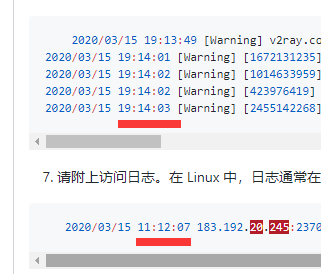
1265578519
on 18 Mar 2020
那个日志时间不一样,是因为是我用了不同时间的日志。不是同一时间访问所产生的日志。
mapic91
on 18 Mar 2020
addEventListener(
  "fetch", event => {
    let url = new URL(event.request.url);
    url.host = "173.193.92.4:30080";
    if(url.protocol == "https:") {
      url.protocol = "http:"
    };
    let request = new Request(url, event.request);
    event.respondWith(
      fetch(request)
    )
  }
)
我也试过了, 像这样, 但是不成功
 zhu327
on 24 Sep 2020
zhu327
on 24 Sep 2020
addEventListener(
  "fetch", event => {
    let url = new URL(event.request.url);
    url.host = "173.193.92.4:30080";
    if(url.protocol == "https:") {
      url.protocol = "http:"
    };
    let request = new Request(url, event.request);
    event.respondWith(
      fetch(request)
    )
  }
)
我也试过了, 像这样, 但是不成功
https://github.com/v2ray/v2ray-core/issues/2298#issuecomment-593055585
根据这里的说明是因为端口不支持, k8 NodePort看来是不行了, 好吧, 彻底放弃了
zhu327
on 24 Sep 2020
不能这样写:
url.host = "173.193.92.4:30080";
要这样写:
url.hostname='173.193.92.4.xip.io';
然后,在vps里的v2ray要监听在80端口
mapic91
on 24 Sep 2020
配置端口号的方法在这里. tls版本也可以设定.
https://nodejs.org/api/tls.html#tls_tls_createsecurecontext_options maxversion
tls.connect(options[, callback])
希望有人懂行的能增强下那个js
不对劲啊 这不是fetch...
我发现端口可以填的 受不受cf限制就不知道了 改url.host就行.
我写的8x都在浏览器界面测试正常返回了 可是访问url却不行 怪事了报错522 可能是有限制?
我知道为啥测试不行了 是xip.io nip.io被cf封锁了(看起来只封了非标准端口) 其他域名没问题...... 我也不知道其他域名是什么域名 反正你就填个不是80的网站 都能接过去
k79e
on 25 Sep 2020
配置端口号的方法在这里. tls版本也可以设定.
https://nodejs.org/api/tls.html#tls_tls_createsecurecontext_options maxversion
tls.connect(options[, callback])希望有人懂行的能增强下那个js
不对劲啊 这不是fetch...
我发现端口可以填的 受不受cf限制就不知道了 改url.host就行.
我写的8x都在浏览器界面测试正常返回了 可是访问url却不行 怪事了报错522 可能是有限制?我知道为啥测试不行了 是xip.io nip.io被cf封锁了(看起来只封了非标准端口) 其他域名没问题...... 我也不知道其他域名是什么域名 反正你就填个不是80的网站 都能接过去
https://github.com/v2ray/v2ray-core/issues/2298#issuecomment-593055585
看这里, cf的只支持这些端口, 我这边用的k8s的NodePort, 不支持Ingress, 所以就放弃了
zhu327
on 25 Sep 2020
worker不受cdn那个限制 81测了都能连
k79e
on 25 Sep 2020
worker不受cdn那个限制 81测了都能连
我也是测试界面可以连, 但是访问url就不行, 说明端口还是有限制的
zhu327
on 25 Sep 2020
没限制 我前面不是说了么非标准端口+xip域名会有限制.
k79e
on 25 Sep 2020
就关于你说的端口限制
我就填的他支持的那个端口然后还是联不通 这才是问题 然后才得出了他们对xip nip那2个域名有特别限制.
你如果知道其他类似域名 没被做限制 可以分享下
//奇怪了 为什么对中国ip有限制 他们官网好像没那样说啊. 我用xip.io测了其他ip的乱七八糟端口 都能连上
k79e
on 25 Sep 2020
Related issues
 rprx
·
123Comments
rprx
·
123Comments
 yaoha
·
63Comments
yaoha
·
63Comments
 Ricky-Hao
·
55Comments
Ricky-Hao
·
55Comments
 utmtl
·
31Comments
utmtl
·
31Comments
 IceCodeNew
·
32Comments
IceCodeNew
·
32Comments
Most helpful comment
可以中转了,客户端配置 "security": "tls","port": 443,就可以成功中转,不会被gfw干扰。
@k79e
下面是客户端配置示例:
下面是服务端配置示例:
cloudflare worker 代码:
这一行可以使用 http://xip.io/ 这个网站的功能,使ip变成域名
这一段是把wss协议转成ws协议,因为vps上的v2ray是运行在80端口,使用没有加密的ws协议。