1) 你正在使用哪个版本的 V2Ray?(如果服务器和客户端使用了不同版本,请注明)
v3.33
2) 你的使用场景是什么?比如使用 Chrome 通过 Socks/VMess 代理观看 YouTube 视频。
应用程序通过socks连接v2ray客户端,以上行10kbps/下行40kbps长时间打流
3) 你看到的不正常的现象是什么?(请描述具体现象,比如访问超时,TLS 证书错误等)
长时间打流后kcp会断开连接
4) 你期待看到的正确表现是怎样的?
kcp长时间稳定运行
5) 请附上你的配置(提交 Issue 前请隐藏服务器端IP地址)。
服务器端配置:
{
  "log" : {
     "access": "/var/log/v2ray/access.log", // 访问日志
     "error": "/var/log/v2ray/error.log", // 错误日志
     "loglevel": "debug" // 日志等级, 警告
  },
  "inbound": {
    "port": xxxxxx,
    "protocol": "vmess",
    "settings": {
      "clients": [
        {
          "id": "xxxxxxxxxxxxxxxxxxxxxxxxxxxxxxxxxxxxxx",
          "alterId": 64
        }
      ]
    },
    "streamSettings":{
      "network":"kcp",
      "kcpSettings": {
        "mtu": 1350,
        "tti": 10,
        "uplinkCapacity": 1,
        "downlinkCapacity": 1,
        "congestion": false,
        "readBufferSize": 1,
        "writeBufferSize": 1,
        "header": {
          "type": "none"
        }
      }
    }
  },
  "outbound": {
    "udp": true,
    "protocol": "freedom",
    "settings": {}
  }
}
客户端配置:
{
  "log" : {
    "access": "access.log",
    "error": "error.log",
    "loglevel": "debug"
  },
  "inbound": {
    "port": 1081,
    "listen": "127.0.0.1",
    "protocol": "socks",
    "settings": {
      "udp": true
    }
  },
  "outbound": {
    "udp": true,
    "protocol": "vmess",
    "settings": {
      "vnext": [
        {
          "address": "xxxxxxxxxx",
          "port": xxxxxxxxx,
          "users": [
            {
              "id": "xxxxxxxxxxxxxxxxxxxxxxxxxxxxxxxxxxxxxxx",
              "alterId": 64
            }
          ]
        }
      ]
    },
    "streamSettings":{
      "network":"kcp",
      "kcpSettings": {
        "mtu": 1350,
        "tti": 10,
        "uplinkCapacity": 1,
        "downlinkCapacity": 1,
        "congestion": false,
        "readBufferSize": 1,
        "writeBufferSize": 1,
        "header": {
          "type": "none"
        }
      }
    }
  }
}
6) 请附上出错时软件输出的错误日志。在 Linux 中,日志通常在 /var/log/v2ray/error.log 文件中。
服务器端错误日志:
    // 在这里附上服务器端日志
2018/08/01 00:21:41 [Debug] Transport|Internet|mKCP: #20712 entering state 1 at 38931664
2018/08/01 00:21:41 [Info] Transport|Internet|mKCP: #20712 closing connection to xxxxxxxxxxxx:44114
2018/08/01 00:21:41 [Debug] Transport|Internet|mKCP: #20712 entering state 3 at 38931664
2018/08/01 00:21:41 [Info] [1793426414] App|Proxyman|Inbound: connection ends > Proxy|VMess|Inbound: connection ends > io: read/write on closed pipe
2018/08/01 00:21:41 [Info] [1793426414] App|Proxyman|Inbound: failed to close connection > Transport|Internet|mKCP: Connection closed.
2018/08/01 00:21:41 [Info] [1793426414] App|Proxyman|Outbound: failed to process outbound traffic > Proxy|Freedom: connection ends > context canceled
2018/08/01 00:21:44 [Debug] Transport|Internet|mKCP: #20712 sending terminating cmd.
客户端错误日志:
    // 在这里附上客户端日志
2018/08/01 00:22:37 [Debug] Transport|Internet|mKCP: #20712 entering state 4 at 38944657
2018/08/01 00:22:37 [Debug] Transport|Internet|mKCP: #20712 entering state 5 at 38944674
2018/08/01 00:22:37 [Info] Transport|Internet|mKCP: #20712 closing connection to xxxxxxx:xxxx
2018/08/01 00:22:37 [Info] [2412311969] App|Proxyman|Outbound: failed to process outbound traffic > Proxy|VMess|Outbound: connection ends > io: read/write on closed pipe
2018/08/01 00:22:37 [Info] Transport|Internet|mKCP: #20712 terminating connection to xxxxxxx:xxxx
2018/08/01 00:22:37 [Info] [2412311969] App|Proxyman|Inbound: connection ends > Proxy|Socks: connection ends > Proxy|Socks: failed to transport all TCP request > io: read/write on closed pipe
7) 请附上访问日志。在 Linux 中,日志通常在 /var/log/v2ray/access.log 文件中。
// 在这里附上服务器端日志
 dragonzhi
All 20 comments
过来关注了
顺便我也留个我当初的记录
https://github.com/v2ray/v2ray-core/issues/1151#issuecomment-408411237
3.32我测的依然不需要长时间挂流量 还是老办法 多下载几次或者干脆中途中断然后重新下载.
3.33估计也一样了....
 k79e
on 1 Aug 2018
k79e
on 1 Aug 2018
@kxmp 我用v3.33按照你的方式测试了一下,基本上10多分钟就断了,从v2ray服务端抓包发现:文件服务器主动断开了tcp连接,原因暂时不明。
咱俩的使用场景不太一样,我的场景是长时间很小的带宽一直跑流量,所以用v3.33测断流的频率比你的场景小很多,10多个小时才断一次。
dragonzhi
on 1 Aug 2018
过来关注下,V2的kcp断流是一直都没有解决的老大难了
 i258559
on 2 Aug 2018
i258559
on 2 Aug 2018
我也遇到同样的问题了. v3.30
 liximomo
on 10 Aug 2018
liximomo
on 10 Aug 2018
ISP的关系,电信联通移动统统封UDP
 testcaoy7
on 13 Aug 2018
testcaoy7
on 13 Aug 2018
@testcaoy7 我在局域网测试过,也有同样的问题,所以软件本身应该也是有问题的,当然,运营商也确实会封udp。
dragonzhi
on 13 Aug 2018
@dragonzhi 我这边(电信CN2)很早暴力UDP工具,如kcp、dragonite就不能用了,一跑马上断流
testcaoy7
on 13 Aug 2018
试过混淆吗,我开了utp混淆之后再也没断过。
    "streamSettings": {
      "network": "kcp",
      "kcpSettings": {
        "uplinkCapacity": 10,
        "downlinkCapacity": 100,
        "header": {
          "type": "utp"
        }
      }
    }
 snhju
on 16 Aug 2018
snhju
on 16 Aug 2018
@snhju 确定吗?我之前试了混淆也断啊,你是怎么测试的?
dragonzhi
on 16 Aug 2018
@dragonzhi 你不是说局域网也断吗? 那运营商是否封 udp 和这个问题还有关系吗?
liximomo
on 16 Aug 2018
@dragonzhi 也可能我们说的断不是一种断把,你说的可能是突然断了,但是马上重新连还能连上。
我说的是断了可能就几个小时甚至十几个小时都连不上了。
snhju
on 16 Aug 2018
@liximomo 是的,我测试过局域网也断,所以我觉得软件本身就有bug,当然即使软件本身没问题,运营商也可能会封的。
@snhju 对,咱俩说的不是一种,我说的是断了但是重连能连上。
dragonzhi
on 17 Aug 2018
最新发现,电信FTTH,断流伴随着断线重连。家里和公司,一个桥接,一个路由,桥接模式明显更稳定。
 cdtsuipo
on 19 Sep 2018
cdtsuipo
on 19 Sep 2018
软件本身的问题:版本v3.41
试过了kcptun+ssr组合 cn2线路稳稳的延迟低从不掉线。
换成v2ray kcp模式延迟是低了,但基本就掉线没完!
服务端日志:
2018/09/21 14:08:34 36.7.82.59:58262 accepted tcp:flora-1.web.telegram.org:443
2018/09/21 14:08:34 36.7.82.59:58263 accepted tcp:flora-1.web.telegram.org:443
2018/09/21 14:09:06 36.7.82.59:55319 rejected  Proxy|VMess|Encoding: failed to read request header > Transport|Internet|mKCP: Read/Write timeout
2018/09/21 14:09:07 36.7.82.59:55308 rejected  Proxy|VMess|Encoding: failed to read request header > Transport|Internet|mKCP: Read/Write timeout
2018/09/21 14:09:07 36.7.82.59:55321 rejected  Proxy|VMess|Encoding: failed to read request header > Transport|Internet|mKCP: Read/Write timeout
2018/09/21 14:09:07 36.7.82.59:55322 rejected  Proxy|VMess|Encoding: failed to read request header > Transport|Internet|mKCP: Read/Write timeout
2018/09/21 14:09:07 36.7.82.59:55338 rejected  Proxy|VMess|Encoding: failed to read request header > Transport|Internet|mKCP: Read/Write timeout
2018/09/21 14:09:07 36.7.82.59:55323 rejected  Proxy|VMess|Encoding: failed to read request header > Transport|Internet|mKCP: Read/Write timeout
2018/09/21 14:09:07 36.7.82.59:58261 rejected  Proxy|VMess|Encoding: failed to read request header > Transport|Internet|mKCP: Read/Write timeout
2018/09/21 14:09:07 36.7.82.59:55326 rejected  Proxy|VMess|Encoding: failed to read request header > Transport|Internet|mKCP: Read/Write timeout
2018/09/21 14:09:08 36.7.82.59:55309 rejected  Proxy|VMess|Encoding: failed to read request header > Transport|Internet|mKCP: Read/Write timeout
2018/09/21 14:09:08 36.7.82.59:55310 rejected  Proxy|VMess|Encoding: failed to read request header > Transport|Internet|mKCP: Read/Write timeout
2018/09/21 14:09:08 36.7.82.59:58262 rejected  Proxy|VMess|Encoding: failed to read request header > Transport|Internet|mKCP: Read/Write timeout
2018/09/21 14:09:08 36.7.82.59:58263 rejected  Proxy|VMess|Encoding: failed to read request header > Transport|Internet|mKCP: Read/Write timeout
2018/09/21 14:09:09 36.7.82.59:55312 rejected  Proxy|VMess|Encoding: failed to read request header > Transport|Internet|mKCP: Read/Write timeout
2018/09/21 14:09:09 36.7.82.59:51193 accepted tcp:flora.web.telegram.org:443
2018/09/21 14:09:09 36.7.82.59:51194 accepted tcp:mail.google.com:443
2018/09/21 14:09:09 36.7.82.59:55328 rejected  Proxy|VMess|Encoding: failed to read request header > Transport|Internet|mKCP: Read/Write timeout
2018/09/21 14:09:09 36.7.82.59:55316 rejected  Proxy|VMess|Encoding: failed to read request header > Transport|Internet|mKCP: Read/Write timeout
2018/09/21 14:09:10 36.7.82.59:51195 accepted tcp:flora-1.web.telegram.org:443
2018/09/21 14:09:10 36.7.82.59:55318 rejected  Proxy|VMess|Encoding: failed to read request header > Transport|Internet|mKCP: Read/Write timeout
2018/09/21 14:09:10 36.7.82.59:51197 accepted udp:8.8.8.8:53
2018/09/21 14:09:10 36.7.82.59:51198 accepted tcp:venus-1.web.telegram.org:443
客户端v2ray+ssTap:
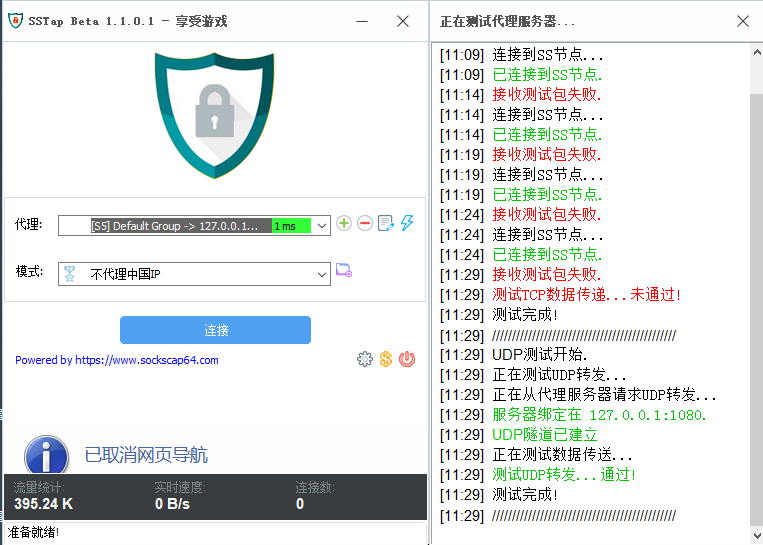
服务端配置:
{
"log": {
        "access": "/var/log/v2ray/access.log",
        "error": "/var/log/v2ray/error.log",
        "loglevel": "warning"
    },
    "inbound": {
        "port": 18887,
        "protocol": "vmess",
        "settings": {
            "clients": [
                {
                    "id": "5c66b9f9-ea1e-eb26-92d5-0708761e6d51",
                    "alterId": 1
                }
            ]
        },
        "streamSettings": {
            "network": "mkcp",
            "kcpSettings": {
                "mtu": 1400, // 1350或者1400都没啥影响
                "tti": 10,
                "uplinkCapacity": 100,
                "downlinkCapacity": 100,
                "congestion": true,
                "readBufferSize": 1,
                "writeBufferSize": 1,
                "header": {
                    "type": "wechat-video" // none或者其它类型全试过
                }
            }
        }
    },
    "outbound": {
        "protocol": "freedom",
        "settings": {}
    }
}
 lazzman
on 21 Sep 2018
lazzman
on 21 Sep 2018
一样,kcp就没能稳定几天,刚配置的服务器两三天就被QOS了,表现为重新拨号kcp就能连上,过一会就掉线了,更换TCP则正常。另外我想问一下,vmess是基于tcp的协议外面再套一层udp的kcp有意义吗?该不会反倒被识别了,是不是直接TLS+web更好
 Lantrancy
on 24 Sep 2018
Lantrancy
on 24 Sep 2018
@Lantrancy 看了一下好像是这样 比较蛋疼 kcptun那边也没讲怎么直接用kcptun裸连 实际上协议层似乎是把原来的tcp转换成了udp 而不是单纯嵌套(我觉得这个能效也未必就比SS+kcptun高 就算高些也说不定只是Golang牛逼)
不过有讲法就是听说gfw能够识别你在看视频还是看网页
而且ss转换成kcp和v2ray的kcp特征可能有些不一样 也许会暴露?
 daiaji
on 6 Oct 2018
daiaji
on 6 Oct 2018
我试过用ws、tcp协议看油管最多只能在10k-20k,用kcp速度可以去到50k,很猛!断流问题套上udp2raw就基本解决了
 kfeimaro
on 19 Oct 2018
kfeimaro
on 19 Oct 2018
@kfeimaro 那应该就是被QoS了……
还在还稳定吗?
daiaji
on 14 Nov 2018
I’m closing this issue because it has been inactive for a few months. This probably means that it is not reproducible or it has been fixed in a newer version. If it’s an enhancement and hasn’t been taken on for so long, then it seems no one has the time to implement this.
Please reopen if you still encounter this issue with the latest stable version. You can also contribute directly by providing a patch – see the developer manual. :)
Thank you!
 kslr
on 20 Feb 2019
kslr
on 20 Feb 2019
不断流了 我测试过
测的是kcptun 发现1连接数的时候 我如果重复那个下载文件然后会中断 重试也没用 连接建立不了了的样子
今天发现可能就是占用了连接数 那个连接没被正常关闭所以继续下载无法新建连接了 默认conn=1
然后我发现不给他老关闭连接 就多发起几个连接也不行. 这个东西原来是这样哇...
v2ray真不清楚 不过新版测了 稳定的很.
我估计v2卡的时候也是连接数被用完.
一般来说软件断流 以前根本就是bug造成的. 当初我lan都测的没法用 更别说什么公网了.. XD
v2的mkcp有连接数配置么? 他会走多路复用么? 有没有人知道呢.
官网上没些连接数的配置. 那这个kcp默认多少连接数的 会不会某些情况占满了就发起不了新连接了?
k79e
on 12 May 2019
Related issues
 ycdm
·
56Comments
ycdm
·
56Comments
 ghost
·
77Comments
dragonzhi
·
31Comments
ghost
·
77Comments
dragonzhi
·
31Comments
 yerikyy
·
32Comments
yerikyy
·
32Comments
 Ricky-Hao
·
55Comments
Ricky-Hao
·
55Comments
Most helpful comment
过来关注下,V2的kcp断流是一直都没有解决的老大难了