V2ray-core: failed to execute v2ctl to convert config file. > unexpected EOF
Please skip to the English section below if you don't write Chinese.
中文:
提交 Issue 之前请先阅读 Issue 指引,然后回答下面的问题,谢谢。
除非特殊情况,请完整填写所有问题。不按模板发的 issue 将直接被关闭。
1) 你正在使用哪个版本的 V2Ray?(如果服务器和客户端使用了不同版本,请注明)
v3.5
2) 你的使用场景是什么?比如使用 Chrome 通过 Socks/VMess 代理观看 YouTube 视频。
客户端ubuntu 16.04 LTS
3) 你看到的不正常的现象是什么?(请描述具体现象,比如访问超时,TLS 证书错误等)
用sudo service v2ray start只是说错误退出,没有找到error.log也没有看到原因,遂尝试直接使用/usr/bin/v2ray/v2ray --config /etc/v2ray/config.json方式,得到如下报错。。一开始怀疑文件格式问题,但重新建立一个文件,并从官方文档复制的例子依然会报错。
Main: failed to read config file: /etc/v2ray/config.json > Main: failed to execute v2ctl to convert config file. > unexpected EOF
但奇怪的是server端(aws的ubuntu server EC2 instance)能启动。但因为配置不同我也无法说清原因
4) 你期待看到的正确表现是怎样的?
正常启动
5) 请附上你的配置(提交 Issue 前请隐藏服务器端IP地址)。
服务器端配置:
    // 在这里附上服务器端配置文件
    // 服务器端可以正常启动
    {
  "log" : {
    "access": "/var/log/v2ray/access.log",
    "error": "/var/log/v2ray/error.log",
    "loglevel": "warning"
  },
  "inbound": {
    "port": 18874,
    "protocol": "vmess",
    "settings": {
      "clients": [
        {
          "id": "masked",
          "level": 1,
          "alterId": 64
        }
      ]
    }
  },
  "outbound": {
    "protocol": "freedom",
    "settings": {}
  },
  "outboundDetour": [
    {
      "protocol": "blackhole",
      "settings": {},
      "tag": "blocked"
    }
  ],
  "routing": {
    "strategy": "rules",
    "settings": {
      "rules": [
        {
          "type": "field",
          "ip": [
            "0.0.0.0/8",
            "10.0.0.0/8",
            "100.64.0.0/10",
            "127.0.0.0/8",
            "169.254.0.0/16",
            "172.16.0.0/12",
            "192.0.0.0/24",
            "192.0.2.0/24",
            "192.168.0.0/16",
            "198.18.0.0/15",
            "198.51.100.0/24",
            "203.0.113.0/24",
            "::1/128",
            "fc00::/7",
            "fe80::/10"
          ],
          "outboundTag": "blocked"
        }
      ]
    }
  }
}
客户端配置:
    // 在这里附上客户端配置
    {
    "inbound": {
        "port": 30022,
        "listen": "127.0.0.1",
        "protocol": "socks",
        "settings": {
            "udp": true
        }
    },
    "outbound": {
        "protocol": "vmess",
        "settings": {
            "vnext": [{
                "address": "masked",  //masked for security reason
                "port": 18874,
                "users": [{
          "id": "masked",
          "alterId": 64,
          "level": 1
                }]
            }]
        }
    },
    "outboundDetour": [{
        "protocol": "freedom",
        "tag": "direct",
        "settings": {}
    }],
    "routing": {
        "strategy": "rules",
        "settings": {
            "domainStrategy": "IPOnDemand",
            "rules": [{
                "type": "field",
                "ip": [
                    "0.0.0.0/8",
                    "10.0.0.0/8",
                    "100.64.0.0/10",
                    "127.0.0.0/8",
                    "169.254.0.0/16",
                    "172.16.0.0/12",
                    "192.0.0.0/24",
                    "192.0.2.0/24",
                    "192.168.0.0/16",
                    "198.18.0.0/15",
                    "198.51.100.0/24",
                    "203.0.113.0/24",
                    "::1/128",
                    "fc00::/7",
                    "fe80::/10"
                ],
                "outboundTag": "direct"
            }]
        }
    }
}
6) 请附上出错时软件输出的错误日志。在 Linux 中,日志通常在 /var/log/v2ray/error.log 文件中。
服务器端错误日志:
// 在这里附上服务器端日志
客户端错误日志:
    // 在这里附上客户端日志
    // 没有生成日志
7) 请附上访问日志。在 Linux 中,日志通常在 /var/log/v2ray/access.log 文件中。
// 在这里附上服务器端日志
8) 其它相关的配置文件(如 Nginx)和相关日志。
 lordfriend
All 12 comments
    {
        "log": {
            "access": "/var/log/v2ray/access.log",
            "error": "/var/log/v2ray/error.log",
            "loglevel": "warning"
        },
        "inbound": {
            "port": 18874,
            "protocol": "vmess",
            "settings": {
                "clients": [
                    {
                        "id": "65b55179-670b-42c4-831e-a2468196f07f",
                        "level": 1,
                        "alterId": 64
                    }
                ]
            }
        },
        "outbound": {
            "protocol": "freedom",
            "settings": {}
        },
        "outboundDetour": [
            {
                "protocol": "blackhole",
                "settings": {},
                "tag": "blocked"
            }
        ],
        "routing": {
            "strategy": "rules",
            "settings": {
                "rules": [
                    {
                        "type": "field",
                        "ip": [
                            "0.0.0.0/8",
                            "10.0.0.0/8",
                            "100.64.0.0/10",
                            "127.0.0.0/8",
                            "169.254.0.0/16",
                            "172.16.0.0/12",
                            "192.0.0.0/24",
                            "192.0.2.0/24",
                            "192.168.0.0/16",
                            "198.18.0.0/15",
                            "198.51.100.0/24",
                            "203.0.113.0/24",
                            "::1/128",
                            "fc00::/7",
                            "fe80::/10"
                        ],
                        "outboundTag": "blocked"
                    }
                ]
            }
        }
    }
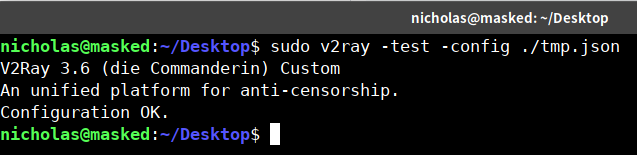
V2Ray 3.6 测试通过.
 nicholascw
on 12 Jan 2018
nicholascw
on 12 Jan 2018
实际问题是你没有将v2ctl文件和v2ray放在一起,请确保V2Ray所在目录里面包含v2ray,v2ctl两个文件
 xiaokangwang
on 12 Jan 2018
xiaokangwang
on 12 Jan 2018
Main: failed to read config file: /etc/v2ray/config.json > Main: failed to execute v2ctl to convert config file. > unexpected EOF 中 failed to execute v2ctl to convert config file 翻译成中文就是无法通过执行v2ctl来转换配置文件。
xiaokangwang
on 12 Jan 2018
没放在一起的意思没理解,我使用官方文档上那个go.sh安装的v2ray。所有执行文件在/usr/bin/v2ray里都存在,我手动使用v2ctl把json转成protobuf格式,然后再用--format pb参数启动依然无法启动
lordfriend
on 12 Jan 2018
v3.6还没有release
lordfriend
on 12 Jan 2018
hmm我今早3点多刚配完一组服务端+客户端中间也有过这个提示.....单纯括号没配对之类的问题, 解决掉就好了. 你看一下你用的那个文件本身jq检查能否通过? 是否有特殊字符?
nicholascw
on 12 Jan 2018
jsonlint之类的lint都pass了,后来用vscode重新保存了一个在桌面也不行...
lordfriend
on 12 Jan 2018
你Server端的文件拉回本地也不能用么?
nicholascw
on 12 Jan 2018
这个倒是没尝试,因为server和本地都是用go.sh安装的,第一次也都是直接用vim在生成的那个文件里改的,所以我觉得没必要这么试。而且server端的配置也要改一下才能在本地用,最后还是信不信任编辑器的问题,我选择相信vscode和vim..
lordfriend
on 12 Jan 2018
顺便我系统是英文版的ubuntu,也不应该有什么特殊字符的问题吧
lordfriend
on 12 Jan 2018
我后来发现某个网页版生成器生成的配置没问题。我后来把有问题的配置传给别人之后,他说有几率正常启动..这很奇怪
lordfriend
on 2 Feb 2018
请同时确保v2ctl和v2ray相同文件夹中包含有 geoip.dat geosite.dat 这两个文件。默认配置中是有引用的。
 qin-nz
on 21 Jan 2020
qin-nz
on 21 Jan 2020
Related issues
 cnperi
·
4Comments
cnperi
·
4Comments
 sunsan05
·
3Comments
sunsan05
·
3Comments
 limaofu
·
3Comments
limaofu
·
3Comments
 samjoeyang
·
4Comments
samjoeyang
·
4Comments
 ToutyRater
·
4Comments
ToutyRater
·
4Comments
Most helpful comment
实际问题是你没有将v2ctl文件和v2ray放在一起,请确保V2Ray所在目录里面包含v2ray,v2ctl两个文件