Please skip to the English section below if you don't write Chinese.
中文:
提交 Issue 之前请先阅读 Issue 指引,然后回答下面的问题,谢谢。
除非特殊情况,请完整填写所有问题。不按模板发的 issue 将直接被关闭。
1) 你正在使用哪个版本的 V2Ray?(如果服务器和客户端使用了不同版本,请注明)
v2ray-v3.5-windows-64
2) 你的使用场景是什么?比如使用 Chrome 通过 Socks/VMess 代理观看 YouTube 视频。
3) 你看到的不正常的现象是什么?(请描述具体现象,比如访问超时,TLS 证书错误等)
我用v2ray同时启用了vmess和ss
idm设置代理服务器 127.0.0.1: 1080 无论socks还是http
使用v2ray显示连接超时,而用ss软件正常使用idm。
网页一切正常只是idm不能用
4) 你期待看到的正确表现是怎样的?
5) 请附上你的配置(提交 Issue 前请隐藏服务器端IP地址)。
服务器端配置:
    // 在这里附上服务器端配置文件
```{
    "log": {
        "access": "/var/log/v2ray/access.log",
        "error": "/var/log/v2ray/error.log",
        "loglevel": "warning"
    },
    "inbound": {
        "port": 13772,
        "protocol": "vmess",
        "settings": {
            "clients": [
                {
                    "id": "xxxxxxxxxxxxxxxxxe29dd2",
                    "level": 1,
                    "alterId": 64
                }
            ]
        }
    },
    "outbound": {
        "protocol": "freedom",
        "settings": {}
    },
    "inboundDetour": [
        {
            "protocol": "shadowsocks",
            "port": 50832,
            "settings": {
                "method": "chacha20",
                "password": "xxxxxxxxxx",
                "udp": true,
                "level": 1
            }
        }
    ],
    "outboundDetour": [
        {
            "protocol": "blackhole",
            "settings": {},
            "tag": "blocked"
        }
    ],
    "routing": {
        "strategy": "rules",
        "settings": {
            "rules": [
                {
                    "type": "field",
                    "ip": [
                        "0.0.0.0/8",
                        "10.0.0.0/8",
                        "100.64.0.0/10",
                        "127.0.0.0/8",
                        "169.254.0.0/16",
                        "172.16.0.0/12",
                        "192.0.0.0/24",
                        "192.0.2.0/24",
                        "192.168.0.0/16",
                        "198.18.0.0/15",
                        "198.51.100.0/24",
                        "203.0.113.0/24",
                        "::1/128",
                        "fc00::/7",
                        "fe80::/10"
                    ],
                    "outboundTag": "blocked"
                }
            ]
        }
    }
}

    客户端配置:
```javascript
    // 在这里附上客户端配置
```{
  "log": {
    "access": "",
    "error": "",
    "loglevel": ""
  },
  "inbound": {
    "port": 1080,
    "listen": "0.0.0.0",
    "protocol": "socks",
    "settings": {
      "auth": "noauth",
      "udp": true,
      "ip": "127.0.0.1",
      "clients": null
    },
    "streamSettings": null
  },
  "outbound": {
    "tag": "agentout",
    "protocol": "vmess",
    "settings": {
      "vnext": [
        {
          "address": "xxxxxx",
          "port": 13772,
          "users": [
            {
              "id": "5 xxxxxxxxxxxxxxxxxxxxb9e29dd2",
              "alterId": 64,
              "security": "aes-128-gcm"
            }
          ]
        }
      ]
    },
    "streamSettings": {
      "network": "tcp",
      "security": "",
      "tcpSettings": null,
      "kcpSettings": null,
      "wsSettings": null
    },
    "mux": {
      "enabled": false
    }
  },
  "inboundDetour": null,
  "outboundDetour": [
    {
      "protocol": "freedom",
      "settings": {
        "response": null
      },
      "tag": "direct"
    },
    {
      "protocol": "blackhole",
      "settings": {
        "response": {
          "type": "http"
        }
      },
      "tag": "blockout"
    }
  ],
  "dns": {
    "servers": [
      "8.8.8.8",
      "8.8.4.4",
      "localhost"
    ]
  },
  "routing": {
    "strategy": "rules",
    "settings": {
      "domainStrategy": "IPIfNonMatch",
      "rules": [
        {
          "type": "field",
          "port": null,
          "outboundTag": "direct",
          "ip": [
            "0.0.0.0/8",
            "10.0.0.0/8",
            "100.64.0.0/10",
            "127.0.0.0/8",
            "169.254.0.0/16",
            "172.16.0.0/12",
            "192.0.0.0/24",
            "192.0.2.0/24",
            "192.168.0.0/16",
            "198.18.0.0/15",
            "198.51.100.0/24",
            "203.0.113.0/24",
            "::1/128",
            "fc00::/7",
            "fe80::/10"
          ],
          "domain": null
        }
      ]
    }
  }
}

6)  请附上出错时软件输出的错误日志。在 Linux 中,日志通常在 `/var/log/v2ray/error.log` 文件中。

    服务器端错误日志:
// 在这里附上服务器端日志
客户端错误日志:
// 在这里附上客户端日志
7) 请附上访问日志。在 Linux 中,日志通常在 `/var/log/v2ray/access.log` 文件中。
// 在这里附上服务器端日志
```
8) 其它相关的配置文件(如 Nginx)和相关日志。
请预览一下你填的内容再提交。
如果你已经填完上面的问卷,请把下面的英文部份删除,再提交 Issue。
 csteike
All 7 comments
请提供 IDM 以及 V2Ray 的详细报错信息。
有可能是 IDM 配置代理服务器出错了。
 Gannti
on 8 Jan 2018
Gannti
on 8 Jan 2018
请分别配置http和socks代理测试,v2ray不支持http、socks同端口。
 liberal-boy
on 5 Feb 2018
liberal-boy
on 5 Feb 2018
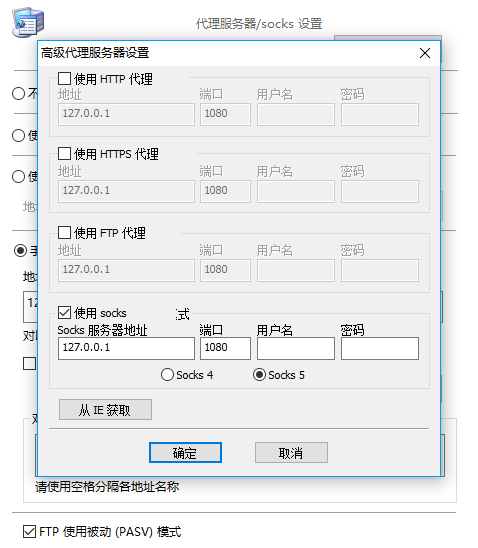
把其他方式的代理都取消,仅使用socks5,实测无问题。
 kirbyzhu
on 12 Feb 2018
kirbyzhu
on 12 Feb 2018
我也有相同的问题,使用ssr下载youtube视频没有问题,但用v2ray下载不了,就算是只设置socks端口不设置其他,一样没有反应,有可能idm不走v2ray的路由,不知道问题在哪里?使用chrome浏览器 SwitchyOmega 插件,相同问题有时候在android手机上下载google play上的app也会产生,但有时又能下载。ssr不会出现这个问题,请开发者是否能检查一下这个问题。
 diksonhe
on 15 Mar 2018
diksonhe
on 15 Mar 2018
@diksonhe
- 使用 IDM 下载 YouTube 视频的话,问题可能出在 IDM,我用 youtube-dl 是可以下载的。
- 已确认 Android 上使用部分地区的 vps 代理,用把 geoip:cn 设为 direct,play 商店会无法下载应用。
- SwitchyOmega 有什么问题?
liberal-boy
on 16 Mar 2018
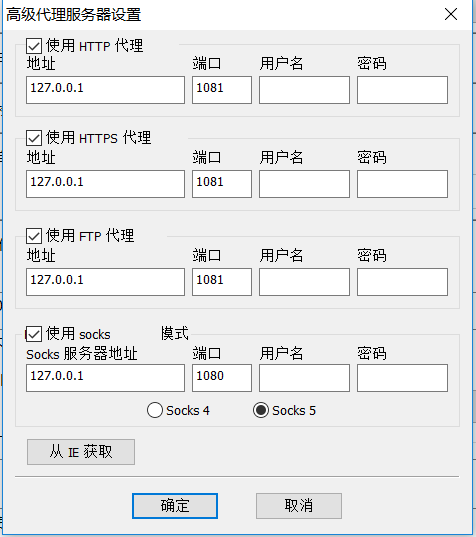
使用客户端v2rayN
 rufengsuixing
on 20 Mar 2018
rufengsuixing
on 20 Mar 2018
@liberal-boy
问题我已经找到!我也将自己的方法告诉大家! 讲v2rayN软件设为全局,然后将idm的代理设为端口+1,也就是列入端口为8080 那么就设为8081,这样就走了v2ray全局端口,idm就可以顺利下载youtube视频了,在 youtube-dl 上无需设置端口,只要开启全局代理就可以下载,如果关闭,就没有任何反应.
diksonhe
on 20 Mar 2018
Related issues
 limaofu
·
3Comments
limaofu
·
3Comments
 vonhezhou
·
4Comments
vonhezhou
·
4Comments
 supersndqd
·
3Comments
supersndqd
·
3Comments
 ToutyRater
·
4Comments
ToutyRater
·
4Comments
 oceanchang
·
3Comments
oceanchang
·
3Comments
Most helpful comment
把其他方式的代理都取消,仅使用socks5,实测无问题。