V: Pls give more info about installation in windows.
Hi,
I love this language at first sight. But I am not sure v is installed properly or not. I did as you said in the installation note. I found an exe file named "v" in my users folder. But I can't run any code(ex: println("hello')) in that cmd window. Its saying that C:\Users\MyName\ is not recognized as blah blah.
So please give more clarity on this. And please tell me how to check if i installed it correctly.
Note : I have added the v.exe path to my path. But it is not working. Do i miss something ?
 vinodvinu
All 14 comments
Hai @vinodvinu You can ask for help on discord.... https://discord.gg/n7c74HM
 dhonx
on 14 Oct 2019
dhonx
on 14 Oct 2019
@vinodvinu Please, can you paste a screenshot, or an exact copy of the error message that you get?
Also can you run it with:
v.exe --version ?
 spytheman
on 14 Oct 2019
spytheman
on 14 Oct 2019
I guess that maybe a full command line + exact error message could help to begin with ?
Do you use MSYS2 ? Cygwin ? mingw32 ? MSVC ?
 nsauzede
on 14 Oct 2019
nsauzede
on 14 Oct 2019
... or WSL?
 Larpon
on 14 Oct 2019
Larpon
on 14 Oct 2019
We need the screenshot and PATH env var
dhonx
on 14 Oct 2019
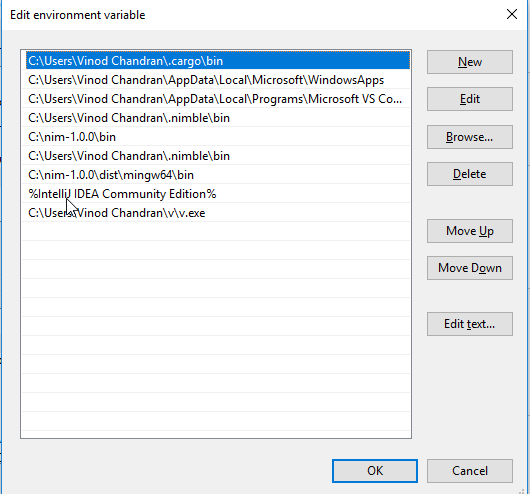
This is the screen shot of Env variables
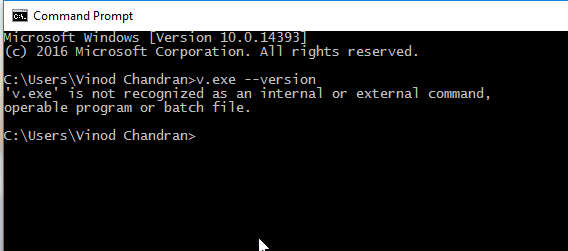
And this is the screenshot of "v.exe --version"
vinodvinu
on 15 Oct 2019
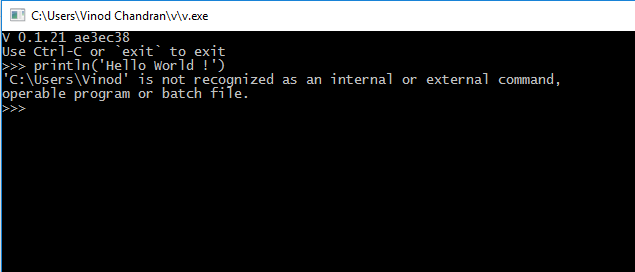
And this is the screenshot of "v.exe" s command window.
vinodvinu
on 15 Oct 2019
I am very much impressed about the speedy responses i got from here. Thank you all and sorry for delay in my reply.
vinodvinu
on 15 Oct 2019
OMG, i think its my fault. After i edited the path to "C:\Users\Vinod Chandran\v" its worked. Now, i can see the version printed on cmd.
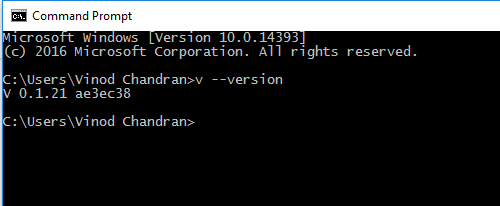
This is the result.
But still i cant run code in v.exe's cmd window.
vinodvinu
on 15 Oct 2019
Have you tried running just v.exe now that you got it to print the version? You should get a >>> prompt where you can write code. Or try writing your code in a test.v in same directory as the compiler and compule and run it with v.exe run test.v?
Larpon
on 15 Oct 2019
1) v.exe should be in v subdirectory, not in your user directory
2) looks like v currently have issues with spaces in working directory, move it to another directory without spaces for now
 vitalyster
on 15 Oct 2019
vitalyster
on 15 Oct 2019
Have you tried running just
v.exenow that you got it to print the version? You should get a>>>prompt where you can write code. Or try writing your code in atest.vin same directory as the compiler and compule and run it withv.exe run test.v?
Thanks a lot. Now everything works perfect. Now i want to learn more about V. Please tell me where to start.
vinodvinu
on 15 Oct 2019
No problem.
I started here: https://vlang.io/docs
Good luck ✌
Larpon
on 15 Oct 2019
Thanks. Bookamrked.
vinodvinu
on 15 Oct 2019
Related issues
 markgraydev
·
3Comments
markgraydev
·
3Comments
 taojy123
·
3Comments
taojy123
·
3Comments
 choleraehyq
·
3Comments
choleraehyq
·
3Comments
 vtereshkov
·
3Comments
vtereshkov
·
3Comments
 penguindark
·
3Comments
penguindark
·
3Comments
Most helpful comment
No problem.
I started here: https://vlang.io/docs
Good luck ✌