Well as the title says i cant even compile on LINUX
 mint-xoxo
All 40 comments
Works for me.
It would be useful if you pasted an error message.
 medvednikov
on 22 Jun 2019
medvednikov
on 22 Jun 2019
btw i use arch
 edgeyboy
on 22 Jun 2019
edgeyboy
on 22 Jun 2019
➜ ./vc -o v .
[1]    22369 segmentation fault (core dumped)  ./vc -o v .
And with the repl:
➜ ./vc
V 0.0.12
Use Ctrl-D to exit
For now you have to use println() to print values, this will be fixed soon

>>> a := 9
>>> println(a)
[1]    22594 segmentation fault (core dumped)  ./vc
 coolreader18
on 22 Jun 2019
coolreader18
on 22 Jun 2019
i use arch btw
mint-xoxo
on 22 Jun 2019
You tried to compile HTML
mint-xoxo
on 22 Jun 2019
I have the same issue in my Arch.
> gdb --args vc
...

V 0.0.12
Use Ctrl-D to exit
For now you have to use println() to print values, this will be fixed soon

>>> println("HAHA");

Program received signal SIGSEGV, Segmentation fault.
(gdb) bt
#0  0x00007ffff7e0096c in fputs () from /usr/lib/libc.so.6
#1  0x000055555555c5c6 in os__File_appendln (f=..., s=...) at v.c:3686
#2  0x000055555555ce8a in os__write_file (path=..., text=...) at v.c:3995
#3  0x000055555556a87f in run_repl () at v.c:7542
#4  0x0000555555566d46 in main (argc=1, argv=0x7fffffffdb98) at v.c:6519
 potatogim
on 22 Jun 2019
potatogim
on 22 Jun 2019
you need clang, not gcc
 CryZe
on 22 Jun 2019
CryZe
on 22 Jun 2019
@mint-xoxo you're trying to compile html, try downloading v.c again.
coolreader18
on 22 Jun 2019
For me, it fails with both clang and cc in ArchLinux also.
 mantielero
on 22 Jun 2019
mantielero
on 22 Jun 2019
Well now when i try and run ./vc -o v . it seg fualts
mint-xoxo
on 22 Jun 2019
@mint-xoxo did you compile it with clang instead of cc?
CryZe
on 22 Jun 2019
The README was old because I had to destroy the git repo. It's been updated now.
You need to have v directory in ~/code/.
medvednikov
on 22 Jun 2019
@CryZe No
mint-xoxo
on 22 Jun 2019

 hello2dj
on 22 Jun 2019
hello2dj
on 22 Jun 2019
not work on my mac
hello2dj
on 22 Jun 2019
@mint-xoxo well you need to, gcc doesn't work
CryZe
on 22 Jun 2019
I think a build script and including v.c in the repo might reduce these issues
 nico-abram
on 22 Jun 2019
nico-abram
on 22 Jun 2019
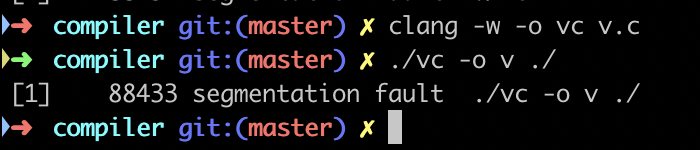
use clang
hello2dj
on 22 Jun 2019
I'm on windows 7 tho
nico-abram
on 22 Jun 2019
Still doesn't work lol
 NotNite
on 22 Jun 2019
NotNite
on 22 Jun 2019
@NotNite whats the output
nico-abram
on 22 Jun 2019
the error Segmentation fault: 11 is probably related to out of the stack loop.
 bitsnaps
on 22 Jun 2019
bitsnaps
on 22 Jun 2019
mkdir /var/tmp/vlang0.0.12/
 daniel-j
on 22 Jun 2019
daniel-j
on 22 Jun 2019
That fixed it @daniel-j, thanks!
coolreader18
on 22 Jun 2019
@medvednikov Could you look this trace?
(gdb) bt
#0  0x00007ffff7e0096c in fputs () from /usr/lib/libc.so.6
#1  0x000055555555c5c6 in os__File_appendln (f=..., s=...) at v.c:3686
#2  0x000055555555ce8a in os__write_file (path=..., text=...) at v.c:3995
#3  0x000055555556a87f in run_repl () at v.c:7542
#4  0x0000555555566d46 in main (argc=1, argv=0x7fffffffdb98) at v.c:6519
(gdb) frame 1
#1  0x000055555555c5c6 in os__File_appendln (f=..., s=...) at v.c:3686
3686      fputs(string_cstr(s), f.cfile);
(gdb) p f
$1 = {
  cfile = 0x0
}
(gdb) frame 2
#2  0x000055555555ce8a in os__write_file (path=..., text=...) at v.c:3995
3995      os__File_appendln(f, text);
(gdb) p f
$2 = {
  cfile = 0x0
}
(gdb) p text
$3 = {
  str = 0x555555591ed0 "fn main(){\nprintln('HAHA');}",
  len = 28
}
(gdb) frame 3
#3  0x000055555556a87f in run_repl () at v.c:7542
7542          os__write_file(file, source_code);
(gdb) p file
$4 = {
  str = 0x5555555918f0 "/var/tmp/vlang0.0.12//vrepl.v",
  len = 29
}
(gdb) frame 3
#3  0x000055555556a87f in run_repl () at v.c:7542
7542          os__write_file(file, source_code);
(gdb) p file
$5 = {
  str = 0x5555555918f0 "/var/tmp/vlang0.0.12//vrepl.v",
  len = 29
}
(gdb) p source_code
$6 = {
  str = 0x555555591ed0 "fn main(){\nprintln('HAHA');}",
  len = 28
}
In this situation, /var/tmp/vlang0.0.12 dir is not created so I make this dir but below that happend.
Starting program: /home/potatogim/workspace/github/v/compiler/vc
V 0.0.12
Use Ctrl-D to exit
For now you have to use println() to print values, this will be fixed soon

>>> println('hello')
V panic: "/home/potatogim//code/v//builtin/array.v" doesnt exist
can't compile most examples.
djazz@stable-tec ~/code/v/examples/tetris > ../../compiler/compiler tetris.v
ls() couldnt open dir "/home/djazz//code/v//gl"
errno=2 err='No such file or directory'
V panic: /home/djazz//code/v//gl doesnt exist
The real question is, does tetris compile
nico-abram
on 22 Jun 2019
@daniel-j we need to read this section again :)
https://github.com/vlang/v#linux-and-macos
potatogim
on 22 Jun 2019
mkdir /var/tmp/vlang0.0.12/
@daniel-j this helped, kinda, but:
$ ./vc -o v . && echo ok || echo fail
ok
$ ls
cgen.v  fn.v  jsgen.v  main.v  parser.v  scanner.v  table.v  token.v  vc  v.c
Where is v binary?
 alkorgun
on 22 Jun 2019
alkorgun
on 22 Jun 2019
#! /bin/bash


rm -rf ~/code
mkdir -p ~/code && cd ~/code && \
git clone https://github.com/vlang/v && \
cd v/compiler && \
wget https://vlang.io/v.c && \
clang v.c -w -o vc && \
./vc -o v .
 Bleser
on 22 Jun 2019
Bleser
on 22 Jun 2019
It actually creates /var/tmp/vlang0.0.12/v.c, same with repl.
ln -s `which gcc` ~/.local/bin/clang
Solution for me, lol.
Clang hard coded everywhere:
~/code/v/compiler$ grep -r clang .
./main.v:   // Find clang executable
./main.v:   fast_clang := '/usr/local/Cellar/llvm/8.0.0/bin/clang'
./main.v:   cmd := if os.file_exists(fast_clang) {
./main.v:       '$fast_clang -I. $args'
./main.v:       'clang -I. $args'
./main.v:       panic('clang error')
./v.c:  string fast_clang = tos2("/usr/local/Cellar/llvm/8.0.0/bin/clang");
./v.c:  string cmd = (os__file_exists(fast_clang))
./v.c:                   ? (_STR("%.*s -I. %.*s", fast_clang.len, fast_clang.str,
./v.c:                   : (_STR("clang -I. %.*s", args.len, args.str));
./v.c:    v_panic(tos2("clang error"));
./cgen.v:   // os.system('clang-format -i $g.out_path')
Binary file ./v matches
Binary file ./vc matches
./vc -o v .
does not produces any output here (to console of new file). ElementaryOS Juno.
 megatux
on 22 Jun 2019
megatux
on 22 Jun 2019
Both packages on AUR are broken too.
https://aur.archlinux.org/packages/vlang
https://aur.archlinux.org/packages/vlang-git
Same issues reported previous in this thread.
 ryukinix
on 22 Jun 2019
ryukinix
on 22 Jun 2019
@megatux see my comment above.
fix: ln -s `which gcc` ~/.local/bin/clang
alkorgun
on 22 Jun 2019
I also encountered same issue on Arch Linux. I just added the following line into v.c due tostrerror requires string.h (but clang does not requires it):
#include <string.h>
 ueokande
on 23 Jun 2019
ueokande
on 23 Jun 2019
First get it works, use clang -w -o vc v.c works for me, gcc not. ArchLinux too.
 kitech
on 23 Jun 2019
kitech
on 23 Jun 2019
read #486 or install from aur/vlang-git
 whoizit
on 24 Jun 2019
whoizit
on 24 Jun 2019
First get it works, use
clang -w -o vc v.cworks for me, gcc not. ArchLinux too.
It work for me! Os is Ubuntu18.04
 ouening
on 24 Jun 2019
ouening
on 24 Jun 2019
Should be fixed with v0.1.0, can you check?
 oxy
on 24 Jun 2019
oxy
on 24 Jun 2019
Fixed on my machine, compiles fine on Arch Linux. Closing.
oxy
on 26 Jun 2019
Related issues
 ArcDrake
·
3Comments
ArcDrake
·
3Comments
 lobotony
·
3Comments
lobotony
·
3Comments
 elimisteve
·
3Comments
elimisteve
·
3Comments
 clpo13
·
3Comments
medvednikov
·
3Comments
clpo13
·
3Comments
medvednikov
·
3Comments
Most helpful comment
btw i use arch