V-calendar: How do you change the outputted date format?
Hi there,
I've been trying to change the date format that's outputted from the component. I've tried using the mask prop on the component, but it just outputs the full date string like so:
Fri Jan 31 2020 00:00:00 GMT+0000 (Greenwich Mean Time)
I could go down the convoluted way of running it through methods or computed, but it's just bulky and it would be much worthwhile using another component.
Can someone please confirm if changing the format is actually possible, or if I will need to use someone else's component?
My component:
<v-date-picker v-model="newEmployment.dateFrom" :masks="{L: 'YYYY-MM-DD'}" is-inline />
How it's implemented
I'm running Vue in conjunction with Laravel, I register the component globally via app.js
import VCalendar from 'v-calendar';
Vue.use(VCalendar)
Thanks in advance
 mrmathewc
All 8 comments
yes I have the same problem. I am trying to convert the date return model to ISOString format. I can solve this by append with FormData, but I have to write extra code for this. It would be great if there was a solution to this
 vciloglu
on 30 Jan 2020
vciloglu
on 30 Jan 2020
Likewise. Right now I have to update my data for this before saving to produce a date object like yyyy-mm-ddThh:mm:ss.000Z. I only have to do this because I do not have the option to format the output; otherwise, I could save the data without the need for the extra code to parse the date to the required format first.
P.S. This is a wonderful piece of work and my preferred calendar for Vue; just saying that this would certainly be a welcome feature ;)
 jeffster9
on 30 Jan 2020
jeffster9
on 30 Jan 2020
Likewise. Right now I have to update my data for this before saving to produce a date object like yyyy-mm-ddThh:mm:ss.000Z. I only have to do this because I do not have the option to format the output; otherwise, I could save the data without the need for the extra code to parse the date to the required format first.
P.S. This is a wonderful piece of work and my preferred calendar for Vue; just saying that this would certainly be a welcome feature ;)
For the time being, I am making use of moment.js to get around my problems. This won't be a permanent solution though.
mrmathewc
on 30 Jan 2020
@mrmathewc Would you mind sharing how you have worked around this problem? I am also experiencing this problem and would love to see how other people have gone about it
 Tommvv
on 4 Feb 2020
Tommvv
on 4 Feb 2020
@mrmathewc Would you mind sharing how you have worked around this problem? I am also experiencing this problem and would love to see how other people have gone about it
Hi @Tommvv! Sure, so basically in my scenario I'm sending an Axios request to my Laravel API. I leave the date format as-is from the component until it get's to the point of me sending the data. So in my post request, I do something along the lines of:
axios.post(this.addUrl + id, {
    from_date: moment(this.newRecord.dateFrom).format("YYYY-MM-DD"),
    to_date: moment(this.newRecord.dateTo).format("YYYY-MM-DD"),
})
This takes the timestamp this calendar component outputs and processes it with moment so it's value is within the schema I have set in the database.
So I go from the timestamp to YYYY-MM-DD
Hope this helps!
Edit: It's worth noting also that the this.newRecord.dateFrom is not the v-model. I'm adopting the v-models value here then manipulating it once I send it via Axios.
mrmathewc
on 4 Feb 2020
For the time being, I am making use of moment.js to get around my problems. This won't be a permanent solution though.
Yeah, same here. Thanks for the feedback :)
jeffster9
on 6 Feb 2020
I was able to format the value of the text input my using masks like this:
<v-date-picker
    :input-props='{
        class: "block appearance-none rounded-lg w-full py-1 px-3 pl-8 text-lg bg-mvs-gray-800 focus:bg-mvs-gray-700 focus:outline-none",
        name: "start_date",
        placeholder: "Start Date",
        readonly: true
    }'
    :min-date="new Date()"
    :masks="{ input: 'MMMM D, YYYY' }"
    is-dark
/>
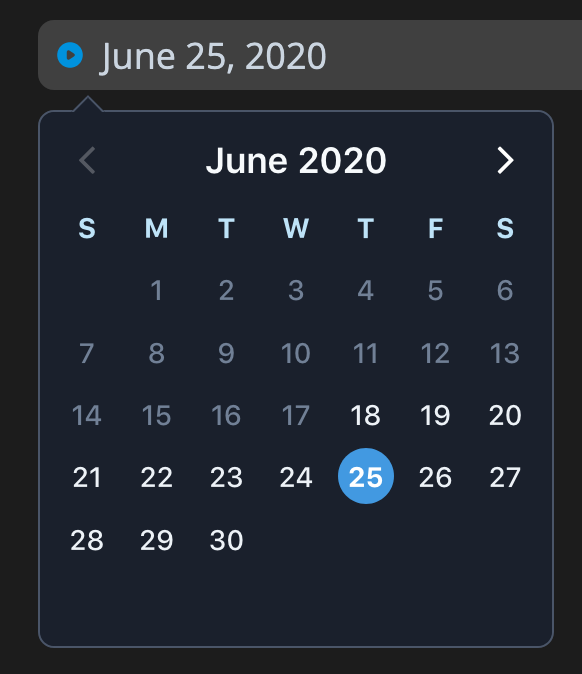
Please note that in my case I don't have an is-inline date picker.
 vasilestefirta
on 18 Jun 2020
vasilestefirta
on 18 Jun 2020
As of 2.0, you can bind directly to strings using the model-config prop.
 nathanreyes
on 14 Nov 2020
nathanreyes
on 14 Nov 2020
Related issues
 hanhtv204
·
4Comments
hanhtv204
·
4Comments
 knagyorg
·
4Comments
knagyorg
·
4Comments
 miralize
·
4Comments
miralize
·
4Comments
 octaviangrozman
·
4Comments
octaviangrozman
·
4Comments
 eafomi4ev
·
3Comments
eafomi4ev
·
3Comments