V-calendar: Viable IE11 workaround?
Does anyone have a viable, working workaround beyond the vague "use polyfills" for getting this library to work in IE11? I understand the position of not wanting to "punish modern browsers", but this library - which we really like - is unusable in projects with a large audience. There are - unfortunately - large numbers of IE11 users in the real world. We've been at this for a few days so this is my last ditch effort before we move on to a different solution. Thank you!
 dylanbromby
All 21 comments
It's more than polyfills, Ie 11 cant read template literals as well.
This package needs to be ran through Babel .... however when you use something like Laravel it's hard to include node_modules....... making this library kinda un usable in ie11 without modifications.
 audetcameron
on 4 Nov 2019
audetcameron
on 4 Nov 2019
@audetcameron surely Internet Explorer 11 support is more important than helping out Laravel users?
To be honest I dont see the connection. In my projects I have a Frontend and Backend github repo. The Frontend app has no interactions / dependencies of the backend project, it doesnt know it exists..so the backend could be running anything like Ruby On rails, Nodejs etc
 bjensen
on 17 Nov 2019
bjensen
on 17 Nov 2019
Supporting a broadly-used browser is a greater imperative than supporting a singular stack choice.
dylanbromby
on 17 Nov 2019
This worked for me using webpack and laravel mix, but the idea is the same for pure webpack projects.
mix.webpackConfig({
  module: {
    rules: [{
      test: /\.js?$/,
      exclude: /(node_modules\/((?!v-calendar).)*\/src)|(bower_components)/,
      use: [
        {
          loader: 'babel-loader',
          options: mix.config.babel()
        }
      ]
  }]
});
 discorick
on 9 Dec 2019
discorick
on 9 Dec 2019
Hi, I use your option of babel-loadder, but I get error when build:
WARNING in ./src/main.js
46:8-17 "export 'default' (imported as 'VCalendar') was not found in 'v-calendar'
 @ ./src/main.js
Thank you!
 SimoralX
on 30 Dec 2019
SimoralX
on 30 Dec 2019
How do I set this up with vue-cli in the vue.config.js file?
thx
 eybarta
on 31 Dec 2019
eybarta
on 31 Dec 2019
How do I set this up with vue-cli in the vue.config.js file?
thx
@eybarta Hi, for my case (vue-cli 4) works such:
//vue.config.js
module.exports = {
  transpileDependencies: [
    // can be string or regex
    'v-calendar'
  ]
}
 Nobi322
on 17 Jan 2020
Nobi322
on 17 Jan 2020
Hello,
I've spent some time to build an "IE11 enabled" version of v-calendar. I did the following things :
- Changed the package.json browserlist config to include IE11
- Added display:ms-grid in "Grid.vue" (where only "grid" was mentionned)
- Replaced the 25 postcss variables (declared in "Calendar.vue") with their actual values in the other files. (CSS variables are not compatible with IE11 and the polyfills for this feature give a pretty horrible result).
Obviously, the last point is the toughest one. To be honest, as long as these variables are static values, I guess they could be replaced by SASS variables.
The resulting library works like a charm on IE11.
 gjactat
on 6 Mar 2020
gjactat
on 6 Mar 2020
Hello,
I've spent some time to build an "IE11 enabled" version of v-calendar. I did the following things :
- Changed the package.json browserlist config to include IE11
- Added display:ms-grid in "Grid.vue" (where only "grid" was mentionned)
- Replaced the 25 postcss variables (declared in "Calendar.vue") with their actual values in the other files. (CSS variables are not compatible with IE11 and the polyfills for this feature give a pretty horrible result).
Obviously, the last point is the toughest one. To be honest, as long as these variables are static values, I guess they could be replaced by SASS variables.
The resulting library works like a charm on IE11.
where would one find such library? ;)
audetcameron
on 6 Mar 2020
@audetcameron I'll probably fork v-calendar to include these IE11 mods. I'll let you know. I'll need it myself anyway to stay up to date with the latest v-calendar releases.
I'm looking forward to the end of Internet Explorer. We all do I guess.
gjactat
on 7 Mar 2020
@gjactat let us know how you get on. I managed to get the library built but the modal wasn't showing at all
 isaac-gilmour-asknicely
on 18 Mar 2020
isaac-gilmour-asknicely
on 18 Mar 2020
Hello,
Sorry for the delay. I've cloned v-calendar and pushed a commit to make it work on IE11 : https://github.com/gjactat/v-calendar/commit/d6f240a91fabb631503b08e6cdf655f19f00558f
I’ve dropped the idea of replacing the PostCss variables in the code in favor of a PostCss plugin that injects the raw values at build time. The v-calendar doesn’t need changes with this approach (except the display:-ms-grid css rule which should probably be handled by PostCss too).
You can clone the repo (https://github.com/gjactat/v-calendar) and launch the following commands
npm i
npm run serve
You should get the same result on IE11 as in the screenshot below.
I’ve tried to keep this commit as small as possible. However, I had to move the test page to "public\index.html". Something has probably changed in vue-cli default behaviour.
Sadly, the npm run dev command won't work on IE11. But for a good reason : This command starts a VuePress server and brings lots of ES6 non transpiled code.
Anyway, the minimalistic test page should give you an idea of the result.
Finally, you will perhaps notice the extra right padding on the full sized v-calendar on IE11. I didn't dig that much that issue since I usually use small sized calendars that don't suffer this artefact.
Hope this will help !
Guillaume
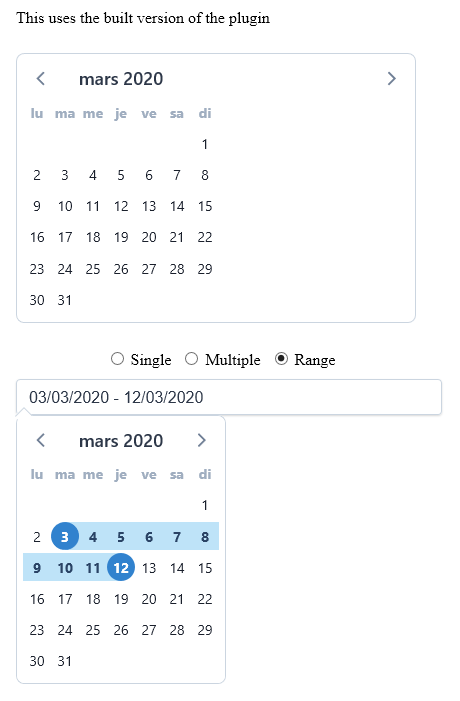
gjactat
on 19 Mar 2020
Excellent work! Thanks, @gjactat !
What is the most elegant way to include your fork of v-calendar to a webpack project?
Setting dependecy "v-calendar": "gjactat/v-calendar" in package.json is not enough, as there are no compiled modules in your fork, so import VCalendar from 'v-calendar' will obviously fail.
Could you give some tips on this? Or the only way is to download and compile the repo, and then include it as a local fs dependecy?
TIA,
Bálint
 kozmanbalint
on 5 Apr 2020
kozmanbalint
on 5 Apr 2020
Hello @kozmanbalint,
I've merged my fork with the latest commits from upstream v-calendar and rebuilt the project. I've also included the "lib" folder in my latest commit. This should fix the issue issue you described
(referencing this repo from package.json).
gjactat
on 5 Apr 2020
Works with IE11 like a charm!
Thank you, @gjactat !
kozmanbalint
on 5 Apr 2020
Hello @gjactat .
Thanks for the great work!
When I installed it before, it worked correctly with IE11.
I just installed it again and the layout seems to be broken.
Can this be addressed?
Let me know if there's anything I can do to help!
 cyocun
on 1 Jul 2020
cyocun
on 1 Jul 2020
@gjactat @cyocun from what I could see, the layout issues are how IE11 deals with flexboxes.
I had a mediocre attempt at investigating these issues but I'm not familiar with the codebase so it was quite hard for me to implement 🙈
IE11 does flexbox rules from the _child_ element, while all other normal browsers do flexbox from the _parent_ element, hopefully this helps you investigate!
isaac-gilmour-asknicely
on 6 Jul 2020
Hello !
I've just realized that I had forgotten a few PostCSS variables. I've just pushed an update to the fork to fix that.
I can't be sure that what it fixes is what you called "broken". So I show you what actually changes with this update :
Before

After
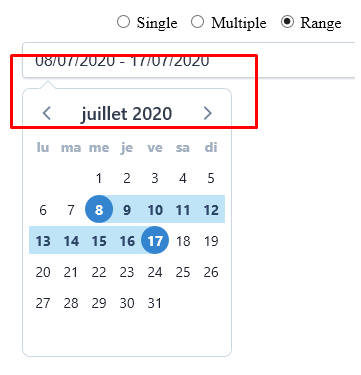
As you can see, the popover now looks pretty much like in any modern browser.
Let me know (maybe with a snapshot) if you still have broken things on screen with this update.
Guillaume
gjactat
on 7 Jul 2020
@gjactat Thanks for the update!
One thing I must apologize for is that I was looking at the old Edge, not IE11 🙏
I had almost no problems with IE11.
One thing I would like to check is that the gap on the right side in this capture can be removed?
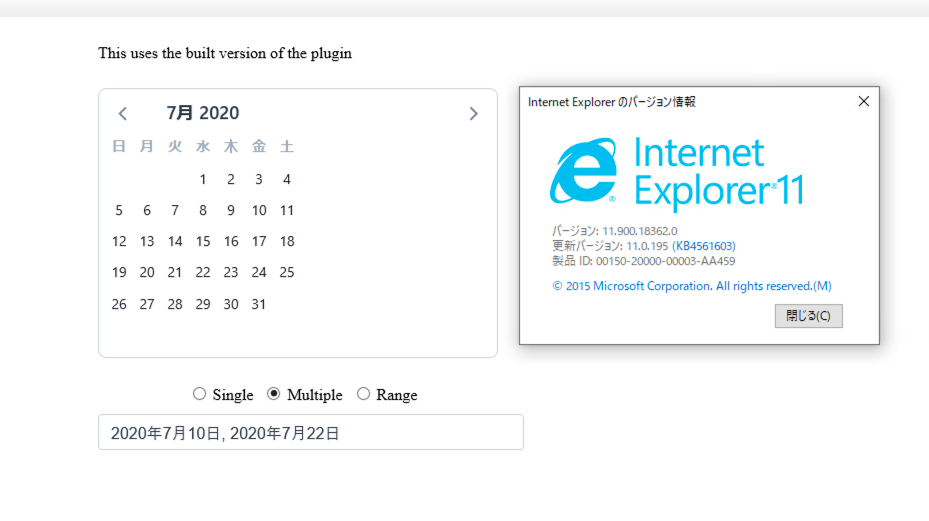
cyocun
on 7 Jul 2020
Hello @kozmanbalint,
I've merged my fork with the latest commits from upstream v-calendar and rebuilt the project. I've also included the "lib" folder in my latest commit. This _should_ fix the issue issue you described
(referencing this repo from package.json).
This should really be part of a pull request. Thanks for the fix @gjactat!
 Wiejeben
on 7 Sep 2020
Wiejeben
on 7 Sep 2020
Thanks for your work, @gjactat!
I've just noticed a problem with Edge Legacy (up to version 44, EdgeHTML 18, another gift Microsoft gave to us…): In Grid.vue, display: -ms-grid; follows display: grid;, so Edge uses -ms-grid instead of grid and this renders a non-working calendar (see screenshot). Flipping both rules already fixes the problem.
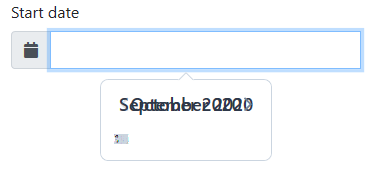
 canidas
on 9 Sep 2020
canidas
on 9 Sep 2020
Related issues
 neel
·
3Comments
neel
·
3Comments
 eafomi4ev
·
3Comments
eafomi4ev
·
3Comments
 octaviangrozman
·
4Comments
octaviangrozman
·
4Comments
 hanhtv204
·
4Comments
hanhtv204
·
4Comments
 jeffster9
·
3Comments
jeffster9
·
3Comments
Most helpful comment
Hello @kozmanbalint,
I've merged my fork with the latest commits from upstream v-calendar and rebuilt the project. I've also included the "lib" folder in my latest commit. This should fix the issue issue you described
(referencing this repo from package.json).