Hi, first off, thanks for the component, it looks amazing :)
I tried the beta version and unfortunately, the styling seems quite broken. Eg.
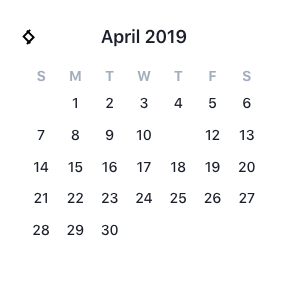
The missing date (Apr 11th) is highlighted:
calendarAttrs = [
    {
      key: 'today',
      highlight: {
        backgroundColor: '#ff8080',
      },
      popover: {
        label: 'Yay today date',
      },
      dates: new Date(),
    },
  ]
The other dates that get highlighted also don't show up and there's no highlighting of dates between the start and end date (for date range).
Are there any other dependencies one must add to the project before being able to actually use this plugin? I didn't see anything in the docs
 lukaVarga
All 8 comments
Same error here. Also you can see that the arrows on top aren't styled properly.
 tplesnar
on 11 Apr 2019
tplesnar
on 11 Apr 2019
Ok, looks to be 2 separate issues here.
First, there is a new preferred way to build up your highlights. Read more here. My approach here is to move away from inline styles to using the built-in themes or classes.
So, for your example you could use
highlight: 'red' // or blue, orange, yellow, indigo, purple, green, teal, pink
Or, assign your own class
highlight: {
  class: 'my-class'
}
Then define my-class in your css with your desired background color. I could try to build in backwards compatibility with the previous styling approach, but I'm still experimenting. My thought here is that I was to easily build in ways for getting the multiple shades of a color working within a single highlight, but I also want to allow for specifying exact colors (hence the class support).
The arrows not styling correctly, let me investigate that. Purgecss may be stripping out a class.
 nathanreyes
on 11 Apr 2019
nathanreyes
on 11 Apr 2019
I think you should provide the defaults with working styles (for eg. red, blue, orange, ... highlight key) as well as allow overriding with the class property (like you said, for setting the exact colors). In my case, I tried specifying eg. highlight: 'red', but nothing changed really.
Right now, the first impression is that styles are broken and the plugin needs additional styling before it can be used. I ended up adding my own styles to achieve what I thought I'd get out of the box, but it's not ideal.
I don't think it's necessarily Purgecss that's at fault here - the problem in the components which use the scss syntax. Eg. Calendar.vue
.vc-arrow-layout {
  display: flex;
  justify-content: center;
  align-items: center;
  position: absolute;
  top: var(--arrow-vertical-offset);
  &.is-left {
    left: var(--arrow-horizontal-offset);
  }
  &.is-right {
    right: var(--arrow-horizontal-offset);
  }
}
This gets loaded as CSS in the browser when one uses the plugin and, obviously due to scss syntax, results in broken CSS because there's no additional compilation. That's why I was asking whether there are additional dependencies that one needs to use the plugin and what I assume results in the broken arrows display.
lukaVarga
on 11 Apr 2019
Sass/scss is no longer a dependency. PostCSS is used for nesting.
nathanreyes
on 11 Apr 2019
Oops. Yeah I see the issue now. There is definitely an issue when building the CSS.
nathanreyes
on 11 Apr 2019
Yeah seems like it :) I saw some other issues as well with min-date and max-date not working properly (ie. if min date is set to today, I cannot move back to March 2019, but I can still select eg. April 5th). I can open a new issue for that if you'd like?
lukaVarga
on 11 Apr 2019
Ok just publish beta.4 that should fix these issues. It was a combination of the postcss and purgecss configs.
nathanreyes
on 11 Apr 2019
@lukaVarga Yes please generate a separate issue for the min-date and max-date props. Thanks for reporting.
nathanreyes
on 11 Apr 2019
Related issues
 miralize
·
4Comments
miralize
·
4Comments
 bocanhcam
·
3Comments
bocanhcam
·
3Comments
 knagyorg
·
4Comments
knagyorg
·
4Comments
 hanhtv204
·
4Comments
hanhtv204
·
4Comments
 eafomi4ev
·
3Comments
eafomi4ev
·
3Comments
Most helpful comment
Ok, looks to be 2 separate issues here.
First, there is a new preferred way to build up your highlights. Read more here. My approach here is to move away from inline styles to using the built-in themes or classes.
So, for your example you could use
Or, assign your own class
Then define my-class in your css with your desired background color. I could try to build in backwards compatibility with the previous styling approach, but I'm still experimenting. My thought here is that I was to easily build in ways for getting the multiple shades of a color working within a single highlight, but I also want to allow for specifying exact colors (hence the class support).
The arrows not styling correctly, let me investigate that. Purgecss may be stripping out a class.