Uwsgi: Error in pip install uwsgi in macos x
Problem installing uwsgi in mac os x 10.11 El capitan with xcode version 8 and python version 3.5.2 using
pip install uwsgi
Following is the error message
*** uWSGI linking ***
    clang -o /Users/projects/test_commerce/bin/uwsgi  core/utils.o core/protocol.o core/socket.o core/logging.o core/master.o core/master_utils.o core/emperor.o core/notify.o core/mule.o core/subscription.o core/stats.o core/sendfile.o core/async.o core/master_checks.o core/fifo.o core/offload.o core/io.o core/static.o core/websockets.o core/spooler.o core/snmp.o core/exceptions.o core/config.o core/setup_utils.o core/clock.o core/init.o core/buffer.o core/reader.o core/writer.o core/alarm.o core/cron.o core/hooks.o core/plugins.o core/lock.o core/cache.o core/daemons.o core/errors.o core/hash.o core/master_events.o core/chunked.o core/queue.o core/event.o core/signal.o core/strings.o core/progress.o core/timebomb.o core/ini.o core/fsmon.o core/mount.o core/metrics.o core/plugins_builder.o core/sharedarea.o core/rpc.o core/gateway.o core/loop.o core/cookie.o core/querystring.o core/rb_timers.o core/transformations.o core/uwsgi.o proto/base.o proto/uwsgi.o proto/http.o proto/fastcgi.o proto/scgi.o proto/puwsgi.o core/zlib.o core/regexp.o core/routing.o core/yaml.o core/json.o core/xmlconf.o core/dot_h.o core/config_py.o plugins/python/python_plugin.o plugins/python/pyutils.o plugins/python/pyloader.o plugins/python/wsgi_handlers.o plugins/python/wsgi_headers.o plugins/python/wsgi_subhandler.o plugins/python/web3_subhandler.o plugins/python/pump_subhandler.o plugins/python/gil.o plugins/python/uwsgi_pymodule.o plugins/python/profiler.o plugins/python/symimporter.o plugins/python/tracebacker.o plugins/python/raw.o plugins/gevent/gevent.o plugins/gevent/hooks.o plugins/ping/ping_plugin.o plugins/cache/cache.o plugins/nagios/nagios.o plugins/rrdtool/rrdtool.o plugins/carbon/carbon.o plugins/rpc/rpc_plugin.o plugins/corerouter/cr_common.o plugins/corerouter/cr_map.o plugins/corerouter/corerouter.o plugins/fastrouter/fastrouter.o plugins/http/http.o plugins/http/keepalive.o plugins/http/https.o plugins/http/spdy3.o plugins/signal/signal_plugin.o plugins/syslog/syslog_plugin.o plugins/rsyslog/rsyslog_plugin.o plugins/logsocket/logsocket_plugin.o plugins/router_uwsgi/router_uwsgi.o plugins/router_redirect/router_redirect.o plugins/router_basicauth/router_basicauth.o plugins/zergpool/zergpool.o plugins/redislog/redislog_plugin.o plugins/mongodblog/mongodblog_plugin.o plugins/router_rewrite/router_rewrite.o plugins/router_http/router_http.o plugins/logfile/logfile.o plugins/router_cache/router_cache.o plugins/rawrouter/rawrouter.o plugins/router_static/router_static.o plugins/sslrouter/sslrouter.o plugins/spooler/spooler_plugin.o plugins/cheaper_busyness/cheaper_busyness.o plugins/symcall/symcall_plugin.o plugins/transformation_tofile/tofile.o plugins/transformation_gzip/gzip.o plugins/transformation_chunked/chunked.o plugins/transformation_offload/offload.o plugins/router_memcached/router_memcached.o plugins/router_redis/router_redis.o plugins/router_hash/router_hash.o plugins/router_expires/expires.o plugins/router_metrics/plugin.o plugins/transformation_template/tt.o plugins/stats_pusher_socket/plugin.o -lpthread -lm -lz -L/usr/local/Cellar/pcre/8.39/lib -lpcre -L/usr/local/Cellar/yajl/2.1.0/lib -lyajl -L/Applications/Xcode.app/Contents/Developer/Platforms/MacOSX.platform/Developer/SDKs/MacOSX10.12.sdk/usr/lib -lxml2 -lz -lpthread -licucore -lm -ldl -framework CoreFoundation /usr/local/Cellar/python3/3.5.2_1/Frameworks/Python.framework/Versions/3.5/lib/python3.5/config-3.5m/libpython3.5m.a

ld: file not found: /usr/lib/system/libsystem_symptoms.dylib for architecture x86_64
clang: error: linker command failed with exit code 1 (use -v to see invocation)
*** error linking uWSGI ***
 vikrantrathore
All 25 comments
+1
 eviljames
on 20 Sep 2016
eviljames
on 20 Sep 2016
FWIW: I've tried modifying buildconf/default.ini adding xml = expat and it builds.
eviljames
on 20 Sep 2016
I've got the same problem :(
 iKeepWalking
on 16 Oct 2016
iKeepWalking
on 16 Oct 2016
+1
 spoon99
on 17 Oct 2016
spoon99
on 17 Oct 2016
+1 @unbit Please check this question
 lizhaode
on 17 Oct 2016
lizhaode
on 17 Oct 2016
People, github added a way to add your reaction to the original submission so you can avoid annoying +1 . Please use them.
 xrmx
on 17 Oct 2016
xrmx
on 17 Oct 2016
Same here, tried to add
xml = expat
and it does not build
 BambiHaber
on 4 Nov 2016
BambiHaber
on 4 Nov 2016
Hi Guys
In this way, it worked for me...
brew unlink libxml2
brew uninstall libxml2
then
brew install --with-python libxml2
brew link libxmls2 --force
pip install uwsgi
Possibly it might work just running the command:
brew install --with-python libxml2
 ilubnon
on 5 Nov 2016
ilubnon
on 5 Nov 2016
@ilubnon note that you have a type-o in the link line (libxmls2 instead of libxml2), but anyway it seems unrelated. I think this is having something to do with the fact of running a new XCode with OSX 10.11, which does not have to seem to have this /usr/lib/system/libsystem_symptoms.dylib file.
BambiHaber
on 7 Nov 2016
seems unrelated, but works for me as well (didn't previously have libxml2) but installing it first allows uwsgi to build as well
 smason
on 7 Nov 2016
smason
on 7 Nov 2016
Tried right now – does not work:
[art@art-osx5:~/tmp/uwsgi]% brew install --with-python libxml2
==> Using the sandbox
==> Downloading http://xmlsoft.org/sources/libxml2-2.9.4.tar.gz
Already downloaded: /Users/art/Library/Caches/Homebrew/libxml2-2.9.4.tar.gz
==> Downloading https://mirrors.ocf.berkeley.edu/debian/pool/main/libx/libxml2/libxml2_2.9.4+dfsg1-2.1.debian.tar.xz

curl: (22) The requested URL returned error: 404 Not Found
Trying a mirror...
==> Downloading https://mirrorservice.org/sites/ftp.debian.org/debian/pool/main/libx/libxml2/libxml2_2.9.4+dfsg1-2.1.debian.t

curl: (22) The requested URL returned error: 404 Not Found
Error: Failed to download resource "libxml2--patch"
Download failed: https://mirrorservice.org/sites/ftp.debian.org/debian/pool/main/libx/libxml2/libxml2_2.9.4+dfsg1-2.1.debian.tar.xz
 svetlyak40wt
on 6 Feb 2017
svetlyak40wt
on 6 Feb 2017
I was able to successfully uninstall and reinstall libxml2, but I'm still unable to install uwsgi. I'm on Python 3.6.0.
    ld: file not found: /usr/lib/system/libsystem_symptoms.dylib for architecture x86_64
    clang: error: linker command failed with exit code 1 (use -v to see invocation)
    *** error linking uWSGI ***

    ----------------------------------------
Command "/Users/johria/.pyenv/versions/3.6.0/bin/python3.6 -u -c "import setuptools, tokenize;__file__='/private/var/folders/wc/5cw9h18x48z9h4dwfk1tk7n5jhnlj6/T/pip-build-h7kn9fol/uwsgi/setup.py';f=getattr(tokenize, 'open', open)(__file__);code=f.read().replace('\r\n', '\n');f.close();exec(compile(code, __file__, 'exec'))" install --record /var/folders/wc/5cw9h18x48z9h4dwfk1tk7n5jhnlj6/T/pip-4xr8_sua-record/install-record.txt --single-version-externally-managed --compile" failed with error code 1 in /private/var/folders/wc/5cw9h18x48z9h4dwfk1tk7n5jhnlj6/T/pip-build-h7kn9fol/uwsgi/
 AlJohri
on 6 Feb 2017
AlJohri
on 6 Feb 2017
@svetlyak40wt that appears to be a problem with your homebrew formula, I get a slight different url appearing in my copy which is found. try again after a brew update
@AlJohri difficult to diagnose from what you have said. maybe it's not finding your homebrew libraries, try with:
LDFLAGS=-L/usr/local/lib pip install uwsgi
(assuming you're using a bourne shell and have homebrew in the standard place)
smason
on 6 Feb 2017
Going thru stack overflow, this works for me
sudo /usr/bin/sed -i.backup -E -e 's@/usr/lib/system/libsystem_symptoms.dylib(, )?@@' \
$(grep -ril /usr/lib/system/libsystem_symptoms.dylib \
/Applications/Xcode.app/Contents/Developer/Platforms/MacOSX.platform/Developer/SDKs/MacOSX10.12.sdk/usr/lib)
Some people are saying that it's due to invalid references in Xcode, I have no idea.
 subokita
on 11 Apr 2017
subokita
on 11 Apr 2017
I don't have a solution, just some words regarding the general problem I had. I was working on OSX 10.11 (El Capitan) and already installed XCode 8. However for El Capitan XCode 8 does not ship with command-line tools and looks like support is not comming. My solution was to upgrade to OSX 10.12 (Sierra), update XCode and then it works.
 Dahie
on 11 Apr 2017
Dahie
on 11 Apr 2017
It works after brew upgrades to new packages.
vikrantrathore
on 28 Apr 2017
@vikrantrathore Brew upgrades to what new packages? I keep my brew packages up to date regularly and uwsgi still doesn't compile in my OS X 10.11.6.
This issue shouldn't be closed.
 gsong
on 28 Apr 2017
gsong
on 28 Apr 2017
Hi @gsong ,
I did what @ilubnon said, but almost work, so i tried this and worked:
brew update
brew unlink libxml2
brew uninstall libxml2
then
brew install --with-python libxml2
brew link libxml2 --force
pip install uwsgi
My OS X is 10.11.6 too!
 gicornachini
on 29 Apr 2017
gicornachini
on 29 Apr 2017
Also make sure you are NOT in a virtualenv when you are running the brew commands
 dpatz
on 17 May 2017
dpatz
on 17 May 2017
@ilubnon i did what you said,there is always output "Error: Permission denied @ dir_s_rmdir - /usr/local/Cellar/libxml2/2.9.5" when i did brew uninstall libxml2 commond.Can you help me how to fix this.
 yuxiaoxi
on 13 Oct 2017
yuxiaoxi
on 13 Oct 2017
@ilubnon brew uninstall libxml2 cann't did,should rm this file by yourself
yuxiaoxi
on 13 Oct 2017
export LDFLAGS="-L/Library/Developer/CommandLineTools/SDKs/MacOSX.sdk/usr/lib/system"
 00o0o
on 1 Nov 2017
00o0o
on 1 Nov 2017
FYI on OSX the default xml parser is now expat
 unbit
on 9 Nov 2017
unbit
on 9 Nov 2017
This issue could also be related to XCode 9 and brew no longer have with-python option for libxml2.
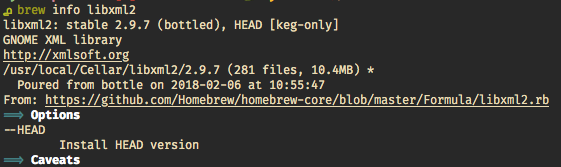
Follow steps above with the change
➜ brew reinstall libxml2
➜ brew link libxml2 --force
 salmanulfarzy
on 6 Feb 2018
salmanulfarzy
on 6 Feb 2018
I don't know why there're so many ways!
For me uninstalling 'libxml2' and then installing 'uwsgi' worked.
brew uninstall libxml2
pip install uwsgi
brew install libxml2
After installing 'libxml2' don't forget to link it!
 nosratullah
on 30 Apr 2020
nosratullah
on 30 Apr 2020
Related issues
 GaretJax
·
7Comments
GaretJax
·
7Comments
 haytham-salhi
·
3Comments
haytham-salhi
·
3Comments
 ercwyne
·
4Comments
ercwyne
·
4Comments
 adamhadani
·
4Comments
adamhadani
·
4Comments
 vlcinsky
·
3Comments
vlcinsky
·
3Comments
Most helpful comment
Hi Guys
In this way, it worked for me...
brew unlink libxml2brew uninstall libxml2then
brew install --with-python libxml2brew link libxmls2 --forcepip install uwsgiPossibly it might work just running the command:
brew install --with-python libxml2