Userland: Firefox black screen issue
Bug:
Firefox showing black screen on startup only the header provided by wm is visible everything else is black
Distribution installed: Ubuntu
Android version 7.1
Proot debug log: https://drive.google.com/file/d/16aMDGagVRTVBn_ubUysuPYfHzzSmR1lb/view?usp=drivesdk
This is some sort of graphics issue related to firefox.
 saurabh6377
All 40 comments
What device do you have?
 corbinlc
on 7 Dec 2018
corbinlc
on 7 Dec 2018
Did you click the firefox app? If so, that creates and uses a Debian filesystem.
OR
Did you install and then launch firefox from inside an Ubuntu filesystm? If so, did the screen go black after you ran firefox & or whatever?
I am not see the same issue, so please provide more info so I can replicate it. Maybe a screen shot could help too.
corbinlc
on 7 Dec 2018
Likely caused by /dev/shm missing
 robsmith11
on 8 Dec 2018
robsmith11
on 8 Dec 2018
I probably have the same issue.
I have installed and started (using bVNC and XSDL) the lxde desktop.
I think firefox, among other applications, will be installed during the installation of the lxde desktop.
When I start firefox, the window frame is Ok. But the content of the window is just Black.
I would like to take a screenshot but I do not have the device with me.
I am using a Nexus 7 LTE 2nd Gen.
 oscar-renteria
on 10 Jan 2019
oscar-renteria
on 10 Jan 2019
how do I get /dev/shm working?
 lewisdonofrio
on 16 Jan 2019
lewisdonofrio
on 16 Jan 2019
Firefox just needs it to exist. You just need to create the directory. Ideally mount it as tmpfs as well.
robsmith11
on 16 Jan 2019
so you can mkdir /dev/shm (cause I thought the devtree was something the bootup/kernel manages - granted were usermode so no kernel 'persay' but....)
lewisdonofrio
on 16 Jan 2019
Yes, mkdir will work if you're root
robsmith11
on 17 Jan 2019
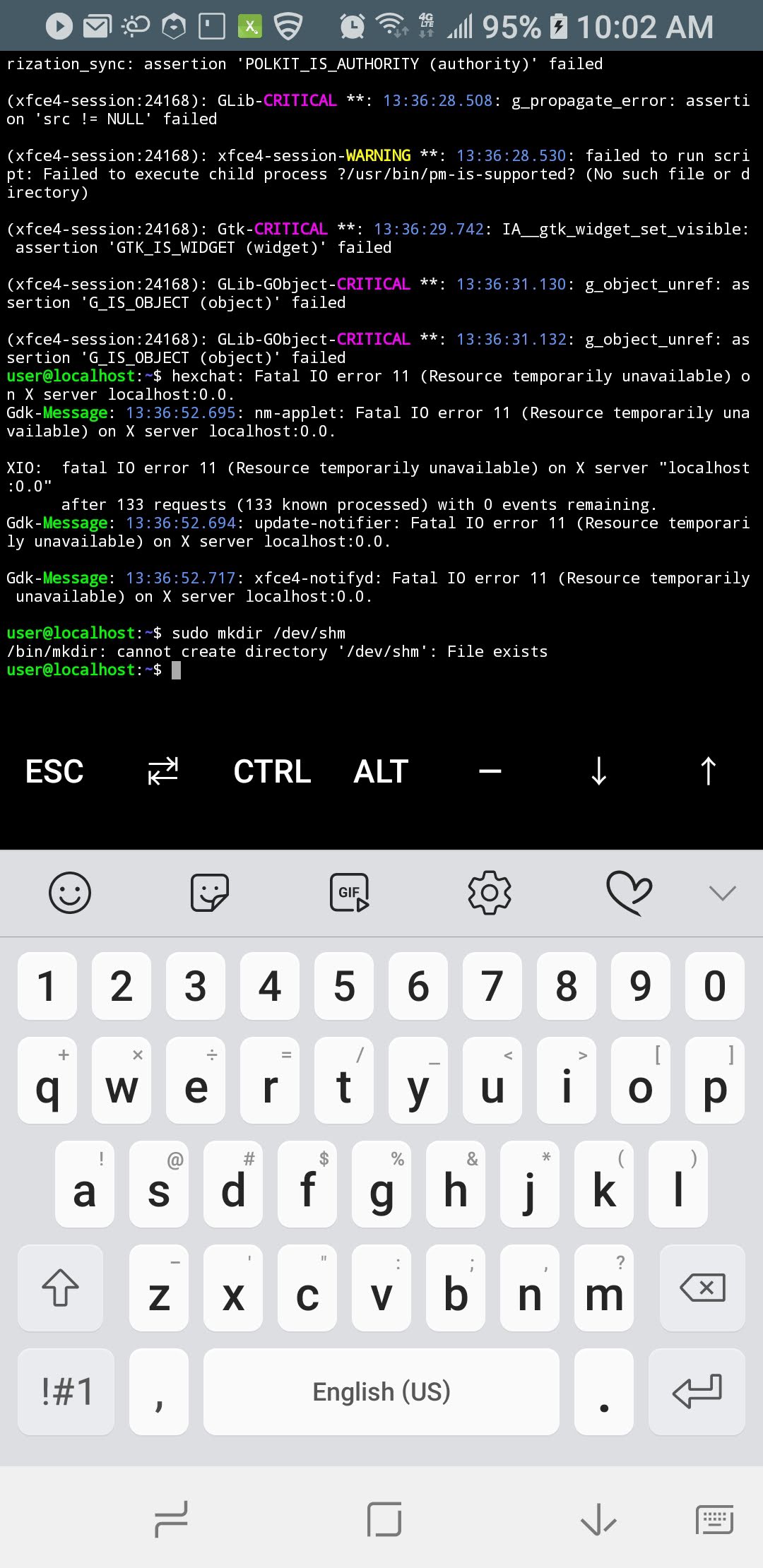
@robsmith11 directory/file already exists (do you run userland or just applying normal linux logic here?)
lewisdonofrio
on 17 Jan 2019
Hmm.. not sure. I haven't tried this in a while and it was on an old tablet.
I don't know what you mean by userland. Maybe check that /dev/shm is writable by the user who is running Firefox.
Using strace/ltrace may help identify the problem.
robsmith11
on 17 Jan 2019
UserLAnd is this exact project, how do you reply and not know userlan?
lewisdonofrio
on 17 Jan 2019
Haha opps. I think I tried this project a few months ago and that's how I ended up subscribed to this issue.
I had the same issue running Firefox in all environments, so I assumed the problem was the same. Could be something else going on specific to userland. IIRC, I ended up running Firefox in a standard chroot of Arch Arm Linux (on Android 8.1).
robsmith11
on 17 Jan 2019
So how would I fix this directory issue so firefox will run?
lewisdonofrio
on 21 Jan 2019
I try this but it will not mount something about readonly: need this then I'll be good
https://bugzilla.mozilla.org/show_bug.cgi?id=1450169
lewisdonofrio
on 1 Feb 2019
moreover I try this:
sudo mount -t tmpfs tmpfs /dev/shm
and it returns
"mount: /dev/shm: cannot mount tmpfs read-only."
HELP ;)
lewisdonofrio
on 1 Feb 2019
you need root access and userLAnd does not support it yet.
 EnderNightLord-ChromeBook
on 1 Feb 2019
EnderNightLord-ChromeBook
on 1 Feb 2019
can you add a distro/asset that would allow for chroot to change this or something else, cause I guess this is all that is needed to get FF to work.....
lewisdonofrio
on 1 Feb 2019
You will have to talk to one of the devs. But I did hear it was on their agenda, but it wasn't their top priority. So using root may come in this year a bit later.
EnderNightLord-ChromeBook
on 1 Feb 2019
We should be able to get firefox working without real root access, as it already works in debian and some people have said it worked for them (I have not investigated). Support for shared memory, which is important for a lot of things is a little bit complicated (covered in a different issue).
corbinlc
on 1 Feb 2019
Firefox will work once this dev directory exists...at least that is what I
read.....not talking about any other distro other ubuntu fwiw.
On Fri, Feb 1, 2019, 4:15 PM corbinlc <[email protected] wrote:
We should be able to get firefox working without real root access, as it
already works in debian and some people have said it worked for them (I
have not investigated). Support for shared memory, which is important for a
lot of things is a little bit complicated (covered in a different issue).—
You are receiving this because you commented.
Reply to this email directly, view it on GitHub
https://github.com/CypherpunkArmory/UserLAnd/issues/403#issuecomment-459870027,
or mute the thread
https://github.com/notifications/unsubscribe-auth/ADA8Hby6Zq2VpoOjdLCKS8-1Jm-nCQwjks5vJK6LgaJpZM4YoJcv
.
lewisdonofrio
on 1 Feb 2019
My firefox too only show blackscreen
I tried to download chromium its not even work too, it doesnt show up even i clicked many times.
Do you know any alternative browser will work with this???

 daizu05
on 5 Mar 2019
daizu05
on 5 Mar 2019
I've figured out a solution, checkout this post
https://github.com/Hax4us/Nethunter-In-Termux/issues/112
wget http://launchpadlibrarian.net/321038372/firefox_53.0.3+build1-0ubuntu0.16.04.2_arm64.deb
dpkg -i firefox_53.0.3+build1-0ubuntu0.16.04.2_arm64.deb
 Xnehaxixh
on 27 Mar 2019
Xnehaxixh
on 27 Mar 2019
I've figured out a solution, checkout this post
Hax4us/Nethunter-In-Termux#112
wget http://launchpadlibrarian.net/321038372/firefox_53.0.3+build1-0ubuntu0.16.04.2_arm64.deb
dpkg -i firefox_53.0.3+build1-0ubuntu0.16.04.2_arm64.deb
We should be able to get
firefoxworking without real root access, as it already works in debian and some people have said it worked for them (I have not investigated). Support for shared memory, which is important for a lot of things is a little bit complicated (covered in a different issue).
Has there been any improvement on getting firefox to run properly without /dev/shm ? i have found as far as userland goes, the debian chroot with lxde runs firefox fine. however running the ubuntu chroot the xfce4 doesnt allow firefox to display properly, black window with proper window frame. I have tried many of the solutions floating around many forums to no avail.
also downgrading to an older firefox is not a very good solution. i understand its the best we have right now but not recomended and also this did not work for me anyway.
 TungstenCarbideProjectile
on 10 Apr 2019
TungstenCarbideProjectile
on 10 Apr 2019
Here are the instructions on how to make Firefox work on Ubuntu in UserLAnd....
https://github.com/CypherpunkArmory/UserLAnd/wiki/FAQ#installing-firefox-on-ubuntu
corbinlc
on 17 Sep 2019
Thank you that is very helpful
TungstenCarbideProjectile
on 18 Sep 2019
I am seeing this issue with latest userland. Install userland, select lxde, let it install and set everything up, launch firefox-esr, black screen. I'm using pixel 3 on Android 10 using userland 2.6.5. Says can't use/find/permission for /dev/shm.
 nightshade427
on 23 Nov 2019
nightshade427
on 23 Nov 2019
I am seeing this issue with latest userland. Install userland, select lxde, let it install and set everything up, launch firefox-esr, black screen. I'm using pixel 3 on Android 10 using userland 2.6.5. Says can't use/find/permission for /dev/shm.
Unfortunately i face the same issue. Debian with lxde was always fine but not anymore
TungstenCarbideProjectile
on 24 Nov 2019
Yep, me too. 60 ESR was working fine with Debian, but the upgrade to 68 ESR triggered the black screen again.
robsmith11
on 25 Nov 2019
Same setup as @nightshade427, same result too.
 CandleHater
on 26 Nov 2019
CandleHater
on 26 Nov 2019
Same issue, is there a way we can reinsta Firefox from scratch
 victorelloveth
on 27 Nov 2019
victorelloveth
on 27 Nov 2019
This should not be closed. It is not Ubuntu-specific. I have the same problem on Debian on Android 7.1.1 on a Levovo Yoga Yab 3 Plus.
In UserLand, I selected Xfce and Lxde under Apps. I tried each with XSDL and bVNC. Firefox-esr loads but renders a window border filled in with black and throws an error that it cannot access /dev/shm.
I tried purging Firefox and installing an old version. I do not remember the process I used (the processes mentioned here for Ubuntu did not work, and old versions are not easy to find). I ended up being able to load Firefox without a black screen, but then the tabs crashed immediately every time, so I did not even find a good workaround by installing an old version.
 rcragun
on 13 Dec 2019
rcragun
on 13 Dec 2019
midori works :)
sudo apt-get midori
 jbirbal-skydom
on 23 Dec 2019
jbirbal-skydom
on 23 Dec 2019
I also have this issue since firefox-esr-68.2.0 (possibly before, but version initially installed in mid-October was OK, whatever that was) on Samsung Galaxy S10 5G / Android 9 and 10. Debian/vnc session, using fluxbox rather than one of the featured DEs.
On my system /dev/shm is a regular directory, files can be saved in it but the dir itself cannot be deleted: any command including sudo rm -rf responds "Directory not empty" (even after deleting all files in it). It's also not possible to mount a tmpfs there (although I don't think any mount command works anyway):
$ sudo mount -t tmpfs tmpfs /dev/shm
mount: /dev/shm: mount(2) system call failed: Function not implemented.
NB. @corbinlc has not joined in discussion of /dev/shm as a tmpfs mountpoint above so I don't know whether this is at all relevant, but I'm detailing it just in case.
I don't understand how the information in the FAQ link posted above the closure of this issue is supposed to help: it just describes how to install firefox-esr.
Clearly this issue is still unresolved - do I understand correctly that it depends on other work being done to support SHM? From #871 - "This has been a long running issue. We now support shared memory, so we need to investigate what is remaining to support new versions of firefox on ubuntu."
 headbank
on 31 Dec 2019
headbank
on 31 Dec 2019
Can you please revisit this issue? Firefox-ESR is no longer an option as it's been updated to v68 now, and I need a more recent version of Firefox anyway. I've tried messing with shm and finding ways to disable hardware acceleration, but Firefox still doesn't work.
 japzone1
on 21 Feb 2020
japzone1
on 21 Feb 2020
you got to force version firefox 59.0.2 in order to make FF work, I did in Synaptic and it works now. You also have to lock the version otherwise it will upgrade next time and stops working.
 nakele
on 20 Mar 2020
nakele
on 20 Mar 2020
Pleased to note that this issue has gone away with current userLAnd and current firefox-esr on Debian, on my Galaxy S10 5G (which has itself had updates since last I looked at this, so maybe it's that). Firefox window renders normally under bVNC and XSDL.
headbank
on 18 Jul 2020
I agree I now have firefox with all my addon's synced up like a whole real desktop but in my pocket, well with my foldable Bluetooth keyboard makes up my whole "road warrior" setup.
lewisdonofrio
on 21 Jul 2020
@headbank @lewisdonofrio does synaptic work on the updated userland?
nakele
on 25 Jul 2020
@nakele sorry can't say, I just use apt in the console.
Were you getting the same (black-window) bug with Synaptic? If so that might affect/have affected all GTK+ apps, I'd assume...(?) FWIW, I had no such bug with Thunar (only GTK+ app that comes to mind) previously or now.
headbank
on 25 Jul 2020
@nakele sorry can't say, I just use apt in the console.
Were you getting the same (black-window) bug with Synaptic? If so that might affect/have affected all GTK+ apps, I'd assume...(?) FWIW, I had no such bug with Thunar (only GTK+ app that comes to mind) previously or now.
No, it's something with Userland version above 2.4
nakele
on 25 Jul 2020
Related issues
 lapsio
·
4Comments
lewisdonofrio
·
4Comments
lapsio
·
4Comments
lewisdonofrio
·
4Comments
 denomparkour
·
4Comments
denomparkour
·
4Comments
 DevelopedLogic
·
7Comments
DevelopedLogic
·
7Comments
 jgiddens
·
6Comments
jgiddens
·
6Comments
Most helpful comment
I am seeing this issue with latest userland. Install userland, select lxde, let it install and set everything up, launch firefox-esr, black screen. I'm using pixel 3 on Android 10 using userland 2.6.5. Says can't use/find/permission for /dev/shm.