Userland: Postgresql tools not configuration properly.
Postgresql create new postgres user . That is to say postgresql when make a config file it show error ===>
pg_createcluster 9.6 main --start
Creating new cluster 9.6/main ...
config /etc/postgresql/9.6/main
data /var/lib/postgresql/9.6/main
locale en_US.UTF-8
Flags of /var/lib/postgresql/9.4/main set as -------A-----e-C
FATAL: could not create shared memory segment: Function not implemented
DETAIL: Failed system call was shmget(key=1, size=40, 03600).
child process exited with exit code 1
initdb: removing contents of data directory "/var/lib/postgresql/9.6/main"
Error: initdb failed
SysV shared memory support need. But android intentionally does not.
Termux is app which is did perfectly
libandroid-shmem will solve problem
Steps to reproduce the behavior:
Device: [Wolton rm3s]
Android Version: [naoget 7.0]
UserLAnd Version [letest]
 yeasin6152
All 29 comments
i have same issue .
Device - Redmi 4
Android version - 7.1.2 N2G47H
 Anonymous1p
on 19 Sep 2018
Anonymous1p
on 19 Sep 2018
I will not be able to install metasploit if this issue will not be solve
Anonymous1p
on 19 Sep 2018
Just letting you know that I am working on this. Neither the Termux solution (not appropriate for chroots) nor the original solution used by Debian No Root and the XSDL Server (not full featured enough) solve this. I have created a new version that has the best of both that I am playing with. I am not sure how close I am to solving this, but I think it is pretty close.
 corbinlc
on 26 Sep 2018
corbinlc
on 26 Sep 2018
Thanks, we are waiting.....
yeasin6152
on 26 Sep 2018
This is actually a really nasty issue. The code for working around android's lack of shared memory needs to get compiled vs glibc to work in the chroot, which requires some changes. Okay done. glibc uses semaphores to lock and unlock mutex (which happens in that code), but Android's kernel doesn't support the system calls related to semaphores. So we need to emulate semaphores in PRoot. PRoot can do this, since it can see all the processes under it. Just lifting the kernel code and putting it into PRoot causes a dependency nightmare that will take a very long time to sort out. Analyzing and recreating the same functionality from scratch will also take a long time. I am not going to be able to solve this right away. But, I am not going to let this die and I think it is achievable, but it is going to be hard.
corbinlc
on 28 Sep 2018
Ok, thanks to replay, please do this something. I think you will be solve
this problem. Thank you...
On Sat, Sep 29, 2018, 2:45 AM corbinlc notifications@github.com wrote:
This is actually a really nasty issue. The code for working around
android's lack of shared memory needs to get compiled vs glibc to work in
the chroot, which requires some changes. Okay done. glibc uses semaphores
to lock and unlock mutex (which happens in that code), but Android's kernel
doesn't support the system calls related to semaphores. So we need to
emulate semaphores in PRoot. PRoot can do this, since it can see all the
processes under it. Just lifting the kernel code and putting it into PRoot
causes a dependency nightmare that will take a very long time to sort out.
Analyzing and recreating the same functionality from scratch will also take
a long time. I am not going to be able to solve this right away. But, I am
not going to let this die and I think it is achievable, but it is going to
be hard.—
You are receiving this because you authored the thread.
Reply to this email directly, view it on GitHub
https://github.com/CypherpunkArmory/UserLAnd/issues/256#issuecomment-425560870,
or mute the thread
https://github.com/notifications/unsubscribe-auth/AkGYFBcJQ219hv5DMXKd1V1rAzWU6W1Hks5ufoqCgaJpZM4WsV_4
.
yeasin6152
on 30 Sep 2018
Just do it guys already.
 Marcus0086
on 18 Jan 2019
Marcus0086
on 18 Jan 2019
@Marcus0086, as mentioned this is a difficult problem. We haven't done anything further on it, but it is still on the roadmap. I do not have an expected completion date. If you have any ideas on how to help with the problem, you may provide them.
corbinlc
on 18 Jan 2019
@corbinlc as you mentioned in your comment about android shared memory issue and yesterday i was reading about ashmem. Maybe it should help. Hmm! I don't know.
Marcus0086
on 21 Jan 2019
Hey @corblnlc I've found something.
"wget https://raw.githubusercontent.com/EXALAB/AnLinux-Resources/master/Library/Ashmem/aarch64/libandroid-shmem.so -P /usr/local/lib"
Then use "env LD_PRELOAD="/usr/local/lib/libandroid-shmem.so" pg_createcluster 11.1 main --start"
Marcus0086
on 21 Jan 2019
I have to set semaphores working in proot to be able to use libandroid-shmem
corbinlc
on 1 Feb 2019
initdb failed..
I try to type pg_createcluster 11 main --start but fail

Please solve this problem
yeasin6152
on 10 Mar 2019
+1
 jancelin
on 26 Mar 2019
jancelin
on 26 Mar 2019
@corbinlc do you think some financial support or manpower could help you on this topic ?
 mdouchin
on 27 Mar 2019
mdouchin
on 27 Mar 2019
Either one could be used here, but I think manpower is more practical. Our core team is all paid salary, but is small (5 people) and is stretched across multiple projects. So, if we raised enough money to get another resource that could be possible, but talented people are expensive and that person would also be distracted by the other work we have going on. More realistically, if a person was willing, self motivated and talented, especially in low level C and linux, then they could help out here. I think I know what needs to be done and at least trying it out shouldn't take too long for the right person. We would eventually get to it, but you can see how long it has already been an open issue.
corbinlc
on 27 Mar 2019
@corbinlc
With termux, I successfully installed and ran postgresql 11 on TV BOX (magic box m16s, CPU Amlogic S912, android 6, no root).
However, in the same TV BOX, with termux-ubuntu and UserLAnd's ubuntu, I can't install postgresql, all stopped at "selecting default max_connections ...".
With Linux Deploy, I successfully installed and ran postgresql 9 on my phone (ARMv71, android 5.1, rooted), following the prompts: https://github.com/meefik/linuxdeploy/issues/13 .
 chan-github
on 4 Apr 2019
chan-github
on 4 Apr 2019
Hello there;same problem here...whem i try to start postgresql db for msf ...
 reksores
on 20 Apr 2019
reksores
on 20 Apr 2019
I have just released a new version of proot that has basic support for these system calls not supported by android:
shmget
shmat
shmdt
shmctl
semget
semctl
semop
These are what is needed for shared memory support and semaphore support. The next time you launch an app/distro/session you should see that it downloads new support files (only a couple of MB worth). After that, sudo apt install postgresql works for me.
Check it out. If something is not working, please give me a specific set of commands to reproduce in a new issue.
Note: I noticed a shared memory hello world work perfectly. I also noticed that a hello world for postgresql worked, but I noticed I had to chmod some files based on some warning thrown out to make it happy. This is probably not normally necessary, but we no longer fully emulate file/dir ownership. Also note, I only implemented the features of the above system call that were required to get this working, there is more work to do to fully support the above system calls, especially shmctl, semctl and semop.
corbinlc
on 17 May 2019
Working! Thanks
jancelin
on 18 May 2019
@corbinlc amazing work done here !!!
mdouchin
on 18 May 2019
Thanks, it was a pain.
corbinlc
on 18 May 2019
@yeasin6152 did you solve the postgresql problems
 sabri-zaki
on 25 May 2019
sabri-zaki
on 25 May 2019
I've fixed it by editing /etc/postgresql/11/main/postgresql.conf:
data_directory = '/var/lib/postgresql/11'
In other words, remove main from the data_directory and reinit.
 infosecabaret
on 16 Sep 2019
infosecabaret
on 16 Sep 2019
i can't find that file destination I can't edit it
and it's just /etc/postgresql/ that's it no other files
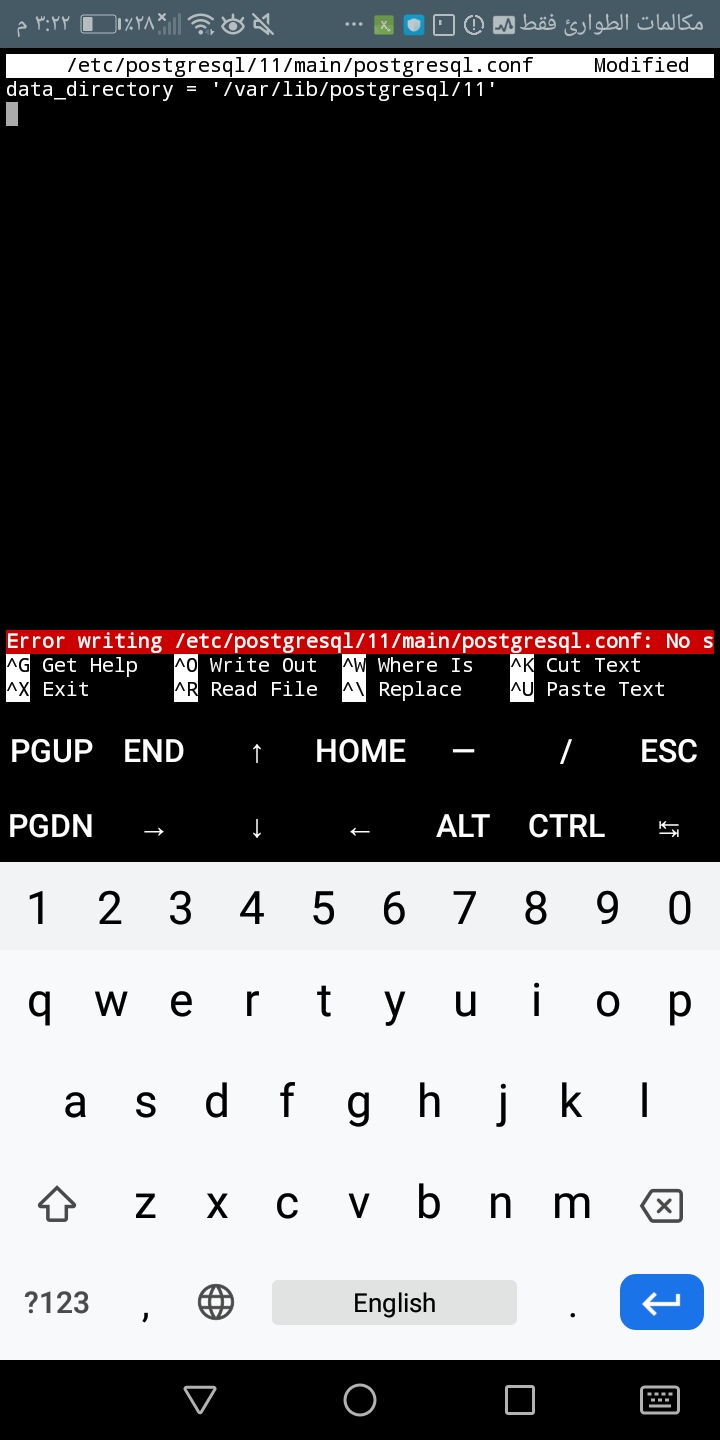
I've fixed it by editing
/etc/postgresql/11/main/postgresql.conf:data_directory = '/var/lib/postgresql/11'In other words, remove
mainfrom thedata_directoryand reinit.
 hamody-114
on 22 Dec 2019
hamody-114
on 22 Dec 2019
problem fixed by adding the files by my self except postgresql.conf file then pg_createcluster 11 main --start then it will work for you.
hamody-114
on 22 Dec 2019
Hey @hamody-114 can you elaborate a lil bit what exactly you did? I am having same issue and there are no files inside /etc/postgresql folder
 andy1729
on 26 Dec 2019
andy1729
on 26 Dec 2019
hey @andy1729 so here some details from what i did:
i found that there is no files in /etc/postgresql so i added them by my self i add the version file of postgresql-11 /etc/postgresql/11 then add main file /etc/postgresql/11/main/ then edit the file as @infosecabaret said just add it to main file and then after mkdir the files run cd /etc/postgresql/11/main/ then su postgres then pg_createcluster 11 main --start then wait and it will be done
note: mention me if anything is wrong ;).
 hamody114
on 27 Dec 2019
hamody114
on 27 Dec 2019
I think i have solution...postgresql database problem for metasploit......
Plz take steps step by step
- sudo apt-get update && sudo apt-get install upgrade -y
- ( External command). sudo apt-get install apt-utils dialog nano mc -y
- sudo apt-get install metasploit-framework -y
- file_version=$(apt-cache depends postgresql | grep "Depends" | cut -d':' -f2 | cut -d'-' -f2)
- pg_createcluster "${file_version}" main --start
- sudo chmod 0600 /etc/ssl/private/ssl-cert-snakeoil.key
- pg_ctlcluster "${file_version}" main start
( Please verify main database start or not for type command pg_lsclusters .. if you see that line in green color you will be sure main database is online... 12 main 5432 down yeasin /var/lib/postgresql/12/main /var/log/postgresql/postgresql-12-main.log)
pg_ctlcluster "${file_version}" main stop
pg_createcluster --user=$(whoami) --encoding=UTF8 "${file_version}" msf -- --username=$(whoami) --auth-host=trust --auth-local=trust
- pg_ctlcluster "${file_version}" msf start
- msf_ver=$(dpkg -s metasploit-framework | grep "Version" | cut -d" " -f2 | cut -d'.' -f1)
- mkdir -v -p ~/.msf"$msf_ver"
- touch ~/.msf"$msf_ver"/database.yml
- Type data in database.yml
development: &pgsql
adapter: postgresql
database: msf
username: msf
password: Password123
host: 127.0.0.1
port: $msf_port
pool: 200
production: &production
<<: *pgsql
test:
<<: *pgsql
database: msftest
username: msftest
password: Password123
And save database.yml file
- psql --cluster "$file_version"/msf -c "create user msf with password 'Password123';" postgres
- psql --cluster "$file_version"/msf -c "alter role msf createdb;" postgres
- psql --cluster "$file_version"/msf -c "alter role msf with password 'Password123';" postgres
- createdb --cluster "$file_version"/msf -O msf -h 127.0.0.1 -U msf -E UTF-8 -T template0 msf
- pg_ctlcluster "${file_version}" msf stop
- pg_ctlcluster "${file_version}" msf start
- cd /usr/share/metasploit*
- bundle exec rake db:migrate
After then run msfconsole
Finally type command db_status and you see to connect postgresql database...
Thanks to all
yeasin6152
on 8 Apr 2020
See #1300 for a bug on Android 10 . Please try on your side and comment on #1300
mdouchin
on 10 Nov 2020
Related issues
 foodmaher
·
8Comments
foodmaher
·
8Comments
 jgiddens
·
6Comments
jgiddens
·
6Comments
 lewisdonofrio
·
4Comments
lewisdonofrio
·
4Comments
 mkevinam
·
4Comments
mkevinam
·
4Comments
 Enzycal
·
7Comments
Enzycal
·
7Comments
Most helpful comment
Thanks, it was a pain.