Userland: Create a new filesystem on a SD card
Hello!
Is it possible to create a new filesystem on a External storage?
Or add the ability to move the application to the external SD card entirely?
Thanks a lot!
 glebone
All 16 comments
That's something I'd also like to address.
I'm aware there's significant problem with sdcard filesystems because afaik Android doesn't allow to change permissions or modification dates on sdcard (to the past, modification to current date should work) and it's something GNURoot never managed to solve either, but maybe something changed in this matter? Or you could emulate permissions and dates on sdcard?
 lapsio
on 7 Aug 2018
lapsio
on 7 Aug 2018
This feature worked in GNU Root Debian, and I really miss SD card image storing feature there. Since UserLAnd supports multi filesystem, it simply drains my device internal memory.
glebone
on 7 Aug 2018
@glebone GNU Root Debian always suffered from serious issues with permissions so it's hard to call it "working feature". For example making script stored in /home executable on permissions level (0777) was impossible iirc. It had some basic permissions emulation for other mountpoints (like /usr/bin) but basically permissions and modification dates handling was mess. A lot of programs which required modification date or permission changes simply crashed under GNURoot. That includes many installation scripts which were calling chmod 755 on script and then executing it as executable file. It's something I didn't experience with UserLAnd, even though I installed the same programs in the same way. It's much more compatible on chmod / chown / utime level with actual linux.
I believe it's exactly because files are not stored on sdcard so probably UserLAnd has more control over permissions on Android level than it would have if files were stored on sdcard.
Still having some emulation for sdcard would be nice feature that would allow "offloading" for example /home or /etc to sdcard.
lapsio
on 7 Aug 2018
@lapsio Thanks for the detailed answer! Agree, at least mounting some directories from the SD card would be useful
glebone
on 7 Aug 2018
I had a working, but very complicated and expensive PRoot extension that I worked on in the past. I may work on this again in the future, but it is honestly not the top of my list. That extension put everything except the support files (busybox, proot, etc) on the sdcard and then if it saw you were possibly going to execute something else, it would move it to internal storage. I think it reduced the amount of internal storage needed in normally cases by something like 75% (don't remember exactly, but it was big). But, it involved a lot of management and caused a noticeable hit to performance whenever you ran something new that wasn't already move to internal storage. I also did a different version that push the files back to the sdcard after executing, but that was even more expensive and you took the hit every time you executed, so having it not push back to the sdcard seemed like the right choice as it got you most of the savings. At best this would be a user choice and not default behavior given the impact.
 corbinlc
on 29 Aug 2018
corbinlc
on 29 Aug 2018
@corbinlc userland-exec was a program which managed to do so in past. It emulated just execve system call. But recent changes in kernel broke it and perhaps it was for x86 or x86_64 instruction sets. now a modified source supposed to work is available. But it might need lot of tweaking to work.
Untill then, perhaps qemu/bochs may run using images on SD card, but rather slowly. On the command line, the emulation might be tolerable.
I had an idea of removing dynamic translation overhead from qemu-system-arm. But I don't even know whether it is feasible.
 projectextremum
on 23 Nov 2018
projectextremum
on 23 Nov 2018
@projectextremum I had a working, but not well tested, Proot extension to solve this, but it was really expensive. Effectively it copied file to internal storage when needed. I like the idea of userland-exec. Where is this project being discussed as I see a few things with that name and am not familiar with it?
corbinlc
on 27 Nov 2018
Is it possible to download the linux system on sdcard ? I do not have enough internal memory so the app cannot run on my phone...
 badrow
on 10 Dec 2018
badrow
on 10 Dec 2018
I am also interested in this. Is there an update?
 ncodeyx
on 5 May 2019
ncodeyx
on 5 May 2019
I'm also interested!(2) I buy a 128GB SDXC today for use with UserLand, but i can't move :)
 Miqueloti
on 8 Aug 2019
Miqueloti
on 8 Aug 2019
Same, can't move to SD Card. Critically needed for an 8GB device. I need an SD Card to enjoy effective Linux experience.
 EoflaOE
on 11 Aug 2019
EoflaOE
on 11 Aug 2019
bumped into this limitation as well.
i'm not familiar with Android restrictions, but has anyone considered the option of creating a filesystem inside a file on the sdcard, and then mounting the file? or is that impossible in android without root?
 altergui
on 28 Sep 2019
altergui
on 28 Sep 2019
Same problem here, I don't have much internal memory but I have a 64GB SD card that would be great for installing all these apps.
Would a disk image like altergui is talking about work?
 Wiiplay123
on 28 Jan 2020
Wiiplay123
on 28 Jan 2020
I think you can in kali
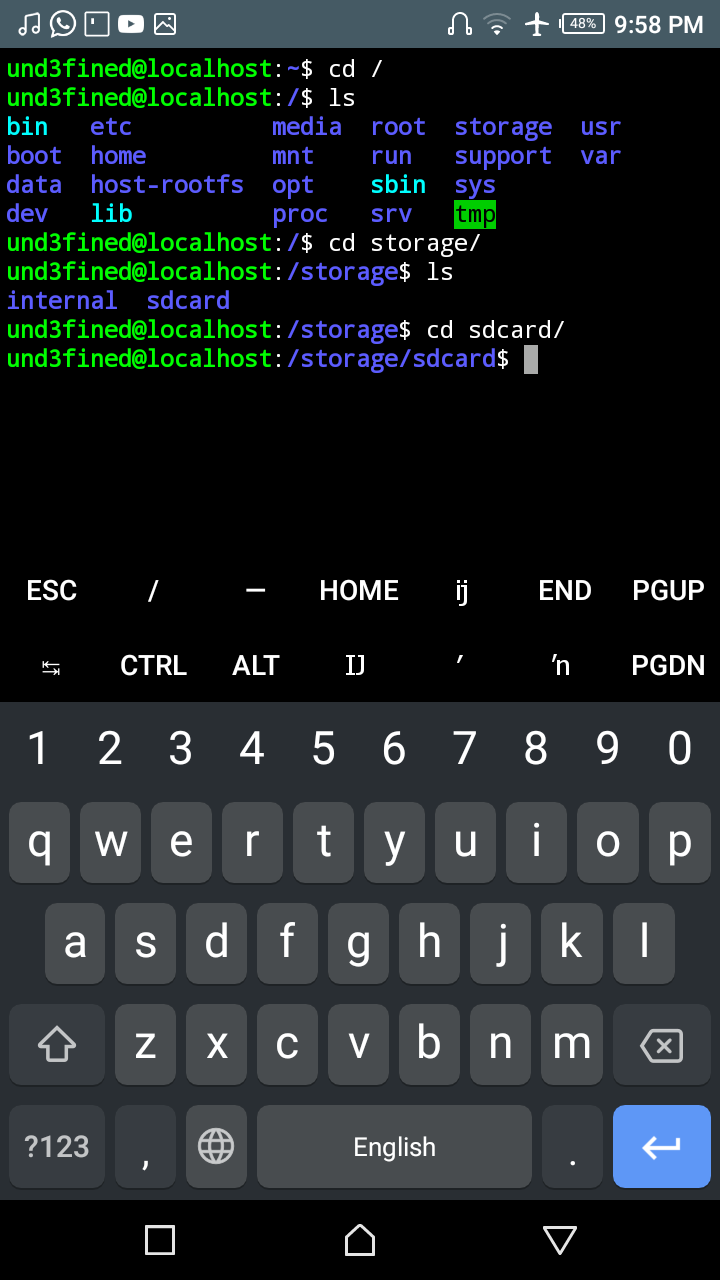
 und3fined404
on 7 Feb 2020
und3fined404
on 7 Feb 2020
I think you can in kali
Enter ls and u will see ur sdcard and internal will be emtpy. So its not a help or solution
 up2smoke
on 13 Feb 2020
up2smoke
on 13 Feb 2020
Hey there, this is an issue in repository AnLinux for external storage supporting , anyone knows is it useful for UserLAnd?
 ciaoly
on 7 Oct 2020
ciaoly
on 7 Oct 2020
Related issues
 ghost
·
7Comments
ghost
·
7Comments
 mkevinam
·
4Comments
mkevinam
·
4Comments
 jgiddens
·
6Comments
jgiddens
·
6Comments
 DevelopedLogic
·
7Comments
DevelopedLogic
·
7Comments
 laem
·
5Comments
laem
·
5Comments
Most helpful comment
I had a working, but very complicated and expensive PRoot extension that I worked on in the past. I may work on this again in the future, but it is honestly not the top of my list. That extension put everything except the support files (busybox, proot, etc) on the sdcard and then if it saw you were possibly going to execute something else, it would move it to internal storage. I think it reduced the amount of internal storage needed in normally cases by something like 75% (don't remember exactly, but it was big). But, it involved a lot of management and caused a noticeable hit to performance whenever you ran something new that wasn't already move to internal storage. I also did a different version that push the files back to the sdcard after executing, but that was even more expensive and you took the hit every time you executed, so having it not push back to the sdcard seemed like the right choice as it got you most of the savings. At best this would be a user choice and not default behavior given the impact.