User.js: updater.bat suddenly stopped working
Hello. Today I tried running the updater.bat but now I get:
Retrieving latest user.js file from github repository...
Update failed. Make sure PowerShell is allowed internet access.
No changes were made.
I have no idea what causes this now, the script worked as intended only a couple of days ago and I haven't made any changes to my computer recently. I never even touched PowerShell, let alone denied it internet access, because I don't even know how to do that. Anyone got any idea how to deal with this? I'm practically tech illiterate. Only thing I could find is this comment from 2018: https://www.ghacks.net/2017/12/29/automation-comes-to-the-ghacks-user-js-configuration-for-firefox/#comment-4334066 but that didn't help either because I don't have any AV installed.
So what's the next best way to update the user.js for me now? Download it directly from the repository and run prefsCleaner.bat afterwards? Is this the same?
 g-2-s
g-2-s
All 44 comments
Sorry for the delay. I don't use the updater myself, and haven't had anything to do with it's creation. Hopefully someone will be along shortly to help
Are you using the lastest version of the updater.bat
- here is the current
rawfile
As for updating manually. When did you last update? Where do you keep your user overrides?
 Thorin-Oakenpants
on 19 Jan 2021
Thorin-Oakenpants
on 19 Jan 2021
Sorry for the delay. I don't use the updater myself, and haven't had anything to do with it's creation. Hopefully someone will be along shortly to help
Are you using the lastest version of the
updater.bat* [here](https://raw.githubusercontent.com/arkenfox/user.js/master/updater.bat) is the current `raw` file
Yes, I am using the latest version.
As for updating manually. When did you last update? Where do you keep your user overrides?
Last successful update was 07-01-2021 when I created a new Firefox profile. Also didn't have any problems updating the user.js on my main profile.
I keep my user-overrides.js in my profile root directory, always have.
I think the problem may be on my end but I actually have no idea what is causing this.
So for manual updating, what do you recommend I do? Does the prefsCleaner.bat need internet access too?
g-2-s
on 19 Jan 2021
OK, so a relatively clean profile. That helps
What I would do is
- download the repo zip file - https://github.com/arkenfox/user.js/archive/master.zip
- rename the current user.js to
user_backup.jsor something (or delete it) - place the current user.js in your profile (from the zip)
- update anything else you want like prefsCleaner.bat etc
- at the end of the user.js manually append your overrides (from your copy of user-overrides.js)
- run prefsCleaner - close FF first
- start FF
I don't think you need to worry about any old prefs that were removed [edit: i.e removed from the user.js and thus prefsCleaner will not pick up on them], since your profile is pretty new, but you could run the scratchpad script, or just check for the following items, and reset them in about:config
Thorin-Oakenpants
on 19 Jan 2021
OK, so a relatively clean profile. That helps
What I would do is
* download the repo zip file - https://github.com/arkenfox/user.js/archive/master.zip

* rename the current user.js to `user_backup.js` or something (or delete it)

* place the current user.js in your profile (from the zip)

* update anything else you want like prefsCleaner.bat etc

* at the end of the user.js manually append your overrides (from your copy of user-overrides.js)

* run prefsCleaner - close FF first

* start FF
I don't think you need to worry about any old prefs that were removed [edit: i.e removed from the user.js and thus prefsCleaner will not pick up on them], since your profile is pretty new, but you could run the scratchpad script, or just check for the following items, and reset them in about:config
Alright, this seems easy enough to do even for a newbie like myself.
Thank you so much for your help.
g-2-s
on 19 Jan 2021
no worries - if you have any problems, sing out .. and if/when you work out what is blocking power shell from accessing the internet, let us know
Thorin-Oakenpants
on 19 Jan 2021
reopening .. @potassiumchloride in #1093 said
Hello,
since I couldn't re-open issue #1092, I started a new one.
Since yesterday I also face exactly the same problem on two Windows machines (7 and 8.1, all 64bit) as the user has reported in issue #1092:
"Update failed. Make sure PowerShell is allowed internet access."
It's the most recent version (4.12) of updater.bat and, needless to say, it has always worked without any problems since I started using ghacks/arkenfox user.js. (I update regularly.) Therefore, I believe, it is not really a problem on your side. It fails both with my regular profile and a temporary, portable profile.
Neither I have changed any Windows settings (on any of the PCs) nor I have installed additional snake oil (external virus scanner, etc.). The PCs just have Microsoft's own virus scanner (Defender, Microsoft Security Essentials) installed.
Ideas anyone?
Thorin-Oakenpants
on 19 Jan 2021
@potassiumchloride - are you using Firefox portable? edit: nvm, I should really read the whole thing before jumping in
Thorin-Oakenpants
on 19 Jan 2021
I use both: a regular installation of Firefox 84.0.2 and also the portable version. It fails in both profiles.
 potassiumchloride
on 19 Jan 2021
potassiumchloride
on 19 Jan 2021
Yeah sorry, I edited my above post (I need to learn to read fully before opening my mouth). The reason I am interested in portable, is that since 84, there are issues with paths - such as FF app updates: the portable apps guys John Halter still hasn't got it right AFAICT - but I know my manual fix (which is to always install 83 and update via the menu) .. but that's all a different story
Thorin-Oakenpants
on 19 Jan 2021
not my area, but I had a play in PS itself: I'm on windows 7
I took the line from the batch file that gets the new file, and I googled how to get a file in PS
https://github.com/arkenfox/user.js/blob/ee3e5f01863dd99e7cd485aa0be335b7d8c45fbe/updater.bat#L135-L137

but I most certainly do not get any files downloaded, period. nada, zilch, zero - but IANAExpert
maybe it's something to do with https://stackoverflow.com/questions/41618766/powershell-invoke-webrequest-fails-with-ssl-tls-secure-channel/41618979#41618979 ? IDK
Thorin-Oakenpants
on 19 Jan 2021
@Thorin-Oakenpants:
Great, excellent catch and good search! I think I know the problem because it is described in your link from stackoverflow.com! It's the "TLS bug" in powershell, we need higher TLS level:
C:\Users\XXX>powershell
Windows PowerShell
Copyright (C) 2016 Microsoft Corporation. All rights reserved.
Standard Powershell:
PS C:\Users\XXX> Invoke-WebRequest -Uri https://raw.githubusercontent.com/arkenfox/user.js/master/updater.bat
Invoke-WebRequest : The request was aborted: Could not create SSL/TLS secure
channel.
At line:1 char:1
+ Invoke-WebRequest -Uri https://raw.githubusercontent.com/arkenfox/use ...
+ ~~~~~~~~~~~~~~~~~~~~~~~~~~~~~~~~~~~~~~~~~~~~~~~~~~~~~~~~~~~~~~~~~~~~~
    + CategoryInfo          : InvalidOperation: (System.Net.HttpWebRequest:Htt
   pWebRequest) [Invoke-WebRequest], WebException
    + FullyQualifiedErrorId : WebCmdletWebResponseException,Microsoft.PowerShe
   ll.Commands.InvokeWebRequestCommand
Now we raise the TLS level:
PS C:\Users\XXX> [Net.ServicePointManager]::SecurityProtocol = [Net.SecurityProtocolType]::Tls12
And invoke the command again:
PS C:\Users\XXX> Invoke-WebRequest -Uri https://raw.githubusercontent.com/arkenfox/user.js/master/updater.bat
Taddddaaaaa, it works:
StatusCode        : 200
StatusDescription : OK
Content           : @ECHO OFF & SETLOCAL EnableDelayedExpansion
                    TITLE arkenfox user.js updater

                    REM ## arkenfox user.js updater for Windows
                    REM ## author: @claustromaniac
                    REM ## version: 4.12
                    REM ## instructions: h...
RawContent        : HTTP/1.1 200 OK
                    Connection: keep-alive
                    Content-Security-Policy: default-src 'none'; style-src
                    'unsafe-inline'; sandbox
                    Strict-Transport-Security: max-age=31536000
                    X-Content-Type-Options: nosniff
                    ...
Forms             : {}
Headers           : {[Connection, keep-alive], [Content-Security-Policy,
                    default-src 'none'; style-src 'unsafe-inline'; sandbox],
                    [Strict-Transport-Security, max-age=31536000],
                    [X-Content-Type-Options, nosniff]...}
Images            : {}
InputFields       : {}
Links             : {}
ParsedHtml        : mshtml.HTMLDocumentClass
RawContentLength  : 10701
Has github changed the minimum TLS version recently? However, the updater script needs to be updated to change the TLS level in the powershell command. This would be the solution to this issue.
[JFTR: The output from above is from the Windows 8.1 powershell.]
potassiumchloride
on 19 Jan 2021
Has github changed the minimum TLS version recently
That was my initial thought. https://github.blog/2018-02-23-weak-cryptographic-standards-removed/ - Feb 2018, but it doesn't mention githubusercontent.com
Thorin-Oakenpants
on 19 Jan 2021
fixed in updater.bat v4.13
Thanks @g-2-s for reporting the problem and thanks @potassiumchloride + @Thorin-Oakenpants for providing more infos !
 earthlng
on 19 Jan 2021
earthlng
on 19 Jan 2021
No, thank you, you guys rock!
g-2-s
on 19 Jan 2021
I assume someone tested it?
Thorin-Oakenpants
on 19 Jan 2021
Yes, with the new updater.bat v4.13 it works perfectly again now! Many thanks to @earthlng for the quick fix and to you, @Thorin-Oakenpants, for digging and finding the TLS issue!
potassiumchloride
on 19 Jan 2021
I wonder if it was me, I started to integrate Repl.it Online IDE as 3rd-party for what I thought was a different repo, but didn't complete it (as I couldn't cross-login), but it then showed itself as applied to the entire organization (arkenfox), but I removed it. Maybe that triggered a minimum TLS change on this repo organization
edit: that was _3 days ago_
Thorin-Oakenpants
on 19 Jan 2021
Damn, I was too fast and cheered too early: While the new updater.bat v4.13 worked perfectly on my Windows 8.1 machine (with a more recent powershell), it still fails with the same error on the Windows 7 computer. Hence, it seems to be fixed on Win8.1 now, but continues to throw the same error on Win7.
potassiumchloride
on 19 Jan 2021
I know this will not be constructive, but seriously... Windows 7 end-of-life was a year ago.
https://www.microsoft.com/en-US/windows/windows-7-end-of-life-support-information
Cheers
 crssi
on 19 Jan 2021
crssi
on 19 Jan 2021
I tried on the Win7 computer the following
D:\>PowerShell -Command "[Net.ServicePointManager]::SecurityProtocol = [Net.SecurityProtocolType]::Tls12; (New-Object Net.WebClient).DownloadFile('https://raw.githubusercontent.com/arkenfox/user.js/master/user.js', 'user.js.new')"
and powershell complains that only "Ssl3, Tls" are accept values; "Tls12" is thus not accepted here (but works on Win8.1 powershell).
potassiumchloride
on 19 Jan 2021
Enable SSL 1.2 over registry.
https://support.microsoft.com/en-us/help/3140245/update-to-enable-tls-1-1-and-tls-1-2-as-default-secure-protocols-in-wi
crssi
on 19 Jan 2021
Ah, you are right, @crssi, that rings a bell! I remember that ages ago I had to force (another!) Win7 computer to enable to speak TLS 1.2 to a printer. I'll try that here as well now and report back!
potassiumchloride
on 19 Jan 2021
If I remember you don't even need to reboot. All newer than Windows 7 already have those registry keys and if this works (@potassiumchloride) you might just add a PS which add those keys?
crssi
on 19 Jan 2021
I tried to use the old version of the updater to download something from another organization/repo and it doesn't work either.
So it looks like github changed something on their end and it's not just affecting our repo because Pants installed whatever that thing was.
@potassiumchloride what's the powershell version on the Win7 machine? You can check with Get-Host f.e.
FYI: [Enum]::GetNames([Net.SecurityProtocolType]) lists the supported protocols
earthlng
on 19 Jan 2021
@potassiumchloride what's the powershell version on the Win7 machine? You can check with
Get-Hostf.e.FYI:
[Enum]::GetNames([Net.SecurityProtocolType])lists the supported protocols
Here are the results from the Win7 machine:
PS D:\FirefoxPortable\Data\profile> Get-Host

Name             : ConsoleHost
Version          : 2.0
PS D:\FirefoxPortable\Data\profile> [Enum]::GetNames([Net.SecurityProtocolType])

Ssl3
Tls
In the meantime I have also searched quite a bit and found some discussions related to Windows 7, Powershell and TLS1.2, such as this, this or this. I added the registry keys which are mentioned on these web pages, but up to now there is no success and updater.bat still fails. By the way, the version of the installed .NET Framework here is 4.8.
@crssi: I checked your suggestion, but realized that the steps from the Microsoft link had already been done here on that Win7 machine, i. e. it's is not the limiting factor in this case.
potassiumchloride
on 20 Jan 2021
this returns the .net versions
Get-ChildItem 'HKLM:\SOFTWARE\Microsoft\NET Framework Setup\NDP' -Recurse | Get-ItemProperty -Name version -EA 0 | Where { $_.PSChildName -Match '^(?!S)\p{L}'} | Select PSChildName, version
I'm 4.0, and I'm going to install 5.1 from here - see what happens - edit: this application is not applicable to your computer
Thorin-Oakenpants
on 20 Jan 2021
Oh... Looks like I celebrated too soon, still not working and yes, I'm on W7 as well.
g-2-s
on 20 Jan 2021
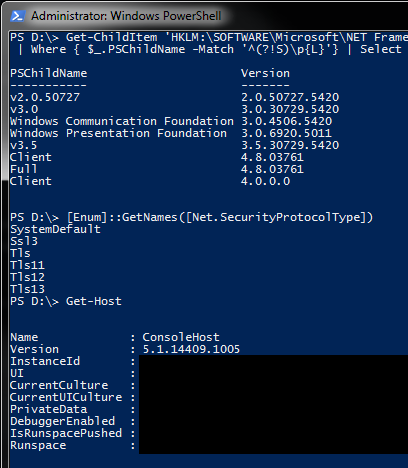
Steps
- I went here: https://www.microsoft.com/en-us/download/details.aspx?id=54616
- click on download
- choose your poison: I went for the two
Win7downloads just in case - install: i unzipped and installed the
Win7AndW2K8R2-KB3191566-x64.msufirst and then I had to reboot - results as above
Not tested, but it says I have tls shit available
Thorin-Oakenpants
on 20 Jan 2021
Steps
* I went here: https://www.microsoft.com/en-us/download/details.aspx?id=54616

* click on download

* choose your poison: I went for the two `Win7` downloads just in case

* install: i unzipped and installed the `Win7AndW2K8R2-KB3191566-x64.msu` first and then I had to reboot

* results as above
Not tested, but it says I have tls shit available
You marvelous you... ! After following step by step what you did. it finally works again! Thank you for your help, hopefully @potassiumchloride can confirm too.
g-2-s
on 20 Jan 2021
OK, so once @potassiumchloride confirms, then we can
- update the wiki re Win7 and to update to
Windows Management Framework 5.1 - in the bat file?
- check the windows version?
- check the tls version?
- on error or before error, output some stuff about updating PS/WMF? link to wiki page?
Thorin-Oakenpants
on 20 Jan 2021
Sorry for my late response. Currently I'm at work and trying to install Win7AndW2K8R2-KB3191566-x64.msu on a rather slow Win7 test machine. Unfortunately, it's stuck (since hours!) at the step of initializing the installation, thus, I'm still waiting for the process to finish. In a couple of hours I'll be at home and try again on a sufficiently "modern" ;-) Win7 machine to hopefully confirm @g-2-s's positive result.
I agree that it's a very good idea to put some additional information at the wiki concerning the minimum requirements (i. e. the manual installation of Windows Management Framework 5.1 on Win7 computers) for updater.bat, since that page is also the starting point for each new user to inform about how to handle the updater scripts. (@earthlng's recent fix made updater.bat already work again on Win8.1 machines.) Setting up (complicated) Windows version/TLS/etc checks in the updater script itself, is maybe too much work load.
potassiumchloride
on 20 Jan 2021
"Good news, everyone!" [1] I'm very happy to confirm as well that after installing Win7AndW2K8R2-KB3191566-x64.msu on Win7 (x64) updater.bat v4.13 is able to fetch the user.js. again! Interestingly, on Windows 7 also the old v4.12 works again now (after installation of Win7AndW2K8R2-KB3191566-x64.msu).
Summary:
- Win7 requires
Win7AndW2K8R2-KB3191566-x64.msuand updater.bat v4.12 or v.4.13 - Win8.1 requires only updater.bat v4.13, but no additional installation
Many thanks to @Thorin-Oakenpants, @earthlng, @crssi and @g-2-s for this joyful bug hunting! ;-)
Edit: By the way, did any of you repo people find any news/announcements from github, as they most probably changed the TLS requirements in the last days?
potassiumchloride
on 20 Jan 2021
damn, I'm just a bit too late. I was going to ask if you could try something else first before installing that update.
earthlng
on 20 Jan 2021
apparently it should be possible to coerce PS to use TLS1.2 even if the enum doesn't list it, because it passes the value directly to SCHANNEL.
From everything I gathered so far:
- TLS1.2 support came with .NET 4.5
- Windows Management Framework 5.1 also requires .NET 4.5 or higher to be installed
and since you already have .NET 4.8 I assume it should've worked to make it use TLS1.2 without needing to install anything else.
Do you maybe have access to another Win7 where you could try that, fe. at work?
steps to try in powershell:
[Enum]::GetNames([Net.SecurityProtocolType]) - check that Tls12 is not listed
Then enter [Net.ServicePointManager]::SecurityProtocol = 3072 and see what happens.
On my Win7 test machine I have .NET 4.7 and PowerShell v2 but for some reason the PS does have Tls11 and Tls12.
Therefore I don't think it's strictly necessary to update to Powershell 5.1 but maybe that's just the easiest solution, IDK.
on error or before error, output some stuff about updating PS/WMF? link to wiki page?
yeah I can do that, np.
earthlng
on 20 Jan 2021
Do you maybe have access to another Win7 where you could try that, fe. at work?
I'm going to try your suggestions on the Win7 machine at work tomorrow. That one failed to install Windows Management Framework 5.1 anyway, as I frustratingly found out today. :-)
potassiumchloride
on 20 Jan 2021
Ok, cool, thanks. Another thing you can try is apply this registry file:
Windows Registry Editor Version 5.00

[HKEY_LOCAL_MACHINE\SOFTWARE\WOW6432Node\Microsoft\.NETFramework\v2.0.50727]
"SystemDefaultTlsVersions"=dword:00000001
"SchUseStrongCrypto"=dword:00000001

[HKEY_LOCAL_MACHINE\SOFTWARE\WOW6432Node\Microsoft\.NETFramework\v4.0.30319]
"SystemDefaultTlsVersions"=dword:00000001
"SchUseStrongCrypto"=dword:00000001

[HKEY_LOCAL_MACHINE\SOFTWARE\Microsoft\.NETFramework\v2.0.50727]
"SystemDefaultTlsVersions"=dword:00000001
"SchUseStrongCrypto"=dword:00000001

[HKEY_LOCAL_MACHINE\SOFTWARE\Microsoft\.NETFramework\v4.0.30319]
"SystemDefaultTlsVersions"=dword:00000001
"SchUseStrongCrypto"=dword:00000001

[HKEY_LOCAL_MACHINE\SYSTEM\CurrentControlSet\Control\SecurityProviders\SCHANNEL\Protocols\TLS 1.2]

[HKEY_LOCAL_MACHINE\SYSTEM\CurrentControlSet\Control\SecurityProviders\SCHANNEL\Protocols\TLS 1.2\Client]
"DisabledByDefault"=dword:00000000
"Enabled"=dword:00000001

[HKEY_LOCAL_MACHINE\SYSTEM\CurrentControlSet\Control\SecurityProviders\SCHANNEL\Protocols\TLS 1.2\Server]
"DisabledByDefault"=dword:00000000
"Enabled"=dword:00000001
Put that code in a file and save it with a .reg extension, then run it and reboot. Afterwards run the PS commands again.
ps. if it's not a 64-bit Win7 remove the 2 WOW6432Node blocks
earthlng
on 20 Jan 2021
Okay, tomorrow I'm going to try the registry hack on that Win7 machine at work, too. I'll summarize the test results and report back then.
potassiumchloride
on 20 Jan 2021
Today I tried @earthlng's suggestions and here are my results from the Win7-64 test machine which has _not_ the Windows Management Framework 5.1 installed. These were my steps:
- Get powershell version:
PS C:\> get-host
Name             : ConsoleHost
Version          : 2.0
- Get the current TLS versions that are possible at the moment:
PS C:\> [Enum]::GetNames([Net.SecurityProtocolType])
Ssl3
Tls
- Get info about currently installed .Net Framework:
PS C:\> Get-ChildItem 'HKLM:\SOFTWARE\Microsoft\NET Framework Setup\NDP' -Recurse | Get-ItemProperty -Name version -EA 0 | Where { $_.PSChildName -Match '^(?!S)\p{L}'} | Select PSChildName, version

PSChildName                                                         Version
-----------                                                         -------
v2.0.50727                                                          2.0.50727.5420
v3.0                                                                3.0.30729.5420
Windows Communication Foundation                                    3.0.4506.5420
Windows Presentation Foundation                                     3.0.6920.5011
v3.5                                                                3.5.30729.5420
Client                                                              4.8.03761
Full                                                                4.8.03761
Client                                                              4.0.0.0
- Execute @earthlng's command:
PS C:\> [Net.ServicePointManager]::SecurityProtocol = 3072
Exception when setting "SecurityProtocol": "The value "3072" cannot be converted to the type "System.Net.SecurityProtocolType" due to invalid enumeration values. Specify one of the following enumeration values and try again. Possible enumeration values are "ssl3, tls"."
(Please notice: The original message is in my local language, I translated it into English!)
- Successfully import @earthlng's registry values, reboot the machine, and repeat steps 2 and 4:
No different results, the output of step 2 and 4 stays the same. Hence, the highest possible TLS level is still TLS1.0!
As far as I can see, the only solution is to install a new Powershell version on Win7.
potassiumchloride
on 21 Jan 2021
@potassiumchloride what about this update https://www.catalog.update.microsoft.com/search.aspx?q=kb3140245 ?
crssi
on 21 Jan 2021
@crssi: On that PC in question kb3140245 is installed (I did that long time ago to be able to send print jobs via TLS1.2 to a remote network printer), but it lacks Win7AndW2K8R2-KB3191566-x64.msu (and then updater.bat fails here with the older powershell).
The Win7 machine, where the updater.bat works again now, has both kb3140245 and Win7AndW2K8R2-KB3191566-x64.msu installed. So I'm not sure if kb3140245 is strictly needed or Win7AndW2K8R2-KB3191566-x64.msu would already have done the job alone.
Unfortunately, I don't have a third test system available that has _not_ kb3140245, but only Win7AndW2K8R2-KB3191566-x64.msu installed.
To sum up: Win7 needs definitely Win7AndW2K8R2-KB3191566-x64.msu (and presumably kb3140245, too) for a working updater.bat now.
potassiumchloride
on 21 Jan 2021
For what is worth, I don't have KB3140245 installed on my Win7 laptop and installing KB3191566 alone made it possible to solve this issue.
g-2-s
on 21 Jan 2021
updated the wiki: https://github.com/arkenfox/user.js/wiki/3.3-Updater-Scripts#small_orange_diamond-windows
Thorin-Oakenpants
on 21 Jan 2021
Thanks @potassiumchloride for testing.
@Thorin-Oakenpants I changed the wording a bit in the wiki because not everyone on Win7 will need to update, as was the case for me.
How do I word it in the updater.bat for the new check?
Is this enough: Your PowerShell version doesn't support TLS1.2; see wiki ?
earthlng
on 22 Jan 2021
Is this enough:
Your PowerShell version doesn't support TLS1.2; see wiki?
maybe something a tiny bit more verbose?
Your PowerShell version doesn't support TLS1.2
Instructions to update PowerShell are on the arkenfox wiki
Related issues
 Just-me-ghacks
·
6Comments
crssi
·
4Comments
Just-me-ghacks
·
6Comments
crssi
·
4Comments
 hunkjazz
·
5Comments
Thorin-Oakenpants
·
7Comments
hunkjazz
·
5Comments
Thorin-Oakenpants
·
7Comments
 kaliostro2
·
7Comments
kaliostro2
·
7Comments
Most helpful comment
Steps
Win7downloads just in caseWin7AndW2K8R2-KB3191566-x64.msufirst and then I had to rebootNot tested, but it says I have tls shit available