Let's try the history.length spoofer first.
This is what it looks like atm:
// ==UserScript==
// @name        Conceal history.length
// @description Intercepts read access to history.length property
// @namespace   localhost
// @include     *
// @run-at      document-start
// @version     1.0.1
// @grant       none
// ==/UserScript==

let _history={length:history.length};
Object.defineProperty(history,'length',{
  get: function() {
    if (_history.length > 2) {
      return 2;
    } else {
      return _history.length;
    }
  }
});
this apparently works in VM because VM does weird things and probably doesn't respect the security boundaries between privileged content scripts and page scripts.
So let's ignore VM and try to make it work with GM.
This is what I got so far:
// ==UserScript==
// @name        history.length spoof
// @include     *
// @run-at      document-start
// @version     1
// @grant       none
// ==/UserScript==

const r = Reflect.defineProperty(history.__proto__.wrappedJSObject,
  'length', {
    get: exportFunction(function length() { console.log("spoofing now..."); return 20; }, window, {defineAs: "get length"})
  }
);

if (!r) console.error('history.length spoof: defineProperty failed');
and a scratchpad script to check if the spoofing is detectable:
(() => {
  if (history.length !== 20) return console.warn("history.length not spoofed");

  const sfunc = history.__lookupGetter__('length').toString();
  const propdesc = JSON.stringify(Object.getOwnPropertyDescriptor(history, 'length'));
  const atts = JSON.stringify(Object.getOwnPropertyDescriptor(history.__proto__, 'length')); // "{\"enumerable\":true,\"configurable\":true}"
  const getlength = JSON.stringify(Object.getOwnPropertyDescriptor(history.__proto__, 'length').get.length);
  const getname = JSON.stringify(Object.getOwnPropertyDescriptor(history.__proto__, 'length').get.name);

  //console.log(sfunc);
  console.log('concealed custom function:', sfunc === "function length() {\n    [native code]\n}");
  //console.log(propdesc);
  console.log(typeof propdesc === 'undefined');
  //console.log(atts);
  console.log(atts === '{"enumerable":true,"configurable":true}');
  //console.log(getlength);
  console.log(getlength === '0');
  //console.log(getname);
  console.log(getname === '"get length"');

  try {
    const t = typeof Object.getPrototypeOf(history).length;
    console.warn('history.length spoofing detected!');
  } catch (e) { console.info('no spoofing detected'); }

})();
The scratchpad should show 5x true plus the info no spoofing detected.
What I have so far seems to check all the boxes except that typeof Object.getPrototypeOf(history).length is now a number (instead of a getter?) and probably as a result of that, calling Object.getPrototypeOf(history) also triggers the custom function.
I also have no idea how to access the original history.length in the custom function for comparison (ie if (_history.length > 2)). Bonus points if someone can make that work ;)
@kkapsner or anyone else (@erosman, @KOLANICH, @claustromaniac ?), please help!
Running the scratchpad (w/o the if (history.length !== 20)) to test Canvasblocker's history.length spoofing shows that it's totally undetectable - how the hell did you do that and what am I doing wrong? :)
ps: exportFunction is not supported by Firemonkey (atm?) and IDK if wrappedJSObject works in the Userscripts API sandbox either
 earthlng
All 56 comments
ps: exportFunction is not supported by Firemonkey (atm?) and IDK if wrappedJSObject works in the Userscripts API sandbox either
Above are not Web API. In FM, user-scripts have the same privilege as page script (plus the dedicated GM.*). In page script, all Web API works normally.
Script Managers that don't use the dedicated userScripts API, inject the user-scripts in a similar way a privileged content script is injected, thus more privileged functions are exposed.
What is the end purpose and benefit of the script?
 erosman
on 8 Dec 2019
erosman
on 8 Dec 2019
Yes, I'm aware of the differences between the userScripts and contentScripts API.
Above are not Web API.
that doesn't mean that you couldn't make them available if you wanted to. Not saying that you should, just that it's possible :)
What is the end purpose and benefit of the script?
the purpose is to hide the real history.length from the website.
the benefit is questionable but I'm more interested in how to make something like this work in general rather than caring too much about this particular script
exportFunction is not supported by Firemonkey (atm?)
don't take that as criticism - it's just stating a fact
earthlng
on 8 Dec 2019
how the hell did you do that and what am I doing wrong?
I call the original getter within the new one and therefore an error is triggered on the prototype. You can check out https://github.com/kkapsner/CanvasBlocker/blob/master/lib/modifiedHistoryAPI.js
But your script is detectable in another way: window["get length"] !== undefined. I think you use the defineAs option to show the correct function name. But this also registers a global variable with that name (https://developer.mozilla.org/en-US/docs/Mozilla/Tech/XPCOM/Language_Bindings/Components.utils.exportFunction#Parameters). To prevent that I really create a getter in CB.
 kkapsner
on 8 Dec 2019
kkapsner
on 8 Dec 2019
the benefit is questionable but I'm more interested in how to make something like this work in general rather than caring too much about this particular script
The history can be cleared in another way.
A possible approach could be a combination of window.addEventListener('popstate' ...) or window.addEventListener('beforeunload'...) & window.stop() & Location.replace()
that doesn't mean that you couldn't make them available if you wanted to. Not saying that you should, just that it's possible :)
True :) I have been asked that before and I believe it creates security holes and defy the purpose of the secure API. If there is a safe way (I need to check that with AMO security team), it can be considered.
erosman
on 8 Dec 2019
@erosman if you want to keep the userScripts APIs clean and safe, you could just give scripts an option to be registered as a contentScript instead of a userScript. That should be pretty easy to implement since both APIs' register functions use the same contentScriptOptions (except css and scriptMetadata)
earthlng
on 8 Dec 2019
@earthlng,
- if you want to spoof more than a single property, you can probably want Proxy.
- for methods don't forget to substitute
toStringandtoSource... and all their children infinitely deep down the chain. It is possible (I have done it myself in 2010, but have lost the source, it was a bit tricky to do in order not to cause an infinite recursion), but ... - invocation of hooks takes time. And this time depends on what is in the hook and on CFG path taken. Usually more time than invocation of pure browser API. And probably less time if you just skip API invocation and the API is slow. So it can be possible to detect the hooking and fingerprint your hooks, if the website knows how much time an unhooked execution takes. Probably can be countermeasured by balancing all the branches. But think a bit - a website can measure the performance of something definitely unhooked and then try to predict the time the operation should take if it is not hooked, for example by using a known relation (I have not conducted a research about that, so it is up to you)
(time api call takes in an etalon environment)/(time benchmark takes on the same machine). I guess the relation can be a function of the used hardware, environment settings and the state of OS schedulers. Hardware probably can be fingerprinted and predicted and its effect estimated. OS schedulers can probably be ruled out by warming the caches: if memory mapping is used for accessing disc, on the second attempt to read the same info the data will be already in memory and probably in CPU cache, so no context switches will likely occur, so no scheduler will likely be involved.
Anyway, my recommendation to you is to start not from a userscript, but from a webextension or just a webpage, because for them you can use the devtools console.
 KOLANICH
on 8 Dec 2019
KOLANICH
on 8 Dec 2019
@kkapsner
your script is detectable in another way
thanks. I was pretty sure that there were probably more ways to detect it but didn't find them
You can check out https://github.com/kkapsner/CanvasBlocker/blob/master/lib/modifiedHistoryAPI.js
That's what you told me the last time, too. Guess what, I'm still not getting it! :)
earthlng
on 8 Dec 2019
@KOLANICH
thanks. I'm not really that interested primarily in the privacy aspect of this but mainly just want to know how to do this kind of thing properly. And to fix the script for people who want to use it with GM.
earthlng
on 8 Dec 2019
if you want to keep the userScripts APIs clean and safe, you could just give scripts an option to be registered as a contentScript instead of a userScript. That should be pretty easy to implement since both APIs' register functions use the same contentScriptOptions (except css and scriptMetadata)
Actually, contentScript API creates privileged content script with the same privilege as extension content script. userScript API which is based on contentScript API was specifically created to limit that privilege. ;)
(_In fact I was the one who asked for a secure API for user-scripts when contentScript API came out initially and liaised with the API developer through its development._)
FM actually uses contentScript API to inject CSS (no security issues there) and the secure userScript API to inject untrusted, unverified, 3rd party user-script.
erosman
on 8 Dec 2019
@earthling:
// ==UserScript==
// @name        history.length spoof
// @include     *
// @run-at      document-start
// @version     1
// @grant       none
// ==/UserScript==

const descriptor = Object.getOwnPropertyDescriptor(history.__proto__.wrappedJSObject, "length");
const original = descriptor.get;
const fakeMax = 2;
const temp = {
    get length(){
        const originalValue = original.apply(this, window.Array.from(arguments));
        const fakedValue = Math.min(fakeMax, originalValue);
        if (fakedValue !== originalValue){
            console.log("spoofing now...");
        }
        return fakedValue;
    }
};
descriptor.get = exportFunction(
    Object.getOwnPropertyDescriptor(temp, "length").get,
    window
);

const r = Reflect.defineProperty(
    history.__proto__.wrappedJSObject,
    'length',
    descriptor
);

if (!r) console.error('history.length spoof: defineProperty failed');
@kkapsner wow, thank you so much!! I was almost there but not quite ;)
I still have a few questions if you don't mind ...
So we have to call the original getter within the new one to trigger an error on the prototype, mainly to make it undetectable, right? Or is there another reason?
And we need to do that even if we didn't want or need the original value in the custom function, right? Is that only required for getters (+ setters?) or also for values, do you know?
And we don't really need the window.Array.from(arguments) in .apply in this case but it doesn't hurt either, right?
earthlng
on 9 Dec 2019
@Thorin-Oakenpants
now that we have the perfect solution for use with a proper UserScripts manager like Greasemonkey, there's still the issue of what to do about other managers like VM with its nasty workarounds like injecting script blocks or eval shenanigans or whatever the hell they're doing; and that wiki page in general.
With the whole document-start thing still unclear to me and without knowing exactly if or when that was fixed - either in FF itself and/or which extension (and in which version!) landed support for it --- and with the issue of different managers using different techniques to load/inject userscripts, it would probably be best to just get rid of that wiki page entirely.
I don't want to update it, I don't want to maintain it, I want nothing to do with it.
The functionality of the 3 scripts that "we" offered, are all implemented in CB and people can just use that instead.
I'd also like to remove any mention of VM from all our pages and if we do want to recommend a userscript manager at all, it should be GM IMO.
Plus perhaps FM for people who want to run some simple scripts in the safest possible way and/or to inject untrusted, unverified, 3rd party user-scripts. But a lot of 3rd-party user-scripts probably won't work with FM, so yeah, IDK.
waddaya say?
earthlng
on 9 Dec 2019
@erosman
Actually, that is not safe.
what about the script discussed here is not safe?
We wrote it, we know what it does, it's probably as undetectable as is possible while still maintaining its functionality and AFAIK there's simply no other way to achieve that without the ability to "breach" the sandbox.
I see your point of wanting to create a tool to run scripts in the safest way possible but if that prevents people from doing what they want to do, they'll just simply use another extension and all your hard work and good intentions achieved nothing.
You're not responsible for the scripts that people decide to run and if someone wants to shoot themselves in the foot there's nothing you can do about that.
Someone else in the other thread proposed to show warning popups/notifications if a script needs/wants elevated privileges and I suggested to give users a way to run scripts in either the safe userScripts- or the more privileged contentScripts-sandbox, which would be a nice way of having the best of both worlds available in 1 tool. And you could put as many warnings around that as you see fit.
earthlng
on 9 Dec 2019
what about the script discussed here is not safe?
I was not referring to the script you have. I was referring to the whole practice of using contentScript API to inject unknown scripts.
contentScript API was created to programmatically inject trusted code as an alternative to injecting script/css via entry in manifest.json.
Using contentScript API , or other API meant for trusted code, to inject 3rd party untrusted code is not the safest option. AFAIK, FM is the only one manager that uses the secure userScript API which created for this purpose.
erosman
on 9 Dec 2019
@earthlng
So we have to call the original getter within the new one to trigger an error on the prototype, mainly to make it undetectable, right? Or is there another reason?
In CB the original value is used to compare if we actually faked something. Also I return the original value if the value is smaller than the threshold. Otherwise it would be very easy to detect that: just open a completely new window and if the length is not 1 there is something fishy.
And we need to do that even if we didn't want or need the original value in the custom function, right? Is that only required for getters (+ setters?) or also for values, do you know?
For values you do usually do not have the error "problem" on the prototype. But I never had a value to fake in CB. Even window.opener and window.name are getters in FF (window.opener is a value in Chrome though).
And we don't really need the window.Array.from(arguments) in .apply in this case but it doesn't hurt either, right?
You actually do not need it. I only hurts the performance a little bit.
@erosman In my tests I saw that the .wrappedJSObject is already present in userScripts (which is kind of the old unsafeWindow object). So you would only have to expose exportFunction to the userScript (not sure if this can be done in an APIscript... but I saw that you have already https://github.com/erosman/support/issues/103 open with that) and the scripts would be fine. I do not know of a scenario where this would be a security issue.
kkapsner
on 9 Dec 2019
@kkapsner thanks for your answers.
Also I return the original value if the value is smaller than the threshold. Otherwise it would be very easy to detect that
Oh definitely. The old script did that and I was going to add it in the new script as well, once I knew how (which I do now, thanks to you)
expose exportFunction to the userScript (not sure if this can be done in an APIscript
it can be easily done and Luca Greco, the guy from mozilla who apparently implemented the userScripts API, showed how here.
If .wrappedJSObject is still available to userScripts and eval is too, it's really not that much more secure than contentScripts. There are other benefits of course, like (a) better isolation, (b) they apparently fixed a potential race-condition which I think means that runAt document-start should be more reliable and (c) the ability to pass variables etc to content scripts before they're injected while still guaranteeing that fe document-start actually runs at document start.
The APIscript can also control which of the "small subset of the WebExtension APIs" available to contentScripts it wants to make available to userscripts. But that's mainly useful for userscript managers while the other benefits could also be handy for other webextensions with content scripts.
earthlng
on 10 Dec 2019
Just for Info: I had a chat with Luca Greco and pasted a snippet to erosman/support#103
erosman
on 10 Dec 2019
@kkapsner sorry if I'm starting to annoy you with all my questions :)
But if you don't mind here are a few more ...
- I see in your CB code that you're using IIFE's like this:
(function(){
// ...
}());
ie the calling brackets inside the outer brackets instead of (function(){...})();.
I assume they both work but is there any difference between the 2, or a reason for when to use 1 over the other?
- I tried to rewrite the old window.name userscript:
// ==UserScript==
// @name        Conceal window.name
// @version     2.0
// @include     *
// @run-at      document-start
// @namespace   ghacksuserjs
// ==/UserScript==

const unsafeWindow = window.wrappedJSObject;
const descriptor = Object.getOwnPropertyDescriptor(unsafeWindow, 'name');
const originalget = descriptor.get;
const fakegetter = {
  get name(){
    const originalName = originalget.apply(this);
    //No CAPTCHA reCAPTCHA
    if(/^https:\/\/www\.google\.com\/recaptcha\/api2\/(?:anchor|frame)\?.+$/.test(window.location.href) && /^I[0-1]_[1-9][0-9]+$/.test(originalName))
      return originalName;

    if (originalName != '') console.warn('Intercepted read access to window.name "'+originalName+'" from '+window.location);
    return '';
  }
};
descriptor.get = exportFunction(
  Object.getOwnPropertyDescriptor(fakegetter, 'name').get,
  window
);

// Q1: do we really need all this ...

const originalset = descriptor.set;
const fakesetter = {
  set name(newname){
    originalset.apply(this, window.Array.from(arguments));
    window.name = newname; // Q2: <- is this the right way to do it??
  }
};

descriptor.set = exportFunction(
  Object.getOwnPropertyDescriptor(fakesetter, 'name').set,
  window
);

// ... ?? `descriptor` should already have the original .set, no?

Reflect.defineProperty(unsafeWindow,'name',descriptor);
the 2 questions are in the code.
If the setter part is indeed necessary then at least we could combine fakegetter + setter in a single temp object, right?
earthlng
on 10 Dec 2019
Regarding 1: they are equivalent. Just a matter of style.
Regarding 2.1: as you always return "" in the getter you do not have to change the setter. But this makes you detectable. As a page could simply set the window.name and immediately check if it was set to the correct value. In CB I track in the name was set by the script and return that. (see https://github.com/kkapsner/CanvasBlocker/blob/master/lib/modifiedWindowAPI.js#L53). So in CB I replaced the setter just to notice if it was set.
2.2: No, you only have to call originalset.
2.??: the descriptor has the original setter at the beginning until you overwrite it.
And yes, you can combine the setter and getter in a single temp object. Didn't do that in CB because of how the managing code works. But in your case it would be much better to read/maintain.
kkapsner
on 10 Dec 2019
But this makes you detectable.
ah, that's what windowNames is for, now I get it. Wow, you really thought of everything!
Thanks again for all your help and explanations, I really appreciate it!
earthlng
on 10 Dec 2019
Wow, you really thought of everything!
Well, I tried to... only thinking like a criminal helps you catch them. So in the back of my head I always think "How can it detect and/or break that?" when I work on the protecting part of CB.
Thanks again for all your help and explanations, I really appreciate it!
You're welcome.
kkapsner
on 10 Dec 2019
I say there is zero benefit.
there is some benefit if someone has a pretty unique history.length due to (almost) never restarting FF or using session restore. You could be the only one who keeps loading/refreshing a certain site in a tab with history.length=47 or whatever. And since the pref is broken there's probably also no max length enforcement and if that's the case and your history.length is like 153 or so, you're almost certainly unique.
Obscuring the length by capping it to 2 doesn't do anything to stop push, go, replace.
yeah push could be problematic but only if you assume a site would actually use that trick to try to detect if you're spoofing the history.length. "replace" doesn't affect history.length and the other 3 could end up navigating away from a site, which would probably be less than ideal during any kind of FPing activity ;)
The question becomes what's worse: potentially giving away 1 bit of information to sites that use push shenanigans to detect history.length spoofing or being potentially unique to every site that just reads the history.length. IMO it's pretty obvious
window.opener
if we're keeping that wiki page we might as well keep that script too, because it's easy to add exclusions for broken sites. And we can use GM.notification to let users know when the script actually kicks in, which is better than just the console warning in my extension.
earthlng
on 11 Dec 2019
@erosman
I take it that's your final decision? You're not going to implement at least exportFunction support?
That'd be a real shame because I can't recommend FM when 2 of our 3 scripts won't work with it.
TBH, you're kind of giving users a false sense of security if you claim that FM is safe to run any kind of untrustworthy, unverified userscript just because it's based on the userscripts API and/or doesn't have exportFunction support.
There are still plenty of bad things that a malicious script can do, or a malicious website that can exploit unintentionally vulnerable userscripts. And there's really nothing you can do about that.
At least the userScripts API somewhat limits the potential outfall in a worst-case scenario and for that reason alone it'd be nice to be able to recommend FM over any other userscripts manager atm.
Ultimately it's the responsibility of end-users not to run scripts they don't understand and you're not really doing anyone a favor by not giving us the tools we need to write safe scripts, especially when a malicious userscript could achieve the same thing by other means anyways.
If you're that worried about exportFunction etc, you could tie it to some kind of @grant permission which triggers a warning when a user installs, imports, saves or updates a script like that.
But you should probably create a new @ value instead of "grant" because in GM etc, scripts don't need special permissions to use exportFunction. fe @exportFunction true or something like that
earthlng
on 11 Dec 2019
TBH, you're kind of giving users a false sense of security if you claim that FM is safe to run any kind of untrustworthy, unverified userscript just because it's based on the userscripts API and/or doesn't have exportFunction support.
Safer, not safe. The same way driving with seatbelts, makes it safer (but not 100% safe).
If I start pointing out the exact reasons one by one, it may result in discontent. ;)
Mozilla created userScripts API because contentScript API was not safe enough for 3rd party scripts. There should be no argument in userScripts API being safer than contentScript API (or similar other methods) for 3rd party script.
One of the primary safety features of userScripts API is Xray vision.
Developers' desire to bypass this main feature (via unsafewindow, exportFunction() & cloneInto()) will simply bypass the security feature created for this very purpose.
I take it that's your final decision? You're not going to implement at least exportFunction support?
I spoke to Luca and Rob (Security team) at length and they said there isn't any safe method to implement exportFunction. If Mozilla security team say there is a safe method, I will definitely implement it.
Please note that exposing global variables to the user-scripts, works both way.
Out of curiosity ........... Can someone ask Jason Barnabe at Greasy Fork, what percentage of scripts require unsafewindow, exportFunction() & cloneInto()?!!!
If the percentage is high, I will try to work something out with Mozilla security team (somehow).
erosman
on 11 Dec 2019
Safer, not safe.
fair enough :)
There should be no argument in userScripts API being safer than contentScript
there isn't. The userScripts API is definitely an improvement in every aspect AFAIK
One of the primary safety features of userScripts API is Xray vision.
the contentScript API has that too, see https://developer.mozilla.org/en-US/docs/Mozilla/Add-ons/WebExtensions/Content_scripts#Content_script_environment
bypass the security feature created for this very purpose
that's the point you don't seem to understand - it's already possible to bypass those security features with just wrappedJSObject and eval.
If Mozilla security team say there is a safe method
they'll never say that because there probably isn't any. But you're asking the wrong question. Ask them if there's anything you could do with exportFunction that you can't already achieve with wrappedJSObject and eval. Their answer will almost certainly be "no" but if they do say "yes" then please ask them for specifics because I'd really like to know. Thanks
earthlng
on 11 Dec 2019
the contentScript API has that too, see https://developer.mozilla.org/en-US/docs/Mozilla/Add-ons/WebExtensions/Content_scripts#Content_script_environment
contentScript API (as explained above) has greater access to browser scope APIs and hence the security risk.
userScript API does NOT have access to any browser scope API, unless specifically defined by the script manager (where the script manager developer must make sure there are no security holes).
However, using contentScript API does not resolve the dilemma you have outlined.
Other script manager developers have specifically created an avenue to enable script writers to bypass the Xray vision (since the legacy Firefox was less restrictive and script manager developer decided to bypass the Quantum Firefox Xray vision security features in order to remain back-ward compatible with scripts using those features).
that's the point you don't seem to understand - it's already possible to bypass those security features with just wrappedJSObject and eval.
In that case, why cant those be used then?
Xray vision separates the scopes of running JS e.g. page (web site JS), content (extension JS injected into page). userscript (extension JS injected into page with limitations), & browser scope (the background JS of extension).
eval() is evaluated within its own scope, AFA I am aware. wrappedJSObject should also be the same.
The issue the script is having, is to cross scopes from limited privilege content JS to page JS (& vice versa).
I have not looked at your script in details, but if the intension is to run in page scope, it can be achieved via <script> ... </script>.
While it gets more difficult if the script needs to pass values between scopes, it is not an issue if the code needs to run in page scope by programmatically injecting the code into the page scope with <script> ... </script>.
As previously mentioned, if there is a high percentage of scripts that require such feature, I will do my best to find a way.
PS. Which script do you need it for and what does it do?
erosman
on 11 Dec 2019
In that case, why cant those be used then?
Because they are detectable and cumbersome.
eval() is evaluated within its own scope, AFA I am aware. wrappedJSObject should also be the same.
No. eval() evaluates in the scope where it is called. If you have a variable a in that scope it will also be available in eval().
wrappedJSObject should also be the same.
Not exactly sure what you mean by that. The .wrappedJSObject is simply the the object without XRay.
PS. Which script do you need it for and what does it do?
The scripts are located in https://github.com/ghacksuserjs/ghacks-user.js/wiki/4.2.1-User-Scripts
They want to protect some fingerprinting/tracking. But if these scripts are detectable (which they easily will be when using <script> and hiding with eval() is error prone) they are kind of useless as they provide a way to fingerprint/track by them.
PS: I think you should definitely stick with the userScript API. As wrappedJSObject is already exposed by Firefox itself I do not think that exportFunction would make a great difference. If a userscript wants to make itself vulnerable to the page scripts it already can. But I'm more a curious bystander - if I want something to be protected I simply include it in CanvasBlocker... ;)
kkapsner
on 11 Dec 2019
No. eval() evaluates in the scope where it is called. If you have a variable a in that scope it will also be available in eval().
That is what I meant, the scope that it is in e.g. page. content, browser etc
Not exactly sure what you mean by that.
I meant as above.
They want to protect some fingerprinting/tracking. But if these scripts are detectable (which they easily will be when using
If you run an userScript at document-start document.head is not yet available:
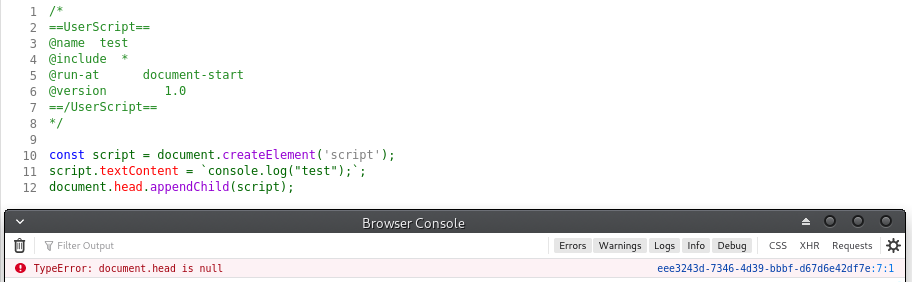
EDIT: using document.documentElement works though.
kkapsner
on 14 Dec 2019
I actually played a little bit with all this and got quite far:
// ==UserScript==
// @name        Conceal window.name
// @version     2.0
// @include     *
// @run-at      document-start
// @namespace   ghacksuserjs
// ==/UserScript==

function injectedCode(){
    const functionsToHide = new Map();

    const descriptor = Object.getOwnPropertyDescriptor(window, "name");
    const originalGet = descriptor.get;
    const originalSet = descriptor.set;
    let setNames = new WeakMap();
    const temp = {
        get name(){
            const originalName = originalGet.apply(this);
            //No CAPTCHA reCAPTCHA
            if(/^https:\/\/www\.google\.com\/recaptcha\/api2\/(?:anchor|frame)\?.+$/.test(this.location.href) && /^I[0-1]_[1-9][0-9]+$/.test(originalName)){
                return originalName;
            }

            const nameToReturn = setNames.get(this) || "";
            if (originalName !== nameToReturn){
                console.warn(`Intercepted read access to window.name "${originalName}" from ${window.location}`);
            }
            return nameToReturn;
        },
        set name(newName){
            setNames.set(this, newName);
            originalSet.apply(this, window.Array.from(arguments));
        }
    };
    const tempDescriptor = Object.getOwnPropertyDescriptor(temp, "name");
    descriptor.get = tempDescriptor.get;
    functionsToHide.set(tempDescriptor.get, originalGet);
    descriptor.set = tempDescriptor.set;
    functionsToHide.set(tempDescriptor.set, originalSet);

    Reflect.defineProperty(window,"name",descriptor);

    // alter .toString and .toSource to hide the function code
    const originalToString = Function.prototype.toString;
    Function.prototype.toString = function toString(){
        const func = functionsToHide.get(this) || this;
        return originalToString.call(func, ...arguments);
    };
    functionsToHide.set(Function.prototype.toString, originalToString);
    const originalToSource = Function.prototype.toSource;
    Function.prototype.toSource = function toSource(){
        const func = functionsToHide.get(this) || this;
        return originalToSource.call(func, ...arguments);
    };
    functionsToHide.set(Function.prototype.toSource, originalToSource);


    // cleanup script element
    var scripts = document.getElementsByTagName("script");
    document.documentElement.removeChild(scripts[0]);
}

// insert code into web context
const script = document.createElement('script');
script.textContent = `(${injectedCode.toString()}())`;
document.documentElement.appendChild(script);
but then realized that the complete userScript has to implement the iframe protection as well (https://github.com/kkapsner/CanvasBlocker/blob/master/lib/iframeProtection.js)...
Simple attack:
var iframe = document.createElement("iframe");
document.body.appendChild(iframe);
console.log(Object.getOwnPropertyDescriptor(iframe.contentWindow, "name").get.call(window));
document.body.removeChild(iframe);
... and now as I had to deal with all that in CB already I'm not intrigued enough to port all that to a userscript without exportFunction. So @earthlng and @Thorin-Oakenpants you can go ahead if you desire to...
kkapsner
on 14 Dec 2019
@kkapsner just FYI, you can add js or html (or plenty others) behind the opening code-block tag and github will highlight the code. I edited your comment so you can see what I mean.
// insert code into web context
I'd never inject a script block like that because that only works if a site's CSP allows it and is therefore not very reliable
Simple attack:
YIKES! well that sucks. Even more reason to get rid of our wiki page asap. Because why bother with such an elaborate userscript when CB already provides that.
re: document.documentElement.appendChild - I was wondering if a site could add their own scripts there and whether those could/would run before the document-start userscript, but based on the Inspector it looks like FF moves scripts defined there (by the site) into the <head> element.
ie this
<!DOCTYPE html>
<html lang="en">
   <script src="detection.js"></script>
   <!-- document.documentElement.appendChild would inject here -->
<head>
becomes this
<!DOCTYPE html>
<html lang="en">
<head>
   <script src="detection.js"></script>
@earthlng CSPs... VERY good point. A simple Content-Security-Policy: default-src 'none'; img-src 'self'; script-src 'self' can then prevent the userScript from registering the functions when they use <script>, eval, new Function, setTimeout or setInterval (that are the ones I tried - but I guess all "normal" script injecting mechanisms are covered as that's the whole point of CSP). So we are back at square one: to do something like that you need exportFunction.
If you want to test something you can use https://canvasblocker.kkapsner.de/test/cspTest.php
But I agree with you that you should get rid of the userScript wiki page. It may also lure some people into a false sense of security.
PS: thanks - kind of knew that github could format things, but did know the syntax.
kkapsner
on 14 Dec 2019
Actually my main point is to get rid of the scripts.
kkapsner
on 15 Dec 2019
Well, I'd actually like to get rid of my window.opener be gone extension because IMO it outlived its usefulness since the same can now be achieved with a normal userscript.
A userscript has the benefits of making it easy to add exclusions and having access to GM.notification to be more obvious for people about when the script actually kicks in (instead of just the console warning).
In the past there were some issues with document-start, maybe in particular with browser.tabs.executeScript (which is what GM uses), but AFAICT they seem to have been fixed in FF at some point.
I tested GM (v4.9) and FM and both are able to run scripts at document start.
You can test it yourself with a script like this:
// ==UserScript==
// @name               test document-start
// @version            1.0
// @match              *://*/*
// @run-at             document-start
// ==/UserScript==

if ('loading' !== document.readyState)
  console.warn("NOT running at document-start! document.readyState: " + document.readyState);
So, in the extension I used
"permissions": [ "<all_urls>" ]to allow it to run on any page. Both GM and FM have that same permission as well- these
"content_scripts"parameters:
"matches": [ "*://*/*" ]"match_about_blank": true"run_at": "document_start"
- this content script:
if (window.opener != null) {
  window.opener = null;
  console.warn('Cleared window.opener!');
}
Here's an updated version of the window.opener script that works with GM and FM:
// ==UserScript==
// @name               window.opener be gone
// @description        Prevents tampering with window.opener.
// @version            2.0
// @match              http://*/*
// @match              https://*/*
// @exclude            https://www.catalog.update.microsoft.com/DownloadDialog.aspx
// @run-at             document-start
// Keys for GM:
// @namespace          ghacksuserjs
// @grant              GM.notification
// Keys for FM:
// @matchAboutBlank    true
// ==/UserScript==

if (window.opener !== null) {
  window.opener = null;

  GM.notification('Cleared window.opener!');
  console.warn('Cleared window.opener @ ' + document.location.toString());
}
instead of
"matches": [ "*://*/*" ]which also matches websockets (ws, wss), I used 2 match lines to limit it to http(s). I'm not too familiar with websockets but I don't think they can use window.opener. (?)I used
"match_about_blank": truein the extension but wasn't sure if that's really necessary.
match_about_blank is always true in GM but it needs to be specified for FM.
What I'm also not sure about is whether we may want/need to use allFrames .. ?!
@kkapsner what do you think?
allFrames is default enabled in GM but would need to be specified for FM.
The exclude for that microsoft domain is there for a couple of reasons:
- obviously because you can't download windows updates from the Microsoft catalog w/o it. It's also the only page I ever encountered that my
window.opener be goneextension broke - an example
@excludeline (to unbreak pages) - can be used as a testpage (and illustrates the usefulness of the GM notification)
- fe go to any KB-download page (fe https://www.catalog.update.microsoft.com/Search.aspx?q=KB3138612), allow JS and click any of the download buttons.
The result with the extension is that it opens a new tab but only shows an error message.
Most people would probably have no idea why it doesn't work. But if you use the userscript instead (without that exclude!) you'll get a notification and can then check the console for the URL you need to whitelist.
I didn't include the URL in the notification itself because as soon as you click on it, it disappears and you can't copy the URL from it.
- fe go to any KB-download page (fe https://www.catalog.update.microsoft.com/Search.aspx?q=KB3138612), allow JS and click any of the download buttons.
earthlng
on 16 Dec 2019
no I didn't test ESR
earthlng
on 16 Dec 2019
You need match_about_blank and allFrames to get a better protection coverage (the fingerprinting could be done in an iFrame).
kkapsner
on 17 Dec 2019
having access to GM.notification to be more obvious for people about when the script actually kicks in (instead of just the console warning).
You can also use notifications from a webExtension.
kkapsner
on 17 Dec 2019
where is your privacy policy?
I dont collect anything in any of my extensions therefore ........... as stated on the extension page:
None of my extensions contain any tracking, advertising or privacy infringement.
what do you want me to link to as your support?
erosman
on 20 Dec 2019
@earthlng Do you have the final script? I'd really like to test it.
 7wgs0gr04v
on 1 Jan 2020
7wgs0gr04v
on 1 Jan 2020
exportFunction works with Chrome?? :))
7wgs0gr04v
on 12 Jan 2020
I agree actually. Support only one.
7wgs0gr04v
on 12 Jan 2020
exportFunction works with Chrome?? :))
No
kkapsner
on 12 Jan 2020
I have removed all references to GM, VM and FM. Not going to recommend anything.
wiki scripts page is just lacking an updated conceal window.name
Edit. Maybe I need more sleep - the one missing is conceal history.length, which IMO is debatable
Closing this
 Thorin-Oakenpants
on 13 Jan 2020
Thorin-Oakenpants
on 13 Jan 2020
So I removed VM and installed GM
- I'm not an expert on GM/VM/FM and I only had three scripts (2 to do with google, and windows.name), so I don't care what I use, as long as it works
- I'll personally defer to earthlng's suggestion of GM. This means I can rely on his scripts working in GM
- and, bonus, I can ditch window.opener be gone extension for the script which allows more flexibility (not that I have ever needed it) .. so one less extension :)
✅ Conceal window.name tested on JoDonym - but I got to say the GM.notifications are excessive: no big deal, I commented out that line
- @earthlng, maybe you could add
http://ip-check.info/?lang=enas an exception to the script?
❓ noopener seems to fail - maybe I'm not testing it right
- set
targetBlankNoOpener= false, so it doesn't interfere with results - go to https://mathiasbynens.be/ and make sure you allow JS (see #765 )
- go to https://mathiasbynens.github.io/rel-noopener/
There are five links in yellow boxes. For some reason this test page always confuses the fuck out of me. I think the first two are the tests and the last three are examples of protected links
Anyway, the first two tests fail and tell me I am hacked (and I reset to the original page for each test)
Thorin-Oakenpants
on 14 Jan 2020
JoDonym works fine for me without an exception for http://ip-check.info/?lang=en
Cool. I'll retest mine and if that works for me as well, I'll remove the line about it in the wiki
No idea why the noopener script doesn't work for you. Check the console, maybe that'll help, IDK
OK. Note, I did have JS etc allowed (see next point)
Question:
User scripts don't execute unless the page has JS enabled, right? Since I default block all JS, then those pages where I do not enable it would not get noopener links "altered"? right? i.e I see this as different to scripts like window.name, as JS is required by the page to try and get that information in the first place. But no-opener is hardcoded - but then the "haxor" can't do anything on the originating page (no JS), right? So is this is a legitimate concern?
Thorin-Oakenpants
on 14 Jan 2020
Cool. I'll retest mine and if that works for me as well, I'll remove the line about it in the wiki
For me: without the exception for the landing page, clicking the test link just reloads the landing page
Thorin-Oakenpants
on 14 Jan 2020
console for window.opener be gone script says
Cleared window.opener @ https://mathiasbynens.github.io/rel-noopener/malicious.htmlCleared window.opener @ https://mathiasbynens.be/demo/opener
But the test page still updates to #hax . There is nothing else in the console. I'll try it in a new profile when I get time, to see if I can troubleshoot it.
Thorin-Oakenpants
on 14 Jan 2020
Just for Info:
unsafeWindow was added in FM 1.24 (for convenience sinceunsafeWindow = window.wrappedJSObject)
window.wrappedJSObject has always available.
So far on tests, exportFunction() & cloneInto() could be achieved with unsafeWindow & window.wrappedJSObject (ref https://github.com/erosman/support/issues/103) as well as window.eval() in Firefox (although there are considerations with window.eval()).
erosman
on 11 Feb 2020
reopening to get to the bottom of this
earthlng
on 12 Feb 2020
and this
For me: without the exception for the landing page, clicking the test link just reloads the landing page
Yet another difference between your setup and mine.
Thorin-Oakenpants
on 12 Feb 2020
Why not to put all trusted gHacks scripts to greasyfork.org repo? And add a quick installation links for the users from the recommended page? We have to do a lot things before we get a complete and safe FF setup. Yet another thing to prepeare your first insallation faster. Plus always only a rescent versions with autoupdates and notifications. (This time I was lucky to see the new #891 issue and didn't miss v2.0)
GreasyFork is light, works fast and stable through the years. I'm using Violentmonkey and have only 2 (trusted) add-blocking scripts from there and never didn't see any suspicious activity from there.
 iWARR
on 29 Feb 2020
iWARR
on 29 Feb 2020
I don't want to provide scripts (or encourage them) at all
My reasoning is along the same lines as "don't add extensions to Tor Browser as it can alter your fingerprint" except I'm talking about scripts - the effects of the script can be felt and there's always the possibility (probability?) that unique/near-unique function names leak
Now, if you for example, always log into gmail (otherwise why would you go there), and you use a script just for that site, that's probably fine - given you already gave them a unique identifier (your login id) - so not all scripts are "bad" in that sense.
Now sure, the effects of some extensions can also be felt and measured, but they should be a lot "safer" than injecting scripts - but IANAExpert on this
We only have one script now. But I do see your point on being able to update/check the script automatically in case @earthlng changes it again - but it doesn't have to be on greasyfork AFAIK - e.g. I have https://github.com/StylishThemes/GitHub-Dark as my update point for a style in Stylus - so I think we could just host it ourselves as a standalone file if @earthlng wants to do that
Thorin-Oakenpants
on 1 Mar 2020
log into gmail (otherwise why would you go there)
I don't. I'm G-hater. But you mean example. Understood.
be a lot "safer"
It "depends". Open your uBlock main panel and you'll see "some garbage" included on the GitHub website. Although ghacks-user.js still here... A bit of "trolling" you :) OK. I just said that GreasyFork was nice according to my experience.
point on being able to update/check the script automatically
Exactly.
GitHub
If so, I like this example:
Remove t.co : https://github.com/kkren/remove_t.co/blob/master/en-us.md
iWARR
on 1 Mar 2020
And now I can confirm that script is OK (tested) using Voilentmonkey.
iWARR
on 1 Mar 2020
Related issues
Thorin-Oakenpants
·
69Comments
 RoxKilly
·
60Comments
Thorin-Oakenpants
·
90Comments
RoxKilly
·
60Comments
Thorin-Oakenpants
·
90Comments
 vertigo220
·
64Comments
earthlng
·
81Comments
vertigo220
·
64Comments
earthlng
·
81Comments
Most helpful comment
Well, I tried to... only thinking like a criminal helps you catch them. So in the back of my head I always think "How can it detect and/or break that?" when I work on the protecting part of CB.
You're welcome.