User.js: FPI + some site exceptions broken [depending on settings]: FF69+ [1556212]
Thorin: read https://bugzilla.mozilla.org/show_bug.cgi?id=1556212
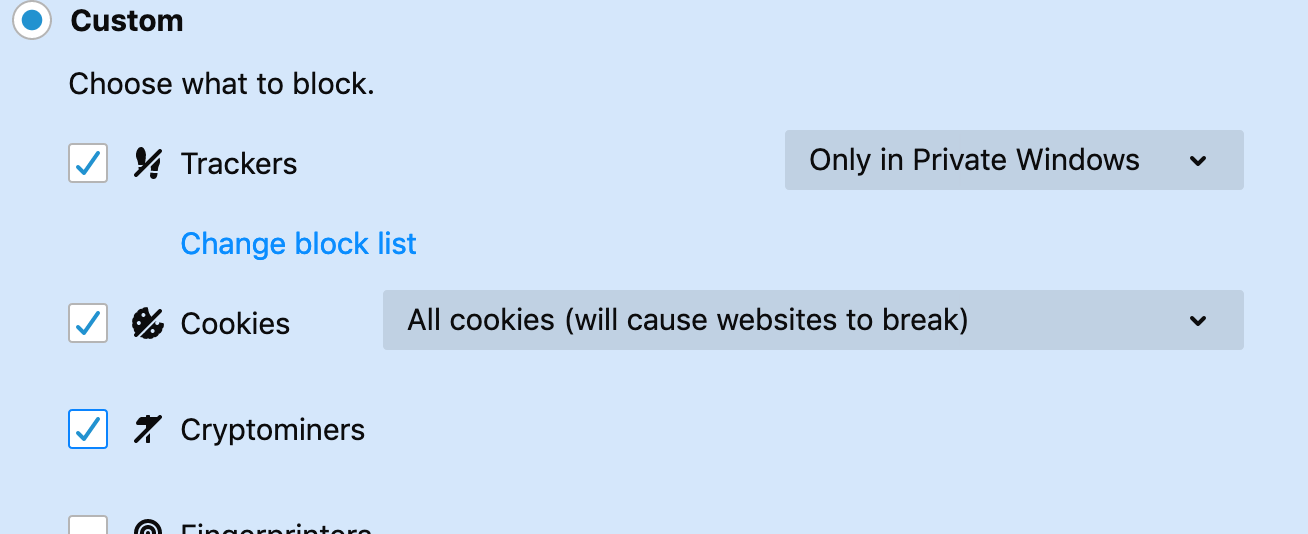
In 68 I blocked all cookies but maintained a list of domains to either allow cookies or allow as session only. This was achieved in the FF built-in preferences.
In my overrides I simply block all cookies via this pref: user_pref("network.cookie.cookieBehavior", 2);
Just updated to 69 and the per domain cookie permissions to either allow or per session seem to be broken. What I mean by this is the following:
68 behaviour: create a cookie permission to allow session only cookies for facebook.com. I am able to log in to facebook.
69 behaviour: same permission as the above but facebook now prompts me that I need to enable cookies. In the 'i' button to the left of the url bar and viewing the 'cookies' option to see what is being blocked and allowed, and I can see that although I have created a permission to allow session cookies for facebook FF is showing that the cookies are being blocked for fb where in 68 it would show as allowed.
For now I have reverted back to the user.js default in blocking all third party cookies.
Troubleshooting:
Fresh nilla profile with no user.js. and set up the prefs manually to just block all cookies and set up a test permission to allow cookies. This worked as per 68 but as soon as I restored the user.js the cookie permissions were being ignored again.
Found this bugzilla which seems to suggest it's linked to FPI.
https://bugzilla.mozilla.org/show_bug.cgi?id=1556212
I will test (in a moment) whether disabling FPI resolves this issue
EDIT. FPI set to true seems to be the cause.
 seanob86
All 21 comments
Confirmed:
On nilla profile block all cookies and set a site permission for reddit.com to allow session cookies.
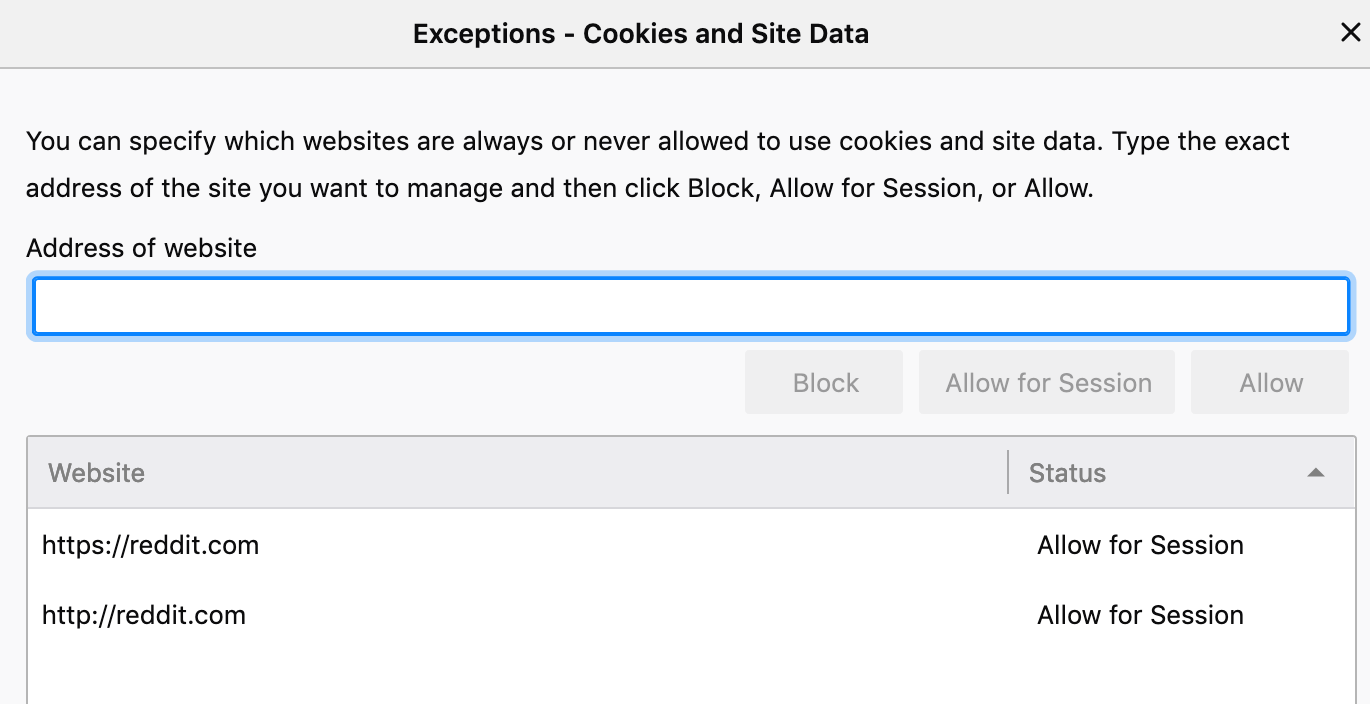
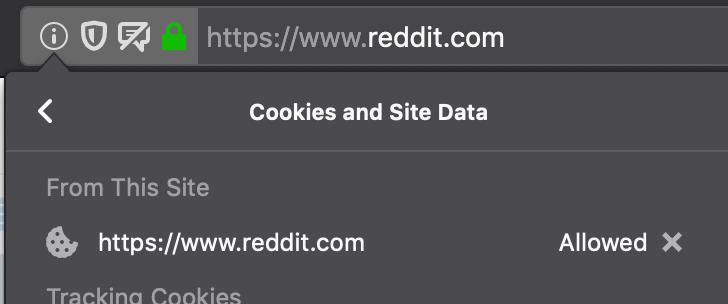
FPI disabled as per nilla default:
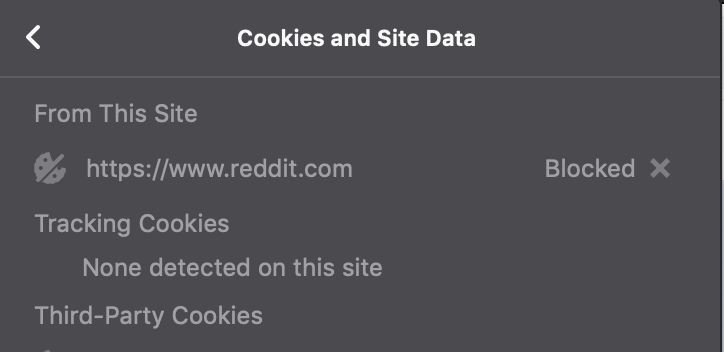
Enable FPI - reddit.com cookies being blocked despite the cookie permissions i set earlier.
seanob86
on 3 Sep 2019
Set the cookie permissions when FPI is on, because they are OA'ed (origin attributed)
Edit: As I said earlier: wipe all existing site permissions (keep a copy of the sqlite so you can see what's in it to re-create them)
This is just a rough example: don't take it too literally
- FF68 and lower: site permissions are like
example.com(no OA) - FF69+: when FPI is on, it is looking for and creating
^^firstPartyDomain=example.comentries, but all you have isexample.comones
 Thorin-Oakenpants
on 3 Sep 2019
Thorin-Oakenpants
on 3 Sep 2019
So I created a brand spanking nilla profile to avoid any gotchas to test the OA theory.
As soon as the new profile loaded I went to about:config and enabled FPI.
Then into preferences and set the cookie permissions to block all cookies and set a site permission for reddit.com to allow cookies. So i'm assuming that the new permissions should by then be associated to FPI i.e OA.
Browsed to reddit.com but the cookies are still being blocked.
seanob86
on 3 Sep 2019
Not sure if this is what I should be looking for... But in the nilla profile I created in my example above (after setting the permissions after enabling FPI), I opened the permission.sqlite file and in the moz_perms table I can see the following entry https://www.reddit.com^firstPartyDomain=reddit.com
seanob86
on 3 Sep 2019
https://www.reddit.com^firstPartyDomain=reddit.com <- yeah, that's what I'm talking about.
I haven't updated, so if the problem still exists, then f&*^k ... I'll have to have a play when I get there, and also test in 70 to see if it's fixed. Suggest you just sit tight on 68
Thorin-Oakenpants
on 3 Sep 2019
@tomrittervg Edge case not picked up? when all cookies are blocked network.cookie.cookieBehavior = 2, and FPI is enabled, and site exceptions are blank, and then site exceptions are added (FPI is on), seems like site exceptions are not being respected in FF69. Or something that has been fixed in subsequent patches?
Edit: PS: I would expect this to apply to any type of site exception, right!
Thorin-Oakenpants
on 3 Sep 2019
 tomrittervg
on 3 Sep 2019
tomrittervg
on 3 Sep 2019
I did some testing as well and it seems to work if I set the permission via the Page Info panel but only if I choose "Allow" instead of "Allow for session".
 earthlng
on 3 Sep 2019
earthlng
on 3 Sep 2019
^^ Both allow and allow for session work for me (I did not use reddit). I added the exception via the site info panel.
Edit: my Dev is still FF69
here's allow for session

here's what is added to the exceptions list in the options UI
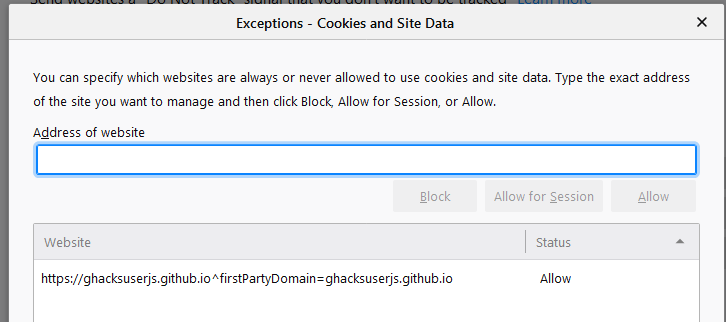
I have not tested by adding in the exceptions panel via the options UI
Thorin-Oakenpants
on 3 Sep 2019
Thanks for testing guys!
So I have hacked the sh** out of my permissions.sqlite file to get this working the way it used to pre FF69 (obviously took a backup first just in-case it bites me later down the track!).
I changed all my allow and allow for session rules as per this template directly in the sqlite file >> https://www.reddit.com^firstPartyDomain=reddit.com
What I found is that if I add the site exception via the UI exceptions panel and then open the sqlite file, the rule is added without ^firstPartyDomain=xyz.com for the type cookie. Interestingly for storageAccessAPI type the rule is added with ^firstPartyDomain=xyz.com. See below (rule added via exceptions panel UI)

Manually modifying the above cookie rule with the correct OA format is a workaround that seems to be working a treat (so far).
Alternatively, if I try to add the firstpartyDomain rule format directly in the exceptions panel, it appears in the list as per the below and fails to accept cookies for the desired rule I attempted to add.

seanob86
on 4 Sep 2019
Thorin-Oakenpants
on 20 Sep 2019
^^My kid is using https://scratch.mit.edu/ and I am almost 100% sure that in previous versions of FF I have used user.js with "only" WebGL enabled, but now I need to also disable FPI.
Where I can download previous versions of FF for testing?
 crssi
on 20 Sep 2019
crssi
on 20 Sep 2019
Where I can download previous versions of FF for testing
Depending on the version, you'll want to open them off-line and disable the app update
- https://ftp.mozilla.org/pub/firefox/releases/
- https://sourceforge.net/projects/portableapps/files/Mozilla Firefox%2C Portable Ed./
Thorin-Oakenpants
on 20 Sep 2019
I don't use containers, and thus I do not use TC in a hardened mode, which I know some of you do
https://bugzilla.mozilla.org/show_bug.cgi?id=1589608 https://bugzilla.mozilla.org/show_bug.cgi?id=1422056 - enjoy ... now your site permissions will per contextid and you'll never remember them when you revisit a site - at least that's how I'm reading it.
Thorin-Oakenpants
on 18 Oct 2019
^^ that is not convenient. 😢
crssi
on 18 Oct 2019
OK, so I finally updated from 68 (to 69.0.3) : PS @tomrittervg FYI re dupes and what happened after I removed them
The only items in permissions.sqlite I have are
- type cookies, for a few websites
- moz-extension stuff
🛩 cookies
- so all I did was revisit each of my sites and re-apply the same site exception from the urlbar
iicon. This adds the proper^firstPartyDomain=*notation, and I end up with duplicates
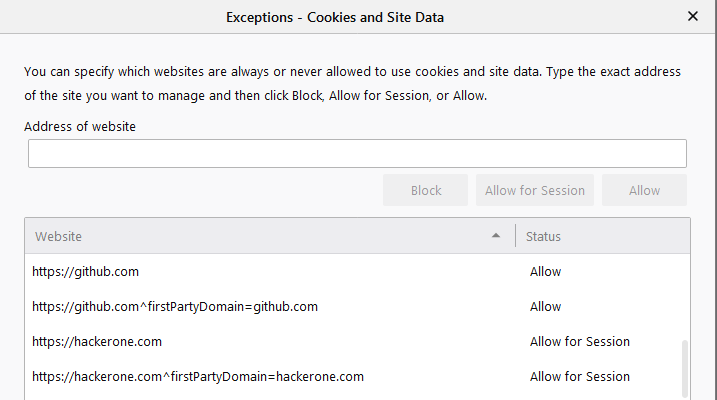
- With these duplicates, as a test, I deleted one of the non-FPI ones, and my auto-login for the site broke (I didn't test logging in). I might test some more later, but at the end of the day, I only have like 10 exceptions, and I never change any of them, so I'll live with 10 cookie permission dupes for a while
🚚 moz-extension: part 1
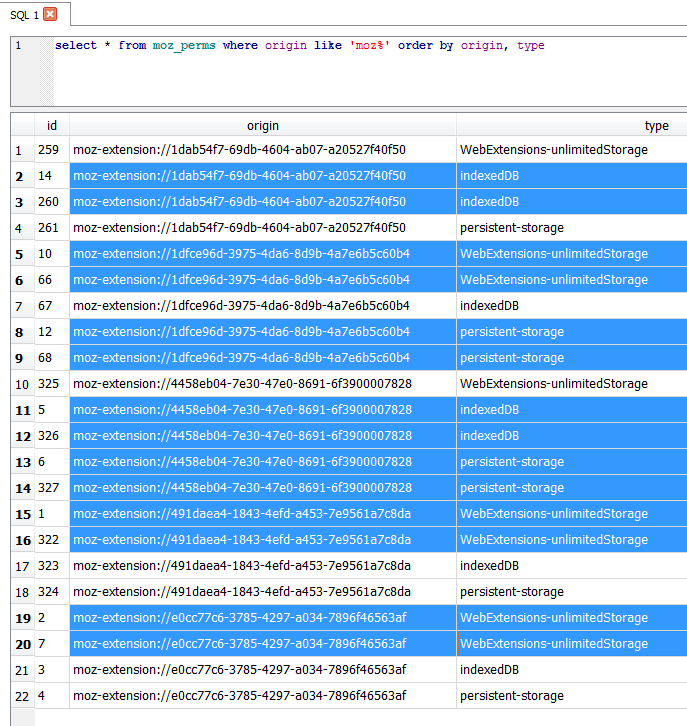
- FF68: five extensions, all with three perms: WebExtensions-unlimitedStorage, indexedDB, persistent-storage
- FF69: ended up with lots of different mixes of duplicate entries
- e.g uBlock Origin duped unlimitedStorage
- Violentmonkey duped indexedDB
- Note Taker duped indexedDB and persistent-storage
- etc
- I removed the newest duplicates, with FF closed using an external app) and restarted and the dupes did not come back, and everything seems to be working fine (but see part2 below)
here's a pic
🚗 moz-extension: part 2
- FF68: two extensions with storageAccess permissions (Window Resizer, Group Speed Dial)
- FF69: those permissions were gone
- everything seemed to work fine though: not that I did any editing/changes
- after I cleaned out the moz-extensions dupes (external app), on the next FF restart I suddenly got those two permissions back, but this time with FPI added, and I got a third one, for Violentmonkey
Anyway, AFAICT all my extensions (and site permissions which are only cookies and never change) are working
Thorin-Oakenpants
on 21 Oct 2019
so all I did was revisit each of my sites and re-apply the same site exception from the urlbar i icon. This adds the proper ^firstPartyDomain=* notation, and I end up with duplicates.
It seems on macOS that there is no way to add exceptions via the i icon from the urlbar - That or I'm doing something wrong. There are no options within that i site information window (on macOS) to add exceptions. I can only view what cookies are being blocked but can't create an exception directly from it. The only other options within that i pop up are launching the Permissions Preferences or Content Blocking Preferences. Therefore the only way on macOS is to open the Privacy & Security within preferences and enter the exception manually. The annoying thing is that you cant directly enter ^firstPartyDomain=* notion as part of the exception as per my previous comment further up on this issue.
seanob86
on 21 Oct 2019
does mac not have this?
- click
iicon (or shield, as the info icon will merge into that) - click the
>arrow to the right of the connection - click
more info - click
permissionstab
I'm still probably going to test why I need duplicates, because when I did my quick test earlier in 69 dev, I didn't.
Thorin-Oakenpants
on 21 Oct 2019
does mac not have this?
OK so it was just me 🤣 I see it now!!!
seanob86
on 21 Oct 2019
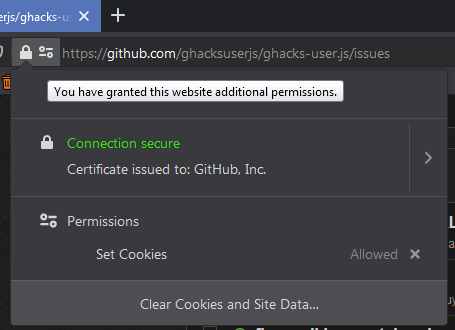
Note that in FF70+ the i info icon is gone. I saw a ticket that said it was merged with the shield. Anyway .. click the padlock/key icon
Thorin-Oakenpants
on 29 Oct 2019
closing this... 69 was two releases ago
Thorin-Oakenpants
on 10 Dec 2019
Related issues
crssi
·
3Comments
Thorin-Oakenpants
·
7Comments
 hunkjazz
·
5Comments
hunkjazz
·
5Comments
 zdat
·
5Comments
Thorin-Oakenpants
·
4Comments
zdat
·
5Comments
Thorin-Oakenpants
·
4Comments
Most helpful comment
Depending on the version, you'll want to open them off-line and disable the app update