i've veiwed the readme but didn't find any readable breakdown of every setting and what it accomplishes.
Is there a similar outline for the updated version of this like on the original platform of the ghacks website?
https://www.ghacks.net/2015/08/18/a-comprehensive-list-of-firefox-privacy-and-security-settings/
I support what you are doing but for those of us that aren't experts, an explanation is needed so that we can selectively make changes for our use case and troubleshoot any problems that may be caused for the websites personally frequented.
Cheers.
 Candlemass
All 13 comments
Is there a similar outline for the updated version of this like on the original platform of the ghacks website
Hell no. That was a nightmare trying to maintain or do anything via a single article and comments. Do you mean is there a web friendly (with hyperlinks) etc version? No.
so that we can selectively make changes for our use case and troubleshoot any problems
The user.js is literally sprinkled with [setup-] tags (38 of them I think) which covers most things that can break websites or upset your chrome (non-website) experience. Although it's not perfect and I have a few more items I want to tag (but not get carried away).
Did you read the wiki? Especially the implementation page? There are four things to look at that are really important. Then two things to consider: do you want to use FPI and RFP.
After that, its setup tags. 38 of them (they also cover most of the above six items) which should cover almost any breakage - I think I will end up with about 45 of them at most. That's it, out of 240 plus prefs that change from default. The vast bulk really don't cause any problems for anyone.
an explanation is needed so that we can selectively make changes for our use case
The explanations are as simple and short as I can get them, and all reside in the user.js - with links to better explain things, or links to technical stuff etc for experts. That's not to say it can't be improved, but there's a limit and balancing act here.
I think if you follow the instructions. Look at the six items in the wiki (uber important, super important), check some setup tags (search for "[setup" in the user.js) for anything obvious, and you're good to go. You won;t lose anything and a pref change is as simple as adding an override.
Overall, I'm not sure what you're asking me to do. What did you have in mind? Keeping in mind that this is not simple stuff, and not aimed at the average user (but I'm trying to lower the entry mark!)
 Thorin-Oakenpants
on 21 May 2019
Thorin-Oakenpants
on 21 May 2019
Hi m/ Candlemass m/ don't forget to search previous issues by entering keywords on top left or RTFM inside user.js
 Atavic
on 21 May 2019
Atavic
on 21 May 2019
I think I've misread what was asked here
i've veiwed the readme but didn't find any readable breakdown of every setting and what it accomplishes. Is there a similar outline for the updated version of this like on the original platform of the ghacks website?
The readme is short for a reason, so people do not lose focus and do not miss anything important. When you ask for a similar outline like the old ghacks article - well, that's exactly what the user.js file is. If you want it to be more reader friendly, then use an IDE that color codes syntax.
I recently added MOAR links to the implementation page - e.g. almost at the very start of the overview wiki page, and the overview page is linked in the very first sentence of the readme. The user.js also says to RTM.
So what is it about all of this that is causing people to not get to the implementation page? @Candlemass is that the problem? i.e if you had known of the implementation wiki page, then you would have been OK, and that I need to highlight/drive visitors to that page even MOAR? Or did you mean something else? I'm having a hard time working out what the problem is.
Thorin-Oakenpants
on 22 May 2019
@Candlemass : not sure why you deleted that comment from a few minutes ago
The current format is the same as the old article. That article was simply the user.js on a webpage. The structure hasn't changed. i.e: numbered sections that group items logically together and sometimes a section header/intro, numbered items with the pref(s) with reference links and some kind of short as-simple-as-i-can-get explanation if required (but we can always improve) .. and now setup tags for things that cause people issues.
Hope that answers your question.
Thorin-Oakenpants
on 24 May 2019
@Candlemass If you want to see the user.js as an html page, try this: https://github.com/ghacksuserjs/ghacks-user.js/issues/608 - @icpantsparti made a tool that lets you load the file, and toggle sections on/off etc, and links were hyperlinked etc. I tried it and loaded my local copy and it's works as advertised. Helps to have a big-ass screen :)
Thorin-Oakenpants
on 24 May 2019
There's also this: https://nwmviewer.shinyapps.io/ghacks_userjs/ but until @overdodactyl arises from the dead, it's dead and stuck on loading an old version, as well as being an early prototype missing features
Thorin-Oakenpants
on 24 May 2019
Hello,
Thanks for the quick response and my apologies for the late reply.
I see that the user.js that was linked is essentially the same as what I was suggesting. The major difference is lack of spacing between settings which makes it some what more of a challenge to navigate for those of us that don't interact with code on a regular basis. Regardless, it serves the same purpose as what I was looking for which is a breakdown of each setting so I know what is happening when each change is made,. This is also immensely helpful for troubleshooting down the line if something breaks or does not function as preferred.
One question though, are you aware of if this is relevant to Palemoon? The reason I ask is since legacy add-on support was dropped by firefox and a lot of the extensions could not be ported or rebuilt due to lack of API’s available to the developers, it’s what I moved to upon release of quantum but searching for references to settings has turned up scarce results compred to firefox due to lower adoption.
Either way, thanks for the all the work and keeping this going as I’m considering switching back now that mozilla seems to have fixed their certificate issue. 240+ changed flags from a default install is no small task.
Candlemass
on 24 May 2019
This repo focus on Firefox. I'm not interested in following PM or Waterfox or other forks. It's enough to just do this one. I also highly believe that all those forks do nothing to increase privacy/anonymity/security etc that Firefox itself can't already do (i.e legacy extensions are not my concern here) - but there may be an edge case. Certainly not interested in PM since it's so divergent. Members of those communities are free to use what we have here, including our archived releases and re-purpose/test them.
If you want to make it visually easier to read the user.js, then configure your IDE e.g Notepad++'s Style Configurator, although I can't see a line height in there. It's not hard to see the next item when preceeded by an active pref: e.g in my style, it's bright AF orange (and booleans are green, numeric values are yellow, etc)
https://raw.githubusercontent.com/ghacksuserjs/ghacks-user.js/master/wikipiki/overview01.png
But when the preceeding pref is inactive, it does become a wall of the same color. But to distinguish, each number starts with /* and ends with */ at the end of the text/references, and these stick out on the side with collapsible indicators - i.e the red bit in the above pic
And sections have a line space between them.
IDK, maybe you can create a style rule that colors /*** to ***/ as a different color. That's the section headers and numbers.
Thorin-Oakenpants
on 24 May 2019
@Candlemass Here you go .. this is what you're after
Normally a style will apply the same color to every comment, whether that's using // or /* or /*** etc. What I did was look at the style I'm using in my Notepad++, and I modified two of them.
Open your user.js in Notepad++, go to Settings>Style Configurator, select JavaScript. The two items I changed are commentline which in the pic below I made a pale orange. So active prefs are orange in my style, and inactive ones become pale orange. This helps break things color wise for every numbered item now.
The second item I changed was commentdoc and in my example I used a pale blue since that color wasn't being used anywhere. This now colors the section headers.
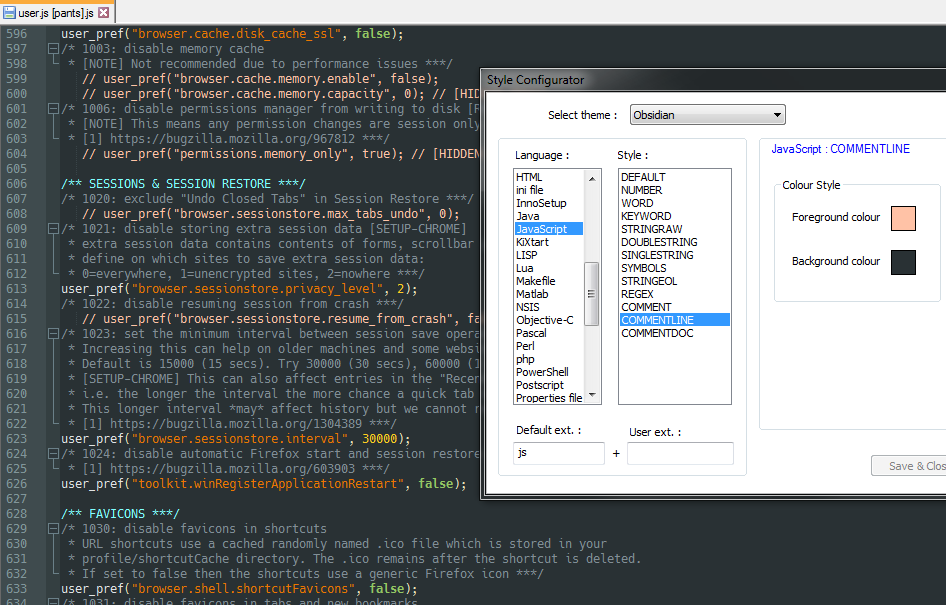
Enjoy
Thorin-Oakenpants
on 25 May 2019
Notepad++ is not available on linux but I did find an alternative that does the trick.
Thanks for the advice.
Candlemass
on 27 May 2019
It also help to use a monospaced font IMO :)
Thorin-Oakenpants
on 27 May 2019
It also help to use a monospaced font IMO :)
It is set by default, though I usually change it to Fira Code + some code for jN enabling DirectDraw, which also enables ligatures.
 KOLANICH
on 27 May 2019
KOLANICH
on 27 May 2019
I just use hack font, cuz I like the diff in the zeros and O's
Thorin-Oakenpants
on 27 May 2019
Related issues
Thorin-Oakenpants
·
7Comments
 GIPeon
·
3Comments
GIPeon
·
3Comments
 crssi
·
3Comments
crssi
·
3Comments
 grauenwolfe
·
7Comments
Thorin-Oakenpants
·
5Comments
grauenwolfe
·
7Comments
Thorin-Oakenpants
·
5Comments
Most helpful comment
@Candlemass Here you go .. this is what you're after
Normally a style will apply the same color to every comment, whether that's using
//or/*or/***etc. What I did was look at the style I'm using in my Notepad++, and I modified two of them.Open your user.js in Notepad++, go to Settings>Style Configurator, select JavaScript. The two items I changed are
commentlinewhich in the pic below I made a pale orange. So active prefs are orange in my style, and inactive ones become pale orange. This helps break things color wise for every numbered item now.The second item I changed was
commentdocand in my example I used a pale blue since that color wasn't being used anywhere. This now colors the section headers.Enjoy