@GIPeon
Rather than pollute the sticky, can we chat in here? I'm not following what you means by "set any shortcut in the setting page". I might need pictures.
Do you mean using ctrl-something to fire the zapper when on a webpage?
 Thorin-Oakenpants
All 12 comments
PS: yes, RFP has lots of little breakages and side effects, and there is a bugzilla that RFP shouldn't affect extensions (e.g timezone spoofing will use the spoofed date when you export settings). And the other side of that, there is also a bugzilla that RFP should tighten up areas where other prefs interfere (i.e don't let other prefs change the RFP fingerprint)
Thorin-Oakenpants
on 24 Apr 2019
Hei there!
Sorry for the late reply!
Rather than pollute the sticky, can we chat in here? I'm not following what you means by "set any shortcut in the setting page". I might need pictures.
Do you mean using ctrl-something to fire the zapper when on a webpage?
Sure thing. I made a small giff displaying only the attempt to set the shortcut. As I said in the ticket, even if I disable/enable temporarily RFP and manage to place the shortcut, it won't work on any webpage.
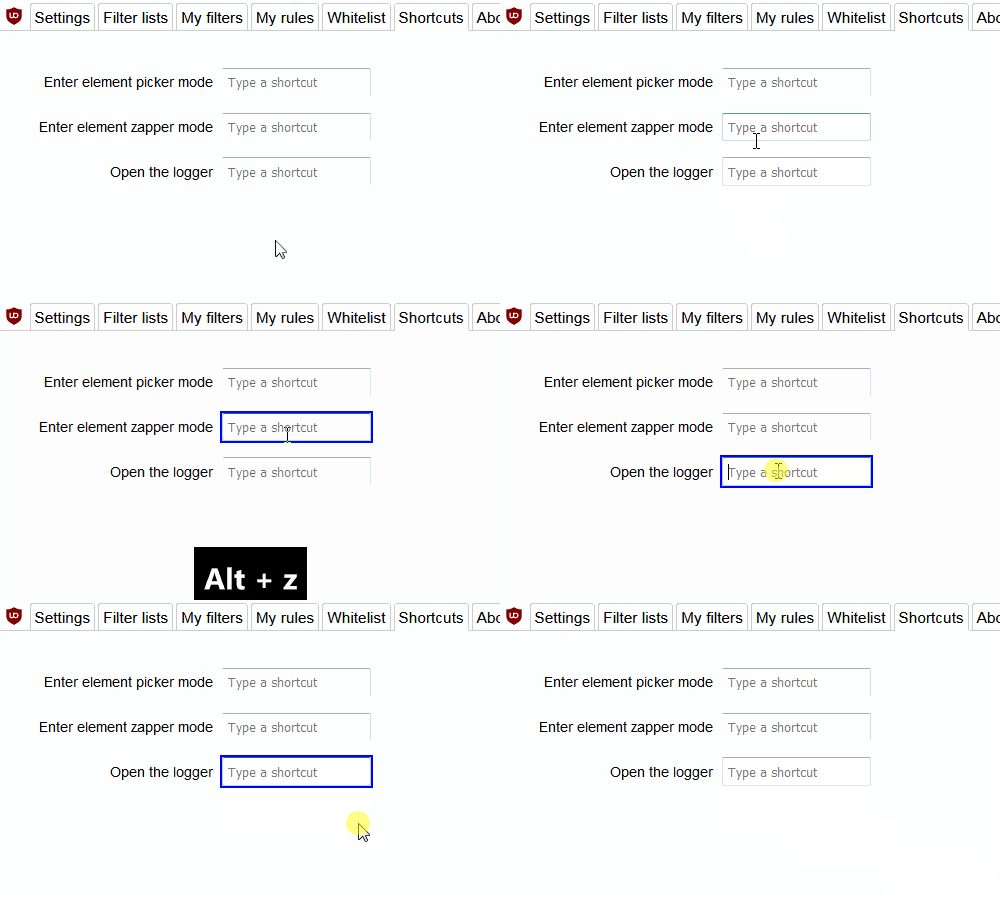
PS: yes, RFP has lots of little breakages and side effects, and there is a bugzilla that RFP shouldn't affect extensions (e.g timezone spoofing will use the spoofed date when you export settings). And the other side of that, there is also a bugzilla that RFP should tighten up areas where other prefs interfere (i.e don't let other prefs change the RFP fingerprint)
Very unfortunate!
But hey I prefer RFP and miss a small convenience, yet I will miss my beloved zapper... :zap: :hurtrealbad:
Thank you for your time!
 GIPeon
on 24 Apr 2019
GIPeon
on 24 Apr 2019
Thanks for the gif :+1: Ima gonna have a play
Thorin-Oakenpants
on 24 Apr 2019
RFP modifies some keys
 ** 1222285 & 1433592 - spoof keyboard events and suppress keyboard modifier events (FF59+)
      Spoofing mimics the content language of the document. Currently it only supports en-US.
      Modifier events suppressed are SHIFT and both ALT keys. Chrome is not affected.
      FF60: Fix keydown/keyup events (1438795)
That was way back before Quantum.
The numbers are bugzilla numbers. Kind of annoying, but easily worked around. When flipping privacy.resistFingerprinting, I did not even find the need to reload the dashboard for any change to take place (a couple of RFP items require a restart: this is not one of them). And it's likely a one off setup for end users. Just flip the pref, set your shortcut, flip the pref back
I'll modify your sticky post so it's a little clearer
@uBlock-user and @gwarser FYI in case you weren't aware and someone pipes up with an issue (sorry, didn't search your issues). Edit: upstream 1450398 (there's a few more, but this is the main one)
Thorin-Oakenpants
on 24 Apr 2019
you said
With resist fingerprint enabled you cant set any shortcut in the setting page. I tried also to disable RFP, set the shortcut and enable RFP again, yet when you try to use the shortcut it wont fire the tool action (eg. Zapper).
I had zero issues getting the zapper to fire on web content. I'll have another play to make sure, although I'm 99% sure I loaded a new different web content page for each test
Thorin-Oakenpants
on 24 Apr 2019
you said
With resist fingerprint enabled you cant set any shortcut in the setting page. I tried also to disable RFP, set the shortcut and enable RFP again, yet when you try to use the shortcut it wont fire the tool action (eg. Zapper).
I had zero issues getting the zapper to fire on web content. I'll have another play to make sure, although I'm 99% sure I loaded a new different web content page for each test
Very interesting, but unfortunately I can't make it work with the RFP enabled. I just did again as you said, switch it on/off and set a shortcut (alt+z, ctrl+z, alt+shift+z), but nothing the zapper wont start.
I'll check my user.js but I don't think I touched anything in that section from your defaults.
GIPeon
on 25 Apr 2019
I just tested in FF66 in a new profile
RFP=true, browser restart- open uBO dashboard>shortcuts, try to set zapper mode as
Alt + Z(doesn't work) - open about:config in a new tab, flip
RFP->false - go back to uBO dashboard, set shortcut (works)
- go back to about:config, flip
RFP->true - open a new tab and go to pornhub or something
- hit
Alt-Zand the zapper mode will work
Maybe something else is interfering at your end? Another extension's shortcuts? Is the zapper not working on all sites, or just the same one you keep testing (it could be the site)?
Thorin-Oakenpants
on 25 Apr 2019
^^ I'll try in my main Firefox, which uses the user.js 99% the same as the master copy.. brb
Update: no problems here. Flip pref, set shortcut, reflip pref, load site, zapper shortcut works
Thorin-Oakenpants
on 25 Apr 2019
Just try with one shortcut. I've only been testing in the zapper mode with alt z. See if just that one works
Thorin-Oakenpants
on 25 Apr 2019
You got it! :tada:
Yes there is some conflict with Tridactyl, very strange since everything works properly with this addon and the extension use extensively shortcuts and stuff.
Mmm guess I will ask them for some info and help.
GIPeon
on 25 Apr 2019
No worries, I'll close this now. I already edited your sticky post
Thorin-Oakenpants
on 25 Apr 2019
I have found one mention about issue with RFP https://github.com/uBlockOrigin/uBlock-issues/issues/106#issuecomment-407536583
Native interface seems to work fine (cog whell - > Manage Extension Shortcuts), and in the future this tab will probably be removed from uBO dashboard.
 gwarser
on 26 Apr 2019
gwarser
on 26 Apr 2019
Related issues
Thorin-Oakenpants
·
5Comments
 earthlng
·
4Comments
Thorin-Oakenpants
·
3Comments
Thorin-Oakenpants
·
5Comments
GIPeon
·
3Comments
earthlng
·
4Comments
Thorin-Oakenpants
·
3Comments
Thorin-Oakenpants
·
5Comments
GIPeon
·
3Comments