User.js: review: 0801: keyword search
@earthlng et al
Firefox comes with the search bar hidden, thus the "omnibar" is the default. With 0801 as false, as per the user.js, this means when I type in banana, I get a "Hmm. We’re having trouble finding that site". Enabled, it means it uses the default search engine. Note that the one-off search buttons are not disabled, so they can click a search engine. I know you use keywords , so I assume that's not broken? But not everyone would do that. I'm a little confused here due to keyword being used (i.e I thought you were still able to type ?g banana to search google for example?)
I don't use the urlbar for searches myself, so I need some feedback on this. As part of the items that users end up overriding (3 people, which is the second third equal highest item), we can certainly add a setup-chrome tag, or we could make it inactive and add a harden tag.
The issue here is not search engines but the leaking of an URL typo. And I think some responsibility should go to end-users to choose a more privacy respecting default search engine. That said, we wipe history (by default), so it's not like we help in anyway with auto-complete.
I there propose that this becomes inactive, tidy up the info for it, and add a harden tag
I'm actually finding it hard to find a decent example: e.g if I typed shit.com instead of shirt.com, the domain actually exists. gooogle.com redirects to google.com. If I type dinsey.com instead of disney.com, that also doesn't exist and I get a site not found (not a search result)
Has something changed that makes .com and maybe some other eTLDs at the end of the urlbar items not use search
Am I missing something here? I'm now failing to see how, in FF66+, you can leak a typo to a search engine
 Thorin-Oakenpants
All 25 comments
I have forgot bookmarks and default search engines, as I use a local homepage at C://index.html that's a simple list of links, as search engines. There are better choices, as this:
https://github.com/JackosDev/Minimo-Homepage
Something basic, with no external css or fonts is fine for me.
 Atavic
on 24 Apr 2019
Atavic
on 24 Apr 2019
Yup, I get that using bookmarks, speed dials, homepages etc eliminates typos (because you're not typing), but this is not about that
Thorin-Oakenpants
on 24 Apr 2019
Typos listed on OP are handled by DNS Servers.
Atavic
on 24 Apr 2019
don't leak typos to a search engine, give an error message instead
That's the description. so at some point, or in some combination of steps that I can;t seem to work out now, FF (not DNS) decided to send data to a search engine. If it returns a valid website or site not found error, then that's fine - that's not a typo leaking to a search engine: which is the problem. I'm just struggling to replicate it with STR. And a lot has changed with the urlbar / omnibar / search in the last 346 FF releases
Thorin-Oakenpants
on 24 Apr 2019
with keyword.enabled = true Firefox seems to use the default search engine only when what I type does not consist of some alphanumeric character followed by . (dot), followed by some alphanumeric character (like x.x) . Firefox doesn't seem to care what those characters are or how many they are. I don't think this has anything to do with other prefs.
Leaking typos to a search engine is still possible, just less likely. Consider you wanted to type secretplace.net and accidentally hit the spacebar somewhere in there, like secretpl ace.net. That's one example I can think of.
Edit: another example secretplace,net (comma instead of dot)
 claustromaniac
on 25 Apr 2019
claustromaniac
on 25 Apr 2019
catnip/net
Thorin-Oakenpants
on 25 Apr 2019
, (comma) and / (slash) sandwich . (dot) on most keyboards, and off course space bar right there and easy to bump.
These are good examples. I think we can add a [setup-chrome] tag and explain it a little - yes/no? And leave as active (yes/no?)
Thorin-Oakenpants
on 25 Apr 2019
 crssi
on 25 Apr 2019
crssi
on 25 Apr 2019
Thanks crssi. One thing I do not want to get into at all, is telling people all about search engines and shit. It's covered to death on the internet.Who am I to judge what search engine respects privacy, and then have to justify that to people (see numerous arguments all over the internet), and then also have to maintain and keep checking on said recommendations. I know I could dumb it down and not even mention a search engine, but then people would ask me. It's a hot potato I would rather not touch.
This doesn't break anything. 801, 807, 808 are just chrome things (they just need a tag at most), but I agree they carry the same risk and have the same mitigation solution. Anyway, user adds user.js, suddenly finds he can't use the urlbar to search for catnip .. finds item by searching for urlbar or search, or [setup, flips it, is a happy camper. Something like that.
Thorin-Oakenpants
on 25 Apr 2019
we can add a [setup-chrome] tag and explain it a little - yes/no?
:+1:
And leave as active (yes/no?)
¯\_(ツ)_/¯ Personally, I don't mind keeping this at active false, but I suppose losing that feature might be annoying to new users of this user.js. Thankfully, there are many alternatives. Another one that is not currently in this user.js is browser.search.widget.inNavBar, which has the same effect as selecting Add search bar in toolbar in about:preferences#search. It could be a decent addition.
claustromaniac
on 26 Apr 2019
Just saying. But I have those at true in overrides. :wink:
OT: Nice to see you back @claustromaniac, we were a bit worried already, like we are for @earthlng.
crssi
on 26 Apr 2019
browser.search.widget.inNavBar - IDK. As I see it, there's a UI option for it. Anyone concerned about privacy would have gone to about:preferences#search and it's right there in your face. It's also there when you customize the toolbar etc. It would also be inactive (I'm not going to potentially change anyone's chrome when it's so easily set already). If anything we could add it as a one-liner to 5000s
I think it would suck from a desktop perspective if and when the searchbar got removed (it will probably happen, that's my gut feeling: basic reasons: simplification of code and interface). It'll just mean a slight change of how I do things (muscle memory for one, order for another) - i.e instead of typing in the searchbar and hitting shift-enter (results in new page), I would have to open a new tab and type in the urlbar, but a new tab places the cursor in the urlbar, so it could end up being quicker, ctrl-t and start typing. What I'm probably going to hate about it, is the dropdown. I find that shit incredibly annoying and distracting, which is why it's so nice to have it off, but not impact my multiple search engine usage in a smaller searchbar.
Now, about that dropdown. So far I'm just messing around in my main FF. What I need to do is play in a new profile with the default user.js. In a default FF setup, only the urlbar shows. If we break keywords, that sucks. Secondly, even if I allow keywords, I'm not sure what else besides browser.urlbar.oneOffSearches is preventing the dropdown from showing the search engine buttons (I just tried it in my main FF, and I'm sure it doesn't require a restart?).
So I need to work out the best balance here so as to not fuck up/change too much from a default FF and certainly not demolish searching ability. Searching (regardless of engine) is fundamental to using the web. Again, I need to play in a nilla profile etc. But I'm starting to think anything that blocks core search functionality should be inactive with a harden tag
Thorin-Oakenpants
on 26 Apr 2019
I like dropdown. Have set it to show me bookmarks as a priority. This way I do not need to go into bookmarks to find/select my favorites and I get to the desired page much quickly... mostly one or two letters, cursor down and enter.
crssi
on 26 Apr 2019
^^ yup. everyone has their own setup. Personally, I use Group Speed Dial extension (tweaked with userContent.css) that means I have access to up to 100 edit: fuck me .. 1000 "bookmarks" in no more than two clicks - edit: that's using a thumbnail (custom static ones), not a list
Thorin-Oakenpants
on 26 Apr 2019
Yeah (pissing contest :smile:), but I don't need the mouse interaction. lol :heart:
crssi
on 26 Apr 2019
lulz .. not a pissing contest at all :grinning: for me I find two clicks max suits me on a desktop
Thorin-Oakenpants
on 26 Apr 2019
Not really meant as a pissing contest (that's why smiley there) :wink:, it was meant as a joke.
crssi
on 26 Apr 2019
^^ I know . Lost In Translation? NOT .. that's why smileys, emoticons etc ate universal. Totally understood your position/thoughts
Thorin-Oakenpants
on 26 Apr 2019
OT: Nice to see you back @claustromaniac, we were a bit worried already, like we are for @earthlng.
Sorry for making you folks worry. You know, I'm like avatar Aang: I disappear 100 years when the world needs me the most.
What's up with @earthlng, though?
claustromaniac
on 27 Apr 2019
Nothing is up with Earthlng .. he's probably just busy He can be quiet for a week at a time, but not usually any longer. I do feel abandoned and left holding the fort a lot of the time though
PS: you look cute on this cover
Thorin-Oakenpants
on 27 Apr 2019
nilla FF66, added user.js - searching from the url is still possible, i.e the search buttons are visible, but hitting enter obviously doesn't work
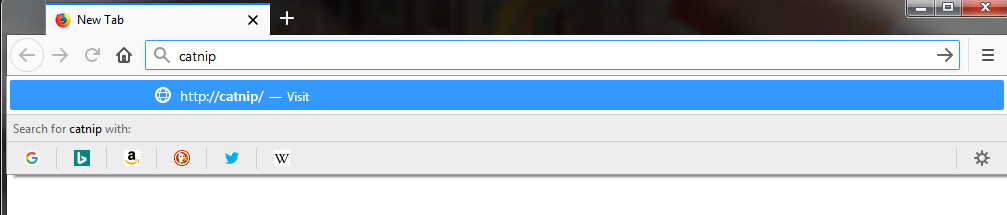
Here are some examples:
catnip com
- hitting enter = Hmm That address doesn't look right
- dropdown suggests http://catnip.com
catnip,com
- hitting enter = Hmm... We're having trouble finding that site
- dropdown suggests http://catnip,com
catnip/com
- hitting enter = Hmm That address doesn't look right
- dropdown suggests http://catnip,com (because I tried to go there it's in my history or something)
Not going to fuck around with it any more, but it clearly treats some country TLDs different to others. Doesn't really matter. What matters is that search isn't fully broken by our settings. I will test shortcuts before I do anything else. And also what happens with keywords off and those three examples above
Thorin-Oakenpants
on 27 Apr 2019
adding keywords to search engines in about:preferences#search does the following and you can just hit enter (since the drop item is pre-selected)

Thorin-Oakenpants
on 27 Apr 2019
with keyword.enabled = true, all three examples of typos went straight to the default search engine
-- end of testing shit--
So....
- I do not think we need to make the pref inactive
- given that the searchbar is hidden by default, this is now even MOAR important
- search is not munted
- search buttons are there
- keyword on search engines work if set up
Suggestion/solution
- add a
setup-chrometag - add a warning and examples of how leaking to search engine can happen (i.e if you're not typing an URL then you were probably going to search, and if an url contains a typo at the TLD part .. etc
- add a suggestion to add keywords to search engines
Thorin-Oakenpants
on 27 Apr 2019
nits?
/* 0801: disable location bar using search
 * Don't leak URL typos to a search engine, give an error message instead.
 * Examples: "secretplace,com", "secretplace/com", "secretplace com", "secret place.com"
 * [NOTE] Search buttons in the dropdown still work, but hitting 'enter' will fail
 * [TIP] You can add keywords to search engines in options (e.g. 'd' for DuckDuckGo) and
 * the dropdown will now auto-select it and you can then hit 'enter' and it will work
 * [SETUP-CHROME] If you don't, or rarely, type URLs, or you use a default search
 * engine that respects privacy, then you probably don't need this ***/
user_pref("keyword.enabled", false);
^ bump .. @claustromaniac am off to make a coffee, them I'm committing myself it soon afterwards, as I am impatient ... and I can always do a fixup if anyone is upset
Thorin-Oakenpants
on 27 Apr 2019
Related issues
Thorin-Oakenpants
·
5Comments
Thorin-Oakenpants
·
7Comments
 zdat
·
5Comments
crssi
·
4Comments
zdat
·
5Comments
crssi
·
4Comments
 grauenwolfe
·
7Comments
grauenwolfe
·
7Comments