User.js: Netflix, Amazon video [solved: 1820+1825+1830 + maybe 2030]
OK, ya got me, yes I was ready to give up and I am still quite daunted by your term, "simple" shortly followed by "50 items to change." I am not a neophyte to computers having all of the computers/laptops/tablets in our household running several incarnations of Ubuntu/Mint et al. :)
What I was hoping for was a simple (my idea of simple, grin) script that would do all the good things for an average user privacy and possibly tracking, with maybe 3 to 5 tweaks. I too avoid all things google except youtube.
So -- using the standard script, but allowing Netflix, Youtube and Amazon videos to run. What must I do?
Thanks for you perseverance. :)
 FlailAway
All 22 comments
Netflix
DRM for HTML, aka EME
 KOLANICH
on 6 Feb 2019
KOLANICH
on 6 Feb 2019
@FlailAway A new profile?
 Atavic
on 6 Feb 2019
Atavic
on 6 Feb 2019
Netflix
DRM for HTML, aka EME
I don't know what that means. I am here looking for help, not and example of how much more you know of user.js than I do.
FlailAway
on 6 Feb 2019
@FlailAway A new profile?
I don't see how that would help with the "simple" changes. Besides I am happy to have just the one profile and let the privacy/tracking cards fall where they mayby giving up some stuff for those three video sites to work.
Edit from Thorin: EXACTLY! Let's keep it SIMPLE, 1 profile, and a handful of overrides. I'm on your side @FlailAway
FlailAway
on 6 Feb 2019
EME deals with Digital Rights Management on media/video delivered via HTML. For Netflix you
have to leave EME enabled:
I don't have one profile only (I have many browsers installed) because I may open:
- Sites containing sensitive personal data
- Pages hat ask my account/password
- Search engines
- Random/unknown pages
- Known pages that work with some unhardened settings
I suggest you to do something similar, once you set it all up, you're safe when you need it and you're also free of issues (while being maybe tracked just a little).
Atavic
on 6 Feb 2019
@atavic: OK, thanks, I am not sure I/we need many profiles, our surfing requirements are what I would imagine is average. Mostly the same old sites. We do use one computer for banking but why would that need a more or less secure profile than a standard one?
I guess if the EME needs to be disabled, I can see the need for two profiles. Banking and video-capable. But, that still leaves me with 49 other things to tweak. Are there any predefined user.js files here? I assume the Netflix etc requirment is not as secure, so we would have to live with that for the times we use Netflix/Amazon.
It would be nice to have 5 or 6 files in the wiki that are already tweaked to maximize specific needs. We can't be the only people using Youtube, Netflix and Amazon Videos that would like to also have user.js security.
Kinda like:
1:
General surfing but with highest level protection: 97% protection - download this --> user.js
2:
General surfing but with Banking, personal data protection: 88% protection - download this --> user.js
3:
General surfing but with access to Youtube, Netflix, Amazon Video: : 72% protection - download this --> user.js
4:
...
The the neophytes of the world (me, et al) can create several profiles and apply the appropriate user.js to each and not need to to tweak 50-ish things at all. :)
FlailAway
on 6 Feb 2019
I can see the need for two profiles.
:+1: I'm glad that you realized it.
Are there any predefined user.js files here?
There's just a big one, with comments included.
We can't be the only people using Youtube, Netflix and Amazon Videos that would like to also have user.js security.
The user.js has comments for the values that can be relaxed a bit.
It would be nice to have 5 or 6 files in the wiki that are already tweaked to maximize specific needs.
What comes closer is maybe this other user.js
Atavic
on 7 Feb 2019
Considering @FlailAway 's last issue, I wish you guys would have said nothing. You're just make it more confusing, throwing acronyms at him, and telling him to use two profiles etc - or pointing to another user.js that really isn't maintained much. Rome wasn't built in a day.
I apologize for taking time off to watch a movie and have a sleep. I will post a proper answer shortly.
PS: you don't really need a new profile for allowing media to run (e.g drm, cdm,. eme etc) in @FlailAway 's case - his threat model doesn't really require it. And you probably don't even need a different profile for banking etc vs normal surfing. He just wants to tweak a few things.
The real gain in privacy will come from using uBlock Origin, even in default mode. That alone will kill 90% of the tracking done by corporate surveillance.
 Thorin-Oakenpants
on 7 Feb 2019
Thorin-Oakenpants
on 7 Feb 2019
@FlailAway : work with me, you'll have to do the testing, i.e tell me when Netflix starts to work for you, and Amazon works etc. I don't have accounts. So I will suggest changes, and then you test and report back to me.
Step 1: You have the user.js in your profile with no changes, right?
Step 2: Make these changes
- open the user.js in a text editor and add the following lines at the end
// OVERRIDES

// RFP & FPI are not for me, yet, let's take it slow for now
user_pref("privacy.resistFingerprinting", false);
user_pref("privacy.firstparty.isolate", false);

// use SSL Session IDs, HTTP2, AltSrv
user_pref("security.ssl.disable_session_identifiers", false);
user_pref("network.http.spdy.enabled", true);
user_pref("network.http.spdy.enabled.deps", true);
user_pref("network.http.spdy.enabled.http2", true);
user_pref("network.http.spdy.websockets", true);
user_pref("network.http.altsvc.enabled", true);
user_pref("network.http.altsvc.oe", true);

// don't block DRM media
user_pref("media.eme.enabled", true);

// To do whenever I update the user.js every 6 to 8 weeks
// 1. Remove sections 1820 and 1825 and save changes - do this before I open Firefox again
// 2. reset all "media.gmp" items in about:config IF NEEDED
Step 3. In the user.js which is still open, scroll up and find sections 1820 and 1825 and remove them - i.e delete all this
/* 1820: disable all GMP (Gecko Media Plugins) [SETUP-WEB]
 * [1] https://wiki.mozilla.org/GeckoMediaPlugins ***/
user_pref("media.gmp-provider.enabled", false);
user_pref("media.gmp.trial-create.enabled", false);
user_pref("media.gmp-manager.url", "data:text/plain,");
user_pref("media.gmp-manager.url.override", "data:text/plain,"); // [HIDDEN PREF]
user_pref("media.gmp-manager.updateEnabled", false); // disable local fallback [HIDDEN PREF]
/* 1825: disable widevine CDM (Content Decryption Module) [SETUP-WEB] ***/
user_pref("media.gmp-widevinecdm.visible", false);
user_pref("media.gmp-widevinecdm.enabled", false);
user_pref("media.gmp-widevinecdm.autoupdate", false);
Step 4. Save the changes to your user.js
Step 5. This is a one time thing, because in future, whenever you update the user.js, immediately open it and remove sections 1820+1825 and save the changes, and then you won't need to reset these
Go to about:config - just type that into the url bar and hit enter, if you get a warning just click ok. Type media.gmp in the search box and you will see a list of items like this
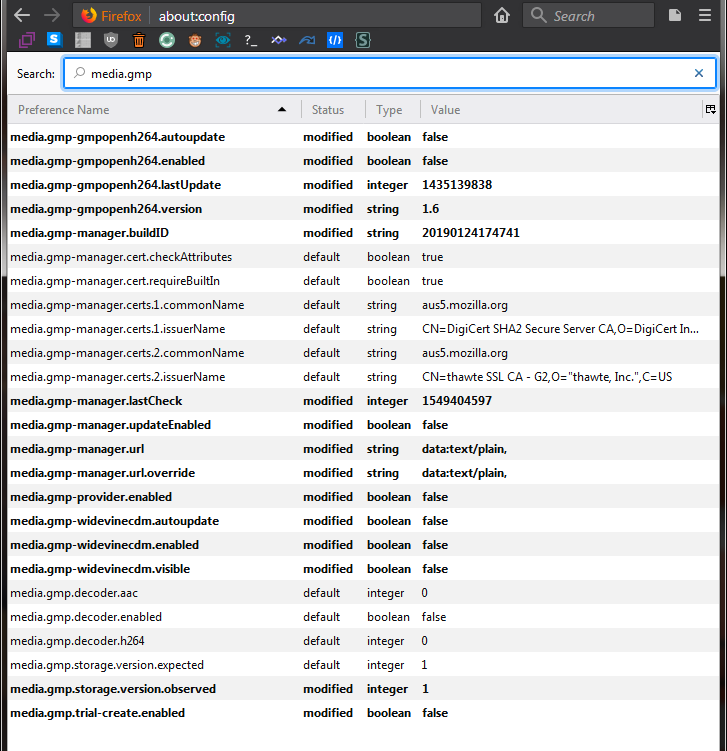
You want to reset some of these. See the ones that say "modified", right click each one and select "reset" and you will end up like this:
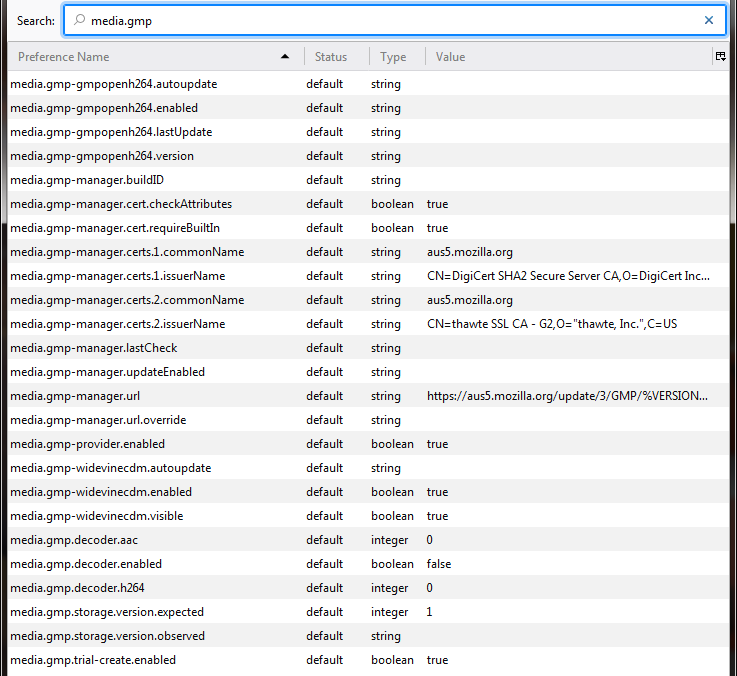
Step 6. Close Firefox
Step 7. Open Firefox
^^ This is a start, but I think there is something else missing to get video to work. But try that.
Thorin-Oakenpants
on 7 Feb 2019
@FlailAway : If that is too daunting, and you're happy to start with another new profile, then I will upload a user.js with all that done for you
Edit: note that in the example I reset more than what was listed: that was to make my instructions simple. Some of them will get modified again by either Firefox or some of the other prefs in the user.js - don't worry about that.
Thorin-Oakenpants
on 7 Feb 2019
When you try to watch a DRM video, you should get a message about Firefox needs to download something something .. this is normal - the GMP is not included in a new profile, as far as i know. It should only takes a few minutes from what I have read.
@earthlng What else is required do you think?
Thorin-Oakenpants
on 7 Feb 2019
You guys shouldn't encourage someone who is both illiterate in these matters and (more importantly) unwilling to read the descriptions inside this file in order to decide for himself what he wants/needs. Let alone test for breakages.
I'd imagine he would be shocked if you asked him to google something that lacks description in the js file.
There are many things in this project that would sooner or later break something for somebody.. You wouldn't want a thread in the 'issues' section for every person who wants free things delivered to them on a silver platter.., do you?
I understand the desire to raise awareness over something you worked hard on, and offer for free. But this isn't the best way to do it, as it just throws more work at you. Especially if you consider this person might just give up on it (in a short while).
Internet privacy is not a "set and forget" matter, therefore, not something for those unwilling to learn the basics of it.
 bodisor
on 7 Feb 2019
bodisor
on 7 Feb 2019
@bodisor I get your points....
It's entirely up to @FlailAway since I said I would help him (not everyone). He's not an idiot - and all this takes is editing a text file. He is clearly interested in privacy and went to the trouble of finding this, and even set up a new profile and added the user.js without issue (he just had to ask how he would know it had taken effect)
Sure, he's not knowledgeable on how it all works, but he's willing to try it. If at any stage he wants to say enough is enough, then that's up to him, and he knows how to create a new profile to get back to where he was - in fact he backed it up (from his first post). And he did read a lot of the wiki (from his first post)
There's zero risk here for him. That's my point. Otherwise I would not encourage it
You wouldn't want a thread in the 'issues' section for every person who wants free things delivered to them on a silver platter.., do you?
FuckNo™
as it just throws more work at you
I'm actually being selfish as I want the info for a relaxed prefs sticky
Thorin-Oakenpants
on 7 Feb 2019
@earthlng What else is required do you think?
EME + Widevine is everything they need for videos, I think. I'm not sure why he has problems with youtube, maybe he's using Flash and would therefore probably need a couple more pref overrides.
I don't really understand why you included SSL Session IDs, HTTP2, AltSrv as well as RFP and FPI?
Another thing worth mentioning is that if he's using Windows he can use the updater script to apply the overrides and also reset prefs so he won't need to do all the manual resetting every time.
so for Windows, adding this to a user-overrides.js next to the user.js and running the updater with the -merge option is the easiest way to stay up-to-date and make videos work on Netflix, etc:
// MY OVERRIDES

user_pref("media.gmp-provider.enabled", true); // 1820
user_pref("media.gmp.trial-create.enabled", true); // 1820
user_pref("media.gmp-manager.updateEnabled", true); // 1820

user_pref("media.gmp-widevinecdm.visible", true); // 1825
user_pref("media.gmp-widevinecdm.enabled", true); // 1825
user_pref("media.gmp-widevinecdm.autoupdate", true); // 1825

user_pref("media.eme.enabled", true); // 1830 - enable EME for Netflix, etc

//// --- comment-out --- 'media.gmp-manager.url'
//// --- comment-out --- 'media.gmp-manager.url.override'
On linux/mac he could just hardcode the 2 gmp-manager.url prefs to their original values in the override file (because the updater.sh doesn't support commenting-out prefs (yet?)), everything else stays the same
EDIT: might also need/want to change 2030 media.autoplay.default
 earthlng
on 7 Feb 2019
earthlng
on 7 Feb 2019
I did set it up the same as yours but then decided to do it the other way - deal with it once and then in future: update, delete section, restart. Seemed easier than update, search in about:config, reset multiple prefs .. it's neither here nor there - either way he would need to remember to do something
I don't really understand why you included SSL Session IDs, HTTP2, AltSrv as well as RFP and FPI?
RFP & FPI: because I think it's overkill for his needs, especially starting out. The other three for perf reasons, he could flip em back later once he gets the hang of things - that was all
Thorin-Oakenpants
on 7 Feb 2019
so he won't need to do all the manual resetting every time
Oh, so the windows updater comments those two out? IDK that
he could just hardcode the 2 gmp-manager.url prefs
media.gmp-manager.url.override is a hidden pref
Thorin-Oakenpants
on 7 Feb 2019
Yes the windows updater can comment out prefs but that won't reset them. But simply placing the prefsCleaner in the same directory will make the updater.bat see it and ask if they also want to run the prefsCleaner. It doesn't get much easier than that.
earthlng
on 7 Feb 2019
media.gmp-manager.url.override is a hidden pref
setting it to an empty string will work but with the 1 downside that it won't check the certifcates (because that part checks for "does it have a user-set value")) - not ideal but it works. But yeah it's probably better to reset it
earthlng
on 7 Feb 2019
@FlailAway : If that is too daunting, and you're happy to start with another new profile, then I will upload a user.js with all that done for you
Thanks Thorin, no, not too daunting and I am happy to test whatever you like to provide until we are both happy with it. But, as Murphy's Law would have it, Thursday morning my SSD decided that it's wear-life was done and crapped-out on me. Despite the wear-status still showing 100% after two years. Anyway, I have just rebuilt this all on a HDD and will learn to love the slow-speed, but much more reliable life. Slow and steady wins the race.
So, the upshot is I will get to testing your user.js hopefully later today but certainly tomorrow if not today.
Oh, and only an idiot would make backups to an external SSD - right? LOL. Yup, me again. Lesson learned so have gone back to an HDD for that too.
Thanks for your efforts, your patience and your defence of me with some of the knee-jerking intolerant others here.
FlailAway
on 8 Feb 2019
this is your solution: https://github.com/ghacksuserjs/ghacks-user.js/issues/635#issuecomment-461335403 re Netflix/Amazon
Thorin-Oakenpants
on 9 Feb 2019
^^ Are there any known security/privacy implications when enabled those?
Does those enabled fit to relaxed version?
Thank you and cheers
 crssi
on 9 Feb 2019
crssi
on 9 Feb 2019
well of course crssi .. why do you think we disable them: read the reference
Thorin-Oakenpants
on 9 Feb 2019
Related issues
 kaliostro2
·
7Comments
Thorin-Oakenpants
·
5Comments
crssi
·
3Comments
Thorin-Oakenpants
·
4Comments
Thorin-Oakenpants
·
5Comments
kaliostro2
·
7Comments
Thorin-Oakenpants
·
5Comments
crssi
·
3Comments
Thorin-Oakenpants
·
4Comments
Thorin-Oakenpants
·
5Comments
Most helpful comment
I don't see how that would help with the "simple" changes. Besides I am happy to have just the one profile and let the privacy/tracking cards fall where they mayby giving up some stuff for those three video sites to work.
Edit from Thorin: EXACTLY! Let's keep it SIMPLE, 1 profile, and a handful of overrides. I'm on your side @FlailAway