User.js: Something strange about security.OCSP.require = true
First, I would like to humbly apologize to @Thorin-Oakenpants, @earthlng and other parties to hijack the other thread. It just happened with a "natural" (wrong) flow instead of opening a new debate and we got carried away.
I feel great respect for you and your work. I am unfortunately limited by my knowledge in compare to you to be a better help. Sometimes happens (like in the other thread) that some of us find something to chew and, unfortunately, the eagerness to participate prevail and blinds me.
I hope I wrote in a understandable way... to express myself in English written words is not "my thing", since I am more talkative than type-tive.
Anyway... the security.OCSP.require stuff:
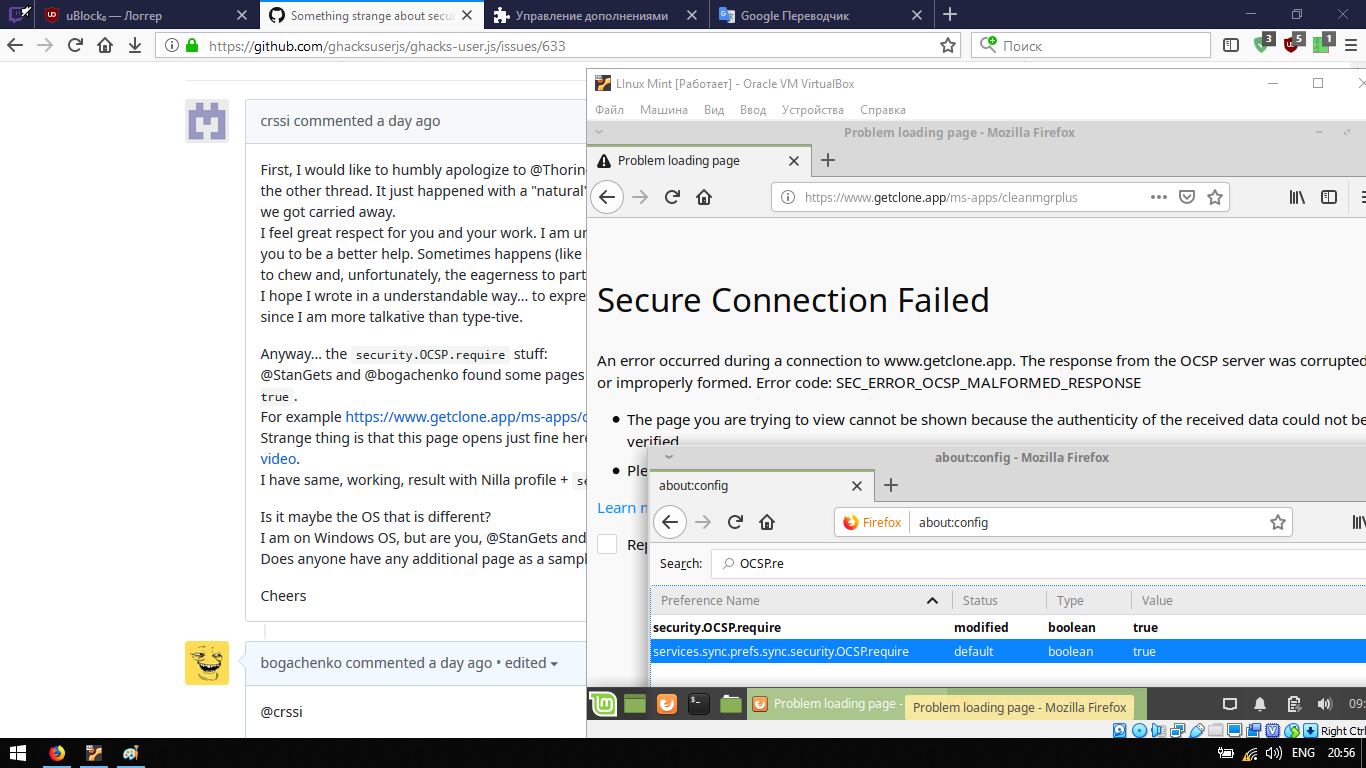
@StanGets and @bogachenko found some pages that does not work with security.OCSP.require = true.
For example https://www.getclone.app/ms-apps/cleanmgrplus.
Strange thing is that this page opens just fine here with the security.OCSP.require = true.. see video.
I have same, working, result with Nilla profile + security.OCSP.require = true.
Is it maybe the OS that is different?
I am on Windows OS, but are you, @StanGets and @bogachenko, on some linux-like OS?
Does anyone have any additional page as a sample, where the breakage occures?
Cheers
 crssi
crssi
All 21 comments
@crssi
First, I would like to humbly apologize to @Thorin-Oakenpants, @earthlng and other parties to hijack the other thread. It just happened with a "natural" (wrong) flow instead of opening a new debate and we got carried away.
yep
I am on Windows OS, but are you, @StanGets and @bogachenko, on some linux-like OS?
no. i am on shitty-windows10
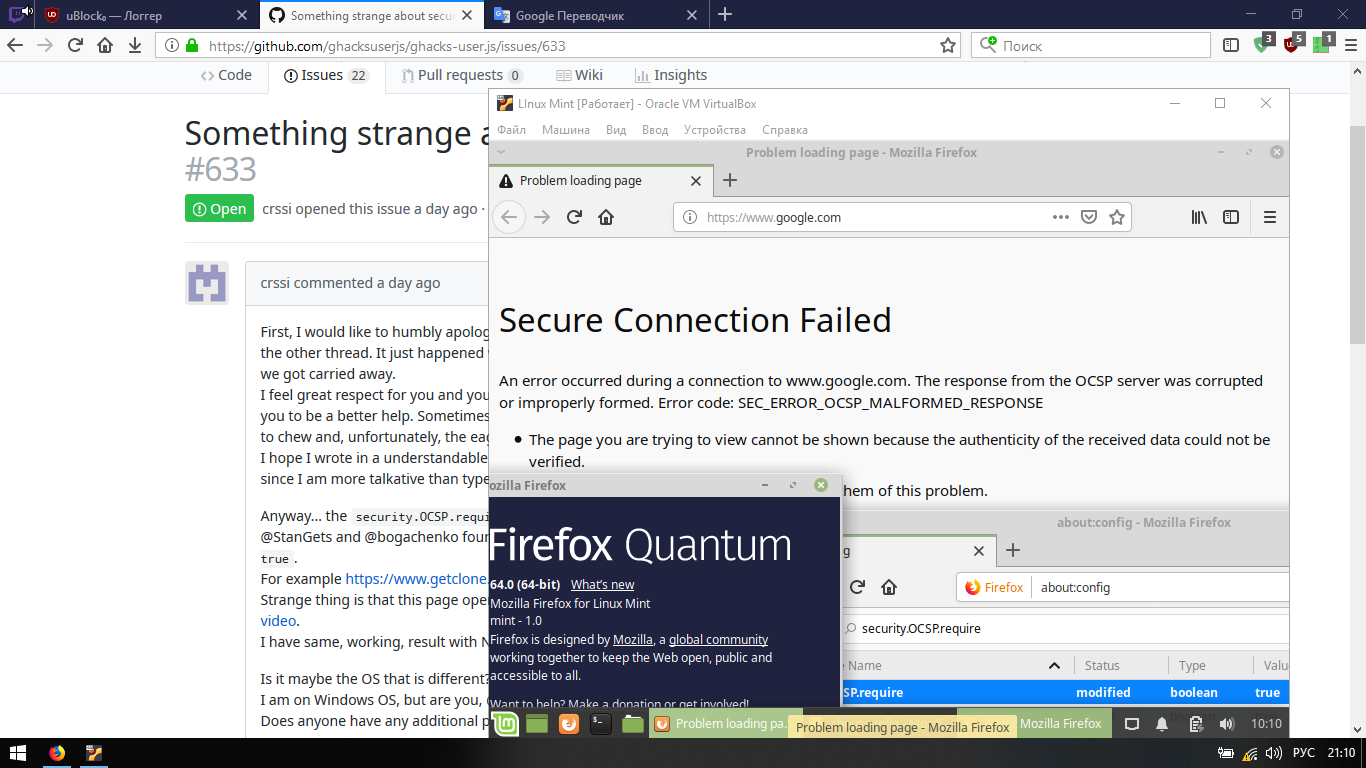
and look. on my virtual machine (on linux mint.. Same as ubuntu) also does not open
Does anyone have any additional page as a sample, where the breakage occures?
strictly speaking, my "true" even google.com doesn't open.. not to mention your site. lol. I'm done
 bogachenko
on 5 Feb 2019
bogachenko
on 5 Feb 2019
Can you try with a clean profile + security.OCSP.require = true?
crssi
on 5 Feb 2019
Well, that's exactly why we enable that pref so that you know when something is wrong.
There are various reasons why the connection can fail: OCSP server is temporarily down/unreachable (=most common reason), different routing for different countries and 1 server is down while others still work, DNS changed and your DNS cache is outdated, something is blocking HTTP connections on the users end, someone is blocking connection to the server somewhere in the middle (VPN, MitM, etc), etc.
The OCSP server name for that URL is http://ocsp.comodoca.com. Can you ping ocsp.comodoca.com? What does it resolve to? If you can't reach it, try trace route and see how far it goes and then you'll know where the problem lies.
I've only had problems with that pref maybe 2 or 3 times, once was over Tor and that was likely indicating the the Tor nodes I was using were trying to do something malicious. The other 1 or 2 times were temporary issues and the sites worked again when I refreshed it a couple minutes later.
 earthlng
on 5 Feb 2019
earthlng
on 5 Feb 2019
@earthlng so I can not open any sites at all with the included fuck
OCSP server is temporarily down/unreachable
hm
@crssi cleared, (I will not throw a screen) does not work, although earlier everything was fixed by deleting the cert9.db file/
at least I thought so. I deleted this file = cleared certificates = the site opens, but now it does not work, apparently my conclusion is wrong
bogachenko
on 5 Feb 2019
Thank you @earthlng, the same thing went trough my head... but before that I wanted to see if there is some other underlying problem. Apparently not. Some conspiracy theory (or without theory) in their countries.
I never had this problem here... not a single case.
crssi
on 5 Feb 2019
@crssi where are you from (if it's not a secret)?
bogachenko
on 5 Feb 2019
Nah... its not a secret. If someone would go digging, it would found out anyway.
crssi
on 5 Feb 2019
@crssi OK, understand. well, probably I have is down OCSP Server, for my county or something like. as the earth said
someone is blocking connection to the server somewhere in the middle (VPN, MitM, etc), etc.
lol, if you install a proxy, everything works (set proxy for italy). haahahaha
bogachenko
on 5 Feb 2019
@bogachenko open a terminal and try these commands:
ping ocsp.comodoca.com - this probably doesn't work for you
tracert ocsp.comodoca.com - see which one is the last IP that can be traced. Then lookup that IP address to the matching company and that's where your problem is
ipconfig /flushdns and then try the 2 above commands again and see if it works now
earthlng
on 5 Feb 2019
^^ that will let us know whether your problem is with your system+OCSP in general or just with your Firefox setup
earthlng
on 5 Feb 2019
@earthlng I installed a proxy another country, the site has opened with the value of "true". when I remove it, an error appears
bogachenko
on 5 Feb 2019
@earthlng
by the way are you sure of tracert ocsp.comodoca.com
isn't traceroute ocsp.comodoca.com?
in linux ~mint~ it traceroute, no?
bogachenko
on 5 Feb 2019
If flushing your DNS cache doesn't help then it's either a server problem or something between you and that server. Then you can either wait and hope it will get fixed soon, disable the pref if you urgently want to access that site, use a proxy or Tor, or if it's just a site you want to read like fe a blogpost or article, you can let https://archive.is/ create an archive of that URL and read it that way.
earthlng
on 5 Feb 2019
In Win7 it's tracert, don't know if that changed in Win10
earthlng
on 5 Feb 2019
@earthlng
If flushing your DNS cache doesn't help then it's either a server problem or something between you and that server. Then you can either wait and hope it will get fixed soon, disable the pref if you urgently want to access that site, use a proxy or Tor, or if it's just a site you want to read like fe a blogpost or article, you can let https://archive.is/ create an archive of that URL and read it that way.
hemorrhoids. everything works fine through a proxy
In Win7 it's
tracert, don't know if that changed in Win10
So this is for shitty windows, fuck. you just say - open the terminal, and there is no terminal in the windows, there is a command line. and I thought it was for linux
bogachenko
on 5 Feb 2019
you said you're using Win10 so I gave you the Windows commands
earthlng
on 5 Feb 2019
@crssi if someone had to apologize for yesterday's 'thread hijacking' it should be me, not you: I was the one who initialized this security.OCSP.require debate by submitting the problematic link, having totally forgotten that it wasn't the right thread.
Concerning the environment : mine is Firefox 65.0 64-BIT / Windows 7 64-BIT
But reading @earthlng comment above,
The OCSP server name for that URL is http://ocsp.comodoca.com.
I realized I had comodoca somewhere in a blacklist. Indeed I had 0.0.0.0 >comodoca.* in a personal (not downloaded hosts) Acrylic blocklist. This was an old entry and I just can't remember why I had included it.
Now all is OK, I've just opened https://www.getclone.app/ with my security.OCSP.require set to true.
P.S. I just pinged successfully ocsp.comodoca.com (with dedicated _TCP Monitor Plus_ application) which resolved to 2.22.22.129
 ghost
on 5 Feb 2019
ghost
on 5 Feb 2019
Did you all get that out of your system, and realize that the protocol is fine, the differences are from caching and networking
Read earthling first post - there are so many other factors and fingers in the chain
 Thorin-Oakenpants
on 6 Feb 2019
Thorin-Oakenpants
on 6 Feb 2019
@crssi @bogachenko @StanGets can you please delete your own offtopic comments in #610 ? Thanks
earthlng
on 6 Feb 2019
@earthlng deleted
bogachenko
on 6 Feb 2019
can you please delete your own offtopic comments in #610 ? Thanks
Done.
ghost
on 6 Feb 2019
Related issues
Thorin-Oakenpants
·
5Comments
 kaliostro2
·
7Comments
kaliostro2
·
7Comments
 hunkjazz
·
5Comments
hunkjazz
·
5Comments
 grauenwolfe
·
7Comments
grauenwolfe
·
7Comments
 zdat
·
5Comments
zdat
·
5Comments
Most helpful comment
Well, that's exactly why we enable that pref so that you know when something is wrong.
There are various reasons why the connection can fail: OCSP server is temporarily down/unreachable (=most common reason), different routing for different countries and 1 server is down while others still work, DNS changed and your DNS cache is outdated, something is blocking HTTP connections on the users end, someone is blocking connection to the server somewhere in the middle (VPN, MitM, etc), etc.
The OCSP server name for that URL is http://ocsp.comodoca.com. Can you ping ocsp.comodoca.com? What does it resolve to? If you can't reach it, try trace route and see how far it goes and then you'll know where the problem lies.
I've only had problems with that pref maybe 2 or 3 times, once was over Tor and that was likely indicating the the Tor nodes I was using were trying to do something malicious. The other 1 or 2 times were temporary issues and the sites worked again when I refreshed it a couple minutes later.