User.js: did you know... just how much shit cookies control?
Results: cookies control:
If you block cookies, these are not accessible to websites to use.
- cookies
- local storage
- session storage
- IDB
- shared workers
- service workers (and by extension sw cache and sw notifications)
If you set a site exception for cookies (either Allow or Allow for session) then they become accessible to websites except workers where the cookie setting must be Allow
original post
.... that blocking cookies also blocks shared workers?
edit: nvm .. it's something else ... needs jesus (for now)
Nope: I was right the first time: blocking cookies also blocks shared workers AND service workers
Class discuss!
 Thorin-Oakenpants
All 25 comments
@fmarier Is this expected behavior ?
edit: STR:
- go here: https://thorin-oakenpants.github.io/testing/
- github = https://github.com/Thorin-Oakenpants/testing
Allow cookies: sweet
Deny cookies (site permissions) - you get a SecurityError
Thorin-Oakenpants
on 29 Jan 2019
Also ... sessionStorage always says it's enabled (despite the cookies being disabled), unlike localStorage, IDB .. that confuses me as well. Seems inconsistent
maybe LSNG changes everything?
Thorin-Oakenpants
on 29 Jan 2019
I'm not sure. Also, I don't work at Mozilla anymore.
 fmarier
on 29 Jan 2019
fmarier
on 29 Jan 2019
hmmm, am building in service worker tests, and I get the same issue when registering a service worker. It's actually not cookies - it's something else.
@fmarier - ah, OK. All the best Francois :) Thanks so much for your input and knowledge over the years, and feel free to drop in whenever you like :kiss:
Thorin-Oakenpants
on 30 Jan 2019
OK, not sure what in my main FF is causing shared and service workers to fail when I allow cookies (yes I have uMatrix allowing them, and yes I have allowed dom.serviceWorkers.enabled) .. so I'll have to narrow that down.
note: the four empty lines depend on service workers (sw cache and notifications), so when I detect an error I propagate that for those results: otherwise they are empty because I haven't built the tests yet.
Here is a vanilla FF60 with cookies enabled (default)

and here it is with cookies blocked (as a site exception)
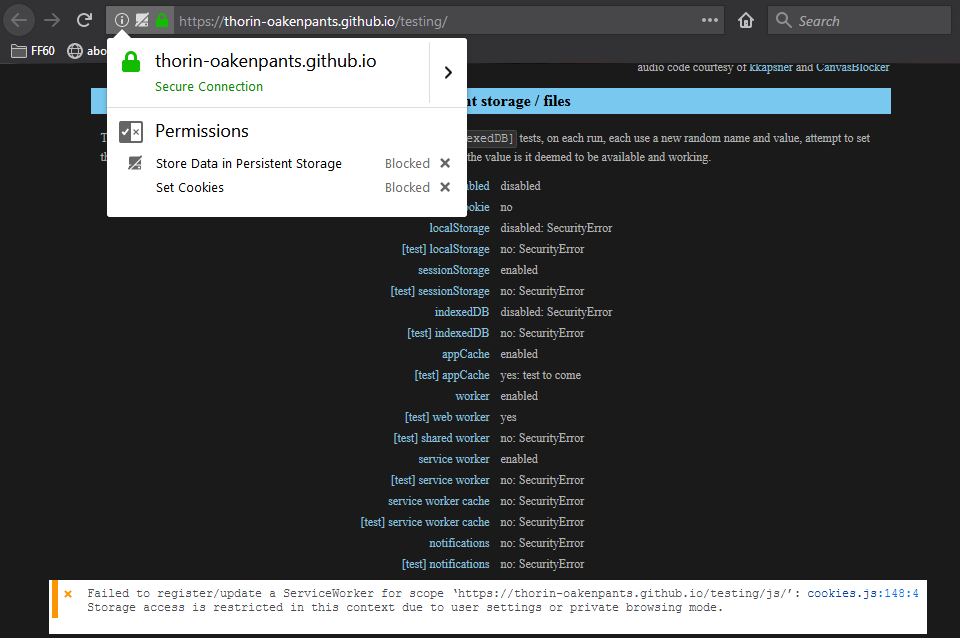
As you can see, cookies themselves, localStorage, sessionStorage and IDB all work or fail depending on the cookie = to be expected, it says it in the user.js
What I didn't expect was cookies to control shared workers and service workers. Very interesting. I'll do the same test in a nilla 64 (don't have a 65, cuz my portable dev edition is on 66 already and I think NGLS is already enabled, I'll check)
Thorin-Oakenpants
on 30 Jan 2019
PS: in PB mode, service workers are not available but I already check if ("serviceWorker" in navigator), and it isn't in PB mode, so the tests are not run.
The "store data in persistent storage" site exception is from another test and does not affect service workers anyway
Thorin-Oakenpants
on 30 Jan 2019
Same results in a nilla FF64 and FF66
Thorin-Oakenpants
on 30 Jan 2019
Tested nilla 64 .. added the entire user.js except I commented out dom.serviceWorkers.enabled, and the sw registration succeeds. I then added all my overrides, which includes blocking all cookies by default. The registration fails, but if I allow a site exception for cookies, it then succeeds.
So AFAICT, my problem is not caused by a pref (I should run the prefs cleaner to be sure). Why it still fails in my main FF with a cookie exception is a mystery. In my main FF I disabled all extensions and the problem remained. I shall now use my test nilla witht he user.js and ad some extensions one by one.
update: ran prefsCleaner.bat .. compared the new pref (after it was repopulated by the user.js) with the backup copy made by the bat file. Absolutely no differences (well, a startup time variable changed). And the problem still exists. So it must be an extension.
Thorin-Oakenpants
on 30 Jan 2019
nailed it. the cookie exception must be "allow". "allow for session" is not enough - wow, that's a bit different
Thorin-Oakenpants
on 30 Jan 2019
@gorhill FYI in case you weren't aware, and for when people have issues with controlling workers in uMatrix: see first post. Tested in FF60 and FF66. It's not something I was aware of.
Also, this is a good test for uMatrix:
- make sure
dom.serviceWorkers.enabled= true - make sure you have allowed cookies in Firefox for the site either by default or thru a site exception
- take the test ( https://thorin-oakenpants.github.io/testing/ )
- you will see
[test] web worker,[test] shared workerand[test] service workerreturnyes - in uMatrix disable web workers
- you will now see all three return
no
note: web worker and shared worker are set as no automatically by code. But service worker catches an error, one with no .name. If the sw test fails I propagate that to sw cache and sw notifications. Hence it looks a little weird with the colon, no:. I'll catch that in code and append "unknown error" or something.
workers allowed in uM

workers blocked in uM

meanwhile, for me, the uMatrix test fails, because it lost the game of rolling the dice with uBlock. This is really something Firefox needs to sort out :sob: :cry:
Thorin-Oakenpants
on 30 Jan 2019
@earthlng we should update the info in section 2700. the info about what cookies control is in 2701 but I'm more inclined to move it into the header section. We could also add that sw and IDB are not available in PB mode.
current (which is clearly not true)
 * [NOTE] Blocking 3rd party controls 3rd party access to localStorage, IndexedDB, Cache API and Service Worker Cache.
 * Blocking 1st party controls access to localStorage and IndexedDB (note: Service Workers can still use IndexedDB).
suggest deleted that from 2710 and adding the following to the section header
/*** [SECTION 2700]: PERSISTENT STORAGE
  Data SET by websites including
         cookies : profile\cookies.sqlite
    localStorage : profile\webappsstore.sqlite
       indexedDB : profile\storage\default
        appCache : profile\OfflineCache
  serviceWorkers :

  [NOTE]: IndexedDB and serviceWorkers are not available in Private Browsing Mode
  [NOTE]: blocking cookies also blocks websites access to; localStorage (incl. sessionStorage),
  indexedDB, sharedWorker, and serviceWorker (and therefore service worker cache and notifications)
  If you set a site exception for cookies (either Allow or Allow for Session) then they become
  accessible to websites except shared/service workers where the cookie setting *must* be Allow
***/
nits?
Thorin-Oakenpants
on 30 Jan 2019
FYI: with uBO winning the game of dice with uMatrix .. the problem is uBO's no-remote-fonts: * true - since I use uM in nightmare mode, I think I can do away with this certainly for 1st party. But i'm not sure if adding a *$font,third-party filter would still cause the same rolling the dice issue - @gorhill
edit: to be a little clearer, the rule for fonts causes an issue, so my question is, does the filter behave in the same way and can still cause an issue? The issue being this
Thorin-Oakenpants
on 30 Jan 2019
@earthlng I can't find the post where you said how you were controlling fonts. Since I block all and only need to whitelist about 5 sites, I'm more than happy to do it the same way as you. What were you using, and what were the rules - TIA :kiss:
Thorin-Oakenpants
on 30 Jan 2019
I'm using Request Control to block fonts. Pattern: Any URL, Types: Font, Action: Block
nits?
blocking cookies also blocks websites access to; localStorage ...
: instead of ; but otherwise :+1:
 earthlng
on 30 Jan 2019
earthlng
on 30 Jan 2019
makes you wonder why on earth a session cookie is treated differently to a permanent one outside of removing it when you close the browser. That sounds like a bug to me.
Makes you wonder what happens when you set all cookies to be session only? (which is the same diff as allowing as normal and clearing on close)
We'll probably need to revisit this test a few times and see what happens when they turn on NGLS
Thorin-Oakenpants
on 30 Jan 2019
I think it's probably because of Private Mode/Windows and that everything is session-only there, plus the things that don't support session-only are disabled in PB, like IDB
earthlng
on 30 Jan 2019
you may need *.mozilla.org and path: *. And read the manual
earthlng
on 30 Jan 2019
@earthlng I can't find the post where you said how you were controlling fonts. Since I block all and only need to whitelist about 5 sites, I'm more than happy to do it the same way as you. What were you using, and what were the rules - TIA 💋
Why not using uBlock?
My Filters:
*$font,first-party,important
*$font,third-party,important
My Rules:
site.com https://subdomain.site.com font allow
or to have global access to this site fonts
* https://subdomain.site.com font allow
Only trouble is to look into uBlock Logger for fonts location, but in case you have only 5 sites could be feasible.
 dezhavu
on 1 Feb 2019
dezhavu
on 1 Feb 2019
@dezhavu Because I want to reduce the risk of two or more extensions fighting over who gets to modify the webpage - only one wins, which means at least one of your extensions is not doing their job as expected - see https://github.com/ghacksuserjs/ghacks-user.js/issues/265#issuecomment-393935989
Edit: and I found that uBO font blocking was causing uM to not stop workers. Since I block all but only need to allow on 4 sites, it is easy for me to use the same method as earthlng. If i understand it correctly Request Control doesn't have this problem (header change) so it can't cause a clash
Edit2: Note, this is not the same granularity as uBO (although Request Control can probably do it if you set up enough fine tuned rules: I'm just using a simple whitelist rule). for example:
- if I need to get 3rdparty font-awesome to work on firstparty.com, then currently I just whitelist 3rdparty, which is not how to do it, because then all the sites that use a popular font source like that would be able to link me (by IP). But my 4 whitelisted sites are all unique, eg *.espncdn.com 's fonts for www.espncricinfo.com is not an issue, and I already have to link to the cdn to make the site work
Thorin-Oakenpants
on 1 Feb 2019
What Pants said. I don't know about "filters" but AFAIK uBlock "rules" use CSP headers to block fonts and that screws with uMatrix. IDK if filters also use CSP but I think gorhill answered that in the issue Pants linked.
earthlng
on 1 Feb 2019
me
edit: to be a little clearer, the rule for fonts causes an issue, so my question is, does the filter behave in the same way and can still cause an issue?
earthlng
I don't know about "filters" but AFAIK uBlock "rules" use CSP headers to block fonts and that screws with uMatrix. IDK if filters also use CSP but I think gorhill answered that in the issue Pants linked.
Nope. I still have no idea. @gorhill :kiss:
Thorin-Oakenpants
on 1 Feb 2019
https://bugzilla.mozilla.org/show_bug.cgi?id=1413615 - this is an interesting little read
Thorin-Oakenpants
on 6 Feb 2019
Are there any features of Privacy Possum (data poisoning) that can be implemented with user.js ?
 slowfar
on 1 Mar 2019
slowfar
on 1 Mar 2019
Most of them. Privacy Possum blocks etag,
while ghacks user js does it with Header Editor.
 Atavic
on 1 Mar 2019
Atavic
on 1 Mar 2019
Are there any features of Privacy Possum (data poisoning) that can be implemented with user.js
A user.js simply controls Firefox (FF) settings. So what can Firefox do (i.e no extensions) that Privacy Possum (PP) does. Let's go thru the list (without inspecting the degree to which PP does things - just taking the concepts at face value)
- PP: block cookies that track you
- FF has a limited tracking protection
- in FF you can disable third party cookies (but enable them on a site by site basis for the very few sites that need them)
- in FF you can disable all cookies (but enable them on a site by site basis for the few sites that need them)
- in FF you can use containers (which can limit some cookie based tracking)
- in FF you can turn on
privacy.firstparty.isolate(FPI) which will isolate cookies based on first party, but doesn't stop the actual cookies - FF can sanitize cookies and related storage on close, and manually (IDB can be an issue)
- in combinations of settings, FF can totally control cookies
So in terms of cookies, extensions do almost jack shit, and can cause problems (leaving behind orphaned persistent data). But it's not perfect, because just connecting to a third party is enough (IP, JS, FP'ing) and FPI doesn't protect against repeat visits. Also, PP can be more of an install and forget, whereas FF in a more hardened mode will take time to curate your exceptions.
Blocks refer headers
- FF can limit some exposure via prefs, but any hardened approach to minimize tracking via this mechanism just results in a broken web. So I would say NO, you need an extension.
Blocks etag tracking
- FF cannot do this on it's own
- Edit: in FF, you can however, disable disk and memory cache which means ETAGs aren't used: this is not as elegant a solution as removing the actual ETAG
Blocks browser fingerprinting
- There are so many FF prefs (hundreds) that affect your FP (fingerprint). Some good, some bad. Some FP'ing cannot be changed with FF prefs. It's a bit complicated.
- Note: there are some FP'ing values that neither FF or an extension can change
- Extensions are limited in some areas that FF can do (because .. you know.. its app code): such as screen resolution detected by css
- FF has
privacy.resistFingerprinting(RFP) which covers a lot of areas, but not all. It's a work in progress
- Examples where it excels (compared to extensions which are limited or can do nothing) are timezone spoofing, screen etc measurements, user agent and navigator objects
- Examples where its lacking right now (but in the pipeline): fonts, domrect, audio FP'ing, math libraries, css line height, scrollbar widths - it will take some time
In general, if RFP covers it then that is the best option (because app code can do more than extensions in most cases). With PP, it's also a different approach. RFP aims to lower entropy, PP aims to randomly increase entropy. There are pros and cons to both. But mixing them seems like a bad idea
Thorin-Oakenpants
on 2 Mar 2019
Related issues
Thorin-Oakenpants
·
4Comments
 zdat
·
5Comments
Thorin-Oakenpants
·
3Comments
Thorin-Oakenpants
·
7Comments
earthlng
·
6Comments
zdat
·
5Comments
Thorin-Oakenpants
·
3Comments
Thorin-Oakenpants
·
7Comments
earthlng
·
6Comments