User.js: help! need some test results: will take you two minutes
:star2: Attention all you watchers! If you have Windows 10, Linux or MacOS, I need your help for a couple of minutes
css line height differs per platform in Firefox, and can thus be used to determine your os. It's not perfect, because I have found that if you change your default serif font and don't allow pages to choose their own fonts (document fonts = 0), then the font used will screw up the result. For example, I use Georgia as my default serif and locked doc fonts to 0 .. and I'm shown up as 19px (and everyone thinks I'm on Linux)
I've built a work-in-progress PoC, but need some more data. I'm just going off the original info supplied by hackerone - source, so I'm not even looking at san serif or monospace, or other fonts families, or styles (but I may do, this is interesting).
The other thing I have found is that something happened with the release of FF62, and all the measurements changed. Maybe it's something to do with stylo, IDK, and it doesn't matter - because I can 100% reliably detect your FF version based on internally how FF handles various JS features (you can't change these using prefs: if JS is allowed to run, I can detect your version in FF60 up)
I need test results to confirm ESR60 and FF64/65
:exclamation: Make sure you allow document fonts for this test
[SETTING]General>Language and Appearance>Fonts & Colors>Advanced>Allow pages to choose...
:exclamation: and don't zoom the page: do the test at 100%
So here is my little test page: https://thorin-oakenpants.github.io/testing/ and this is the bit of info I need from you guys ad gals
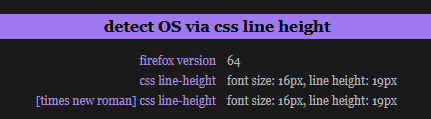
:small_orange_diamond: ESR60
| OS | expecting | confirmed result |
| -----: | :------------ | :--------------- |
| Windows7 | 19.2 or 20 | 20 |
| Windows10 | 19.2 or 20 | |
| MacOS | 19.5167 | 19.6833 (in a dodgy VM) |
| Linux | 19 | 19 (debian) 17 (debian 32bit) |
| Android | | |
:small_orange_diamond: FF64/65 preferably (or at least 62 or higher)
| OS | results |
| -----: | :--------- |
| Windows7 | 18 |
| Windows10 | 18, 19 (scaling=200%) |
| MacOS | 19.2, (19.6833 in a dodgy VM) |
| Linux | 19 (arch) 17 (debian) |
| Android | 19.5 |
Note: the test has two css line heights. One I specify to use the Times New Roman font: just paste both results. I am not sure what the default serif font is on other platforms, and if hackerone's test used the default font or specified one
...
 Thorin-Oakenpants
All 27 comments
It may make sense to check with rfp on and off and usual ff vs tbb. And how about other engines?
Maybe it's something to do with stylo
stylo can be disabled in about:config.
I also wonder if these have changed because of a hardcoded value, or because of the same reasons font fingerprints change between versions.
 KOLANICH
on 16 Jan 2019
KOLANICH
on 16 Jan 2019
RFP does not affect css line height .. don't really care about the cause of the change ... it's not a definitive os proof .. more for fun to show people that spoofing UA sucks donkey's balls
font fingerprinting per OS is much easier than this ... in fact it's downright easy AF
edit:
and usual ff vs tbb
TB is not the issue - I have that under control. They actually did modify this value, but now its off again. The point is that if TB breaks the test, that's good. I want to show what happens when it's not protected (which is moot since it's too easy to get OS anyway)
Thorin-Oakenpants
on 16 Jan 2019
Win 10, FF 64.0.2 x64
firefox version | 64
-- | --
css line-height | font size: 16px, line height: 18px
[times new roman] css line-height | font size: 16px, line height: 18px
 crssi
on 16 Jan 2019
crssi
on 16 Jan 2019
^ thanks
Thorin-Oakenpants
on 16 Jan 2019
Arch Linux, Firefox 64.0.2:
firefox version                   64
css line-height                   font size: 16px, line height: 23px
[times new roman] css line-height font size: 16px, line height: 19px
 yssmcl
on 16 Jan 2019
yssmcl
on 16 Jan 2019
^^ thanks :kiss:
Thorin-Oakenpants
on 17 Jan 2019
Mac OS 10.12.6
firefox version | 64
css line-height | font size: 16px, line height: 19.2px
[times new roman] css line-height | font size: 16px, line height: 19.6833px
ESR
firefox version | 60
css line-height | font size: 16px, line height: 19.2px
[times new roman] css line-height | font size: 16px, line height: 19.6833px
 theontimetechguy
on 17 Jan 2019
theontimetechguy
on 17 Jan 2019
^^ oooh .. nice
edit: not sure why a ESR60 returns the new value, but seems MacOS returns more than one decimal point
Thorin-Oakenpants
on 17 Jan 2019
Debian, FF 64.0.2 (64-bit)
firefox version 64
css line-height font size: 16px, line height: 23px
[times new roman] css line-height font size: 16px, line height: 17px
 1xPdd
on 22 Jan 2019
1xPdd
on 22 Jan 2019
^^ thanks :kiss:
Thorin-Oakenpants
on 22 Jan 2019
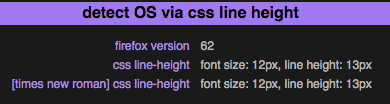
macOS 10.12.6
firefox version 62
css line-height font size: 12px, line height: 13px
[times new roman] css line-height font size: 12px, line height: 13px
 grauenwolfe
on 22 Jan 2019
grauenwolfe
on 22 Jan 2019
thanks @grauenwolfe - that seems low. Can I ask if you have retina display? Or if you have a dpi other than 96? Also that you allow pages to set their own font (just for the test). TIA :kiss:
Thorin-Oakenpants
on 23 Jan 2019
@grauenwolfe .and @1xPdd , can you redo your tests - a few days ago I inadvertently removed the css rules to enforce font size 16 on both and times new roman on the second
Thorin-Oakenpants
on 23 Jan 2019
No problem.
First, yes, the pref to allow document fonts was changed for this. Was curious about the rsults so I relaunched FF and tested again with same results. Second, no Retina Display used, this was with an NEC PA302W monitor which has the following:
aspect ratio: 16:10
resolution: 2560 x 1600
ppi: 101
Can run it on the Macbook Pro that _does_ have Retina Display if you want.
grauenwolfe
on 23 Jan 2019
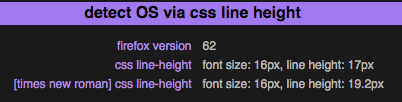
New test:
firefox version 62
css line-height font size: 16px, line height: 17px
[times new roman] css line-height font size: 16px, line height: 19.2px
grauenwolfe
on 23 Jan 2019
Can run it on the Macbook Pro that does have Retina Display if you want.
Might be interesting :) I know who to call for my retina display detect testing then
Thorin-Oakenpants
on 23 Jan 2019
21-inch 1920x1080 screen, if that matters
firefox version 64
css line-height font size: 16px, line height: 23px
[times new roman] css line-height font size: 16px, line height: 17px
1xPdd
on 23 Jan 2019
^ bump ... come on guys .. 900+ stars .. 90 odd watchers .. can we get some MOAR results - especially non-windows
Thorin-Oakenpants
on 29 Jan 2019
W10x64 (system scaling set to 200% if it matters)
firefox version 64
css line-height font size: 16px, line height: 19px
[times new roman] css line-height font size: 16px, line height: 19px
 Marc05
on 29 Jan 2019
Marc05
on 29 Jan 2019
^^ thanks @Marc05 :kiss:
Thorin-Oakenpants
on 29 Jan 2019
that's a bit of a bummer, as 19px were kind of a linux thing. Does "scaling" change anything? And since the values didn't change, are you sure that Times New Roman was used? - TIA
Thorin-Oakenpants
on 29 Jan 2019
Setting the OS scaling to 100% produced the following results:
firefox version 64
css line-height font size: 16px, line height: 18px
[times new roman] css line-height   font size: 16px, line height: 18px
The setting mentioned in the OP is checked. Here is what it looks like at 200%:
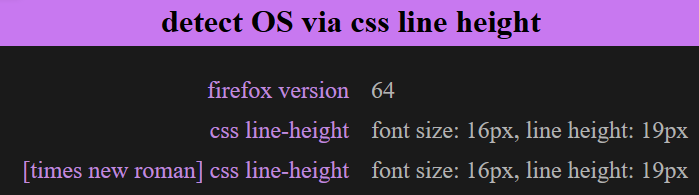
Note that my native resolution is 2736x1824.
Marc05
on 29 Jan 2019
Running Firefox 60.4esr 32 bit
Linux raspberry 4.9.0-8-amd64 #1 SMP Debian 4.9.130-2 (2018-10-27) x86_64 GNU/Linux
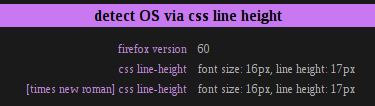
theontimetechguy
on 30 Jan 2019
@theontimetechguy :kiss: I'll talk to you later .. get the lube handy
@Marc05 oooh, that's awesome. So scaling affects it. Which means the rules are still workable as a "best guess" (i.e no zoom, no scaling, probably no HiDPI)
Thorin-Oakenpants
on 30 Jan 2019
GNU/Linux (Debian)
60.4.0esr (64-bit)
firefox version | 60
css line-height | font size: 16px, line height: 19px
[times new roman] css line-height | font size: 16px, line height: 19px
 cy7yz2rj
on 30 Jan 2019
cy7yz2rj
on 30 Jan 2019
thanks @cy7yz2rj :kiss: :beer:
Thorin-Oakenpants
on 30 Jan 2019
thanks everyone ... I think I have enough info
Thorin-Oakenpants
on 4 Feb 2019
Related issues
Thorin-Oakenpants
·
88Comments
 Aeriem
·
64Comments
Thorin-Oakenpants
·
69Comments
Aeriem
·
64Comments
Thorin-Oakenpants
·
69Comments
 overdodactyl
·
65Comments
overdodactyl
·
65Comments
 vertigo220
·
64Comments
vertigo220
·
64Comments