User.js: Interactive real-time user.js: Stage 1 [Data Collection] Part 2
We're trying to build an online, interactive, real-time user.js as an extension of this repository.
- The prototype is here: https://nwmviewer.shinyapps.io/ghacks_userjs/
- Previous waffling was in #569, and then in #574
- Feedback and suggestions for what people would find useful to have are always welcome.
This issue will focus on
- what data we want to include
- simplifying data collection
- ensuring the quality and accuracy of the data being pulled
- the table structure to facilitate layout
:small_red_triangle_down: DATA COLLECTED
x100s section info
- [x] section No.
- [x] section title
- [x] section header
- [x] ?? multi-line sub-section headers
/**- there are only 2
- /* safe browsing (sb) <- good info
- /* tracking protection (tb) <- 2 lines not important
always between /* number and ***/
- [x] pref number
- [x] Description: first line
- [ ] description & subsequent data not picked up if first pref is commented out: see 1202, 2508, but subsequent pref(s) are active
- [x] Info
- [x] Notes
- [x] Warning
- [x] Setup tags
- [x] Settings
- [x] Tests
- [x] Reference Links
always after /* number and ***/
- [x] pref Name
- [x] pref Value
only on user_pref lines, at end after ; //
- [x]
[HIDDEN*(icon) - [x]
[DEFAULT*(includes value and optional text) - [ ] ?? comments (do we need them, lets do a count and see what they contain)
always after /* number on the first line (applies to all prefs for that number) OR on user_pref lines, not both
- [x]
[FF*(includes number or numbers, eg [FF60+] or [FF40-49] - [x]
[WINDOWS][MAC][LINUX][ANDROID]
:small_red_triangle_down: DATA QUALITY / COLLECTION
- [x] get tags out of section headers
- [ ] first line cleanups
:small_red_triangle_down: THINGS TO THINK ABOUT
- [ ] sections that don't have a pref but do have kids
- I think 0105 -> 0105a/b/c/d is the only one. We should check this. If this is the only one, if so we're OK We don't want to propagate the setting tags anyway and the info isn't needed
- [ ] propagation of something from
/* ... ***/to each pref when a number is multi-pref
- not good when filtering and the first pref falls off, leaving a blank
- propagate something like
see parent pref xxxx for info? Doesn't always work
- [ ] how to pull thru sections like 4600 that use a one-switch char and different syntax
Here's a turtle :turtle:
:small_orange_diamond: UI THINGS we've spotted (not important yet)
- [ ] count includes displayed section titles (i.e it shows rows displayed)
 overdodactyl
All 36 comments
That's me for now. I feel a huge beersies session and pig out coming on .. tis the weekend. It'll be a totally "no pants" episode with loud music and me running naked thru the house yelling and singing. See you in 24 hrs (if I survive)
@earthlng , sorry mate, about the PR. But when you get the time, if you're OK with it, feel free to squash and commit it. (then we can get on with diffs). Oh, and your thoughts would be super welcome on all of this :kiss: :suckingup:
@overdodactyl Take a break buddy, drink some wine ... what can wrong, they said! See if you work out how to propagate from always between /* number and ***/ to each user_pref for these four items
- has [test
- has [warning
- has [setting
- has [setup* - differentiate between each type, and allow for future appendages (e.g.
[setup-harden])
^ I'd rather do that than pollute each user_pref with [T], [W] etc.
This would then get us two clearly defined sets of data
number, first line, all the text (info+notes+warning+setup*+tests+settings), links
pref number, pref first line, pref value, and all the icons we need
That would get all filterable info onto every user_pref - hellyeah
 Thorin-Oakenpants
on 8 Dec 2018
Thorin-Oakenpants
on 8 Dec 2018
Where are you pulling this from.. 0303 has a windows tag in the first line, but not in the PR. Edit: and FFversions and more. Looks like you're pulling the master?
BTW: I added an item to OP, I don't think we should pull any section header info into the table, or break it up with any extra lines. So don't work on that. If there is any section header text, we can just add it to the index. Single table, one line each pref, it's all fitting in and looks awesome
Thorin-Oakenpants
on 8 Dec 2018
Definitely is improving! Propagating the info shouldn't be too difficult.
Where are you pulling this from.. 0303 has a windows tag.
That admittedly took way too long to figure out haha. I thought the url for the file stayed consistent within a PR, but nope. It was pulling from the original commit there, but it's updated to the latest version and the windows tag is gone.
I don't think we should pull any section header info into the table, or break it up with any extra lines. So don't work on that. If there is any section header text, we can just add it to the index. Single table, one line each pref, it's all fitting in and looks awesome
Perfect! That will be much simpler to implement anyways :)
overdodactyl
on 8 Dec 2018
change display of [FF from icon to (bold dark orange?) text
Where do we want to put this info? Do we want it as text in the info column, or just in the dropdown?
overdodactyl
on 9 Dec 2018
Section header info is now in the index - needs some formatting work, but it's there
overdodactyl
on 9 Dec 2018
In the info column it's never hidden (and I hate hiding shit). Orange sucks on white text. But we can talk formatting later :) I know it will look weird with text among icons , but color coding man... you'll see later on. Its just an idea but the icons would be in set columns, rather than concatenated and left aligned, and they would be colored. And the FF version would look like this, you could even strip the FF part

^^ that's the kind of look I want for setting, test, warning, setup* etc in the dropdown. because its the background, it allows for lighter and a broader range of colors.
Just need to come up with some light/pale colors (not too wish washy). And since our order is always consistent, we should take that into account as well.
Section header info is now in the index - needs some formatting work, but it's there
Sweet, I was going to ask how hard it would be to put a demarcation line between sections, but since we got stuff in there now, no need. Formatting it will do.
What happens to them when you filter? Does it hide the ones that don't apply? eg if my filter shows nothing from section 1000, does the 1000 section header still show? I know .. jumping the gun.
Thorin-Oakenpants
on 9 Dec 2018
Ahh, I misread that. header info into the index
Thorin-Oakenpants
on 9 Dec 2018
I like the formatting idea - once we get all the info we want there I'll work out the best way to implement that (not sure if we would want actual columns for each, or just align each type of tag with spacing).
Ahh, I misread that. header info into the index
I thought that's what you meant with earlier...did you want that info to stay in the table?
overdodactyl
on 9 Dec 2018
Ooh, I see color in some icons.
The header info I think is good in the index, because it gets bulky. But collapsed would be good.
As for the table, in an ideal world, we would want to demarcate each section with the section title (bold, bigger font or whatever, and if there are no items displayed for that section, the section header would be auto hidden. It's always been that way for the last 25+ years in reports - crystal reports, even access 95! showing my age now...
But we're working with what you have, and it's not built in. For now, it's a wishlist item
Thorin-Oakenpants
on 9 Dec 2018
Sounds good! Since I removed the sorting ability, that should be a lot easier to implement
overdodactyl
on 9 Dec 2018
Well, to be honest. if/when we have section titles in the table at some stage, then a collapsed header would fit best there, so its right next to the relevant prefs. Prototyping lols .. always changing ~our~ my mind. (and the section column would be hidden, it's just used as a foreign key)
Thorin-Oakenpants
on 9 Dec 2018
Works for me - I've changed the index so the descriptions are collapsible, but the same code can be used to create the collapsible elements for the table later on
overdodactyl
on 9 Dec 2018
Section details are now rows in the table.
It doesn't work with searching yet, but that will come later.
overdodactyl
on 10 Dec 2018
Just hold off on searching, we need to talk about that and decide what it's actually meant to do, and filtering
Thorin-Oakenpants
on 10 Dec 2018
we need to talk about that and decide what it's actually meant to do, and filtering
Sounds good - for now I've removed the search box and added a sample filter for "Settings"
Update: section headers are removed if all children prefs are filtered out
overdodactyl
on 10 Dec 2018
I kinda liked filter... its easier and faster to find stuff where when filtered are conveniently listed together without needing to jump around the page.
Also list of all prefs (active and inactive) would be nice with an icon or perhaps italic font for inactive prefs.
 crssi
on 10 Dec 2018
crssi
on 10 Dec 2018
Filtering is definitely still a to-do item. There is a sample at the top with the checkbox "Settings".
Inactive prefs can be included using the "Show Inactive Prefs" checkbox, and are indicated by an icon. Though I think I might prefer either dimming them out or changing to italic font or something of that nature to avoid adding an additional column
overdodactyl
on 10 Dec 2018
^^ slow down there crssi. We'll fine tune function a little later, and formatting after that. But I expect the filter line to look like this (we can pretty it up later) .. and search is a word(s) filter, not a search IMO
Setting `[x]` Warning `[ ]` Test `[ ]` OS` [▼dropdown ]` Version `[▼dropdown ]` Setup `[▼dropdown ]` Keywords `[....comma delimited? string?...]` `[APPLY]`
Changes could be auto-refresh of the data, or like tortrac, require hitting an update button (so users can make multiple choices before committing)
Thorin-Oakenpants
on 10 Dec 2018
^^ We'll also have to decide how that filter should work. i.e. do we have to meet all selected conditions or any condition
overdodactyl
on 10 Dec 2018
@Thorin-Oakenpants don't worry, I am not rushing anywhere and I do not try to persuade into anything... just saying. :wink:
crssi
on 10 Dec 2018
^^ exactly. First we get the data collection (and quality) sorted, then the layout/structure and where we put shit (because that impacts features), then the functionality, and lastly the formatting.
Personally, I prefer the all conditions - that's how bugzilla, tortrac etc do it, but then they're dealing with large numbers of records, so they need the granularity. For us, a lot of combinations of filters don't even make sense - why would someone want to find "warnings" for "FF42". It's just that if you make it conditional, you lose a lot of functionality.
I see usage as one off filters for most things - eg
- filter for setup* - user can set prefs for troubleshooting
- filter for a FF version - user can see the few prefs we add per version
- filter for settings - user can lookup what pref relates to something in the UI
I'm not really seeing a need for anyone to combine filters. So for us, I think its more usable as conditional. Just something to think about.
@crssi Nah, you're all good man. You've earned the right to be heard. Speak up if you want to :kiss:
Thorin-Oakenpants
on 10 Dec 2018
Just some things to think about: add to OP if you want under UI things
- expand doesn't seem to be sticky when you toggle other items, eg active or settings
- expand controls all lines. Would it be an idea to split section vs prefs. Section headers can be quite
Thorin-Oakenpants
on 10 Dec 2018
just FYI (not saying anything needs to be done about it!)
https://nwmviewer.shinyapps.io/ghacks_userjs/ doesn't like Tor users: 403 Forbidden
 earthlng
on 10 Dec 2018
earthlng
on 10 Dec 2018
So for us, I think its more usable as conditional. Just something to think about.
I would tend to agree...especially with ones like WINDOWS, were the tag really means windows only not applicable to Windows (I could see users filtering by an OS, coming up with very few results, and thinking those are the only ones the have to worry about).
expand doesn't seem to be sticky when you toggle other items, eg active or settings
Individual pref expansions might be challenging to carry over, but global settings (all expanded/collapses) should be an easy fix.
expand controls all lines. Would it be an idea to split section vs prefs
That would be easy to do as well.
doesn't like Tor users: 403 Forbidden
Damn, that's a bit disappointing. I'm not sure there's much I could do about that as long as it's hosted on shinyapps.io, but I'll look into it :)
overdodactyl
on 10 Dec 2018
403 Forbidden
I got this the first time I tested, but I switched circuits and it was fine
overdodactyl
on 10 Dec 2018
oh okay, well I must be very unlucky then because every circuit I tried was blocked. But yeah it's no biggie
earthlng
on 10 Dec 2018
Hmm, or perhaps I was just lucky. I just tried several more and it worked 2/15 times.
Here's a screen grab to show I'm not totally making it up haha:
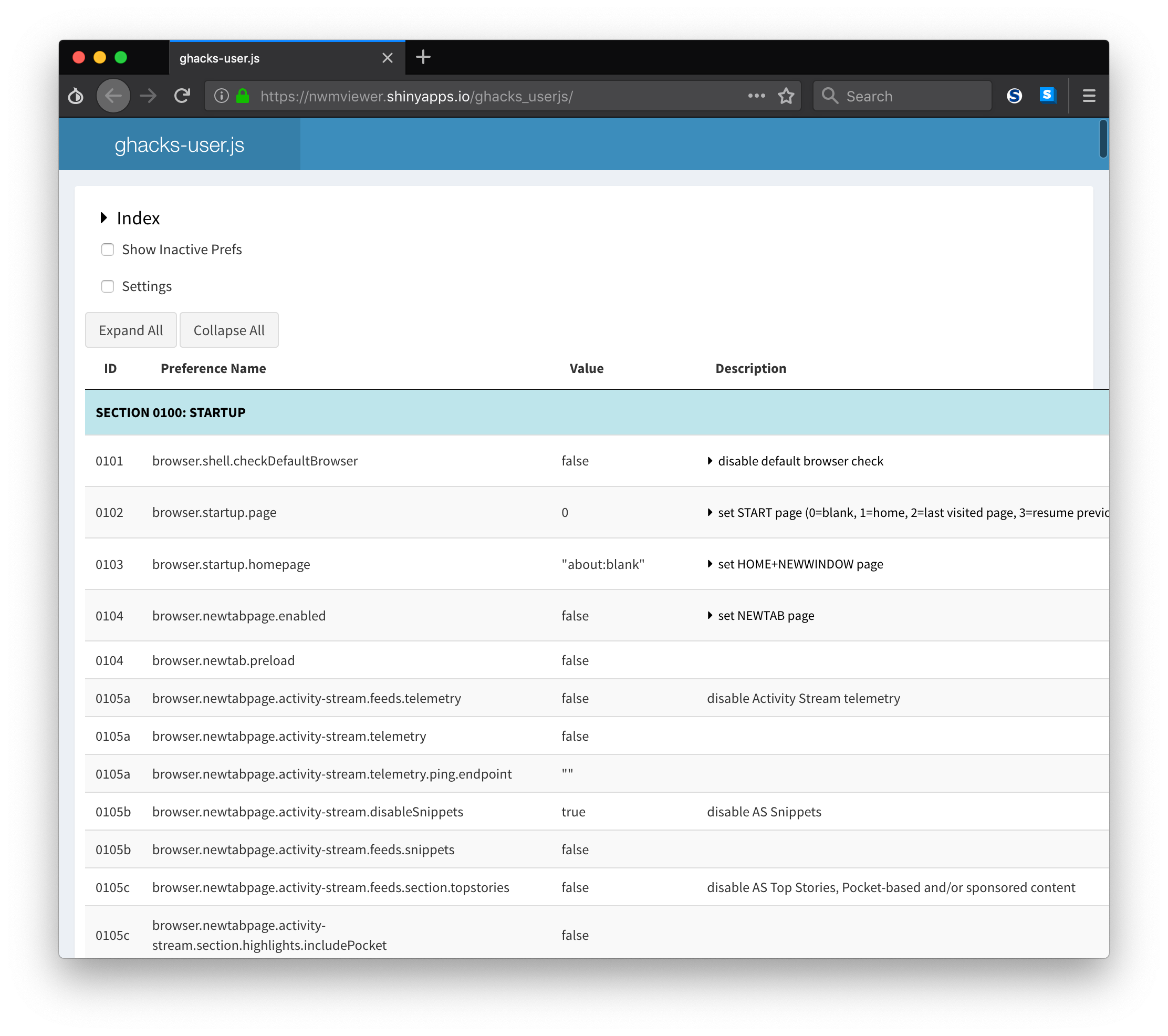
Ideally we could get it working, but with the free tier of shinyapps.io you have limited server control.
overdodactyl
on 10 Dec 2018
^^ FFS @overdodactyl .. that's a sloppy PS job if I ever saw one :trollface:
https://metrics.torproject.org/bubbles.html#country - not much to hide in. Yeah, I get it, they probably block by ip
Thorin-Oakenpants
on 10 Dec 2018
Hey @overdodactyl .. see this commit: https://github.com/ghacksuserjs/ghacks-user.js/commit/23733097a95d9db37028d0ec8c7991bd0bf0a04b
The reason I would want easily distinguishable icons to show in the info column, even if they're in the main body (tests, warnings, etc), is so that they're easily seen even when lines are collapsed.
For versions, you use [FF* to detect them, but like defaults, we can include extra info. The above commit is a rare case (and I hate throwing away info) where the diffs are so great, but begs the question of how do deal with version tags that get longer - we don't want the info column to get polluted with long strings
So here's what we have
[FF52] → 52
[FF52-FF62] → 52-62
[FF52, FF62-compat] → 52
and here's one that may one day pop up (but I doubt it)
[FF52-62, FF60-compat] → 52-62
So thinking about that, when you output the result, read until you find a comma or ], strip multiple FF's. Is that easy enough to do? Examples above. That would keep em short for the info column.
Thorin-Oakenpants
on 11 Dec 2018
So thinking about that, when you output the result, read until you find a comma or ], strip multiple FF's. Is that easy enough to do? Examples above
That's easy to do and sounds like a good approach!
PS: Just as a heads up, I've got a busy week ahead, so I may not be able work a ton on it over the next several days, but I'm not giving up on it!
overdodactyl
on 11 Dec 2018
2508 lost it's description because it has multiple prefs, but the first one is commented out
/* 2508: disable hardware acceleration to reduce graphics fingerprinting
 * blah blah ***/
   // user_pref("gfx.direct2d.disabled", true); // [WINDOWS]
user_pref("layers.acceleration.disabled", true);
edit: am searching current js for ***/ [linebreak] // and also spotted 1202. These two seem to be the only ones. Should we code around it, or change the order of the prefs so the active one is first (and we'd have to remember to not fuck that up in future edits)?
Thorin-Oakenpants
on 24 Dec 2018
These two seem to be the only ones. Should we code around it, or change the order of the prefs so the active one is first (and we'd have to remember to not fuck that up in future edits)
I think it depends on how we want to handle propagating info from one item to the next.
I'm still not sure what should be done with that. i.e. for multiple items with the same description, should we have the description written for each one, or only the first and have a ref to the pref with the description or what?
I don't love the idea of repeating so much info, but when taking into account things like filtering, it might be the best thing to do...
Thoughts?
overdodactyl
on 26 Dec 2018
I don't love the idea of repeating so much info, but when taking into account things like filtering, it might be the best thing to do
Me too. With an Info Systems career, I always like normalization .. until I got into data warehousing, and then speeding shit up was all the shizzle! I dunno right now, it's listed in OP, so we can come back to it.
Are you at a bottleneck waiting for a decision yet?
Thorin-Oakenpants
on 27 Dec 2018
Are you at a bottleneck waiting for a decision yet?
Unfortunately I think I am a bit :/ I've got some other small things, but that's the biggest thing at this point (which will also have a big impact on how we are able to filter...without duplicating info that will become more tricky as well)
overdodactyl
on 31 Dec 2018
Possibles for duplicating /* to ***/ data except for items we display as an icon (each filter has an icon).
1- leave empty and at top of doc in short blurb where we say a few things explain if a description is empty, look up.2- everything else looks naff (e.g I thought about just sayingsee xxxxor tooltip'ing the info) and can be problematic to code (several examples which wouldn't follow the rules)
I say we don't propagate info to empty description fields
Thorin-Oakenpants
on 3 Jan 2019
closing .. I think the :cat2: caught and ate the :bird:
Thorin-Oakenpants
on 7 May 2019
Related issues
earthlng
·
78Comments
 vertigo220
·
64Comments
Thorin-Oakenpants
·
69Comments
overdodactyl
·
65Comments
earthlng
·
56Comments
vertigo220
·
64Comments
Thorin-Oakenpants
·
69Comments
overdodactyl
·
65Comments
earthlng
·
56Comments
Most helpful comment
Section details are now rows in the table.
It doesn't work with searching yet, but that will come later.