User.js: Interactive real-time user.js: Stage 1 [Data Collection]
We're trying to build an online, interactive, real-time user.js as an extension of this repository.
The prototype is here: https://nwmviewer.shinyapps.io/ghacks_userjs/
This issue will focus on (1) what data we want to include, and (2) ensuring the quality and accuracy of the data being pulled.
Feedback and suggestions for what people would find useful to have are always welcome. (Thorin: previous waffling was in #569 )
Right now what we have, for active prefs:
- [x] ID (text)
- [x] Section (text)
- [x] Preference Name (text)
- [x] Value (text)
- [x] Description (text)
- [x] Info
- [x] UI Setting (icon)
- [x] Hidden Pref (icon)
- [x] Links (~icon)
- [x] Tags (icon)
- [x] Notes (icon)
- [x] Tests (icon)
- [x] enforcing defaults (
// default:): note we would need to specify a warning somewhere that this is not definitive and users should check) (icon) - [x] OS specifics (e.g. Windows only) (icon)
- [x] Firefox version specifics (i.e. FF55+, FF57+ ...) (icon)
- [x] section header information (there's important stuff in there, and providing incomplete info to users is a disservice)
Things we could consider adding data/icons for:
- [ ] Inactive prefs, and how would we deal with sections like 4600 that use a one-switch char and different syntax format
- [ ] depending on layout, might pull thru comments at end of user_pref lines
NAH- Settings that don't have a user_pref (see 0902)
Current issues:
- [x] Multi-line notes
- [ ] Tags that are indicated by section header only (needs to be fixed in
user.js, not programatically) - [x] UI Settings that include double quotes (see 2650) - RESOLVED by replacing w/
'(script fix) - [x] Descriptions (first line only overflow/mixes with more info)
- [x] double settings ( see 0201b)
- [x] Version specific prefs only looks in description
 overdodactyl
All 65 comments
how do we define descriptions?
consider
/* 1021: disable storing extra session data [SETUP-CHROME]
 * extra session data contains contents of forms, scrollbar positions, cookies and POST data
 * define on which sites to save extra session data:
 * 0=everywhere, 1=unencrypted sites, 2=nowhere ***/
ideally the description should be the first line (minus anything we pull out separately). this keeps it short and simple. That bring up the questions of 1) what about subsequent lines that aren't a note 2) do we have any numbered items which would break this (yes we do, eg 1023)
line1 is borked
/* 1023: set the minimum interval between session save operations - increasing it
 * can help on older machines and some websites, as well as reducing writes, see [1].. etc
which then brings up the question of Notes. Notes (and warnings and settings are always after the description/info lines) and are just part of the full description IMO. The "tagging" of them in the user.js just gives them more weight. Since they're always at the end, these tagged items are not a problem.
If we cleanup all first lines for numbered items, then subsequent lines would could be pulled thru as a new data field eg "extrainfo" (and subsequently used how we want in the layout)
 Thorin-Oakenpants
on 5 Dec 2018
Thorin-Oakenpants
on 5 Dec 2018
So this is the basic flow of how I was parsing things - you might have a better approach given your familiarity with the file over mine:
Read file line by line
Skip lines that are blank
If a line contains
[SECTION], define the section value for each id until we reach a different oneIf a line starts with
/*or*, we are dealing with the details of a user_pref, and will set attributes of a pref until we reach eitheruser_pref(...or// user_pref, at which point that pref will be assigned the values (or disregarded in the case of// user_pref)- If the line contains
[SETTING], that whole line is attributed to the setting - If the line starts with
[#], that whole line is attributed to a link - If the line contains
[NOTE], that whole line is attributed to a note - If the line contains
[TEST], that whole line is attributed to a test - Anything else gets pasted into a buffer that results in the "description"
- If the line contains
Stop reading once we hit the line with
crossed the Jordan.
So that's why multi-line Notes get messed up, the line with "[NOTE]" goes to the note line, following ones get added to the description section.
Notes (and warnings and settings are always after the description/info lines) and are just part of the full description IMO.
If this is the case, we can just change the flow so that once you hit [NOTE], everything that's not one of those other special cases gets pasted into a notes buffer instead of a description one.
Oh, and at the end the description is searched for tags.
Edit: Sorry, I guess that doesn't really address the second example you provided...
If we cleanup all first lines for numbered items, then subsequent lines would could be pulled thru as a new data field eg "extrainfo" (and subsequently used how we want in the layout)
That sounds like a good way to go
overdodactyl
on 5 Dec 2018
About the only thing not "marked" is those extra lines after the first one, after that everything has a unique demarcation. The current setup works if we are vigilant with the user.js, and vet the current one.
/* 0330: disable telemetry
 * the pref (.unified) affects the behaviour of the pref (.enabled)
 * IF unified=false then .enabled controls the telemetry module
 * IF unified=true then .enabled ONLY controls whether to record extended data
 * so make sure to have both set as false
 * [NOTE] FF58+ `toolkit.telemetry.enabled` is now LOCKED to reflect prerelease
 * or release builds (true and false respectively), see [2]
 * [1] https://firefox-source-docs.mozilla.org/toolkit/components/telemetry/telemetry/internals/preferences.html
 * [2] https://medium.com/georg-fritzsche/data-preference-changes-in-firefox-58-2d5df9c428b5 ***/
- parse line 1 = number and "description"
- parse next lines (plural) until you hit the next tag or user_pref
- gives you a multi-line more info
- continue parsing next lines (plural) until you hit the next tag or user_pref
- gives you a multi-line [NOTE]
- etc
- then it gives you a ref, then a second ref, then finally the pref & value (and active state)
That should be workable? right?
Otherwise we could go down the route of [INFO] which would make it easier for you I guess, and make the whole file consistent?
/* 0330: disable telemetry
 * [INFO] the pref (.unified) affects the behaviour of the pref (.enabled)
 * IF unified=false then .enabled controls the telemetry module
 * IF unified=true then .enabled ONLY controls whether to record extended data
 * so make sure to have both set as false
 * [NOTE] FF58+ `toolkit.telemetry.enabled` is now LOCKED to reflect prerelease
PS: see the see [2] in the description lines (we have a few of those) .. you will need to parse for reference links as * [number] - just checking with ya
Thorin-Oakenpants
on 5 Dec 2018
^^ this would solve all multi-line issues. You would just need to parse and remove carriage returns and leading 's and any trailing **/s
And I'm not against adding [INFO] into our all our numbered items that have secondary "description" lines - @earthlng what do you think?
Thorin-Oakenpants
on 5 Dec 2018
Either approach (making everything after the first special indicator default to NOTES instead of description, or adding the INFO tag), would work for me. I think the biggest thing is just how we would want to add the info into the table. i.e do we want (1) Description + Notes or (2) Description + Info + Notes.
PS: see the see [2] in the description lines
I think we should be good there...lines are only attributed to ref links of the line starts with [#] (not including the preceding spaces and * characters). For example:
* [1] https://bugzilla.mozilla.org/1319773#c22 gets set as a ref link, but * or release builds (true and false respectively), see [2] does not
overdodactyl
on 5 Dec 2018
In the latest version multi-line notes are fixed, so now it's mostly up to deciding what to do with long descriptions like 0330
Update: Now the first line is taken for the description, any immediately proceeding unmarked lines are put in the "info" icon, and multiple-line notes should be as expected.
overdodactyl
on 5 Dec 2018
Just so you are aware, after
/* number: 1st line description
 * lines for info
there is no consistent order until ***/ with
[NOTE]
[SETTING]
[WARNING]
etc and other tags
References are always last (before the user_pref lines). Just checking that order is not important in your parsing
Thorin-Oakenpants
on 6 Dec 2018
We should be good there - order doesn't matter
overdodactyl
on 6 Dec 2018
how we would want to add the info into the table. i.e do we want (1) Description + Notes or (2) Description + Info + Notes.
Or (3) Description + Info&Notes
Both Info and Notes individually can be quite long. Combined they can be a monster. The Notes IMO are really part of the info, so I would combine them and make the field split them with a carriage return (in fact I would bullet them). And drifting off into the UI aspect, I would have this auto-collapsed (maybe with a global switch).
I think it's important to have all the information available. It's a bit shit and irresponsible to provide everything but leave out information (we add it for a reason), and no everyone will bother to come here for the full thing. Which kinda leads me to the section header info (which we can revisit, added to list in OP, as in we could hardcode some text (or pull it all thru?), and hide it behind an info icon)
Side Q: I see you checked off "double settings" in issues. Do we have any multi-notes? Yup, I spotted some: see 0517 and 2302. And 2701 has a multi-note, split by a setting (I'll fix that - done). That's it. two prefs with multi-notes
PS: Also saw a [USAGE] tag: is this discovered and displayed by your parsing, or included automagically - i.e. do we want to just hardcode for specific tags and the line(s) becomes part of the previous field, or do we future proof for new tags down the track (not that I think we add many, except maybe [SETUP* ones).
Thorin-Oakenpants
on 6 Dec 2018
OT: @overdodactyl can you reply to this (I am sick of people not reading the user.js and making wild statements) - https://old.reddit.com/r/linux/comments/a24diw/using_linux_to_take_the_suck_out_of_the_modern/eax6wq1/
- We do not disable SB by default but it is there for those who want it. We do disable real time binary checks. Disabling the URL (for those who want it) is a fallback/fail-safe, future-proofing (shit has happened in the past with these sorts of things - e.g. regression bugs). NOTE: Smitty-Werbenmanjens even says "just disabling safe browsing should be enough" .. should, huh!
- we do not spoof the UA etc, we leave that up to RFP. We explicitly kept, AND blanked the values AND make them all inactive, AND told people not to use them in the section header in section 4700
- as for "some other settings that may make it easier to track users" - everyone is unique without changes, and almost everyone makes some changes. FP'ing via JS is and has always been controlled by controlling third parties and JS (uMatrix, uBlock etc). Otherwise these are only worse-case scenarios assuming they are being used in the wild (there is much lower hanging fruit and methods), but we SPECIFICALLY go out of way to reduce anything that might do this, such as messing with permissions (location, notifications etc), disabling ciphers, changing default Tracking Protection, enforcing PB mode, enabling/disabling media formats (webm, ogg, flac, etc) and so on. And not bothering with things like WebVTT or VP9 media thresholds etc. We're quite selective, depending on the threat.
TIA
Thorin-Oakenpants
on 6 Dec 2018
The Notes IMO are really part of the info, so I would combine them and make the field split them with a carriage return (in fact I would bullet them). And drifting off into the UI aspect, I would have this auto-collapsed (maybe with a global switch).
Sounds good - the info is all pulled out at the moment (just put in the icons), so I might leave this until the UI work.
Which kinda leads me to the section header info (which we can revisit, added to list in OP, as in we could hardcode some text (or pull it all thru?), and hide it behind an info icon)
Instead of adding an additional icon, we could also add a hover to the section number since it's already there. The data shouldn't be too hard to pull out, but given the length and detail of some of them, it might not be a bad idea to hard code them and with some proper formatting - I'll look into that though. Another option would be to include the info up top after the index or something of that nature.
The harder one to implement might be the "subsection" info.
Do we have any multi-notes?
Right now the content from all notes is included, but only separated by a space, so we might want to consider formatting a bit, but content-wise it's handled.
Also saw a [USAGE] tag: is this discovered and displayed by your parsing, or included automagically
The only pref with a usage tag is inactive, so at the moment it isn't included. But since it is after the NOTE, and does not match one of the predefined tags, it would get include in the NOTE section.
i.e. do we want to just hardcode for specific tags and the line(s) becomes part of the previous field, or do we future proof for new tags down the track (not that I think we add many, except maybe [SETUP* ones).
The biggest issue I see with future proofing is determining how we would display the info. Right now we have a designated icon for each tag. All the SETUP* ones are currently using the same icon (might be worth considering a change there), but if we keep it that way, additional SETUP-* tags could be easy to future proof for.
can you reply to this
done
overdodactyl
on 6 Dec 2018
This is super cool and has a lot of potential! very nice work :bird:
 claustromaniac
on 6 Dec 2018
claustromaniac
on 6 Dec 2018
Section header info is added...we'll just have to decide on the location/styling
overdodactyl
on 6 Dec 2018
Woah.. slow down young man!! :)
Looking at the active prefs pulled thru, for values, there is TWO nasty ass long ones, 0201 & 0401. They are URLs. If we could somehow overcome that, it would free up a lot of horizontal real estate when designing the layout - ideas?
Location of section headers, needs to go in as each section starts so the info is near the prefs we refer to, IMO. And the position I am thinking of would follow the js. We only want to list the section number, name, and header info ONCE, not for every pref.
Inactive prefs: Ultimately I would want them there (perhaps as hidden rows - is that possible with this code, give inactive prefs a
But we can shelve inactive prefs for now, and think about it. I mean we could decide not to, and make the blurb say this is not the FULL list, visit X to see the entire thing.
after the numbered first line, when you combine "info" and notes, I was just thinking, all you need to do is make the "[NOTE]" bold. And just run multiple [NOTES] together, etc, Keep it all in one line, rather than my earlier suggestion to do a line break and maybe bullet them.
eg: 2302
Service workers essentially act as proxy servers that sit between web apps, and the browser and network, are event driven, and can control the web page/site it is associated with, intercepting and modifying navigation and resource requests, and caching resources [NOTE] Service worker APIs are hidden (in Firefox) and cannot be used when in PB mode. [NOTE] Service workers only run over HTTPS. Service Workers have no DOM access.
future tags: I can look at removing that [usage] tag. And checking for any [regex] stuff that aren't tags. What I see for these is that we don't need icons for future ones. Just use the text and buttonize them, like the labels here on the issues (sure some can be icons). But think about it
(FF65+), [warning], [setup-perf] [setup-chrome] [setup-web], etc : if you use the text, this removes the need to scroll back up for the column headers, and you simply put the [setup ones at the end.
Getting ahead of myself here:
row1: [os icon], [enforcing-default icon], [hidden pref icon], [FF number], prefNo, pref name, pref value, description
Those first four columns (set width) would act like an indent, since they're not always, eg
2300: WEB WORKERS ▼Click to read me (this is the section header text)▼
   [W] [D] [H] [42] 2301 prefA, value, It does stuff
                         Blah Blah Blah [SETTING] [TEST] [1], [2], [3]
       [D]     [63] 2302 prefB, value, It does MOAR stuff
                         Blah Blah Blah [TEST] [1], [2]
   [M]     [H]        2303 prefC, value, It does EVEN MOAR stuff
                         Blah Blah Blah [1], [2], [3], [4]
where M-Mac, W=Windows in my example, H=hidden D=enforcing defaults in my example: Row1 having those icons fixed width to the right LEFT, makes it so much easier to visually parse. Row2 is info+notes (merged), setting, tests, reference links, which start lined up under prefname, I would just merge the lot together (or rather concatenate them) for display
That just leaves tags or which we (so far) only have warning and three setups. Not sure how to fit them in nicely, and allow [setup* to concatenate with growth. Man, did I get ahead of myself. It would look better in some visual mockups in the next stage.
That kinda leaves me to do some cleaning up in the js
- numbered 1st line to be self contained
- make info in section headers apply to pref numbers, eg [SETUP-CHROME in 0800, etc
- anything else we can think on
Yup, I think we're at the data quality stage (except grabbing inactive prefs which is problematic given sections like RFP ALTs)
Thorin-Oakenpants
on 7 Dec 2018
Looking at the active prefs pulled thru, for values, there is TWO nasty ass long ones ... ideas?
See what you think of the latest version. It abbreviates character strings that are wider than 20 characters, but the full character string is displayed as a tooltip on hover.
We only want to list the section number, name, and header info ONCE, not for every pref.
Sounds good - I'll have to try figure that out with the sorting
Inactive prefs: Ultimately I would want them there
I've added them him (hidden by default, with a checkbox for adding/removing). Nothing fancy, but the data is there
Note, this only applies to prefs before user_pref("_user.js.parrot", "4600 syntax error: the parrot's crossed the Jordan");, after that the syntax changes, so that will take a little more work.
The rest sounds great, I'll keep those in mind when we start the UI stage! :)
overdodactyl
on 7 Dec 2018
It abbreviates character strings that are wider than 20 characters, but the full character string is displayed as a tooltip on hover.
:+1: Awesome. So much better for layout. 20 chars seems like a good point. Probably nothing over that except URLs.
But we should think about making these selectable. Wikipedia used to do it, when you clicked on a [refence] link it would open a tiny box with the info (which for them could be clicked to take you to the relevant references number at the bottom on the page).
https://upload.wikimedia.org/wikipedia/commons/thumb/e/e1/ReferenceTooltips-Hover2.png/350px-ReferenceTooltips-Hover2.png <-- I swear that was text selectable.
No worries, it can wait. Not a big issue. (also, would people copy paste the truncated version into their about:config? .. who knows!)
I'll have to try figure that out with the sorting
Honestly, we do not need sorting at all. If we have filters (checkboxes at the top like here ), and we have search (on the web page), that is far and enough for end-users to reduce results.
About the only one that could have been handy if applied globally (and not in sections) is FF version - but our info is incomplete (but pretty much spot on since we started here). Probably only useful for people trying to catch on stuff, in which case they can filter each release 1 by 1
Sorting pref name, or description doesn't mean anything, and filters handle the others. And you always have ctrl-F to jump to things. As said elsewhere, keeping a logical structure at all times (i.e enforcing sections to stay ordered) is the only way to go. Ditch sorting, it complicates things and is not needed
inactive prefs
Yeah, we can think about them for a few days .. like maybe after 64-beta is out :)
Fucking loving it man. Can't wait to finish this issue off and get into the visual design / UX phase
Thorin-Oakenpants
on 7 Dec 2018
But we should think about making these selectable
Good point. We could either do something like the popup, or what I just changed it to (double clicking the cell opens an editable/selectable box). I like the box option for copy/paste, but not sure how I feel about the editing. It could potentially cause confusion (though not much, and it only takes a refresh to get back the normal values), but it could also add for some cool export related features in the future, and it makes copying easy.
Honestly, we do not need sorting at all. If we have filters (checkboxes at the top like here ), and we have search (on the web page), that is far and enough for end-users to reduce results....Ditch sorting, it complicates things and is not needed
Sounds good.. That should make things easier :)
Adding some sorting in shouldn't be too challenging, I'm mostly just thinking about how to implement section headers only once instead of at each element.
Can't wait to finish this issue off and get into the visual design / UX phase
Same! Getting close :)
overdodactyl
on 7 Dec 2018
I'm mostly just thinking about how to implement section headers only once instead of at each element.
Not 100% sure. Separate tables?
[anchor from index] table: 0100 | STARTUP | ▼section header readme▼ (clickable)
table: prefs etc
[anchor] table: 0200 | GEO | ▼section header▼
table: prefs etc
??
Thorin-Oakenpants
on 7 Dec 2018
Definitely an option, though there are parts of have a single table that I like (more compact, don't need header rows multiple times, single search box etc.)
overdodactyl
on 7 Dec 2018
Definitely an option, though there are parts of have a single table that I like (more compact, don't need header rows multiple times, single search box etc.)
You know better than me :) You're the one coding it. Single search is a must - not sure if I would call it search, because it actually filters. Search they can use ctrl-F. Also, what does it search a) only what's not hidden/collapsed? and b) what fields (i would exclude filters already provided by checkboxes, and things like links, settings etc - just really leaves pref name, value, and any text we show
Single table and colspans, but you can't do that really until we work out where items go (see my earlier example with icons on the left)
PS: I opened the prototype in Opera (because i had been too lazy to un-uM and un-uBO the bits in my main FF, like XHR, JS, fonts, but done now), and in Opera, the tooltip for [1] does a mental rapid blinking. In FF it doesn't quite do that, but really requires precise mouse placement and no movement. without looking at it again, is there anyway to pad or extend the tooltip area, eg <tooltip>space[space1space]space</tooltip>
Just thinking ahead, but said it before. Using icons which hide variable info that is already super short - best example here would be the FF version - [X] (icon with tooltip) vs 65 (text no tooltip). One hides info (like MS burying options three menus/screens deep) and the other needs nothing for the end user to do.
OPTIONS
[ ] show/hide inactive [ ] collapse/expand section headers [ ] collapse/expand detailed info
FILTERS (probably all on one line with text field right aligned, use icons if you want)
[ ] hidden [ ] enforces default [ ] UI setting [ ] warning [ ▼] setup* tags [ ▼] release
[__entertexthere ___] pref name, value, description, information
by detailed info in options, I mean all the text we concatenate after 1st line, which would be info+notes+references, but we have quite a bit of width now, and I can see this as being always visible.
note to self: stay away .. focus on 64-beta and other shit
Thorin-Oakenpants
on 7 Dec 2018
Settings that don't have a user_pref (see 0902/0903)
0903 does. If its just the one pref, then ignore it? If it ain't a pref.... unless you can think of a way to include it (allow blank/null for the prefname prefvalue), the info text itself says "There is no preference for this..." . up to you? Would be nice to have it, but it's an anomaly
Thorin-Oakenpants
on 7 Dec 2018
Just thinking out loud here, so please do not burn me as some heretic. :smile:
If you like the idea, even if is set for a stage 51 or so, it better to know the goal upfront.
A wet dream would be the possibility to upload or paste into text field or set an URL to custom user overrides, where this page would show all those prefs with marked difference between ghacks-user.js and overrides.
Doh... I hope I have expressed myself correctly and in a way that you understand what I am trying to say. If not... just ask. ;)
Cheers
 crssi
on 7 Dec 2018
crssi
on 7 Dec 2018
Weird stuff:
- have a couple of [setting] with nothing as
// [setting]- see 0105
Does this matter?
Sometimes [setting] comes before [note] - see 0110, 0517, 0860, 0862, 0901, 1401, 1402.. fixing this now (so you can concatenate info+notes (and probably warning) - DONE
On that, the text needs to all be together and read as whole. So I would make the warning icon reflex that it has a warning (boolen), but concatenate info+note+warning into one field, bold the [NOTE] tag, red text the [WARNING] tag
Edit: also changed that one [USAGE] into [NOTE]
Thorin-Oakenpants
on 7 Dec 2018
I also need to look at various fields we pull that are marked in either the section header OR the pref number, but differ or do not apply to all of the subsequent content, e.g
see 0351
/* 0351: disable sending of crash reports (FF44+) ***/
user_pref("browser.tabs.crashReporting.sendReport", false);
user_pref("browser.crashReports.unsubmittedCheck.enabled", false); // (FF51+)
user_pref("browser.crashReports.unsubmittedCheck.autoSubmit2", false); // (FF58+)
^^ I'll fix this one by just moving the FF44 to EOL of relevant pref. But assuming I didn't fix it, how does your code handle this? Does it apply FF44 to all, then override the release version per pref IF a new number is provided?
Edit: another example is 0412
Thorin-Oakenpants
on 7 Dec 2018
What do you do with EOL comments
/* 1205: disable TLS1.3 0-RTT (round-trip time) (FF51+)
 * [1] https://github.com/tlswg/tls13-spec/issues/1001
 * [2] https://blog.cloudflare.com/tls-1-3-overview-and-q-and-a/ ***/
user_pref("security.tls.enable_0rtt_data", false); // (FF55+ default true)
or 0201b
// user_pref("permissions.default.geo", 2); // 0=always ask (default), 1=allow, 2=block
I did a quick count (entire js) and there are 117 (am in the middle of editing some out) ; // instances up to but excluding 5000 personal. I guess we better look check those as well, and see what can to be moved into the main info section.
Thorin-Oakenpants
on 7 Dec 2018
what does it search a) only what's not hidden/collapsed? and b) what fields (i would exclude filters already provided by checkboxes, and things like links, settings etc - just really leaves pref name, value, and any text we show
Sounds good - I'll leave it how it is for now until we get the filter buttons in (being able to use the search for, for example, [SETUP- makes testing a little easier for me)
but really requires precise mouse placement and no movement. without looking at it again, is there anyway to pad or extend the tooltip area,
Definitely should be doable! Do you like how it is now with the hover, or do you think it would be better to activate on click? With the on click option, it would stay visible until you click it again, so it would make copy/pasting easier.
Using icons which hide variable info that is already super short - best example here would be the FF version
Good point!
have a couple of [setting] with nothing as // [setting]- see 0105...Does this matter?
It only matters in the sense that the ones with / / [setting] don't get a setting attribute it the table...it doesn't mess anything else up. What we could do to fix that is, if a pref as [setting], but no description, it gets assigned the previously described setting (similar to what I do for ids - if a pref doesn't have an id, it's given the same one as it's predecessor). For example:
user_pref("browser.newtabpage.activity-stream.feeds.snippets", false) would get assigned Home>Firefox Home Content>... to show/hide what you want.
I'll fix this one by just moving the FF44 to EOL of relevant pref. But assuming I didn't fix it, how does your code handle this? Does it apply FF44 to all, then override the release version per pref IF a new number is provided?
The description itself does not carry into proceeding user prefs (we can change as necessary), so there the first would get 44, the second 51, and the third 55. The first would have the description, the next ones wouldn't.
What do you do with EOL comments
Right now it takes in the content, searches for (1) tags, (2) hidden, (3) default, and (4) ff version, and that's it. We may need to add the remaining content to description or something to handle cases like 0201b.
overdodactyl
on 7 Dec 2018
@crssi - I think that actually would actually be a fairly trivial thing to implement. The same parser could probably be used to pull out active prefs, and then it's just a matter of merging data frames and doing column comparisons (super simple in R).
There are a lot of cool features we could add. Another example would be with the ability to edit cells that I mentioned above. It might be neat to provide the ability to generate an overrides file from the table (just a downloadable file with prefs that have been changed by the user).
But that's probably getting a little ahead of things and won't come until we are done with the stuff in this issue along with the initial UI stuff :)
overdodactyl
on 7 Dec 2018
Right now it takes in the content, searches for ... (3) default
To clarify (3):
If it finds default, it compares the proceeding value with the user pref value. If they are the same, the pref get's assigned the default attribute.
This was done because in some cases the default is listed, but does not match the value. For example:
user_pref("security.dialog_enable_delay", 700); // default: 1000 (milliseconds)
I'm still doing some massive cleaning up, but noticed that the prototype shows 1273 description as
display "insecure" icon (FF59+) and "Not Secure" text when the full line also has on HTTP sites appended to it
Edit: I see ... even my edited version I was looking at, I too screwed it up. It's because it hit a (FF60+) string
was
/* 1273: display "insecure" icon (FF59+) and "Not Secure" text (FF60+) on HTTP sites ***/
I am however editing it
Thorin-Oakenpants
on 7 Dec 2018
Oh interesting, I didn't consider cases for (FF##+) like this. What are you changing it to?
overdodactyl
on 7 Dec 2018
/* 1273: display "insecure" icon and "Not Secure" text on HTTP sites ***/
user_pref("security.insecure_connection_icon.enabled", true); // (FF59+)
user_pref("security.insecure_connection_text.enabled", true); // (FF60+)
   // user_pref("security.insecure_connection_icon.pbmode.enabled", true); // (FF59+) private windows only
   // user_pref("security.insecure_connection_text.pbmode.enabled", true); // (FF60+) private windows only
^^ probably an bit of an outlier. Might need to check all (FF strings and see/enforce if any used in comments, sentences, we don't add the + symbol - would that help in parsing/regex - i.e (FFnumber+)
Edit, or make where it's not meant to be picked up, we don;t use () on it, eg (not the best example)
/* 1408: disable graphite which FF49 turned back on by default
make where it's not meant to be picked up, we don;t use () on it, eg (not the best example)
That should work if it's not too much of a hassle to change! Another possibility would be to make the other ones that are meant to be picked up formatted like a tag. e.g. something like [FF57+]
overdodactyl
on 7 Dec 2018
:+1: , that'll make all [taggy] stuff use square brackets
I can do that in my next edit. I'm just editing a local master copy and then do an entire copy paste job. So that'll take place in the next hour or so. I'll replace all ( with [ for FF versions and check for those in sentences etc
Thorin-Oakenpants
on 7 Dec 2018
that'll make all [taggy] stuff use square brackets
well, almost. it doesn't cover enforcing defaults. Edit: we have 27 of these (assume they come straight after // ). Maybe we can search and replace those with a tag, this would remove other issues where eg default: 1000
Thorin-Oakenpants
on 7 Dec 2018
^^ That shouldn't be problem, I think we have a fairly robust check for that
overdodactyl
on 7 Dec 2018
As I go thru these 195 (full user.js) FFversion tags, I'll move as many as I can from description etc to EOL comments. Kind of a future proofing for when we get addition prefs for that same number
Thorin-Oakenpants
on 7 Dec 2018
I have changed (hidden pref) to [HIDDEN PREF] - edit: in my local edit, so will be in next commit
Thorin-Oakenpants
on 7 Dec 2018
Is this still handled OK (I do want to tag enforcing default somehow), but in the meantime
0906
user_pref("signon.storeWhenAutocompleteOff", true); // default: true [FF30+]
ooooh ... what about this one?
2002
user_pref("media.peerconnection.ice.default_address_only", true); // [FF42-FF50]
user_pref("media.peerconnection.ice.no_host", true); // [FF51+]
can you handle that since all [FF* are version tags
Thorin-Oakenpants
on 7 Dec 2018
Is this still handled OK
I'll have to make a small change to the regex to look in brackets for versions instead of parentheses, but I think this is a better approach.
I do want to tag enforcing default somehow
How would you feel about just adding it as a tag, and not including the value (IMO you don't really need it since it is right next to the pref value):
user_pref("signon.storeWhenAutocompleteOff", true); // [DEFAULT] [FF30+]
And then when you want to include the default value that's not being used:
user_pref("security.dialog_enable_delay", 700); // default: 1000 (milliseconds)
^ That way it's treated more as note and is clearly distinguishable from enforcing a default value.
can you handle that since all [FF* are version tags
That would be easy fix :)
overdodactyl
on 7 Dec 2018
I did some search and replaces and am double checking things. DOES it matter if all the ones in section headers have square brackets?, eg 4000s & 4500s
Thorin-Oakenpants
on 7 Dec 2018
Do you mean changing it to like:
/* 4502: set new window sizes to round to hundreds [FF55+]
 * [SETUP-CHROME] Width will round down to multiples of 200s and height to 100s, to fit your screen
If so, that should be fine!
overdodactyl
on 7 Dec 2018
heh .. so many exceptions: I'll just remove the hidden info
user_pref("privacy.resistFingerprinting", true); // [FF41+] [HIDDEN PREF] (not hidden FF55+)
Thorin-Oakenpants
on 7 Dec 2018
No, I meant the the info in the SECTION header:eg
/*** [SECTION 4000]: FPI (FIRST PARTY ISOLATION)
 ** 1278037 - isolate indexedDB [FF51+]
 ** 1277803 - isolate favicons [FF52+]
 ** 1264562 - isolate OCSP cache [FF52+]
 ** 1268726 - isolate Shared Workers [FF52+]
 ** 1316283 - isolate SSL session cache [FF52+]
I could change those ones to round brackets, but if capture section headers differently, then we don;t need to worry
Thorin-Oakenpants
on 7 Dec 2018
Oh...At the moment section headers aren't parsed for tags or anything, so it should be fine as is
overdodactyl
on 7 Dec 2018
^^ nvm. I will stick to the rule that non tags do not use square brackets
Thorin-Oakenpants
on 7 Dec 2018
What were your thoughts on default vals? Do you like the [DEFAULT] idea? I think it might help clarify things too; I remember the first time I saw these I wasn't immediately clear on what they meant.
For example:
user_pref("network.proxy.autoconfig_url.include_path", false); // default: false
With no other other context or explanation, this could be interpreted as either:
(1) default: false: the default value for this pref is false
(2) default: false means that the provided value is not default (i.e. default is true)
overdodactyl
on 7 Dec 2018
I have removed a couple as I went thru, such as the security.dialog_enable_delay which differs. No point in having that info there. Users can just reset it in about:config.
I've also put [FFtag] before defaults, because default; true [FF55+], looks like it was defaulted to true in 55+ (when reading the js, not the prototype). AND .. we have this sort of info
We have 30 default: strings. Most are default: value and we should square bracket those, because we have some we don;t want tagged
- // user_pref("font.name.serif.x-western", "Georgia"); // default: Times New Roman
and some we need to include the extra info in tooltips - user_pref("privacy.usercontext.about_newtab_segregation.enabled", true); // [FF51+] default: true in FF61+
I think if we use [DEFAULT: *] then that's the whole lot to be tagged, tooltip - yes?
- eg [FF51+] [DEFAULT: true in FF61+]
PS: we only include default: value if its enforcing the default. The Big E started that (to help with his diffs I think), and it's damn handy
Thorin-Oakenpants
on 7 Dec 2018
^^ DONE - all defaults we want tagged are now [DEFAULT: value + text if needed] - in next commit, which I will do as a PR so eyes can double check it
Thorin-Oakenpants
on 7 Dec 2018
Sounds good!
we only include default: value if its enforcing the default.
Definitely handy, my point was just that since it is only there for ones enforcing default, including the value doesn't add any extra info.
user_pref("signon.storeWhenAutocompleteOff", true); // [DEFAULT]
From that it's clear the default is true. You don't need [DEFAULT: true], which IMO muddles the meaning a bit. Just a personal preference though and shouldn't effect being able to implement anything.
overdodactyl
on 7 Dec 2018
my point was just that since it is only there for ones enforcing default, including the value doesn't add any extra info.
Yup, it does. Because not all platforms have the same default value, so it pays to put it in, plus as you can see, in [DEFAULT: true in FF61+] we can add more info inside the tag
Thorin-Oakenpants
on 7 Dec 2018
Can we get some eyeballs on this: https://github.com/ghacksuserjs/ghacks-user.js/commit/0e123e7468e73b03a574bbe5a067f703c1992bd9
330 additions, 324 deletions - I need to pick up on any typos etc
Thorin-Oakenpants
on 7 Dec 2018
oh man... I must be tired, forgot to create a PR - here you go https://github.com/ghacksuserjs/ghacks-user.js/pull/576
Thorin-Oakenpants
on 7 Dec 2018
another reason sorting should be completely removed is for when we have multiple prefs under one number, eg see 2702 where the description, links are only pulled for the first pref
which kinda brings up the issue of that. Individual prefs (e.g when filtered), if not the first pref, will be missing data - and if not filtered, it isn't clear to end users that the parent/first pref has all the data between /* number and ***/. This is a problem.
Solution for me is to duplicate the data for subsequent prefs. How we present it is a different story.
Thorin-Oakenpants
on 7 Dec 2018
I just uploaded the latest version, which uses the file from the latest PR and should account for all the changes.
Solution for me is to duplicate the data for subsequent prefs. How we present it is a different story.
This is essentially what I did for the ids. If a pref didn't have an id, it inherited the previous one. We could do this for the description as well, but it becomes a little more challenging for things like notes or links since not every pref has these (so you can't just say, "if this pref doesn't have an <attribute>, it's the same as the previous one")
overdodactyl
on 7 Dec 2018
I just uploaded the latest version, which uses the file from the latest PR
Cool. I'm going to AWOL from any more checking testing (but I will be around) for the next day and a bit.
This is essentially what I did for the ids.
Yeah, hidden column for section hundreds, allows you to "group by" and create a section header line.
For everything between /* number and ***/, it's just something to think about. We're trying to create a denormalized set of data from a normalized text file. And it doesn't help when some tags are both parent (multi-pref numbers) and individual prefs
EDIT: but you do have a pref number per pref, so this does still allow for "group by" on that. And you can certainly use that to propagate data down from the previous pref, and THEN replace tags if they duplicate. I'm not a coder, so don't shoot me ! :)
Thorin-Oakenpants
on 7 Dec 2018
True, we could definitely do something of that nature. We would just need to decide which attributes carry over (id, notes, description, info, links presumably), and most importantly how to display.
Repeating the same stuff isn't ideal (especially when it isn't obvious it's the same until you hover to get the info) isn't ideal IMO, but neither is the perception that an id doesn't have info when it does. I'll give it some thought.
I'm going to AWOL from any more checking testing (but I will be around) for the next day and a bit.
Sounds good - I should probably do the same haha
overdodactyl
on 7 Dec 2018
There are some things we can do here.(ignoring 5000 on)
We can make sure that certain tags are against prefs only (so there is no need to propagate them)
- all 30
[HIDDEN*tags are only against prefs - all 25
[DEFAULT*- ditto - all 12
[WINDOWS- ditto (just did some changes to PR)
- there are no Mac or Linux ones, and 1 android in a section header
- almost all 136
[FFare against prefs
- except 4 of them : 0503, 0703, 2306, 2805
- if we fixed those that would be cool, and I think we need to do that
All the following (should) be always in between /* number and ***/
- following text lines
- all 59
[NOTE - all 9
[WARNING - all 50
[SETTING(except those two in 105b+105c) - all 10
[TEST
Of these ^^, I do not feel the need to even have a notes column, we should drop it IMO. It's part of the info. Same for warning, that text belongs with the full picture/info. BUT we could still have a warning per pref for you to pull thru and apply a red scary icon, by applying a accompanying [W] against each pref. We could do the same with [S] for setting and [T] for test. No tooltips, just an icon.
The new info field would just be the full /* number and ***/ minus the first line, strip carriage returns, etc, and pretty the text by bolding the actual tags (not the text), black for NOTE, orange for SETTING, red for WARNING, blue for [TEST]. Did I miss anything.?
That just leaves [SETUP* which needs work to get them out of section headers, and then to decide what to do. Because they need propagating in multi-pref numbers
Thorin-Oakenpants
on 7 Dec 2018
e.g
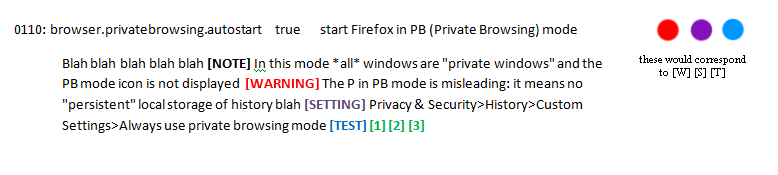
The icons for these are just indicators, we could do the same with [SETUP* (combine them into one). The super combined info could be toggled globally, or collapsed/expanded individually. Test and [ref] would be hyperlinked. Setting can be a bit messy, but could be a tooltip, so it shrinks the length.
This would only leave the issue of how to propagate the new combined info, and I am in favor or not doing that but using three tiers (I know, you haven't worked out how to two tiers!)
edited (combined info would not be with prefs but up one level)
 - number1, description, combined info
         - pref1, value, comments, icons
         - pref2, value, comments, icons
 - number2, description, combined info
       - pref1, value, comments, icons
 - number3, description, combined info
       - pref1, value, comments, icons
Looks great in theory, we'll see if I can figure it out :)
As a small step in the right direction I've just combined notes & info into one
Edit: I've also disabled sorting
overdodactyl
on 7 Dec 2018
Have some work to do to get all the info displayed again, but see what you think of the direction it's going when you get a chance
overdodactyl
on 8 Dec 2018
- almost all 136
[FFare against prefs
- except 4 of them : 0503, 0703, 2306, 2805
- if we fixed those that would be cool, and I think we need to do that
DONE :tada: I have committed those changes to the PR, after confirming the multi-prefs per number were.all the same release version.
Now you only need to check user_pref lines at the end for [HIDDEN, [DEFAULT, [FF, [WINDOWS, [ANDROID, [LINUX, [MAC - no need to propagate them from the parent, or compare them etc. Simplify your code for all those tags when you want.
Still working on other stuff - tags out of headers, first line cleanups, and thinking about what to do with non user_pref line tags that we need to propagate, including [SETUP*
Thorin-Oakenpants
on 8 Dec 2018
It's looking great, thanks! That will definitely help simplify the code
overdodactyl
on 8 Dec 2018
Can you close this and start a new issue (so you can edit OP), this one is getting long AF. Just call it the same name, part 2 and type a random word for OP. I have a checklist etc to post into OP when you do - thanks :kiss:
Thorin-Oakenpants
on 8 Dec 2018
Related issues
 earthlng
·
78Comments
Thorin-Oakenpants
·
69Comments
Thorin-Oakenpants
·
78Comments
earthlng
·
87Comments
Thorin-Oakenpants
·
90Comments
earthlng
·
78Comments
Thorin-Oakenpants
·
69Comments
Thorin-Oakenpants
·
78Comments
earthlng
·
87Comments
Thorin-Oakenpants
·
90Comments
Most helpful comment
Have some work to do to get all the info displayed again, but see what you think of the direction it's going when you get a chance