User.js: task: update wiki [CSP clashes eg 1xCB setting & uM]
Is it possible to block the Canvas API with FF prefs ?
 theWalkingDuck
All 52 comments
 Atavic
on 9 Sep 2018
Atavic
on 9 Sep 2018
@theWalkingDuck Not from prefs alone AFAIK.
If you look at canvas methods (I am not an expert), there are 10 APIs (if that's the right word) - see https://bugzilla.mozilla.org/show_bug.cgi?id=1422890
- canvas.toDataURL
- canvas.toBlob
- canvas.mozGetAsFile
- canvas.isPointInPath
- getImageData
- readPixels
- canvas.isPointInStroke
- canvas.measureText (not blocked by RFP)
- getContext
- fillTest
I do not think they ever designed or thought of a master switch for all of these.
Not all of these are covered by RFP (the one noted above is becayse it was noted in the bugzilla, so don;t take that above list as indicative of anything). Hence why I have RFP=true, but fall back to CanvasBlocker (see https://github.com/ghacksuserjs/ghacks-user.js/issues/350 first post, Canvas section). I think RFP on its own is enough (but again I am not an expert), eg OffScreen Canvas is not covered, but that has a pref which is default off
/* 2028: disable offscreen canvas (FF44+)
 * [1] https://developer.mozilla.org/docs/Web/API/OffscreenCanvas ***/
user_pref("gfx.offscreencanvas.enabled", false); // default: false
Long story short, from issue 350 link above
Do NOT set to block as this will disable the API and you will not get the same result as RFP
Up to you what you want to do - either block, fake or let RFP handle it
- Blocking would be very rare in my opinion (default for extensions are usually to fake)
- Faking random values (values, plural) is rare. I doubt anyone does tracking of this, but it seems like it should be easy to gain entropy from it: doesCanvasFakeRandomEveryRequest - true/false = 1bit
- RFP seems like the only plausible way forward, in terms of gaining enough users with the same behaviour, but its early days and I can't see RFP being front facing in Firefox for at least 4 or 5 more releases TBH
 Thorin-Oakenpants
on 9 Sep 2018
Thorin-Oakenpants
on 9 Sep 2018
RFP is always on so I have to rely on it.
Unfortunately I can't use CanvasBlocker becouse I'm using uMatrix which is indispensable for me.
theWalkingDuck
on 10 Sep 2018
CanvasBlocker like uMatrix, uses CSP-Headers to filter contents.
In cases where both extensions add there own CSP-Headers, only one extension works properly.
There is no way to aggregate those CSP headers. This is the downside of WebExtensions.
Modifications made by one extension can be overwritten by other extensions which is dumb by design.
theWalkingDuck
on 10 Sep 2018
CSP in CanvasBlocker is only used for blocking data: URIs.
You can disable that part and still have the canvas blocking functionality.
 earthlng
on 10 Sep 2018
earthlng
on 10 Sep 2018
No, I'm talking about "Block data URL pages" under "Misc" - uncheck that and CB doesn't interfere with other CSP modifying extensions like uBO, uMatrix, NoScript etc
earthlng
on 10 Sep 2018
CSP in CanvasBlocker is only used for blocking data: URIs.
That's weird.
I made some tests in the past and I found out that CanvasBlocker uses CSP Header if the document contains inline-scripts. That's why I came to the conclusion not to use it with uMatrix.
but I will run some tests and get back to you.
theWalkingDuck
on 10 Sep 2018
@earthlng
let's take this simple inline script. uMatrix is set to block scripts and CanvasBlocker is set to default.
<script>
    document.write(window.navigator.userAgent);
</script>
result: CanvasBlocker interferes with uMatrix.
WebExtension                              Script
---------------------------------------------------
uMatrix                                   blocked
uMatrix(reload page)                      blocked
        ... clear cache ...
uMatrix + CanvasBlocker                   not blocked
uMatrix + CanvasBlocker(reload page)      blocked
        ... clear cache ...
uMatrix + CanvasBlocker                   not blocked
uMatrix + CanvasBlocker(reload page)      blocked
.
.
uMatrix 1.3.14
CanvasBlocker 0.5.3
FF 61.0.1 Linux
theWalkingDuck
on 11 Sep 2018
and CanvasBlocker is set to default.
that's the problem. see https://github.com/ghacksuserjs/ghacks-user.js/issues/497#issuecomment-419897172
earthlng
on 11 Sep 2018
Indeed, that's the solution but correct me if I am wrong ... I thought that setting is for data URIs like
data:text/html,<script>document.write(window.navigator.userAgent);</script>
Why is that setting propagate to inline scripts ?
maybe I'm simply wrong.
theWalkingDuck
on 12 Sep 2018
Is it possible to block the Canvas API with FF prefs ?
No, but More than one extension does it. And this raises issues that Mozilla folks will never solve IMHO.
In cases where both extensions add there own CSP-Headers, only one extension works properly.
Both extensions do work properly, but the outcome respects the 2nd extension (that overwrites the modification of the 1st one).
Atavic
on 12 Sep 2018
Is it possible to block the Canvas API with FF prefs ?
contrary to what @Atavic claims, AFAIK no it's not possible to block Canvas API with FF prefs.
Maybe he can enlighten us with what those prefs are ... ?
Both extensions do work properly
well, if uBO for example suddenly allows inline javascript when it should actually block it, I wouldn't say "Both extensions do work properly" but maybe that's just me
I thought that setting is for data URIs like
data:text/html,...
it is.
Why is that setting propagate to inline scripts ?
it's not. 1 extension uses CSP to block inline scripts and the other uses CSP to block data URIs - only 1 can win
earthlng
on 12 Sep 2018
Edited the previous reply.
To me these are chained issues e.g. the last extension wins, while both extensions do work.
Atavic
on 12 Sep 2018
That means CanvasBlocker adds the CSP header by default, without scanning the document for data URIs . That makes sense ... why wasting time..? I guess that was my blind spot.
I'm sure that many of those who are using CanvasBlocker are also using some sort of content filters like uMatrix. So using Block data URL pages as a default setting is really a bad idea.
Isn't that a case for the Wiki ?
theWalkingDuck
on 12 Sep 2018
Isn't that a case for the Wiki ?
Absolutely. Not just something under CB but probably some general warning about CSP and multiple extensions - edit: i.e on the extensions page
Thorin-Oakenpants
on 12 Sep 2018
@earthlng How do we word this. A sweet short sentence or two at the top'ish of the wiki (and I'll look at trimming that intro down) that explains extensions "clashing"
:exclamation: Don't use extensions together (or in configurations) that "clash" (link to bugzillas or issues on rolling the dice). Blah blah. This is one reason why we do not recommend NoScript with uM & uBO.
and under CanvasBlocker add the thing about unchecking "Block data URL pages" under "Misc"
PS: do you how the order is worked out? I'm not 100% sure on FF load, but kkapsner came up with first loaded (I need to find his comment, so I might have it back to front). So if you found, for example, that out of CB and uM, that CB was winning the war, then disable then enable CB, and suddenly uM will win (assuming you have extension auto-updating off). You might find this handy when testing stuff
Thorin-Oakenpants
on 23 Oct 2018
Well it's not that easy and I don't think you can explain the issue in 2 sentences. And a lot of people will have no idea which addons can interfere with each other. Do we really want to go there and risk getting tons of questions from people about which of their addons might interfere?
In some cases it also depends on addon settings. Even uBO + uMatrix interfere with each other. I use a customized version of uBO to make sure the 2 work nicely together but that only works with the way I use them
earthlng
on 23 Oct 2018
disable then enable CB, and suddenly uM will win
AFAIK you need to disable and enable the one you want to win, not the other way around.
btw NoScript has some code to make sure it always wins which is nice but if other extensions start using similar code the issue will only get worse. It's not great atm to say the least and hopefully mozilla will do something about it but I won't hold my breath
earthlng
on 23 Oct 2018
The order is
- install time
- updates change that order
- heavy webext (or webext that have issues like uBo while loading blocklists) are queued on the bottom of the chain.
So, if you have an ESR version with updates disabled the order is static.
If you update, the last updates webext goes on the bottom of the chain (overwriting previous modifications).
If uBo has issues while loading blacklists, it is available at a later time and is queued on bottom.
Atavic
on 23 Oct 2018
I don't know if the order is fixed. AFAIK all extensions are started in parallel and whichever takes the longest to load will win. Unless of course they use some workaround to make sure they always win like NoScript does for example.
earthlng
on 23 Oct 2018
Order varies with updates and is set by install time.
Atavic
on 23 Oct 2018
Well, I did say " (I need to find his comment, so I might have it back to front)" :grin:
Even uBO + uMatrix interfere with each other. I use a customized version of uBO to make sure the 2 work nicely together but that only works with the way I use them
Can you elaborate on this, even in an email - eg my setup is uBO is semi-hard - blocks all 3rd party & fonts, and uM is uber-hard (only 1st party css+images). see pics. How does this differ from yours? Would you care to share - even start a new issue to keep it cleaner, i.e uM+uBO only
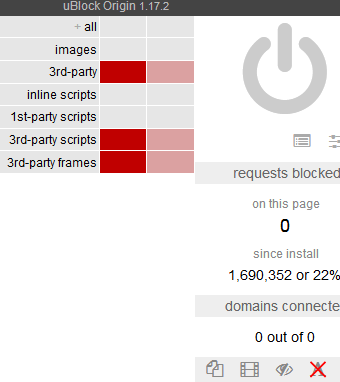
Maybe I should add inline scripts - does this cause much breakage?
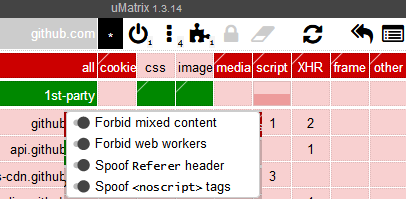
Can't get much harder here, right .. guys? was it something I said? Aww guys .. come back.
Well at the very least we can add the exception for Canvas Blocker if you use uM/uBO (it was either right?)
Thorin-Oakenpants
on 23 Oct 2018
try https://1337x.to/home/ - if you see the content, chances are inline script wasn't blocked.
If you block everything in uBO AND uMatrix then it's probably not an issue but I prefer to do all my JS blocking with uMatrix only for simplicity because I don't want to unblock everything twice.
Font blocking is better done with Request Control for example - that eliminates one of the potential CSP interferences that uBO can cause. But again, if you want to allow fonts on a bunch of sites it's getting a bit annoying to configure that with RC. Since I don't do that it's fine for me.
and the whole issue is not just affecting CSP. fe blocking cookies with uM or something else will also interfere with WebAPI Manager. I'm sure there are countless other problematic combinations as well
earthlng
on 23 Oct 2018
hrmmm .. in my setup, I don't see any issues then (but I'm quite similar to your setup)
well uBO is not blocking any JS in my setup, it's just blocking connections to 3rd parties. This allows me to have a cleaner uM for working with (I think) - but yeah, it's duplicitous. I don't see these causing a clash - its request/domain blocking (edit: as gorhill says, if either one blocks, then it's blocked).
Cookies, well they're blocked at the app level - I only allow about a dozen (half are session only). I don't seem to have any extensions that require a cookie permission, but yeah, I know Peter's WebAPI required one. You can always set an exception using the moz-extension-UUID thing via manifest URL>view page info>permissions
I'm interested in this Request Policy used to block fonts. I only allow about 7 or 8 site exceptions in uM - that should be easy to set up (and I don't mind the hassle of maintaining it)
Thorin-Oakenpants
on 23 Oct 2018
Font blocking is better done with Request Control
Why don't you use uBlocks static filter ?
block third party font
*$font,third-party
block third party fonts / exclude aaa.com, bbb.com...etc
*$font,third-party,domain=~aaa.com|~bbb.com|~ccc.com
theWalkingDuck
on 23 Oct 2018
Why don't you use uBlocks static filter ?
yeah that should work as well.
I said "Font blocking is better done with Request Control for example" :)
blocking fonts with RC also seems to block fonts embedded as data: URIs. Don't know if a uBO static filter also does that. I guess it depends what one prefers. Since I already used RC for other things as well I just went with that.
I'm interested in this Request Policy used to block fonts. I only allow about 7 or 8 site exceptions in uM - that should be easy to set up (and I don't mind the hassle of maintaining it)
It's probably not worth the hassle tbh. If you don't block 1st party (inline) scripts with uBO you might not run into too many problems. But uBO also supports csp-overwriting rules and if uBO "wins" against uM then it can lead to JS being allowed in some cases. That's why I use a customized version of uBO that makes sure the CSP is never touched by uBO. But since I most likely won't be able to get it signed and you can't use unsigned addons in FF Release there's no point in discussing my custom uBO any further.
earthlng
on 23 Oct 2018
@theWalkingDuck > Why don't you use uBlocks static filter ?
OK, so what I have is this: (you can see my default settings above: eg I allow inline)
no-remote-fonts: * true
no-remote-fonts: bugzilla.mozilla.org false
no-remote-fonts: developer.mozilla.org false
no-remote-fonts: dxr.mozilla.org false
and a few other sites
So how do I change that to "static filter". Do I wipe all those rules and replace with a single line as per your example? What if the list of domains gets too long? Can I repeat a new line eg
*$font,third-party,domain=~aaa.com|~bbb.com|~ccc.com
*$font,third-party,domain=~ddd.com|~eee.com|~fff.com
edit: that's a silly 3 rules above for mozilla, might as well have one rule. I need a cleanup methinks
Thorin-Oakenpants
on 23 Oct 2018
yes you can repeat the line. The rule only blocks third-party fonts though, IDK if that's what you want.
earthlng
on 23 Oct 2018
if you want to block all fonts, 1st- + 3rd-party, except for a few chosen sites I'd add the important parameter and remove third-party:
*$font,important,domain=~bugzilla.mozilla.org|~developer.mozilla.org|~dxr.mozilla.org
earthlng
on 23 Oct 2018
Do I wipe all those rules and replace with a single line as per your example?
just change no-remote-fonts: * true to false and remove the domain-specific no-remote-fonts rules
earthlng
on 23 Oct 2018
I'm not sure what I want. I definitely didn't want your custom uBO, what I wanted was to know where uBO and uM can "clash" (I assume its always thru CSP), and you said fonts can (maybe I misread it).
https://github.com/gorhill/uBlock/wiki/Per-site-switches#no-remote-fonts
Since I limit myself to browser.display.use_document_fonts=0, I'm not sure what fonts ever get downloaded (I assume those that are allowed via gfx.downloadable_fonts.enabled=true). If it's a first party font, then I do not see an issue? I also have FPI on, so even cached it shouldn't get used as 3rd party?
So if I did this, then it should "eliminate" the potential problems? Just like you did by using Request Control ? Right? Or should I just stick to my current setup?
Thorin-Oakenpants
on 23 Oct 2018
slightly reworded
if you want to block all fonts, 1st- + 3rd-party, except for a few chosen sites, use the
importantparameter instead ofthird-party:
*$font,important,domain=~aaa.com|~bbb.com|~ccc.com
That could be added to the uBO wiki
@gwarser @uBlock-user (not sure which of you can change the wiki). Just read up a few posts: Or to summarize: Instead of using no-remote-fonts: * true, an alternative is the above (in order to lessen the chances of rolling the dice with extensions and CSP).. I think I got that right :)
Thorin-Oakenpants
on 23 Oct 2018
$important is only required if there is an exception filter..
 uBlock-user
on 23 Oct 2018
uBlock-user
on 23 Oct 2018
in order to lessen the chances of rolling the dice with extensions and CSP
CSP is not used for blocking fonts with that switch, CSP in uBO is used for blocking inline-scripts and for CSP-esque filters.
That could be added to the uBO wiki
It's already there
If you want to allow third-party fonts for some specific sites you can add them by modifying the above filter:
*$font,third-party,domain=~example.com|~other.example.net|~different.example.org
uBlock-user
on 23 Oct 2018
I actually like the filter better than the rules.
- `$important is ok to use regardless of whether or not there is an exception filter (I'd rather use best practice)?
- font blocking does not use CSP in both rules and filters?
- do CSP-esque filters exist in subscribed lists? what on earth does a CSP-esque filter look like
PS: only answer if you have time :) TIA
Thorin-Oakenpants
on 23 Oct 2018
Sure, you can use $important regardless as it gives you impunity.
font blocking does not use CSP in both rules and filters?
Yes, they're blocked by types, font is a category of network request which uBO listens through webRequest API, just like script, xhr etc... Also whenever CSP is enforced the policy will be mentioned in the console, you can look it up in dev tools on a website where CSP is enforced.
do CSP-esque filters exist in subscribed lists? what on earth does a CSP-esque filter look like
Filters with $csp directive? uBO Filters uses it and so does Easylist.
uBlock-user
on 23 Oct 2018
grr. couldn't get it to work. Maybe I'll try again another day
original using rules (reduced so you can't ID me) - fonts loaded only on these sites
no-remote-fonts: * true
no-remote-fonts: amiunique.org false
no-remote-fonts: gitlab.com false
no-remote-fonts: imgur.com false
no-remote-fonts: mozilla.org false
no-remote-fonts: whotracks.me false
no-remote-fonts: www.netmarketshare.com false
new using filters (with no-remote-fonts: * false) - no fonts load
Edit: and I removed all the other no-remote-fonts rules
*$font,important,domain=~~amiunique.org|~imgur.com|~gitlab.com
*$font,important,domain=~mozilla.org|~netmarketshare.com|~whotracks.me
If you want to allow first-party and block third-party you will need to use filters, the switch blocks all or allows all only.
Dynamic Filtering takes precendence over Static filtering, you're using both, don't do that.
uBlock-user
on 23 Oct 2018
*$font,important,domain=~~amiunique.org|~imgur.com|~gitlab.com
*$font,important,domain=~mozilla.org|~netmarketshare.com|~whotracks.me
Combine those two in one with
*$font,important,domain=~mozilla.org|~netmarketshare.com|~whotracks.me|~amiunique.org|~imgur.com|~gitlab.com and don't use dynamic filtering.
uBlock-user
on 23 Oct 2018
If you want to allow first-party and block third-party
Nope. I want to block all fonts (1st and 3rd party), but when I allow them on a site, I want to allow all. Is this not possible with a filter? I can do it with rules, but the idea was to get away from CSP. But since you said font blocking in rules is not handled by CSP, then I should be OK. Man I'm confused now.
i think I'll just stick with rules, since the big E didn't want to share his Request Policy info :grin: (probably so he doesn't have to babysit me)
Thanks for your time and knowledge @uBlock-user , appreciate it :kiss:
Edit: > Combine those two in one with
Well my list is longer, and I will add to it. Hence I would have more than one line
PS: > Dynamic Filtering takes precendence over Static filtering, you're using both, don't do that
Sorry, I did remove the no-font rules, except the no-remote-fonts: * false
Thorin-Oakenpants
on 23 Oct 2018
but the idea was to get away from CSP. But since you said font blocking in rules is not handled by CSP, then I should be OK. Man I'm confused now.
Yes stick with rules, there's no CSP involved here.
uBlock-user
on 23 Oct 2018
CSP is used to block inline (data:) fonts when no-remote-fonts switch is used:
https://github.com/gorhill/uBlock/issues/1539
I checked this briefly two weeks ago and uMatrix uses CSP for blocking inline script and workers, uBO for no-scripting, inline scripts, (inline) fonts and network filters with $csp=... option.
 gwarser
on 23 Oct 2018
gwarser
on 23 Oct 2018
CSP is used to block inline (data:) fonts when no-remote-fonts switch
So why isn't the policy mentioned in the console like it does when you block inline-scripts ?
uBlock-user
on 23 Oct 2018
*$font,important,domain=~amiunique.org|~imgur.com|~gitlab.com
*$font,important,domain=~mozilla.org|~netmarketshare.com|~whotracks.me
sorry I was wrong, you can't use multiple lines with filters like that. It only uses the last one ie the exceptions in the 1st rule won't work and fonts will be blocked on amiunique.org, imgur and gitlab.
since the big E didn't want to share his Request Policy info grin (probably so he doesn't have to babysit me)
- Request Control not Request Policy
- if you'd actually look you'd see that it's super simple. New Rule > Pattern=Any URL; Types=Font; Action=Block. For allows just define the match pattern for the domain, Types=Font again and Action=Whitelist.
@gwarser & @uBlock-user
there are other CSP-esque filters in some lists like blob.
IMHO it's a pretty bad idea to allow list managers to overwrite the CSP like that.
earthlng
on 23 Oct 2018
Ouch, "console". Do you have any test page? font-src * is used, so any remote fonts are blocked only by WebRequest.
Wildcard, allows any URL except data: blob: filesystem: schemes.
Interesting. I see entry for inline scripts in console even if no script exists in page. Nothing for fonts.
Dirty profile - message is shown only when something is really blocked.
gwarser
on 23 Oct 2018
I see entry for inline scripts in console even if no script exists in page
could be content scripts and/or possibly userscripts injected by extensions
earthlng
on 23 Oct 2018
@earthlng I agree about the overwriting part, Easylist and some others like Fanboy has been pain in the ass ever since gorhill introduced CSP as those maintainers started writing policies without testing thoroughly, I have to use $badfilter to mitigate that shit.
uBlock-user
on 24 Oct 2018
Ouch, "console". Do you have any test page? font-src * is used, so any remote fonts are blocked only by WebRequest.
Nevermind, I tested on https://getbootstrap.com/docs/3.3/css/ and it tried to load an inline-font and CSP was enforced as below

Actually everything that is loaded inline can only be blocked by CSP.
uBlock-user
on 24 Oct 2018
@gwarser $inline-font hasn't been documented.
uBlock-user
on 24 Oct 2018
@earthlng I agree about the overwriting part
I'm glad you agree. I think there should be a setting (maybe under Advanced) to disable these CSP-esque filters or they should just be ignored in 3rd-party lists and only allowed in "My Filters" and if necessary in uBlock's own lists (maintained by gorhill and you guys?).
If that's too much to ask or too hard to implement then maybe it would be better to at least let built-in policies (like script and/or font-blocking) take precedence over filter-based policies
Additionally to that it would also be nice to have another setting to completely disable CSP modifications, possibly with a strong warning not to use it unless someone understands exactly what that means. @gorhill mentioned in another issue here that he's willing to do it but just didn't have the time to do it yet.
I think the 2nd part is easy to implement with a simple check before running injectCSP() plus whatever is necessary to add a new setting in the UI.
Since you guys, @uBlock-user & @gwarser, are contributors to uBO (I believe, right?) maybe you could push this a bit?
Anyhow that's just my 2 cents
earthlng
on 24 Oct 2018
I think there should be a setting (maybe under Advanced) to disable these CSP-esque filters or they should just be ignored in 3rd-party lists and only allowed in "My Filters" and if necessary in uBlock's own lists (maintained by gorhill and you guys?).
If you already have an well thought idea, then suggest it on the tracker. Make sure to detail it though.
maybe it would be better to at least let built-in policies (like script and/or font-blocking) take precedence over filter-based policies
It already does, all dynamic rules take precendence over static filters.
maybe you could push this a bit?
Can't push any further when he already said he would, it's on his mind along with numerous other tasks for this extension.
uBlock-user
on 24 Oct 2018
I updated the wiki re CB's block data URLs
Thorin-Oakenpants
on 11 Nov 2018
Related issues
earthlng
·
81Comments
earthlng
·
87Comments
Thorin-Oakenpants
·
88Comments
Thorin-Oakenpants
·
69Comments
earthlng
·
66Comments
Most helpful comment
Yes stick with rules, there's no CSP involved here.