User.js: Preferences UI Issues etc: [solved browser.sessionhistory.max_entries > 0 as per instructions]
I am on Linux so this may be a short conversation. And before I forget wana say I really appreciate the work you all do here.
Search, Privacy & Security and Firefox Account tabs will not open but the url does change accordingly. Same situation in about:debugging.
Drop down menu for Windscribe VPN displays only white with outline.
Page reload does not work however stop does.
Also having a problem with my windows tablet freezing while using the same user.js
Was going to try halving method next but thought this may save some time, been at it already a couple hours. I removed section numbers, notes and any preferences (except max_tabs_undo) that would not be changed. This was tested on new profiles so problem is in there somewhere.
 Cinik
Cinik
All 20 comments
FF version? and Windows tablet version?
tabs in options (search etc) - no problems here, page reload same, VPN not sure. This sounds more like corruption? Lots of linux users here too. Can't see anything in the user.js that could cause these (VPN aside), but haven't done a diff of yours vs our default (yet). I know you said a new profile works no problems, so this is a head scratcher. There is is nothing in there to lock out about pages (AFAIK) or interfer with FF internals such as reload/stop/open/close etc. :puzzledface:
tablet freezing sounds like an OS vs App issue - FF59.0.3 was released for the new windows update (not sure if this applies to you). Could also be a graphics card thing.
 Thorin-Oakenpants
on 2 May 2018
Thorin-Oakenpants
on 2 May 2018
Dig some more quick digging - lets just stick to the linux issues
- first, make sure all extensions are disabled and restart
- try enabling/disabling hardware acceleration (make sure to comment them out in the user.js because you will need to restart FF to take affect)
- make sure it's not a theme - just use the default(s)
Edit: sounds weird, but make sure your system time is legit
Edit: possibly covered by disabling all extensions - but e10s may be a factor
Thorin-Oakenpants
on 2 May 2018
Windows 10 tab 1703 59.0.2
On linux I started this with 59.0.2. Today I went ahead an updated to 59.0.3 moving old profile to flash drive an let Firefox create a new profile. Did not change any settings or add any addons. With the new profile the problems listed did not exist until I launched Firefox again with the user.js that you see attached to first post.
Hardware acceleration was one of the first settings I checked, and yes it was disabled in about config.
E10s aswell showed disabled.
Cinik
on 2 May 2018
Hi, I did a quick compare with one of my scripts and the only thing that stands out to me is user_pref("browser.sessionhistory.max_entries", 0); // master: 10
why is e10s disabled? That should not be the case if you ran it without any addons.
 earthlng
on 2 May 2018
earthlng
on 2 May 2018
oh and check the console after triggering the problems and post it here if there is something
earthlng
on 2 May 2018
Drop down menu for Windscribe VPN displays only white with outline.
that maybe because that addon might use not ideal storage API and you delete that with user_pref("privacy.clearOnShutdown.cookies", true);
earthlng
on 2 May 2018
Why e10s disabled not sure and I am trying to verify, on tab now so am looking in the prefs.js from profile I moved from linux.
Windscribe drop down did work until I added the new user.js, tend to change countries alot.
Cinik
on 2 May 2018
I think fixing the e10s might solve everything (this was one reason I had missing graphics one time). The e10s compatibility system addon was dropped in 59.
VPN is a separate issue - we had one before about HoxyVPN and it hated security.OCSP.require see #295 (not saying this is the case here, but worth checking)
Thorin-Oakenpants
on 2 May 2018
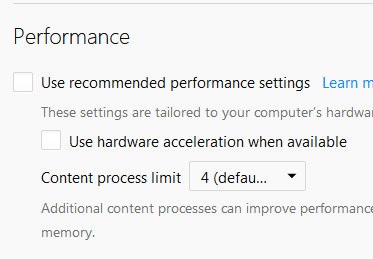
Assuming you can scroll about prefs > general .. what does it say for
- vanilla profile
- vanilla profile with user.js (start and close firefox a couple of times)
Thorin-Oakenpants
on 2 May 2018
May have told you wrong about e10s being disabled, am not seeing it in prefs.js now, will need to wait til I can get back on linux.
Will give security.OCSP.require a try.
Cinik
on 2 May 2018
As for my tab 59.0.2 portable when it does freeze (every 5-20 minutes) taping on network icon on taskbar seems to temporarily fix it. Best I can tell it only happens when a page or two is loading, or in the middle of a download. Other wise can switch between tabs ok except then.
Cinik
on 2 May 2018
A performance impact is to be expected because we disable various things like disc cache, asmjs, http2, prefetching etc.
earthlng
on 2 May 2018
I'll never understand how people can trust free VPN providers. This particular one seems shady as fuck.
Users are encouraged to and rewarded for promoting it, ie you can't trust any comments about it anywhere. That's the definition of shilling. One of their linked "Media Mentions" articles mentions
... and that entire thread is full of some pretty solid praise for Windscribe's terms of service and actual performance.
I wonder why that is ;) ...
Rebilling revshare is available on case-by-case basis and requires you to keep promoting Windscribe.
And how is it possible that a yearly plan costs $49 and under https://windscribe.com/affiliate they say a user gets $45 if a referred user signs up for a year??!! They only keep $4?? And since lots of their users probably don't pay at all how is it possible that they have servers in 52 countries and 100 cities?
They also seem to like Monero https://windscribe.com/miner and I wouldn't be surprised if they inject crypto miners into the sites users visit. They have to make money somehow and if it's not miners it's something else. I wouldn't trust them at all but that's just me.
earthlng
on 2 May 2018
A performance impact is to be expected because we disable various things like disc cache, asmjs, http2, prefetching etc.
Err, no - maybe this shit happens on ESR, IDK, but not Quantum. I'm on a 7+yr old PC (win7, 64bit, 8gb ram, fairly bleeding edge at the time, home built, speedy as F, played skyrim for a month solid until I took an arrow to the knee) and (except for first time after a reboot) FF opens in about 1 second, the UI is uber responsive and snappy, nothing hangs or sticks, certainly not chrome. Yup, no HW acceleration despite my card, no asmjs, no disk cache.
I think we'll have to wait for @Cinik to come back and confirm the e10s state. It doesn't take much to narrow down with the halving method, but could be tricky if it's multiple items in combo
Thorin-Oakenpants
on 2 May 2018
E10s are NOT disabled, not sure why I thought that, was something in about:config. Gota say I feel a little stupid for not double checking before answering. My set up looks like your screen shot Pants. about:support >Web Content Processes 2/4
Cinik
on 3 May 2018
I've deal with this too if browser.sessionhistory.max_entries = 0.
Try changing it to 1, 2, or anything else and see what happens.
Edit: forgot to mention I'm on Mac so we're sharing a lot of the same code. May be a Unix/Darwin thing. Who knows. I just know that sessionhistory.max_entries cannot be 0 on any Mac, so it seems.
 grauenwolfe
on 3 May 2018
grauenwolfe
on 3 May 2018
user_pref("browser.sessionhistory.max_entries", 5); fixed it. All issues in Linux now gone :D
Checking tab now, will be back.
Cinik
on 3 May 2018
Tablet seems to be working now aswell however user_pref("browser.sessionhistory.max_entries", 5); was already set. Time will tell.
Thanks Pants, Earthlng and Grauenwolfe.
Cinik
on 3 May 2018
0804
* default=50, minimum=1=currentpage, 2 is the recommended minimum as some pages...
Earthlng pointed this one pref out earlier, IDK why I didn't pick up on it being zero (note to self, make a point to READ stuff instead of skimming over it) - I should have read the info in the file on 0804
Thorin-Oakenpants
on 3 May 2018
I'll close this for now. Good its all working. The windows tablet thing could be anything : 3rd party, driver, IDK. Let us know if it keeps playing up
Thorin-Oakenpants
on 3 May 2018
Related issues
earthlng
·
6Comments
Thorin-Oakenpants
·
7Comments
 crssi
·
4Comments
Thorin-Oakenpants
·
5Comments
Thorin-Oakenpants
·
4Comments
crssi
·
4Comments
Thorin-Oakenpants
·
5Comments
Thorin-Oakenpants
·
4Comments