User.js: Questions: Default Permission for "Extract Canvas Data" & Option to Store Pwds
Hello,
Is there no way to stop the annoying prompt "Allow Website to Extract Canvas Data?"
--> I poked around a bit and can't find a way. If that's true, then I'm amazed that FF would create a site level permission and not allow us to default the permission to "Blocked" for all sites.
--> I have the "canvas blocker" extension per your recommendation. All options are at default, so the "Block Mode" is set to "fake readout API." Maybe "Block readout API" would be more effective?
--> Most annoying part is that before the Amazon.com login page redirects from the login page to the 2-factor code page, the prompt auto-submits with "Yes, allow fingerprinting" before I can tell them to fuck off. I mean...the nerve of them!Does User.js not control Options>Privacy&Security>"Remember logins and passwords for websites"?
--> I've always had it off.
--> I see that User pref 901 is commented out: // user_pref("signon.rememberSignons", false);
2a. Does that mean I've been controlling this through the "options" page and not the Ghacks User.js file?
2b. Why comment out pref 901? Seems like the spirit / reason for existence of the Ghacks user.js file is to shut down stuff like the ability to save passwords.
Background...given that the stupidity of still asking the 2nd question when it appears the answer is staring me in the face... I'm new to FF, about:config, and user.js in the past 6-months & still learning what "options" settings are/can be controlled through User.js and which ones aren't/can't.
Another reason for asking the question: I just updated from 58 to 59, and it appears that a couple of things from the Options/privacy page didn't carry over. Not sure if I just didn't catch in the past (since FF56), or if FF forgot some of my settings on the upgrade from 58 to 59.
Really appreciate all that you guys do. Reading through the open & closed issues, I'm in awe.
Thanks!
 zazenbingle
All 17 comments
1a. RFP (privacy.resistFingerpinting) is an all-or-nothing buy-in. i.e. either you do everything it says or forget it - hence no global default for this site permission - which only exists when you have RFP turned on. In 59, they made the prompts only come up for those that are "user initiated" and thus the canvas prompt fatigue should be alleviated, a lot. The affect of this is still being investigated to see if it fits as a total solution. You said you just updated from 58 to 59 - so I expect your problem will be solved re too many prompts. NOTE: that when you get prompts, you can always save the decision, but that gets wiped if you clear site permissions.
So in 59+ you should see a lot less canvas prompts. Prompts that you deny or are automatically denied, will result in a 10x10 white canvas. If you need to, you can override this in the site permissions (you will have to load the page to access them via the info icon or right-click and select page info etc - there is no canvas section (yet if ever) in about:preferences#privacy>Permissions
1b. Passwords: no right or wrong answers. Saving passwords helps users have complex passwords, but does not enforce them to have strong ones. And saving passwords means persistent data is kept. All we can do is let users make their own mind up - hence it is inactive. But if they DO want to save passwords, then the other settings we enforce will help.
2a: "Does that mean I've been controlling this through the "options" page" << controlling what?
Amazon.com login page redirects from the login page to the 2-factor code page, the prompt auto-submits with "Yes, allow fingerprinting" before I can tell them to fuck off.
Wot? The default for canvas is to ask unless you have previously set it to remember. If you do nothing, then it denies - the canvas does not auto-submit with "yes" unless you told it to
Just go to amazon.com (or amazon.de or whatever) and load any page, now right click in the page somewhere and choose View Page Info - then click on Permissions tab, and note that Extract Canvas Data has a default to always ask. If you want to change it, untick use default and check allow or block as you require
 Thorin-Oakenpants
on 23 Mar 2018
Thorin-Oakenpants
on 23 Mar 2018
Hi
Does that mean I've been controlling this through the "options" page and not the Ghacks User.js file?
Yes. You can activate that pref in your user.js or add it to your overrides file if you use our updater script. (see https://github.com/ghacksuserjs/ghacks-user.js/wiki/3.2-Applying-Your-Changes)
 earthlng
on 23 Mar 2018
earthlng
on 23 Mar 2018
Got it.
Follow-up: You are correct, all I had to do was set the preference to "Block Canvas Extract" on the Amazon login page's permissions. Sneaky bastards that they somehow managed to invoke the fingerprinting prompt AFTER clicking the submit button, which made me think the prompt was originating from a different page.
Thanks for explaining on the saved passwords. I'll add that preference to my list of overrides at the bottom of the script.
You guys rock!
I guess I hit "Close & Comment" at the bottom? Thanks again.
zazenbingle
on 23 Mar 2018
You're on to it! I like a clean and tidy issues :kiss:
Thorin-Oakenpants
on 23 Mar 2018
Hey -- After sleeping on it, I've got a theory on what happened & wanted to share it with you. If you agree with the theory, then I propose that add a warnings section to Wiki 3.1 "Resetting Inactive Prefs."
As a total amateur hack privacy enthusiast, I've never run a .bat file that required CMD:CD to a new filepath and I'd never heard of the scratchpad. But, I stumbled through & ran the .bat file / scratchpad scripts after updating FF58 to FF59.
What I think happened: Between the .bat file and scratchpad scripts, I reset the values to default which to that point I had controlled manually via Options>Privacy. Heck, I didn't even understand what I was controlling manually through Options>Privacy vs the User.js file.
--> I'm not confident enough with this stuff to prove this. It just seems like the best explanation because when I updated FF from 56 to 57 and from 57 to 58, FF remembered those settings that I had controlled manually through Options>Privacy. This is the first FF update that forgot them, and it's the first time I've used the .bat file/scratchpad scripts.
If you agree that's what happened, then I propose and addition to wiki, 3.1 "Resetting Inactive Prefs"
- New section between "The solution" and "How to run a scratchpad script" entitled "Warnings!"
- "The settings you control manually through the interface Options>Privacy will be reset to their defaults. Think of it as an opportunity to increase your automation by moving those manually controlled settings to your user.js exceptions file."
I don't know enough to know if that's possible. Does every manual setting in Options>Privacy have a corresponding user pref to control it?
Hope you find this useful. Please go ahead and close when ready.
Thanks again for all that you do.
PS: In case the order of my actions are important, here's how I did it:
[With FF closed]
- Backed up the profile
- Downloaded earthlng user.js v59.0-alpha, manually appended my exceptions, manually updated user.js in my profile folder.
[Opened one session of FF] - Updated FF58 to FF59
- Ran the .bat & scratchpad scripts.
- Closed down FF session, then re-opened (which took like 30-seconds to load that first time. Very fast after that.)
- Confirmed in about:config that my User.js changes were in effect.
zazenbingle
on 24 Mar 2018
- when you talk about the bat file, what are you referring to? the updater or the prefs cleaner?
- whether a preference has a UI or not is irrelevant - it does not affect how this whole thing works
- the user.js contains info on which prefs have a UI setting
- users who don't read the user.js may get confused why a UI setting changed - that's on them
- the scratchpad scripts only covered up to v57 - it is easier to use the prefs cleaner bat
- except for the items we removed, because the prefs cleaner bat won't know about them
- we will probably provide all new scratchpad scripts for FF60, otherwise watch the changelogs
- you only need to run the scratchpad scripts once, and they are samples to match our user.js - the only relevant one really is the removed items - running it multiple times is not necessary. The prefs cleaner bat is an always up-to-date solution, use that.
When a person uses our user.js, then if they want to override the values they add an override section - this makes it simple to update. When a user runs the pref cleaner it will reset to default every pref that is commented out - because that's what they should be. If a user wants to OVERRIDE or enforce a value on a pref that is in the user.js, then they should do that in the user.js.
I fail to see the problem?
Thorin-Oakenpants
on 25 Mar 2018
when you talk about the bat file, what are you referring to? the updater or the prefs cleaner?
--> Prefs cleaner.
OK, looks like I misunderstood how to use the .bat & scripts. I just walked through 3.1 "The Solution" from the top to the bottom (didn't run the troubleshooter...I'm not THAT dense!) In the future, I'll just run the .bat prefs cleaner and the script for REMOVED, if there's a new one at the next release.
There is no problem! Last thing I want is to annoy. I sincerely appreciate this tool and all the knowledge documented in the wiki, user.js, and the github issue. I spend hours reading through all this stuff, and the helpful links spread throughout. That you guys stay up on the changes and help the rest of us with recommended settings, free of charge, is truly amazing to me. Thank you. I mean, until I started following you on Github, I never realized how fluid browsers are with settings added & dropped with each version.
The prefs cleaner re-setting my [exceptions made vi UI] was a wake-up call to my own lax approach and an invitation to automate via the User.js exceptions file instead of via the UI. Only shared it with you in case you thought it was worth mentioning in Wiki 3.1. Sounds like that's not the case.
Probably comes down to shades of beginner. I read the entire User.js before implementing, top to bottom. I read through many of the linked pages. I read through the wiki several times - which is awesome and thank you for creating & maintaining it. I implemented user.js with about 5 minor exceptions appended to the bottom, then I clicked through the UI and made a couple of more changes. Never occurred to me (until this experience) that the best practice is to stop making any changes via the UI and only make them in the User.js exceptions file.
Thanks again for all that you guys do. I appreciate it!
zazenbingle
on 25 Mar 2018
No, you're not dense :) Wiki can always be improved and new sets on eyes on it is always welcome
Issue 1: user.js changes shitloads of things, some of which happen to be in the options UI. User sets up user.js. User notices something in the UI that he enabled is now disabled. He re-enables it. A few days later he notices it is back to disabled. OMG .. what could be causing this ...
Issue 2: Prefs cleaner.bat - explicitly says that it will reset everything commented out in the user.js. User runs prefs cleaner, notices something changed -> indicative perhaps of your situation where we decided the pref was best at default, but it happened that you changed it via the UI.
- this is good, now you're using our recommendations - which is what the prefs cleaner is mean to do (i.e get the prefs.js into line with the entire user.js)
- this is slightly bad - user should have been more aware, or at least enforced any prefs in the user.js that require overriding, as an override
At the end of the day, if issue 1 is sorted out, issue 2 would probbaly never happen
that the best practice is to stop making any changes via the UI and only make them in the User.js exceptions file
Not every UI option is in the user.js. But definitely try to stick everything you want in the overrides. It's a really cool way to enforce changes stick on a restart (allows you to toggle things for testing and not be afraid to forget resetting them) and is a good master list for other setups / migrations / new profiles / reference.
for example - I have these in my overrides, even though they are not in the user.js
// OVERRIDES
/* findbar etc */
user_pref("findbar.modalHighlight", true);
user_pref("findbar.highlightAll", true);
user_pref("accessibility.typeaheadfind", true);
So after all that, and I haven't re-read the wiki, I am not sure if there anything else to do?
Thorin-Oakenpants
on 25 Mar 2018
that the best practice is to stop making any changes via the UI and only make them in the User.js exceptions file
Yes. To be more blunt. If ANY pref is in the user.js, then override it in the user.js.
- If its active and you want the value changed, override it at the end - so updater bat works
- If its commented out and you want to force a change, override it at the end - so prefs cleaner works
- If its not in the user.js, add it to overrides at the end anyway so you have a record etc
Thorin-Oakenpants
on 25 Mar 2018
Appreciate you summing it up. Nope, no action required, will close.
Six months ago when I first tried this, I had a sense of foreboding about making any changes via the UI. But I was too new to confidently research each UI option & map it back to about:config. And I was too intimidated to make lots of changes. It was my first time in the profile folder.
The exceptions I made originally were all so basic that the about:config pref spelled them out to a layperson. My first two exceptions are:
user_pref("browser.startup.homepage", "https://duckduckgo.com/");
user_pref("browser.startup.page", 1); //(0=blank, 1=home, 2=last visited page, 3=resume previous session)
But not all about:config pref names jump out at the layperson like that. So it's like a mapping that takes (forever?) to gel in the mind, or 500 dots where only about 100 or so immediately connect between the pref and the UI in the newbie's mind. Nothing to be done about it. But it would be awesome if FF would have place a hover-tip over the text of each UI element that showed the corresponding about:config pref name(s).
Determined to add some value, so a parting shot of a wiki tip: it would have saved me an hour or two of troubleshooting that one time if I had bracketed the top and bottom of my exceptions page with:
user_pref("_user.js.parrot", "Begin preferences override");
...all of your exceptions go here...
user_pref("_user.js.parrot", "End preferences override");
OK, I'm going now. Thanks again for everything!
zazenbingle
on 25 Mar 2018
Its right there in the example :grin:
/*** MY OVERRIDES ***/
user_pref("_user.js.parrot", "overrides section syntax error");
...
user_pref("_user.js.parrot", "SUCCESS");
how to work out what a UI preference changes
Example: Options>General>Browsing>Always use the cursor keys to navigate within pages
- Open your profile directory
- Go to your Options page (in this case
General) and get your item ready (in this case scrolling all the way to the bottom to theBrowsingsection) - In your profile directory, COPY prefs.js - rename to something
- in this case the option was unchecked so I called it
prefs-unchecked.js
- in this case the option was unchecked so I called it
- In Options, make your change, eg I checked the item
- In your profile directory, COPY prefs.js - rename to something
- in this case the option is now checked so I called it
prefs-checked.js
- in this case the option is now checked so I called it
- In Options, if you want, set the item back
- compare the two files
- delete the two files
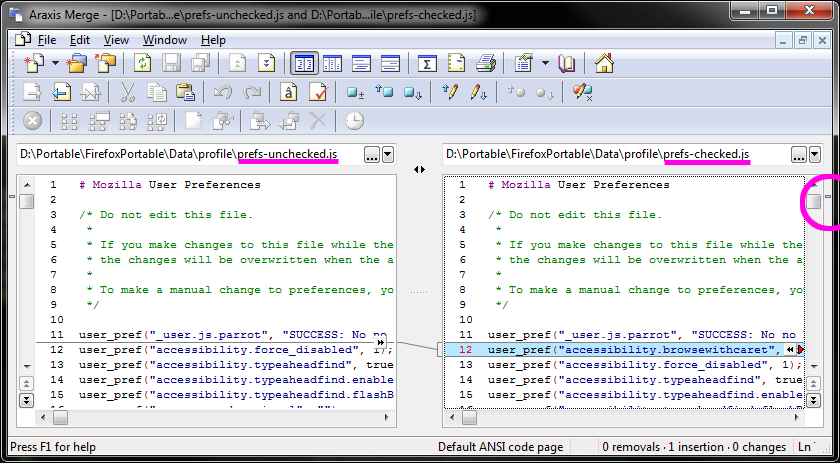
As you can see, the only change (see the little blue bar indicator far right) is a single pref. This is important because some UI options change multiple prefs. The line, which is partially obscured (didn;t want to post a large image), is as follows (so true = checked, false = unchecked)
user_pref("accessibility.browsewithcaret", true);
That's awesome.
Note self: sometimes it's best to just stop digging. But I never think of that until after hitting the "Comment" button.
zazenbingle
on 25 Mar 2018
I actually don't bother to do two copies, I just compare a copy to the live one. But the reason I said to do it the way above was to help eliminate problems. And also to do it as quickly as possible, because there are internal prefs changing all the time, mainly to do with last updated, last checked etc date stamps - and these can just make things messy when comparing
Thorin-Oakenpants
on 25 Mar 2018
I've updated the wiki page to include the new prefsCleaner script for Linux/Mac and used the opportunity to include a warning as suggested by @zazenbingle .
I also tried to make it clearer that people don't need to run both the prefsCleaner + the scratchpad scripts (except for the REMOVED one).
Thanks @zazenbingle for lettings us know that there was room for improvement. If you'd read it again now, do you think it would have helped you understand it better?
earthlng
on 24 Apr 2018
This is great feedback in my opinion. Makes me realise that every little thing that can be done to ease a bit the process of managing these Firefox files/settings is worth it.
In other words, makes me feel a bit less of a lazy dude with a weird hobby. Annoying @earthlng by having him review my frequent PRs can _actually_ help. It's _actually_ worth it.
Oh man... I'm just getting started here. @earthlng, you don't know what you're in for!
 claustromaniac
on 24 Apr 2018
claustromaniac
on 24 Apr 2018
It's actually worth it.
It really is :smile:
earthlng
on 24 Apr 2018
I'm waiting for an update to the updater merge function that can comment out active user-prefs in the ghacks user.js. You're up for a challenge? :grin:
earthlng
on 24 Apr 2018
Related issues
 crssi
·
3Comments
Thorin-Oakenpants
·
7Comments
crssi
·
3Comments
Thorin-Oakenpants
·
7Comments
 GIPeon
·
3Comments
GIPeon
·
3Comments
 zdat
·
5Comments
Thorin-Oakenpants
·
7Comments
zdat
·
5Comments
Thorin-Oakenpants
·
7Comments