snip
 Thorin-Oakenpants
All 11 comments
If I recall correctly, these are determined by serving you unique scripts that are found in each of those filter lists. If the site detects that x unique scripts located in filter y are being blocked, you are most likely subscribed to it.
If this is the case, I'm not sure there would be a way to block it..
There was a Reddit post about this a while back, I'll see if I can find it again.
 overdodactyl
on 14 Feb 2018
overdodactyl
on 14 Feb 2018
/* Remove add search section */
.search-add-engines {
    display: none;
}
Next time I get I FF update I'll check out the little arrow!
overdodactyl
on 14 Feb 2018
As for detecting the filters, they could serve many of the things found in those lists via first-party scripts, couldn't they?
The EasyList, for example, begins with a long list of "general tracking systems." A first party (in this case, browserleaks) could just hit you with a bunch of those. The list would only need to contain a few unique items or a unique subset
overdodactyl
on 14 Feb 2018
Looks like that might be the case. New profile, downloaded uBO (no changes) and ran the test with the logger open:
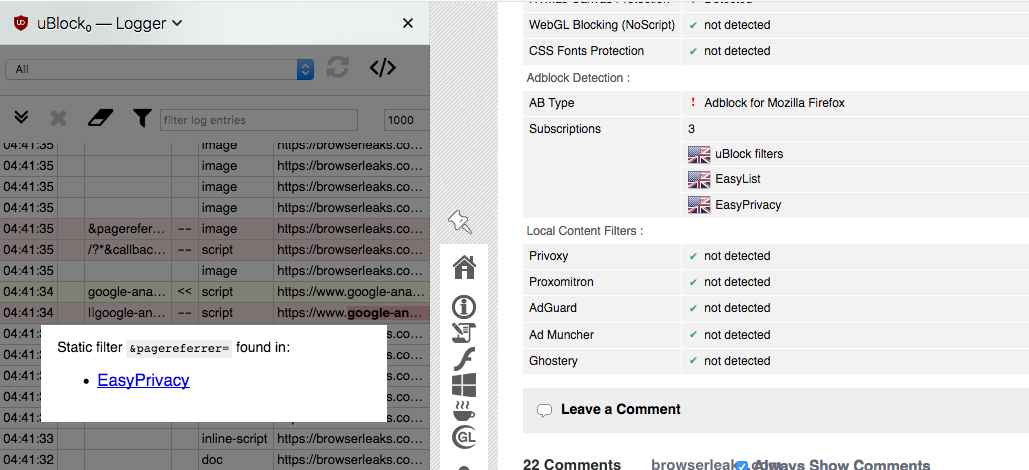
A first party script (from browserleaks.com) is getting blocked due the first section previously mentioned in EasyPrivacy
overdodactyl
on 14 Feb 2018
^ Sorry, didn't see your comment before posting :)
overdodactyl
on 14 Feb 2018
Not sure what a practical approach to preventing that would be..
I would have to imagine 90% of uBO users don't ever even touch the settings, so just sticking with the defaults would give up the least amount of info.
overdodactyl
on 14 Feb 2018
Interesting, hadn't seen anything about CA or cipher suite fingerprinting before. It is odd three are showing up as unknown (same result here). I did a quick bugzilla search and didn't see anything about it
overdodactyl
on 14 Feb 2018
It's those 3 filters in _uBlock filters_ lists:
||flexytalk.net^
||cdn*.deadline.com^
/?*&callback=callback_json_adblade*$script
But there is no point trying to escape such detection, and more generally, there is not much that can be done: any single filter list has it's own set of filters, and this can be used make a fingerprint of a filter list, to make a good guess of whether it's in use.
Blocking all scripts by default is the cure to such detection.
 gorhill
on 14 Feb 2018
gorhill
on 14 Feb 2018
Thanks for the info above Pants!
get rid of the ... update app + symbol
You just wanted to get rid of the little icon when an update is available, right?
i.e. go from this

to this

?
If so, this is what did it for me:
#PanelUI-menu-button[badge-status="update-available"] > .toolbarbutton-badge-stack > .toolbarbutton-badge,
#PanelUI-menu-button[badge-status="update-manual"] > .toolbarbutton-badge-stack > .toolbarbutton-badge,
#PanelUI-menu-button[badge-status="update-restart"] > .toolbarbutton-badge-stack > .toolbarbutton-badge {
  display: none !important;
}

#PanelUI-menu-button[badge-status="update-available"],
#PanelUI-menu-button[badge-status="update-manual"],
#PanelUI-menu-button[badge-status="update-restart"]{
  list-style-image: url("chrome://browser/skin/menu.svg");
}
OK, cool, it removes the lot
You sure I didn't remove too much? Not positive what ya wanted to keep.
PS: that's a lot of code to remove one badge - do I really need all of it?
The first code chunk is to remove the green icon thingy. The second is to replace the normal hamburger icon (when there's the update icon, it uses a different hamburger that's missing the upper right corner).
There's three id's for each because it appears they have different selectors for different updates (update-available, update-manual, update-restart)
overdodactyl
on 15 Feb 2018
Sounds good...I updated my browser, so I'll have to wait until tomorrow to see it again/get back to ya
overdodactyl
on 15 Feb 2018
Related issues
Thorin-Oakenpants
·
5Comments
 grauenwolfe
·
7Comments
grauenwolfe
·
7Comments
 crssi
·
4Comments
Thorin-Oakenpants
·
5Comments
Thorin-Oakenpants
·
4Comments
crssi
·
4Comments
Thorin-Oakenpants
·
5Comments
Thorin-Oakenpants
·
4Comments