User-event: userEvent.type not working with <input type="time">
@testing-library/user-eventversion:12.2.0- Testing Framework and version:
jest:26.6.0
- DOM Environment:
@testing-library/jest-dom:5.11.5
Relevant code or config
import React from 'react'
import { render, fireEvent } from '@testing-library/react'
import userEvent from '@testing-library/user-event'

function InputNumber() {
  return <input type="time" role="textbox" />
}

describe('Test <InputNumber>', () => {
  it('Update with fireEvent', () => {
    const { getByRole } = render(<InputNumber />)
    const input = getByRole('textbox')
    fireEvent.change(input, { target: { value: '01:01' } })
    expect(input.value).toBe('01:01')
  })

  it('Update with userEvent', () => {
    const { getByRole } = render(<InputNumber />)
    const input = getByRole('textbox')
    userEvent.type(input, '0101AM')
    expect(input.value).toBe('01:01') // <- FAILS
  })
})
What you did: Called userEvent.type on <input type="time">.
What happened: input.value remains "".
Problem description: It would seem that keystrokes are not making their way to the input field. I've tested this under both en-US and en-GB locales, the result is the same.
 kellengreen
All 7 comments
@kellengreen, thanks for reporting this. Would you be interested in getting this supported?
 kentcdodds
on 6 Nov 2020
kentcdodds
on 6 Nov 2020
If @kellengreen does not take it, I'd be interested in working with it 👀
 gndelia
on 8 Nov 2020
gndelia
on 8 Nov 2020
Hey all, thank you for your quick replies.
If this is indeed an unsupported use case (and not a bug) then yes I would love to see this resolved. In my current role I wont be able to provide much assistance so @gndelia please feel free to take the lead on this if you're interested.
kellengreen
on 8 Nov 2020
@gndelia, go for it 👍
kentcdodds
on 8 Nov 2020
ok I've been doing some testing yesterday and I think I've found the root cause. I'm leaving some insights in case anyone wants to add their thoughts or tell me if I'm in the wrong track 😅
How it looks
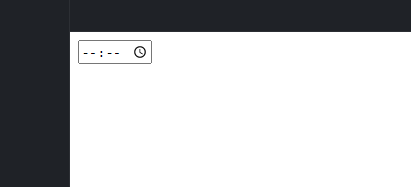
(I'm going to be honest, I've never used the HTML native timer lol)
From what I understood, when the user types into an <input type="time" /> the input.value is "" (empty string) until the value set is a valid one. While the user could see what has typed (for instance just a valid hour, but not the minutes), input.value is still a string empty until the user finishes. I've only tested this on chrome, but from what I could see in the code, the type="date" has a similar issue in which what the user is typing is "temporal", and requires a special handling of this scenario (which type="date" has), so the solution will be similar in that sense
I also understood the same from the whatwg spec about the behaviour; quoting here:
The value attribute, if specified and not empty, must have a value that is a valid time string.
The value sanitization algorithm is as follows: If the value of the element is not a valid time string, then set it to the empty string instead.
My only doubt is that in chrome at least, moving from "hours" to "minutes" takes place automatically, so it's not required for the user to type :, _but_ the fireEvent.change does require to receive that. So I'll have to consider the value and add the : manually. It wasn't required for me to type AM to set a time; I'm not sure of the validity (yet) of typing that, so I'd have to review it
In addition to that, as soon as the user types a value >= 3 in the hours, it goes to the minutes "box", but if the user types, 0, 1 or 2, the focus is maintained in the "hours" section of the timer (which makes sense because the time could be a two-digit one, while with 3 it could only be the 3 am, at least in the default options)
These are some scenarios that should be considered when testing
gndelia
on 10 Nov 2020
I think we'll need a special branch of code for this because it looks like the input and change events don't actually fire until you finish with all the key events.
Here's what I get in the user event playground when typing 01234a into the time input: https://codesandbox.io/s/user-event-playground-eo909?file=/index.html
input#time[value=""] - pointerdown
input#time[value=""] - mousedown
input#time[value=""] - focusin
input#time[value=""] - pointerup
input#time[value=""] - mouseup
input#time[value=""] - click
input#time[value=""] - keydown
input#time[value=""] - keypress
input#time[value=""] - keyup
input#time[value=""] - keydown
input#time[value=""] - keypress
input#time[value=""] - keyup
input#time[value=""] - keydown
input#time[value=""] - keypress
input#time[value=""] - keyup
input#time[value=""] - keydown
input#time[value=""] - keypress
input#time[value=""] - keyup
input#time[value=""] - keydown
input#time[value=""] - keypress
input#time[value="01:23"] - input
input#time[value="01:23"] - change
input#time[value="01:23"] - keyup
input#time[value="01:23"] - focusout
All we need to do is make sure we simulate these same events with type on a time input.
kentcdodds
on 11 Nov 2020
Amazing work. Thank you.
kellengreen
on 4 Dec 2020
Related issues
 beckerei
·
6Comments
beckerei
·
6Comments
 dvargas92495
·
4Comments
gndelia
·
6Comments
kentcdodds
·
5Comments
dvargas92495
·
4Comments
gndelia
·
6Comments
kentcdodds
·
5Comments
 CodingDive
·
4Comments
CodingDive
·
4Comments
Most helpful comment
Amazing work. Thank you.