So, currently Uppy Modal looks like this:

_img 1_
It works, but:
- It’s a bit heavy
- A bunch of space is wasted when you are, say, in Drag & Drop, while all the progress/selected files are in a tiny popover thing
- The whole workflow is based on the idea that we have tabs and we switch between them to switch between services like Google Drive, Instagram, Dropbox or local Drag & Drop.
So we thought maybe it’s time to rethink that UI and see if we could do better.
It’s work in progress, but the result at the moment is this:

_img 2_
It’s lighter, has a Dashboard/Workspace screen that combines progress + selected files screen with DragDrop/Local files screen. The idea being that by default you are always at this screen, and everything happens here, but you can move away to acquire files from somewhere else and then be back here to see their upload progress or annotate them.
This is not the final design, we are tweaking and tinkering as we progress. See comments for more UI mockups.
 arturi
All 42 comments

_img 3_

_img 4_

_img 5_

_img 6_
Artur’s mockups.
arturi
on 6 Jul 2016

_img 7_

_img 8_

_img 9_
Alex’s mockups (rough basic version). The main take from these is: let’s try and make the service (Google Drive or Dropbox) fill up the whole space, with a back button and a close button to get back to the Dashboard area with your newly selected files. No distractions, easier on mobile. Simple, but powerful idea ;)
arturi
on 6 Jul 2016
Wow this looks awesome!!!
maybe you can give every image a number so one could more easily comment on it?
 hpvd
on 6 Jul 2016
hpvd
on 6 Jul 2016
Some general thoughts on details:
- progressbar within image preview may be sometimes hard to see (depending of colors of images uploaded...)
- EDITED: sorry I'm on mobile...when opening image to fullscreen just saw this is already included - perfect :-)
[having the possibility to see some more details would be great.
To keep design clear some of this could be shown on hover on icon/preview would (number of progress %, remaining GB, remaining time etc please see https://github.com/transloadit/uppy/issues/94 "1)") ] - not only "cancel upload" but also "pausing upload" would be more then just "nice" :-)
please see https://github.com/transloadit/uppy/issues/94 "2"
hpvd
on 6 Jul 2016
"combines progress + selecting files screen with DragDrop/Local files screen."
is perfect!
hpvd
on 6 Jul 2016
hmm just a "big" question:
do one really need a screen "summing up all uploads"?
Or could uploud control be done directly on "source" / selecting tab.
why thinking of this?
- it's an additional element itself
- it's an additional point in navigation
- may add additional clicks for users to select, start, control, select additional...
- background: I would guess probably most users would upload from one single source
hpvd
on 6 Jul 2016
a question on detail:
what do different coulors (red and blue) of file icons indicate?
edit: ah "uploading" I think... maybe one could adapt this colours to colours of checkmark (green) to have only one same colour for same state?
hpvd
on 6 Jul 2016
Collecting files from all sources in one dashboard (that also supports drag/drop) has the advantage that people could rotate, rename/label/tag, and other client-side enriching of data before hitting upload. It will also be clearer which selection of files will be uploaded. Duplicating these controls in all sources does not seem appealing to me.
FWIW I like the idea of the completing-circle (

) to indicate a file is uploading. If we overlay it on top of the file, it has not only become a larger visual indicator, but we get the additional advantage of it being more apparent that further interaction (rotations, tagging, etc) are no longer possible at this point. The indicator basically blocks further interaction. Clicking the circle would pause the upload, indicated by the traditional two-vertical-stripes pauze symbol. This would then offer: a) cancel b) resume.
Filling up the entire space with the source seems like a good idea, as discussed in our call as well. The button should then not read "Upload files" but "Pick files" or "Select files" instead, I feel, as it puts them in the dashboard, ready for upload, but we're not uploading just yet (due to the mutations that could still happen).
One other approach that perhaps could work is drawing the lines like such 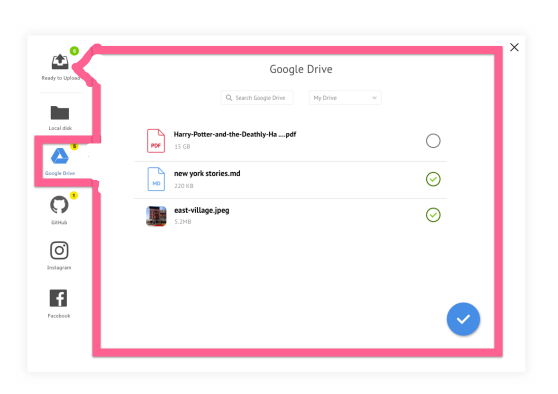 (I apologize for this abomination), indicating we are now in Google Drive, and files will be put into "Ready for upload"
 kvz
on 6 Jul 2016
kvz
on 6 Jul 2016
Perhaps, if ready for upload is on the right side, this drawing would make more sense
sources [ select ] --> ready for upload
But I realize this would consume quite some real estate on mobile. So I'm only 20% convinced this is a good way 😄 👯
kvz
on 6 Jul 2016
sure I understand the unifying thought behind collecting all files in one central space.
And I like unifying very much too.
It's a real good reason if one would allow applying actions like renaming, rotating..
hpvd
on 6 Jul 2016
just a small modification on one of the images shown above...
a very clean startup screen with navigation

hpvd
on 6 Jul 2016
sorry just edited https://github.com/transloadit/uppy/issues/96#issuecomment-230698770
hpvd
on 6 Jul 2016
The idea is more that the drag & drop area is also the workspace. So instead of just local, it will hold files selected from the other sources as well. This is the reason it is not called local.
kvz
on 6 Jul 2016
.. hmm ok.
Just two thoughts on this:
maybe a own "local" would have the advantages of being more clear for the user and
would also help in field of modularisation (maybe not every one wants uploads from local..)
hpvd
on 6 Jul 2016
an other detail:
I really like these "number in circles" design, but it's hard to put numbers with more than one digit in it...

hpvd
on 6 Jul 2016
maybe a own "local" would have the advantages of being more clear for the user and
would also help in field of modularisation
That's a tough question yes. We the button immediately open the system dialog. But that might be a bit unexpected. We could add a select local file button in the working surface. But that might be inconsistent. About the use-case
maybe not every one wants uploads from local
this seems to me it would not be very common, and might be achieved with a flag on the dashboard, effectively disabling the dragdrop and button.
However, this is talking more on a technical level, which we want to avoid in the current thread, so I'm backing out here, and will limit myself to thinking about what the best ux would be
kvz
on 6 Jul 2016
I really like these "number in circles" design, but it's hard to put numbers with more than one digit in it...
could be achieved with smaller font-size or ∞ for the rare usecase where someone manually selects >99 files.
kvz
on 6 Jul 2016
rare usecase
with manual conventional selection one by one, yes.
But with drag and drop one could do this...and could think of several use cases see https://github.com/transloadit/uppy/issues/97
hpvd
on 6 Jul 2016
two ideas for showing a summary on different places:


hpvd
on 6 Jul 2016
Another way to show (many) sources would be to add a plus button to the dashboard, much like how Slack does it here:

the list that pops up might show 'google drive' and 'local disk' and in the latter case, it will be less of a surprise if a System dialog pops up, than if 'local disk' was one of these side buttons. Added advantages:
- we save screen estate
- easier scrolling
We'd lose the information how many files where selected from Instagram, or Google Drive, but that is pretty meaningless information since you could see the files right in the dashboard. If we wanted, we could show the sources there, but I have a hard time imagining it really being useful, so I'd vote not adding that now, and if there is a pressing case, make it opt-in behavior, as to clutter the interface the least possible.
kvz
on 6 Jul 2016
tiny addition:
to
it will be less of a surprise if a System dialog pops up, than if 'local disk' was one of these side buttons.
even "local" doesn't need to bring a surprise: it simply opens drag and drop field with button to select file. Only if button is clicked system dialog opens
hpvd
on 6 Jul 2016
Good navigation solutions for reference:
arturi
on 10 Jul 2016
was in https://github.com/transloadit/uppy/issues/99
but fits perfectly here within this issue:
wow looks already great :-)
modal, screenshot 22.07.2016 12:33

just small comment:
Since the "here" in "Drop files here" ist not direct "here" - its somehow "below" in the field - maybe this is an interesting possibility:

hpvd
on 29 Jul 2016
just a questions:
are the filestypes shown in image the ones which are allowed for upload?
see "possibility to restrict upload" #69
if so: is/will be the image fully dynamic?

hpvd
on 29 Jul 2016
Currently it is dynamic, these file types could be easily altered, that’s why there are font differences. But I think for now it should just be a generic image, maybe with a built-in way to have some custom text on top, like “Please attach your photo and ID scan for your visa application”. I just wanted something fun, so tried it like that, but I also thought about a more boring option:

arturi
on 29 Jul 2016
To answer your previous comment:
Since the "here" in "Drop files here" ist not direct "here" - its somehow "below" in the field - maybe this is an interesting possibility:
Yes, thought about that too:


Went with what made most sense, just to settle on something and not get stuck, could be easily altered later on.
What do you guys think, @hedgerh @kvz?
arturi
on 29 Jul 2016
It is common to have the visual dashed area smaller that the actual drag and drop area, which can sometimes capture files dropped anywhere in the UI, which is what Uppy does now.


But yes, the text is usually on the dashed area.
arturi
on 29 Jul 2016
I personally think it's odd that the plugins are inside the drop area. I would be okay solving this with
Drop files below, paste, or select from:
Alternatively:
Select files from:
Or drop them here
But if there are strong opinions towards other directions, I'm easily convinced on this one.
kvz
on 9 Aug 2016
I'm not crazy about the plugin selection tabs being within the drop area, either. I'm also not crazy about the top text as it is: "DROP FILES HERE, PASTE OR IMPORT FROM". It should definitely be indicative of what those tabs are for, rather than talking about dropping files/pasting files first.
I really like Kevin's suggestion of "Select files from:" at the top and other instructions below in the drop area:

One thing, if we take the plugin tabs out of the drop area, could we make it so files dropped into its area are still accepted, despite not being within the dashed bordered drop area?
 hedgerh
on 10 Aug 2016
hedgerh
on 10 Aug 2016
maybe
add some information on hover #115
belongs to this topic to...
hpvd
on 10 Aug 2016
just added some more information regarding usage of aria lables and titles in #115
hpvd
on 16 Aug 2016
It should definitely be indicative of what those tabs are for, rather than talking about dropping files/pasting files first.
I missed the last comments here. I think you are right, I’ll play with that some more and go towards what you are suggesting.
arturi
on 22 Sep 2016
Tried semiTransparant design option for Dashboard Modal too:

Not sure, and that thing is only supported in Safari on Mac and iOS, but anyway.
arturi
on 22 Sep 2016
Two possible takes on upload in progress and pause/resume button design:
_img 20_

_img 21_

arturi
on 22 Sep 2016
_img 22_

Experimented with removing dashed border after some files have already been dropped/selected. Looks much cleaner to me. And the user already knows that they can drop files there.
arturi
on 25 Sep 2016
And the initial screen:
_img 23_

arturi
on 25 Sep 2016
removing dashed border looks really nice and clean :-)
Just to think this a little further: do one really need it in the initial screen at all?
Especially in modal mode one has already some kind of border between pop-up and background.
And with symbol and text "Drop and paste files here" every one knows what to do...
hpvd
on 25 Sep 2016
when using uppy "integrated" within a website (no popup), one will often also choose a design where the uppy region looks somehow separated from the surrounding (slightly different background color, frame all around uppy or..)
btw: will there be an example for this on http://uppy.io/examples/... ?
hpvd
on 25 Sep 2016
may look like this

hpvd
on 25 Sep 2016
img 21
I like not having 2 elements to indicate/control progress, and just one. I might like the circle more in general.. but i realize that leaves little room for progress reporting. So for me, a single bar wins then I think.
I like not having dashes when the drop is done. I dislike not having dashes when the drop is encouraged.
kvz
on 27 Sep 2016
Just to think this a little further: do one really need it in the initial screen at all?
I like not having dashes when the drop is done. I dislike not having dashes when the drop is encouraged.
I too think dashes are a universal sign of drag & drop. Made screenshots of those in ImageOptim and VLC: http://imgur.com/a/aV3Qx, also see above for WebTorrent and other screenshots are posted.
On that note, came up with this ideas:
_img 24_

_img 25_

arturi
on 27 Sep 2016
+1
hpvd
on 30 Oct 2016
Related issues
 ogtfaber
·
4Comments
ogtfaber
·
4Comments
 quetzyg
·
3Comments
quetzyg
·
3Comments
 skunkwerk
·
3Comments
skunkwerk
·
3Comments
 aleccool213
·
3Comments
aleccool213
·
3Comments
 risonsimon
·
4Comments
risonsimon
·
4Comments