Upload-artifact: Uploading a single file
 lannonbr
All 36 comments
you can't since we use the artifact name as a folder to hold all uploaded files.
 TingluoHuang
on 13 Aug 2019
TingluoHuang
on 13 Aug 2019
@TingluoHuang I think that counts as a feature request :)
 os6sense
on 17 Aug 2019
os6sense
on 17 Aug 2019
@os6sense agreed, the UI could have some pop-up dialog to allow you download individual file within your artifact.
TingluoHuang
on 20 Aug 2019
IMHO, this action could/should:
- Support providing a list of items, each being either a folder (current behaviour), a file (first comment above), a glob pattern (also requested in #11), or an exclude pattern (https://github.com/actions/upload-artifact/issues/44#issuecomment-571293418).
- NOT package the content automatically.
- The name should be optional, and only used to create 'sections' in the pop-up, not to name the artifacts.
For example:
  with:
    title: my-artifacts
      - files: [ path/to/artifact.tar.gz ]
      - name: "Packages"
        files: [ path/to/rpms/*.rpm,  path/to/debs/*.deb ]
      - name: "Docs"
        files: [ "README.md", path/to/docs, !path/to/docs/tmp ]
would create:
- my-artifacts:
- artifact.tar.gz
- Packages:
- package_x86_64.rpm
- package_aarch64.rpm
- package_x86_64.deb
- package_aarch64.deb
- Docs
- README.md
- USE_GUIDE.md
- CHANGELOG.md
Ideally, the GUI would allow to download each file separately OR a tarball of each of the sections ('Packages' and/or 'Docs', in these examples), as suggested by @TingluoHuang.
EDIT
Related to #5, each of the files or sections should also have a 'remove' button, only visible to maintainers.
Ideally, it would be possible to reorganize the content of the 'artifacts folder'. I.e., move items from a section to another.
 eine
on 23 Aug 2019
eine
on 23 Aug 2019
Yup, would love to be able to upload files instead. my build process already ends with a zip file and currently this action would just zip the zip.
 Stanzilla
on 30 Aug 2019
Stanzilla
on 30 Aug 2019
Yup, would love to be able to upload files instead. my build process already ends with a zip file and currently this action would just zip the zip.
This is worse with any non-zip package/tarball. For zips I extract them, so they are compressed again. However, for tar.gz, you get double compression.
eine
on 30 Aug 2019
@damccorm any plans for that?
Stanzilla
on 10 Sep 2019
@damccorm any plans for that?
/cc @madhurig
eine
on 13 Sep 2019
I would also love to be able to specify an already made zip or other single file instead of getting zip containing a zip
 mooreatv
on 22 Sep 2019
mooreatv
on 22 Sep 2019
Bump
 Jeff-Tian
on 10 Oct 2019
Jeff-Tian
on 10 Oct 2019
This issue and #7 sum up ~100 reactions. @chrispat, @TingluoHuang, @madhurig, might we have an update about the status of this enhancement request?
eine
on 21 Oct 2019
Also, I _had_ a process which produced a .zip file, and when I discovered this idiosyncrasy I removed that step so that it just uploaded the directory... only to discover that the build now took 20 minutes where before it took ~1. It appears that when you _do_ upload a folder, it does the zipping on the server instead of the client, which is just... why? I'm left feeling the only reasonable way to use this action is to zip your artifact locally yourself, then upload it and live with the fact that you will have to download a zip containing a zip.
 pelotom
on 22 Oct 2019
pelotom
on 22 Oct 2019
Ideally you could upload files uncompressed and be able to reference them by url. That way you could include screenshots within markdown of a status check / comment.
 jperl
on 30 Oct 2019
jperl
on 30 Oct 2019
This would be fantastic. In particular, the current zipping does not preserve symlinks or the executable bit.
 chrisdembia
on 21 Nov 2019
chrisdembia
on 21 Nov 2019
@eine @damccorm @madhurig Is there any update about this? I really like idea in https://github.com/actions/upload-artifact/issues/3#issuecomment-524442814. Lack of this is also one of the reasons why I can't use GitHub Actios as my primary CI.
 filips123
on 14 Dec 2019
filips123
on 14 Dec 2019
@filips123, unfortunately, not at all. Label "work in progress" was added to #7 18 days ago, but there has been no comment/update that I am aware.
eine
on 14 Dec 2019
@filips123 @eine Posted an update about v2 in https://github.com/actions/upload-artifact/issues/7#issuecomment-566114993
 konradpabjan
on 16 Dec 2019
konradpabjan
on 16 Dec 2019
Will the v2 also support globs or uploading of all files in a certain folder?
I'm currently using electron and I need to upload 12 files (exe's, dmgs, snaps, ymls, ...) but I have to adjust the GH action with every release (as the name changes because the version is included in the name) and I have to define an upload action for every file
 DalderupMaurice
on 14 Jan 2020
DalderupMaurice
on 14 Jan 2020
@DalderupMaurice, on the one hand, I think that the relevant new is that the action is going to be open sourced. Whether globs or uploading all files is supported should not be relevant once we can all contribute. On the other hand, although not clean, you can currently update the names programmatically, so that you don't need to change the names manually for each release. See examples about setting the output of a step and using it afterwards.
eine
on 14 Jan 2020
The v2 preview is out and ready for feedback! 😀
For more information see: https://github.com/actions/upload-artifact/issues/62
With the v2-preview you can now upload artifacts by specifying
- An individual file
- A directory
- A wildcard pattern
Note: We only currently support downloading an artifact from the GitHub UI by zipping all the files together (this is independent of how the artifact gets uploaded). If you upload an individual file, in the UI the artifact will still present itself as a Zip because that is currently only what we support. We have plans in our roadmap to offer a more enhanced artifact UI experience that will allow you to browse and download individual files from an artifact. No ETA on when that might arrive, but it is something that we really really want to enhance.
Some more information about zipping and compression: https://github.com/actions/toolkit/blob/master/packages/artifact/docs/additional-information.md#is-my-artifact-compressed
konradpabjan
on 13 Mar 2020
Wonderful @konradpabjan. Thank you for the hard work, it is much appreciated!
 imjasonmiller
on 13 Mar 2020
imjasonmiller
on 13 Mar 2020
Hi,
@konradpabjan. I've tried the version 2 to upload a single file but it stills zip it, Is that the intended behaviour?
Thanks
 illera88
on 28 Apr 2020
illera88
on 28 Apr 2020
@illera88 See my comment: https://github.com/actions/upload-artifact/issues/3#issuecomment-598820814
The zip is provided because of a UI limitation and it is independent of how an artifact gets uploaded
konradpabjan
on 28 Apr 2020
Thanks!! Looking forward for the update you mentioned
illera88
on 28 Apr 2020
v2 has officially been released! https://github.blog/changelog/2020-04-28-github-actions-v2-artifact-actions/
With it, you can now specify
- An individual file
- A directory
- A wildcard pattern
The README has also been updated with examples on how to upload individual files. I consider this issue fixed so i'll be closing this.
A lot of users many still be confused and think that their artifacts are uploaded as a zip (they're not). Files are uploaded individually one by one. We have some work to do on the UI side of GitHub to allow users to browse and download files individually from an artifact. Right now in order for everything to be downloaded at once, a zip gets dynamically created when you click to download the artifact. This zip is a UI limitation and it is independent of how the artifact gets upload.
UI enhancements can be tracked in this issue (we'll report when we have something to share): https://github.com/actions/upload-artifact/issues/14
I'll be pinning this issue for awareness in-case anyone stumbles upon this and is a little confused as to why they get a zip.
konradpabjan
on 28 Apr 2020
Thanks @konradpabjan!
After recent updates, many of the features requested above are implemented already:
- [x] Support providing a list of items, each being either a folder (current behaviour), a file (first comment above), or a glob pattern (also requested in #11).
- [ ] ? Or an exclude pattern (#44 (comment)).
- [ ] NOT package the content automatically.
- [x] The name should be optional, and only used to create 'sections' in the pop-up, not to name the artifacts.
- [ ] GUI would allow to download each file separately OR a tarball of each of the sections ('Packages' and/or 'Docs', in these examples), as suggested by @TingluoHuang. See https://github.com/actions/upload-artifact/issues/14#issuecomment-620728238.
- [x] Related to #5, each of the files or sections should also have a 'remove' button, only visible to maintainers.
- [ ] Ideally, it would be possible to reorganize the content of the 'artifacts folder'. I.e., move items from a section to another.
Supporting a list of paths/patterns as an alternative to https://github.com/actions/upload-artifact#uploading-to-the-same-artifact is already being tracked in #55.
@konradpabjan, can you please clarify the state of the item marked with ??
eine
on 28 Apr 2020
@eine
Exclude characters and multiple paths should be added after the major bugs introduced with v2 get sorted out (some of the connection errors reported are pretty serious, so I don't want to add any new features yet. stability > new features). Both of those should be completed at the same time though.
In terms of GUI updates and other improvements.... I don't like to give promises or dates 😂I tend to be off pretty significantly so it's best to just wait.
konradpabjan
on 12 May 2020
The issue seems to be resolved, but I'm facing some problems with it. Upload and download a file (.env) on project root.
Trying to do a cat on downloaded file I got cat: .env: Is a directory.
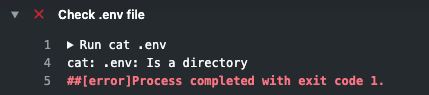
I wrote a public test action:
jobs:
  build:
    runs-on: ubuntu-latest
    steps:
      - uses: actions/checkout@v1

      - name: Create .env file
        run: |
          echo "my file content" > .env
          cat .env

      - name: Check .env file
        run: |
          cat .env

      - name: Store .env artifcat
        uses: actions/upload-artifact@v2
        with:
          path: .env

  deploy:
    needs: build
    runs-on: ubuntu-latest
    steps:
      - uses: actions/checkout@v1

      - name: Get artifact
        uses: actions/download-artifact@v2
        with:
          path: .env

      - name: Check .env file
        run: |
          cat .env
Downloading the artifact on GuitHub interface, the zip file contains my ".env" file like expected.
What I'm missing out?
 TiagoGouvea
on 2 Jun 2020
TiagoGouvea
on 2 Jun 2020
@TiagoGouvea see the log from "Get Artifact"
https://github.com/TiagoGouvea/github-actions-test/runs/732127090?check_suite_focus=true#step:3:6
Artifact artifact was downloaded to /home/runner/work/github-actions-test/github-actions-test/.env/artifact
That should explain it, but if the behaviour is the expected or unexpected from this action, I don't know :)
 dentarg
on 2 Jun 2020
dentarg
on 2 Jun 2020
Thank you @dentarg for you quick answer and your observation.
In fact, checking now, there are two situations (show above).
My expected behavior, on any case, would be the file get back to the same path. On both cases it downloaded to a folder.
With name: envFile
- it downloaded the file to
.env/.env - Public action
Without name
- it downloaded the file to
.env/artifact/.env - Public action
TiagoGouvea
on 2 Jun 2020
https://github.com/bradennapier/eslint-plus-action/blob/master/src/artifacts.ts
I just got done doing a bunch of effort to get artifacts handling working really nicely using the api directly instead of the toolkits so all the features can be enabled. Figure y'all might find it useful since a lot of that took forever :-P
I still need to do a pass at polishing but it all works well.
 bradennapier
on 7 Jul 2020
bradennapier
on 7 Jul 2020
When I am uploading my folder it is getting uploaded in zip format . So, can someone tell me why that is happening as I am not uploading it in a zip format but still it is getting uploaded in a zip mode.
 zakiya27
on 11 Dec 2020
zakiya27
on 11 Dec 2020
Artifacts are always downloaded as zip. If you were to upload a zip, iirc anyone downloading it would get a zip containing a zip.
The download-artifact actions gets around that btw.
 MCOfficer
on 11 Dec 2020
MCOfficer
on 11 Dec 2020
Recently I tried to upload the DMG (it's a compressed package by itself), but I got it packed into ZIP 🤔
Seems this case isn't completed...
How I got it:
    - name: Upload Package
      if: runner.os == 'macOS'
      uses: actions/upload-artifact@v2
      with:
        path: build/package/archive-filename.dmg
        name: ${{ matrix.config.name }} ${{ matrix.config.build_type }}
 Wohlstand
on 13 Dec 2020
Wohlstand
on 13 Dec 2020
A lot of users many still be confused and think that their artifacts are uploaded as a zip (they're not). Files are uploaded individually one by one. We have some work to do on the UI side of GitHub to allow users to browse and download files individually from an artifact. Right now in order for everything to be downloaded at once, a zip gets dynamically created when you click to download the artifact. This zip is a UI limitation and it is independent of how the artifact gets upload.
MCOfficer
on 13 Dec 2020
@MCOfficer, Oh, ok, understood, thanks for the explanation!
Wohlstand
on 13 Dec 2020
Related issues
 lacasseio
·
3Comments
lacasseio
·
3Comments
 lelegard
·
5Comments
lelegard
·
5Comments
 emilianbold
·
3Comments
emilianbold
·
3Comments
 davidmoremad
·
6Comments
davidmoremad
·
6Comments
 aparcar
·
5Comments
aparcar
·
5Comments
Most helpful comment
IMHO, this action could/should:
For example:
would create:
Ideally, the GUI would allow to download each file separately OR a tarball of each of the sections ('Packages' and/or 'Docs', in these examples), as suggested by @TingluoHuang.
EDIT
Related to #5, each of the files or sections should also have a 'remove' button, only visible to maintainers.
Ideally, it would be possible to reorganize the content of the 'artifacts folder'. I.e., move items from a section to another.