 panzergame
All 11 comments
You mean an custom startup blender? I thinked about this yesterday. lol I can share my startup .blend (it's pretty custom for game dev). Actually I also tell to all my audience to create the same default as mine (portuguese +BF bge video, but It's the same for UPBGE):
https://youtu.be/Bes42OKqiH8
Edit: If the logic bricks goes out, the way we create games will change a little bit. So we will need to rethink the default UI.
 UnidayStudio
on 14 Jul 2018
UnidayStudio
on 14 Jul 2018
my startup blender is a bit different:
right side bigger: yes
bottom part covers the entire width of the screen and is game logic, that way the properties end up under the right side, in the corner.
i don't change the scenes part, instead i use the right side for text editor (hence why it needs to be bigger), properties editor, and whatever i need at the time. having the text editor menu in the middle of the screen is more "comfortable" when selecting text files and using menues than having to move the cursor and looking to the bottom of the screen. properties menu has the buttons at the top.
i agree that upbge should be blender game as default instead of blender render.
default fullscreen resolution could also be changed from the arcaic 640x480 to something more modern, maybe not 1920x1080 but something like 1366x768.
my screen resolution is 1920x1080.
 Jesusemora
on 14 Jul 2018
Jesusemora
on 14 Jul 2018
Some note for the startup (discussed with @UnidayStudio) :
- world background
- default sun light with PCF shadow
- plane under the cube with static box, size 10units
- environment lighting
panzergame
on 11 Aug 2018
More ideas:
- add a python component in the cube doing nothing (like the component generated by
Create Component) ; - python editor with syntax highlighting.
panzergame
on 14 Aug 2018
I tested a startup:
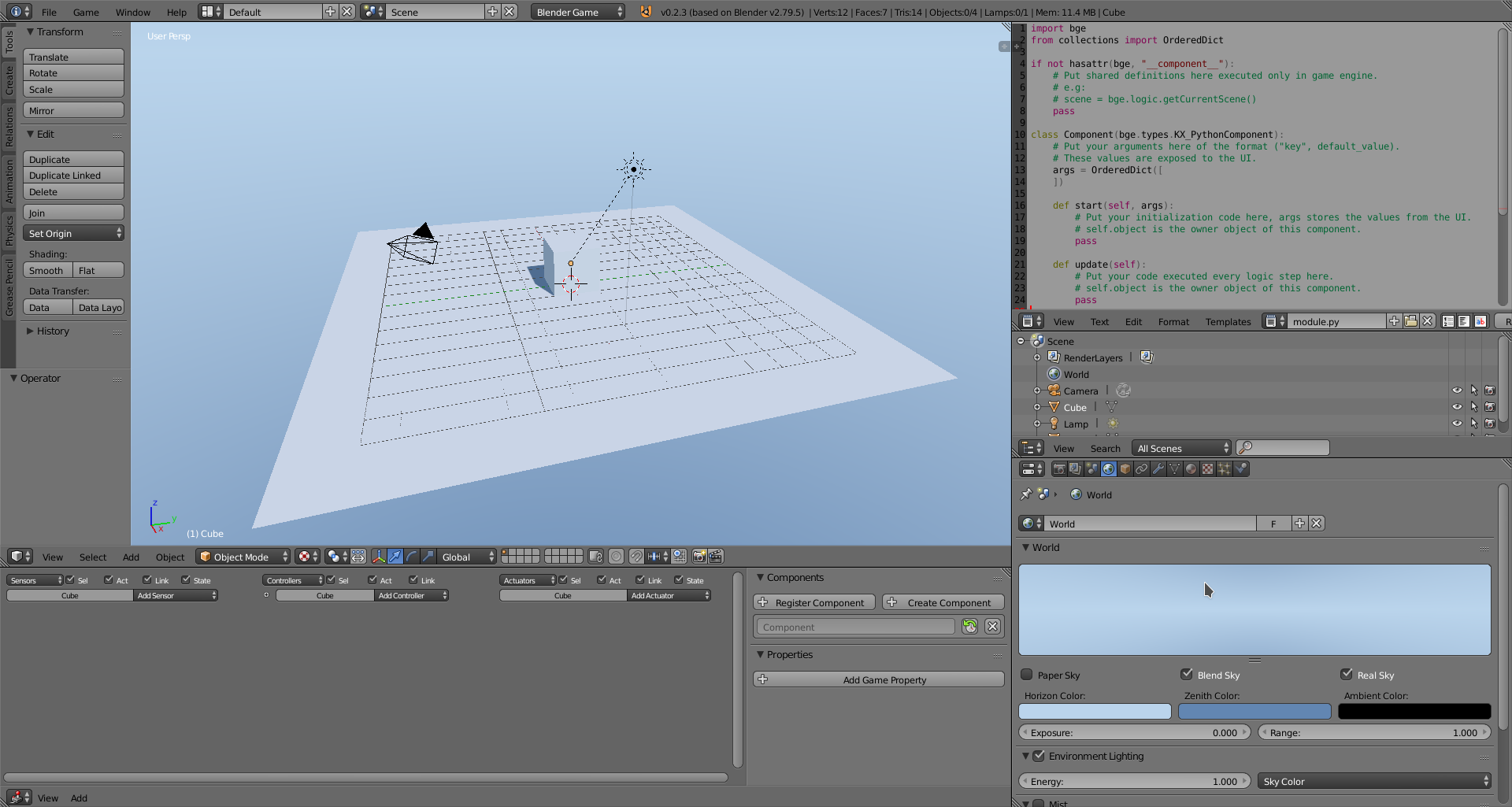
File:
startup.zip
There's also profile and render queries enabled by default.
About the theme, do someone have something a little bit darker ?
Any feedback is welcome.
panzergame
on 18 Aug 2018
Looks great!
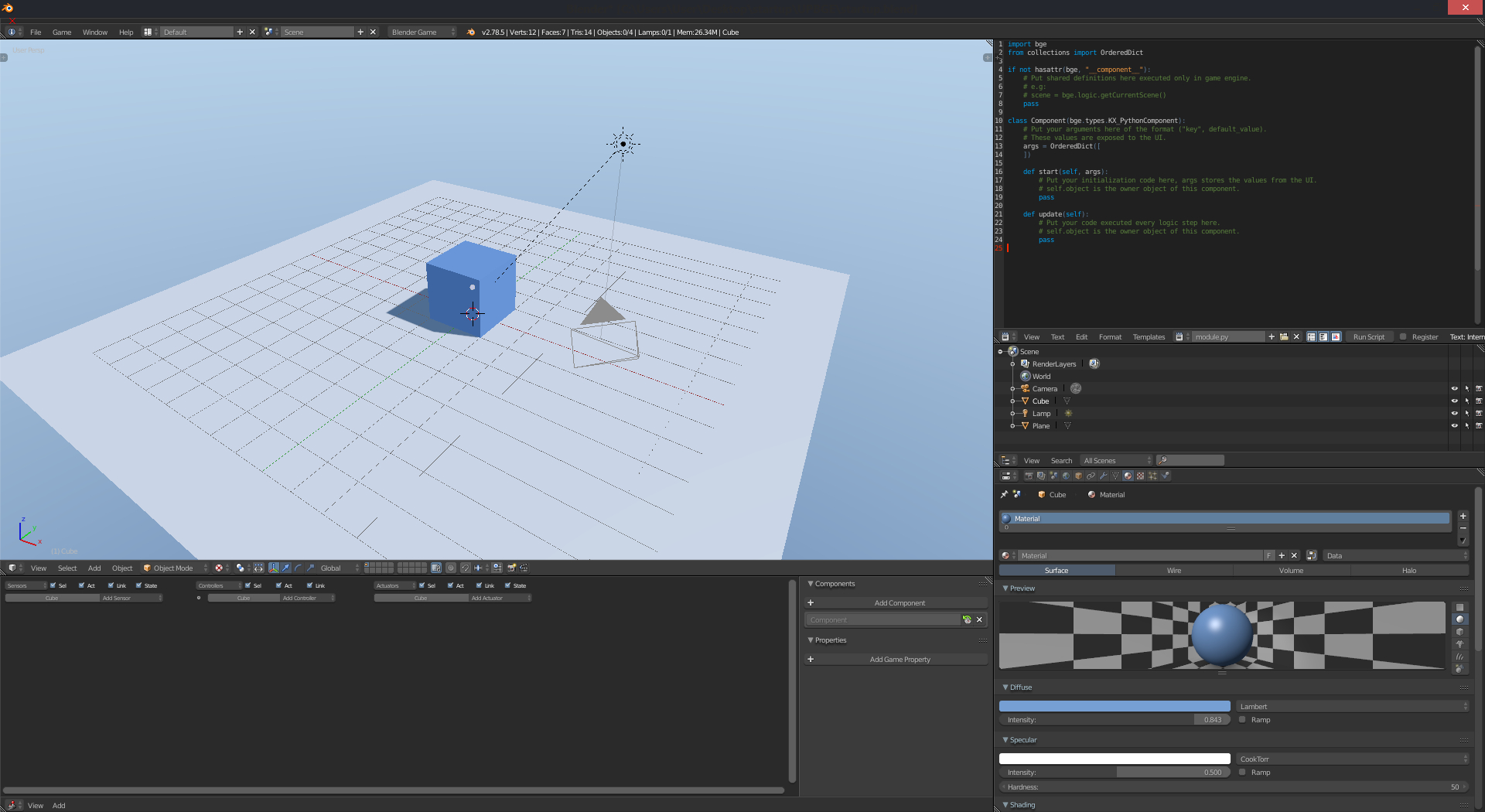
As it is very redundant with the current Game Logic layout, what about replacing the Game Logic screen layout with this, rename it to "Default" and rename the current Default layout to "Modelling" or something like that? This way we would also preserve the current Default layout which is very handy for modelling or similar tasks.
And please move the Info Bar all the way to the top (look at the small red "x" in the top left corner of the following screenshot, the marked area just takes away place). But this might be caused by my theme so if you don't have this problem just ignore it, I will move it manually then.
Also, I think the cube could do with another color:
 MoritzBrueckner
on 18 Aug 2018
MoritzBrueckner
on 18 Aug 2018
A set of 2D filters packed in <-- putting down an idea.
 adriansnetlis
on 18 Aug 2018
adriansnetlis
on 18 Aug 2018
Great. I made some changes:
- Since Logic Bricks will no longer exists, I moved the bricks to the top right (to access the components and properties) and the script to the bottom left (if someone uses an external script editor, it's easy to remove the script tab).
- I added by default 4X antialiasing because yes, generally BGE/UPBGE games have serious troubles of Aliasing (the userbase don't seems to know that AA exists).
- I increased the lamp shadow area a little bit (again, the userbase don't seems to know this lol). But not too much.
- I tweaked the background colors a little bit (the best option is probably add a sky texture, but I don't know if I agree with this by default, because generally isn't great to put too much data in a default file).
- I added two Hemi lamps to simulate Sky Light (blue) and Bounce Light (yellow). in my artist opinion, this was a gain.
- I changes the cube color (and mat name) as @Momel15 suggested (and added a material to the ground).
- I renamed the Sun Lamp to Sun (and I forgot to rename the bounce and sky lights. lol)
These changes was based on my personal experience using UPBGE + what I use to teach in my channel.
Download Link:
http://pasteall.org/blend/index.php?id=50182
And I agree with @Momel15 theme suggestion and also with removing the Game Logic Layout (this is a Fork about making games, Game Logic should be default :smile: ).
@adriansnetlis Gave a good idea about 2D filters, but I've to remember that isn't good to create a startup file with too much data stored in. And It's also always good to deliver a 10/10 rating stuff to the userbase, so we need to choose careful the shaders. My suggestion is to wait until the next UPBGE version that will came with multiple render outputs) I can make something. (Alctually IMHO Post processing should be a default thing inside the engine.
@panzergame It's hard to find you online, you could create a Discord :smile:
UnidayStudio
on 19 Aug 2018
Good work :)
What about exposing the outliner ?
Other than that i though to setup the cube as a static box and the plane as a static triangle mesh.
I created a Discord channel for UPBGE: https://discord.gg/8QBxEyB
panzergame
on 20 Aug 2018
@panzergame I almost never use Outliner. But I know that it's a bad idea to made decisions based on one user. I'll made a small survey about this (and probably other things as well).
@Momel15 Could you please provide us the theme that you made?
UnidayStudio
on 23 Aug 2018
Could you please provide us the theme that you made?
It's not by me, I didn't upload the screenshot above to show the theme in the first place, it was about showing the cube's color and default layout, so I don't know if we can use it.
But anyway, here's the theme: http://pasteall.org/1083958/xml
But I'm not sure about copyright, as I said it's not made by me and I don't know the original theme it's based on, but I modified a lot (it actually might have been made by me but I can't remember it anymore :D)
MoritzBrueckner
on 23 Aug 2018
Related issues
 vlad0337187
·
7Comments
vlad0337187
·
7Comments
 RomStef
·
4Comments
RomStef
·
4Comments
 BlenderDoc
·
4Comments
BlenderDoc
·
4Comments
 denicolas
·
4Comments
UnidayStudio
·
6Comments
denicolas
·
4Comments
UnidayStudio
·
6Comments
Most helpful comment
Great. I made some changes:
These changes was based on my personal experience using UPBGE + what I use to teach in my channel.
Download Link:
http://pasteall.org/blend/index.php?id=50182
And I agree with @Momel15 theme suggestion and also with removing the Game Logic Layout (this is a Fork about making games, Game Logic should be default :smile: ).
@adriansnetlis Gave a good idea about 2D filters, but I've to remember that isn't good to create a startup file with too much data stored in. And It's also always good to deliver a 10/10 rating stuff to the userbase, so we need to choose careful the shaders. My suggestion is to wait until the next UPBGE version that will came with multiple render outputs) I can make something. (Alctually IMHO Post processing should be a default thing inside the engine.
@panzergame It's hard to find you online, you could create a Discord :smile: