Firefox doesn't load the page anymore, it says the http certificate expired on thursday (23/11/2017).
Unfortunately Firefox doesn't allow (only in this case, usually it works?) adding an exception, so currently there is no possibility to open e.g. the upbge api with firefox.
 MoritzBrueckner
All 15 comments
its the way firefox handles these certificates now makes it impossible to visit the site..no way to add exceptions, even disabling security features does not let you enter...I hate the way tech is headed sometimes...I'm sure the certificates could be updated, but tbh, I do not know how....
In short...same problem here....chromium & opera have no problem.
 justinbarrett
on 26 Nov 2017
justinbarrett
on 26 Nov 2017
Fixed.
 panzergame
on 26 Nov 2017
panzergame
on 26 Nov 2017
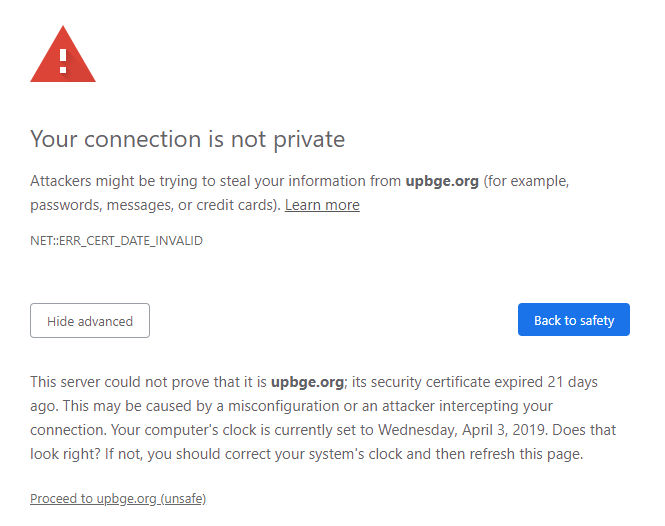
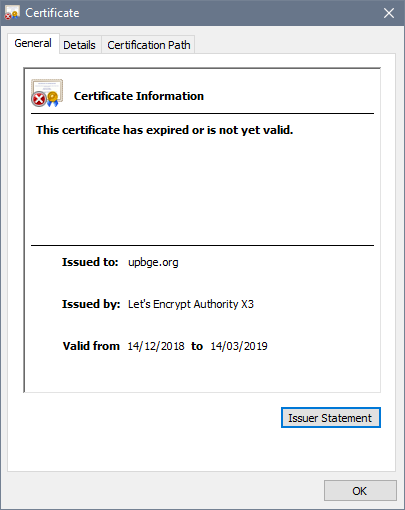
This is an issue again.
 ChildishGiant
on 3 Apr 2019
ChildishGiant
on 3 Apr 2019
Now the problem is greater, nor opera, nor chrome, allow access because they say that the page no longer exists, I think they have closed it. It's the end of UPBGE.
 Frankjore
on 8 Apr 2019
Frankjore
on 8 Apr 2019
I have a recent copy of master win_64 and shuvit has cloned the API.
wkk is looking at getting buildbot up.
Panzergame has been unreachable about renewing the website.
On Mon, Apr 8, 2019 at 4:01 AM Frankjore notifications@github.com wrote:
Now the problem is greater, nor opera, nor chrome, allow access because
they say that the page no longer exists, I think they have closed it. It's
the end of UPBGE.—
You are receiving this because you are subscribed to this thread.
Reply to this email directly, view it on GitHub
https://github.com/UPBGE/blender/issues/637#issuecomment-480785356, or mute
the thread
https://github.com/notifications/unsubscribe-auth/AG25WVhfgRE2HMDtPtjWvCh0ntVG7CVMks5veyFsgaJpZM4QqfhL
.
 BluePrintRandom
on 8 Apr 2019
BluePrintRandom
on 8 Apr 2019
@Frankjore ah indeed, nice catch.
What do you think about hosting some pages for UPBGE on GitHub directly?
It is not like the website needs a lot of logic, see https://pages.github.com/
 marechal-p
on 8 Apr 2019
marechal-p
on 8 Apr 2019
I guess it's time for Armory to take over 😕
ChildishGiant
on 8 Apr 2019
I have access to upbge domain provider. @marechal-p or @blueprintrandom when you are ok with the new site we can do the change.
 lordloki
on 8 Apr 2019
lordloki
on 8 Apr 2019
I'd recommend using github pages to host with a custom domain. As long as you don't need any server side/back end stuff, it's great.
https://help.github.com/en/articles/using-a-custom-domain-with-github-pages
ChildishGiant
on 8 Apr 2019
Ok. Thank you for your work, lordloki. You will communicate when it is possible to access the page.
Frankjore
on 8 Apr 2019
@lordloki You can continue sending me details at marechap.[email protected], such as do we need to host the website and simply point the domain to that? What exactly is it that you have?
marechal-p
on 8 Apr 2019
I get the following:
Unable to connect
Firefox can’t establish a connection to the server at upbge.org.
The site could be temporarily unavailable or too busy. Try again in a few moments.
If you are unable to load any pages, check your computer’s network connection.
If your computer or network is protected by a firewall or proxy, make sure that Firefox is permitted to access the Web.
We cannot download the program!
 ThyQueen
on 9 Apr 2019
ThyQueen
on 9 Apr 2019
We cannot download the program!
Well, your are writing this on the project's repository, with all the sources and instructions to build it...
Meanwhile things are tried to bring it back up, will take some time.
marechal-p
on 9 Apr 2019
Ok, I pointed out upbge.org domain to github new upbge-web project. I added to @marechal-p @BluePrintRandom @youle31 to admin for this project. If you need another ones please send me a message.
I need 24 hours more to enforce HTTPS until then you will see the classic non-https message.
lordloki
on 9 Apr 2019
The domain seems to be available now, and pointing to the repository you created, perfect!
marechal-p
on 9 Apr 2019
Related issues
 cederom
·
7Comments
cederom
·
7Comments
 NatGazer
·
7Comments
NatGazer
·
7Comments
 joelgomes1994
·
4Comments
joelgomes1994
·
4Comments
 Feral3d
·
3Comments
Feral3d
·
3Comments
 UnidayStudio
·
4Comments
UnidayStudio
·
4Comments
Most helpful comment
Ok, I pointed out upbge.org domain to github new upbge-web project. I added to @marechal-p @BluePrintRandom @youle31 to admin for this project. If you need another ones please send me a message.
I need 24 hours more to enforce HTTPS until then you will see the classic non-https message.